Try it on your own data
Every report in this article is in the free plan. One snippet for web and apps, up to 10 sites.
Start freeCustomer service chat is real-time text support on your website, best for visitors stuck on a page right now. Quality is not one number: it is a fast first response, one-touch resolution, and never making the visitor repeat, all three at once. This playbook covers channel fit, staffing math, routing, handoffs and four metrics.
What you will learn
- Chat fits visitors stuck on a page right now; route attachments and audit trails to email, and urgent, complex, emotional problems to phone
- Staff with slack: 30 chats/h at 6 min handling needs 2 agents at 75% occupancy, not 1 at full occupancy; the concurrency cap protects one-touch resolution
- Measure first response (human-only), resolution rate, CSAT and chatted-vs-not conversion together; the 12% vs 3% gap is observational, not proof of cause
What customer service chat should handle (and what it shouldn't)
Customer service chat earns its place when a visitor is stuck on a page right now and the answer takes a few turns. That is the sweet spot: the question is fresh, the visitor is still looking at the problem, and a short exchange unblocks them before they leave. For the definition of the channel itself, see live chat; this section is about dividing work across your customer service channels.
Use one decision rule to route a problem:
- Stuck on a page right now, answerable in a few turns → chat. Checkout errors, "where is the setting", plan confusion.
- Needs attachments or an audit trail → email. Bug reports, billing disputes, anything you may need to reference later.
- Urgent, complex and emotional → phone. An angry customer with a complicated problem needs voice and judgment, not a text thread.
The table below maps six common problem types to a channel, why it fits, and when to switch. The pattern to notice: chat is the default for in-the-moment blockers, and you move to email or phone before the conversation stalls — not after the visitor has repeated themselves three times.
One switching rule keeps this honest: if a chat needs more than a handful of turns, or needs a file, name the next channel and move deliberately ("I'll email you the steps so you have them on record"). A chat that drags on is usually a problem that belonged in email from the start.
| Problem type | Channel | Why | When to switch |
|---|---|---|---|
| Stuck on a page (checkout error, can't find a setting) | Chat | Answered in a few turns while they're still on the page | Email if it needs logs or a long investigation |
| Order status | Chat | Quick lookup, one or two turns | Email if the order needs a manual trace |
| Simple how-to | Chat | Short steps, confirm it worked | Email if it needs screenshots or a long guide |
| Bug report | Needs attachments, repro steps and an audit trail | Chat to triage, then move to email | |
| Billing dispute | Needs records, a paper trail and careful wording | Phone if it escalates and gets emotional | |
| Complaint (angry, complex) | Phone | Urgent, emotional, needs judgment | Chat only to book the call |
Chat is the default for in-the-moment blockers; move to email or phone before the conversation stalls. Channel-efficiency framing follows LiveChat's customer-service page.
How many chat agents you need: a worked example
Sample data: a small team peaks at 30 chats per hour, average handling time is 6 minutes per chat, and each agent can hold 3 chats at once. How many agents should be on shift?
Start with the workload. Thirty chats at six minutes each is 30 × 6 = 180 agent-minutes per hour of work that has to be done.
Now the capacity of one agent. An hour has 60 minutes; at six minutes per chat that is 60 ÷ 6 = 10 sequential chats, and holding three at once multiplies that to 60 ÷ 6 × 3 = 30 chats per hour — but only at full occupancy, with every slot always busy. The naive answer is one agent. It is also fragile: at 100% occupancy any burst queues, a break leaves nobody, and there is no room to think.
Plan at 75% occupancy instead. One agent then delivers 60 × 3 × 0.75 = 135 agent-minutes per hour, so you need ceil(180 ÷ 135) = ceil(1.33) = 2 agents. The 25% slack is what keeps the first response fast when volume spikes.
Cross-check with slots. Average concurrent chats are 30 × 6 ÷ 60 = 3, and two agents offer 2 × 3 = 6 slots, so slots sit at 50% utilization — enough headroom for a burst without queueing.
One decision rule changes the answer: if the six minutes is mostly active agent work (typing, investigating, calling someone) rather than wait time, concurrency does not multiply capacity. Then you need 180 ÷ 60 = 3 agents at full occupancy, or ceil(180 ÷ 45) = 4 at 75%. Ask which kind of handling time you actually have before you trust the concurrency multiplier.
The sensitivity table shows how the answer moves when one assumption changes (75% occupancy, three concurrent unless noted).
| Scenario | Workload (agent-min/h) | Capacity per agent at 75% | Agents needed |
|---|---|---|---|
| Base: 30/h, 6 min, 3 concurrent | 180 | 135 | 2 |
| Handling time rises to 8 min | 240 | 135 | 2 |
| Concurrency capped at 2 | 180 | 90 | 2 |
| Volume rises to 45 chats/h | 270 | 135 | 2, at the limit |
At 45 chats per hour, two agents are exactly at their planned limit (2 × 135 = 270), so add a third for burst headroom rather than running flat out. Notice what the concurrency cap is really for: it protects one-touch resolution. An agent juggling too many chats answers slowly and forgets context, which is how the "never make them repeat" goal dies. Speed needs slack; quality needs a cap.
Assignment and transfer rules that keep chats moving
Four decision rules cover most of the day-to-day:
- Auto-assign to available agents. Route each new chat to an agent who is online and under their concurrency cap; do not let chats sit in a shared pool waiting for someone to pick them up.
- Transfer only on a skill gap. Move a chat when it needs billing, technical or account expertise the current agent lacks — not because the current agent is busy or finds it inconvenient.
- Warm transfer, always. Send a short summary before the visitor moves, so the receiving agent reads the context first and opens with "I see you're getting an error at checkout" instead of "How can I help?".
- Hold the concurrency cap. A transfer must not push the receiving agent over the cap from the staffing example (three). If everyone is at the cap, the chat waits in queue briefly rather than overloading an agent and slowing every conversation.
Setup details — routing rules, permissions, online status — are in chat routing and assignment; this section is the policy, not the configuration. The thread tying these rules together is the thesis: a transfer is only acceptable if the visitor does not start over.
Handing off to tech or billing without making the visitor repeat
A handoff fails the moment the next team asks the visitor to explain again. The fix is a four-line template that travels with the chat, so the receiving team can act immediately:
- Context — who the visitor is, the current page and the source they came from.
- Problem — the issue in the visitor's own words, not your paraphrase.
- Already tried — what you checked or did, so nobody repeats it.
- Needed + owner — the specific action required and the named person who owns it.
Here is the template filled for a checkout error handed to the technical team:
| Line | What the agent writes |
|---|---|
| Context | Visitor on /checkout, came from the pricing page; account email on file. |
| Problem | "I click Pay and get 'card declined', but my bank says the card is fine." |
| Already tried | Confirmed the error reproduces; ruled out an expired card; checked the status page (no outage). |
| Needed + owner | Tech to check the payment gateway logs for this session; owner: Priya, reply by end of day. |
The rule that makes this work: the visitor confirms once ("I'm passing this to our tech team with everything you've told me — you won't need to repeat it"), and then the two teams talk to each other, not through the visitor. For wording that lands well, see live chat scripts and chat etiquette; for building the skill across the team, see customer service training.
The four numbers that tell you chat is working
Speed alone is a vanity metric. Track four numbers together, because the thesis stands or falls on all three goals at once — fast first response, one-touch resolution, and no repeating — and conversion is the outcome you are trying to move.
| Metric | Definition / formula | Sample month |
|---|---|---|
| First response time | Time to the first human reply; automated replies excluded | Median 40 s |
| Resolution rate | Resolved chats ÷ all chats | 720 ÷ 900 = 80% |
| CSAT | Post-chat rating on a 1–5 scale | 300 ratings, avg 4.4 / 5 |
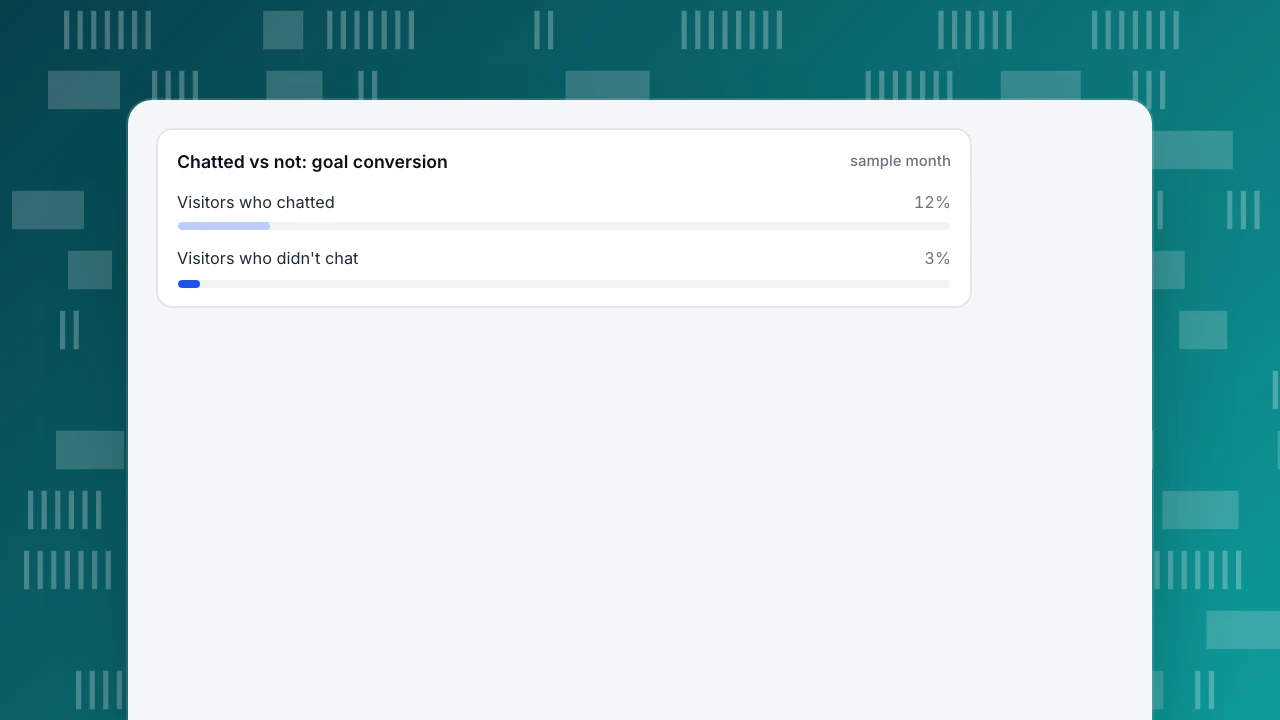
| Chatted vs not conversion | Chatted rate ÷ no-chat rate − 1 (relative lift) | 12% vs 3% → +300% |
Sample data: one month, 900 chats. Here is the arithmetic, recomputable end to end:
- 720 of 900 chats were resolved: 720 ÷ 900 = 80% resolution rate.
- The median first response was 40 seconds, counting human replies only.
- 300 visitors left a post-chat rating, averaging 4.4 / 5.
- Of 200 visitors who chatted, 24 reached the site's goal: 24 ÷ 200 = 12%.
- Of 4,000 visitors who did not chat, 120 reached it: 120 ÷ 4,000 = 3%.
- Relative lift: 12 ÷ 3 − 1 = +300%.
- One week had only 18 chatters, below 30, so that week is flagged as too small to rely on.
Read the conversion gap carefully. It is an observational comparison, not an experiment: visitors who choose to chat are often further along in their decision, so the gap overstates what chat alone caused. Report it as "visitors who chatted converted at 12% versus 3%", not "chat lifted conversion 300%". Definitions worth keeping precise: first response and resolution rate; if the CSAT line is the weak one, how to improve CSAT covers the fixes. When the three quality goals hold together — fast first reply, one-touch fix, no repeating — the conversion comparison is the number you can take to the business.
Chatted vs not: goal conversion
sample monthRunning this playbook in TapCub
Take the two-agent team from the staffing example, facing the 30-chats-per-hour peak. A visitor is stuck at checkout with a card error. The goal is the whole thesis at once: a fast first human reply, a one-touch fix, and no making them repeat. Here is how that runs in TapCub.
- Enable chat on the same script and visitor ID. For a site already running TapCub analytics, turn on Enable live chat in Live chat › Chat settings › Appearance and save; a new site gets the code at Live chat › Chat settings › Install. Because analytics and chat share one script and one visitor ID, each conversation lands in Live chat › Inbox with a side panel showing the current page, the source and the last two days of browsing; View in analytics opens the visitor's analytics profile. Before the visitor has finished describing the error, the agent can see they are on /checkout and arrived from the pricing page, so nobody asks "what page are you on?" — the no-repeating goal, built in.
- Cover the peak without a pre-chat form. Set hours by timezone in Live chat › Chat settings › Office hours, and let Live chat › Chat settings › Offline messages collect an email and a question when both agents are offline; work that queue from new to replied to closed. TapCub's widget has no pre-chat form, so ask for the email inside the conversation. With AI on, the knowledge base answers first and the offline form appears only when it cannot. Two agents cannot cover 24/7; honest hours plus an owned offline queue keep the peak from spilling into unanswered chats.
- Assign with a cap, transfer with a note. In Live chat › Chat settings › Appearance, turn on Auto-assign new conversations to online agents and set Max concurrent chats per agent to 3, the cap from the staffing example; when both agents are at the cap, the new chat waits in Waiting until someone is free. Agents mark themselves online, away or offline in Live chat › Inbox, and only online agents receive new assignments. To pass the checkout error to the colleague who handles payments, transfer it from the inbox and put the four-line template in the handoff note, which only agents see; the visitor sees a system line, and the move is recorded on the conversation timeline. Keep the visitor-facing confirmation ("you won't need to repeat it") as a site-level line in Live chat › Canned replies, insert it with "/" and edit before sending. More on building that library: canned responses.
- Measure the three goals, then the outcome. Live chat › Reports gives first response (human replies only), resolution rate (resolved ÷ all chats) and CSAT on a 1–5 scale; offline messages are counted separately, not as resolved. Live chat › Reports › Conversion attribution compares visitors who chatted and reached a goal with those who browsed without chatting, and shows the relative lift. Replay the sample month: 12% versus 3% is 12 ÷ 3 − 1 = +300%, and the 18-chatter week trips the fewer-than-30 too-small flag. It is still observational, for the reasons above.
Boundaries worth stating plainly: the chat widget has no pre-chat form; AI only generates replies — it does not change orders, send emails or call other systems; TapCub is not a CRM or a ticketing system, so tech and billing handoffs go to your own tools with the template; and there is no A/B testing, so the conversion comparison stays observational.
FAQ
What is customer service chat?
Customer service chat is real-time text support embedded on your website, where a visitor and an agent exchange messages to solve a problem in the moment. It suits visitors stuck on a page right now. Done well it delivers three things at once: a fast first response, one-touch resolution, and never making the visitor repeat themselves.
What's a good first response time for live chat?
There is no universal standard, so set the target from your own baseline and staffing. Track the median rather than the average so one slow chat does not hide the rest, and count human replies only. Check the peak hour separately: a 40-second monthly median, as in the sample month, can hide a 30-chat hour where visitors wait minutes. Slack in the staffing plan is what protects it.
How many agents do I need for 30 chats an hour?
With six-minute handling and three concurrent chats, the workload is 180 agent-minutes per hour. One agent covers it only at full occupancy; plan two at 75% occupancy for slack. If the six minutes is mostly active agent work rather than wait time, concurrency does not multiply capacity, so budget three at full occupancy or four at 75%.
Do automated replies count toward first response time?
No. First response time measures the gap until the first human reply; automated greetings, bot messages and knowledge-base answers are excluded, per Zendesk's definition. TapCub's reports count human replies only. A fast bot greeting can mask a slow human pickup, which is why the human-only number is the one to manage.
Does live chat improve conversion?
The sample month shows visitors who chatted converting at 12% versus 3% for those who did not — a +300% relative lift. But that is observational: chatters are often further along in their decision, and weeks under 30 chatters are too small to trust. Chat helps most when it delivers the three goals together — fast first reply, one-touch fix, no repeating.
See also: Shared Inbox: 5 Actions and 3 Rules to Stop Double Replies.
See also: Chatbot vs Live Chat: How to Split the Work Between Them.
See also: Best Live Chat for Small Business: Four Things to Check Before You Choose.
See also: Live Chat Support Software: 4 Criteria and a Pilot With Pass Marks.
See also: Benefits of Live Chat: What It Delivers and How to Measure Each One.
See also: Customer Support Channels: Which to Offer, With Cost and Response Targets.
See also: Asynchronous Messaging for Support: How It Works and When Live Chat Wins.
See also: Customer Service Email: Response Times, Triage and When to Move to Chat.
Sources
- Rastegar-Panah, M. First Reply Time: What It Is & How to Improve It. Zendesk Blog, updated 2026-07-07 — FRT definition, automated replies excluded, median vs average. Verified 2026-11-15.
- Zendesk. About native Support time duration metrics. Zendesk Support — first reply time = ticket creation to first public agent reply. Verified 2026-11-15.
- LiveChat. Customer Service. LiveChat — one-touch handling and phone-efficiency framing cited in the channel table. Verified 2026-11-15.
Was this article helpful?
We use your answers to fix and expand this page.
Couldn’t send. Please try again in a minute.
Thanks for the feedback. We’ll use it to improve this page.You’ve already sent feedback on this page. Thanks.

Customer Experience Consultant
Writes about live chat, visitor conversations, and self-service, sharing practical ways to make customer communication clearer and more effective.