Try it on your own data
Every report in this article is in the free plan. One snippet for web and apps, up to 10 sites.
Start freeHandle customer service email by replying inside 12 hours at most and inside 1 hour for issues where delay costs money, using one clock and a few labels. Chat answers in seconds; email answers in hours. This guide gives the benchmarks side by side, a triage workflow for a small team with a worked workload example, and a rule for when an email thread should move to chat.
What you will learn
- Reply to email within 12 hours at most and within 1 hour where delay costs a sale or trust; state whether you count business or calendar hours
- Triage with a few labels and different targets; templates plus a help center cut sample workload from 57.2 to 47.7 hours a week
- Move a thread to chat after two round trips: three 12-hour replies can mean 36 hours of waiting against a chat of about 8 minutes
How fast should you answer customer service email?
Aim to reply inside 12 hours at the slowest and inside 1 hour for the issues that cost you money if they wait. Help Scout's reply-time guidance lists 1 hour as the top-tier first response for email and 12 hours as good enough, citing third-party data from 2025. For live chat the same page lists under 1 minute and 1.5 minutes.
That gap is the reason email works as a channel: a customer who writes to you expects a delay of hours, not seconds. It is also the reason email goes wrong. When a thread needs three replies from each side, a 12-hour reply time becomes up to 36 hours of waiting before the customer has an answer.
| Live chat | ||
|---|---|---|
| First-response target (best / good enough) | 1 hour / 12 hours | under 1 minute / 1.5 minutes |
| Observed average | No sourced average we could verify | 35 seconds first response (LiveChat report, 2024 data) |
| Typical length of one exchange | Hours between messages | 8 minutes 25 seconds per chat (same report) |
| Clock you manage | Hours | Seconds |
| Best for | Detail, attachments, paper trail | Quick questions while the customer is on the page |
The targets are references, not promises to copy. Help Scout notes that industry, customer demographics and product all change expectations; its page also does not say which cited source backs which figure.
How do you measure first response time without fooling yourself?
The same email can have a first response of 1.5 hours or 65.5 hours depending on how you count. Decide the clock before you set targets.
Sample data: an email arrives on Friday at 16:30. The first human reply goes out on Monday at 10:00. Business hours are 09:00 to 17:00 on weekdays.
- Calendar clock: Friday 16:30 to Monday 10:00 = 65.5 hours.
- Business-hours clock: Friday 16:30 to 17:00 = 0.5 hours, plus Monday 09:00 to 10:00 = 1.0 hour = 1.5 hours.
Both numbers are true. The business-hours number tells you how well your team performed while open; the calendar number is what the customer experienced. Report both, and publish only the one a customer could verify (usually the business-hours promise, stated with your hours).
Two more definition choices change the number. Zendesk measures first reply time from ticket creation to the first public comment from an agent, so an automatic acknowledgement does not count. And tickets solved without any public comment are not in the metric. Copy that rule: an auto-reply that says "we got your message" is not a first response. The first response glossary entry covers the variations.
What does a triage workflow look like for a small team?
Triage means reading each incoming email once, labelling it, and routing it, so the urgent ones are never behind the easy ones. Use a handful of labels, each with its own target:
| Label | Share of email (sample) | Target first reply | Who handles it |
|---|---|---|---|
| Billing or account access | 15% | 1 hour in business hours | Whoever is on triage |
| Bug report or outage | 10% | 1 hour in business hours | On triage, then product |
| Pre-sale question | 12% | 1 hour in business hours | On triage; a lost lead cannot wait |
| Order or account status | 30% | 4 hours | Anyone, from a template |
| How-to | 25% | 12 hours | Anyone, from a template or help article |
| Other | 8% | 12 hours | Anyone |
The targets are policy choices that stay inside the 1-hour and 12-hour range Help Scout lists. The rule behind them: the faster targets go to emails where a delay costs a sale or damages trust; the slower ones go to emails the customer can wait on.
The workflow each morning and after lunch:
- Read once and label. The person on triage opens each new email, applies a label, and either answers (if under two minutes) or assigns it.
- Answer the one-hour labels first, then order status, then the rest.
- Never reply from memory to a billing issue. Look up the account, then answer; a wrong answer creates a second email.
- Close the loop. When the issue is fixed, mark the thread resolved so a late customer reply reopens it rather than starting an untracked thread.
For a team that shares one mailbox rather than forwarding copies, see shared inbox.
| Label | Share of email | Target first reply |
|---|---|---|
| Billing or account access | 15% | 1 hour in business hours |
| Bug report or outage | 10% | 1 hour in business hours |
| Pre-sale question | 12% | 1 hour in business hours |
| Order or account status | 30% | 4 hours |
| How-to | 25% | 12 hours |
| Other | 8% | 12 hours |
Sample data; targets stay inside the 1-hour to 12-hour range in published guidance.
How much time do templates and a help center save?
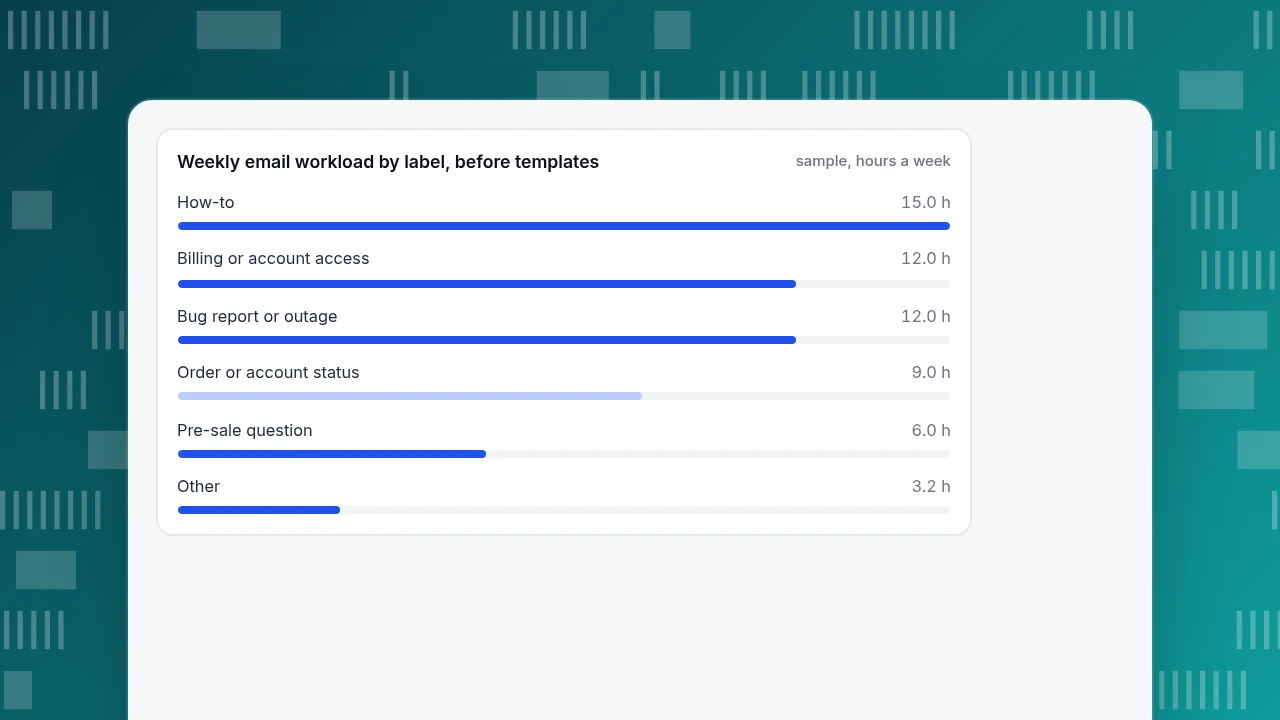
Sample data: 600 emails a week split as in the table above, with assumed handle times of 3 minutes for order status, 6 for how-to, 8 for billing, 12 for bugs, 5 for pre-sale and 4 for other.
| Label | Emails | Minutes each | Hours a week (before) |
|---|---|---|---|
| Order or account status | 180 | 3 | 9.0 |
| How-to | 150 | 6 | 15.0 |
| Billing or account access | 90 | 8 | 12.0 |
| Bug report or outage | 60 | 12 | 12.0 |
| Pre-sale question | 72 | 5 | 6.0 |
| Other | 48 | 4 | 3.2 |
| Total | 600 | 5.72 average | 57.2 |
Now suppose a reply template with the order link cuts order-status email from 3 to 1.5 minutes, and a how-to template plus a help-center link cuts how-to from 6 to 4 minutes. Order status becomes 180 × 1.5 ÷ 60 = 4.5 hours and how-to becomes 150 × 4 ÷ 60 = 10.0 hours. The new total is 4.5 + 10.0 + 12.0 + 12.0 + 6.0 + 3.2 = 47.7 hours, a saving of 9.5 hours a week or 16.6%.
Templates only save time if the person still reads the email before sending. A template that answers the wrong question creates a follow-up, which costs more than the minute it saved. Edit before sending.
Weekly email workload by label, before templates
sample, hours a weekHow do you know if the team can keep up?
Compare the work arriving each day with the productive hours available.
Sample data: 600 emails a week is 120 a day. Two agents each have 6 productive hours a day (the rest goes to meetings and breaks), so 12 hours = 720 minutes.
- Before templates: 120 × 5.72 = 686 minutes of work ÷ 720 = 95.3% utilization.
- After templates: 120 × 4.77 = 572 minutes ÷ 720 = 79.5%.
At 95% there is no slack for a spike, so a bad day becomes a backlog and the 12-hour target slips. As a working rule (a judgment, not a published standard), keep average utilization near or under 80%, and act when it creeps above 85%: cut handle time, add a person, or move the repeat questions to self-service. Check this number weekly, because it shows backlog risk before response times do.
When should you move an email conversation to chat or a call?
Move it when more replies will not move it forward. Three signals:
- Two round trips and still unresolved. Each round trip costs up to your reply target. Three round trips at a 12-hour target is up to 36 hours of waiting, against 8 minutes 25 seconds for an average chat in LiveChat's report.
- The customer is asking questions you need answered to proceed (which device, which error, what happened first). Those are fast in a live exchange and slow in email.
- The customer sounds frustrated. Tone is easier to repair in real time.
How to do it without sounding like you are dodging: offer, do not insist. "This will be quicker if we talk for five minutes. Can I call you, or would you prefer to chat on our site now?" Then record the outcome in the same thread so the history stays in one place. For running the chat side well, see live chat customer service.
What should a customer service email contain?
Five parts, in this order:
- The answer or next step in the first line. The customer should be able to stop reading there.
- The reason, in one or two sentences, only if it helps.
- Numbered steps if there is a procedure, one action per line.
- What you need from them, if anything, stated as a single question.
- What happens next and when, such as "I will check again on Thursday morning".
A subject line that restates their problem ("Re: refund for order 1042") lets them find the thread later. Keep a short list of banned phrases that delay the answer ("as per my last email", "unfortunately we are unable to"), and replace them in your templates.
How to handle email follow-up in TapCub
TapCub is not an email helpdesk: it does not receive or send support email as a mailbox. It does help with the part of email that comes from your website, the pre-sale and how-to questions, and with the "move it to chat" step.
- Catch website questions in chat. Turn on live chat in Live chat › Chat settings › Appearance and set hours in Live chat › Chat settings › Office hours. When nobody is online, a visitor can leave an email and a question as an offline message (Live chat › Chat settings › Offline messages; statuses New, Replied, Closed), so it does not become an untracked email.
- Reuse the template idea. Live chat › Canned replies lets an agent insert a saved reply by typing
/and edit it before sending, at personal or site level. - Move email conversations to chat. Send the customer the standalone chat page link for your site (it can sit in an email signature). The agent sees the visitor's source and last two days of browsing alongside the conversation.
- Read the response numbers. Live chat › Reports shows average first response (the agent's first reply; AI replies do not count), resolution rate and satisfaction, so you can compare chat against the 1-minute and 1.5-minute targets above.
FAQ
How quickly should you respond to a customer service email?
Aim for 12 hours at the slowest and 1 hour for issues where delay costs money. Help Scout's guidance lists 1 hour as top-tier and 12 hours as good enough for email. State your hours so the promise is something a customer can check.
What is a good customer service email structure?
Put the answer or next step in the first line, add the reason briefly, give numbered steps for any procedure, ask for what you need as one question, and say what happens next and when. Re-use the structure in templates and edit before sending.
Is email or chat better for customer service?
Neither wins on everything. Email suits detail, attachments and a paper trail; chat suits quick questions while the customer is on the page. LiveChat's report puts average first response in chat at 35 seconds, while email is measured in hours.
How do you calculate email first response time?
From when the email arrives to the first human reply. Zendesk counts to the first public agent comment and excludes automatic acknowledgements. Decide whether to count calendar hours or business hours; the same email can be 65.5 hours on the calendar and 1.5 in business hours.
When should you move an email conversation to chat or phone?
After two round trips without resolution, when you need quick answers to proceed, or when the customer sounds frustrated. Offer rather than insist, and note the outcome in the same thread.
Sources
- Help Scout, "Email customer service: what's an acceptable reply time" (targets for email and chat, checked 2026-11-20): helpscout.com
- LiveChat, Customer Service Report (35-second average first response; 8 minutes 25 seconds average chat; 2024 data): livechat.com
- Zendesk Support, "Tips for lowering first reply time" (how first reply time is calculated): support.zendesk.com
Was this article helpful?
We use your answers to fix and expand this page.
Couldn’t send. Please try again in a minute.
Thanks for the feedback. We’ll use it to improve this page.You’ve already sent feedback on this page. Thanks.

Product Analyst
Focuses on event analysis, conversion funnels, and retention, using clear metric definitions and structured analysis to explain product performance.