Try it on your own data
Every report in this article is in the free plan. One snippet for web and apps, up to 10 sites.
Start freeCustomer support channels are the routes customers use to reach you: email, live chat, phone, social messages and self-service. Offer only the ones you can staff well enough to keep their response promise. This guide compares them with response targets and a sample cost per contact, shows how to check workload hours, and gives rules for which channel a small team should add first.
What you will learn
- Offer a channel only if its monthly workload fits a real schedule; an unanswered chat bubble is worse than none
- Chat is cheaper than email only when agents handle two or more chats at once; recompute cost per contact with your own handle times
- A real-time channel using under about a quarter of one agent's hours should run in set windows, not all day
What counts as a customer support channel?
A support channel is any route a customer can use to reach you with a question or problem, and each one has its own speed, cost and staffing pattern. The common ones are email, live chat, phone, social media direct messages, self-service (a help center or knowledge base) and, for some products, in-app messaging or SMS.
Two distinctions matter more than the list itself:
- Assisted vs self-service. Assisted channels (email, chat, phone) need a person on your side for every contact. Self-service needs a person only when an article is written or fixed.
- Real-time vs asynchronous. Chat and phone expect an answer while the customer waits; email and messaging tolerate a gap. The clock you must hit is different, and so is the staffing you need to hit it.
Offering a channel is a promise. A chat bubble that nobody answers for two hours is worse than no chat bubble. So the question is not "which channels exist?" but "which can we staff well enough to keep the promise?" The rest of this guide gives you a table to compare, a worked cost example you can rerun with your numbers, and rules for choosing. If you are already running several channels and want them to share context, see omnichannel engagement.
Support channels compared: response targets, cost and best use
The first-response targets below come from published guidance (Help Scout lists a "top-tier" and a "good enough" target per channel, citing third-party data from 2025). The cost column is sample data from the worked example in the next section, not a benchmark.
| Channel | First-response target | Sample cost per contact | Best for | Watch out for |
|---|---|---|---|---|
| 1 hour (best) / 12 hours (good enough) | $4.00 | Detailed, non-urgent questions; anything needing attachments or a paper trail | Back-and-forth threads that stretch a simple issue over days | |
| Live chat | under 1 minute (best) / 1.5 minutes (good enough) | $3.00 with 2 chats at once; $6.00 one at a time | Quick pre-sale and how-to questions while the visitor is on the page | Needs coverage during stated hours; quality drops when agents juggle too many chats |
| Phone | No published benchmark we could verify; set your own answer-time and abandon-rate targets | $5.00 | Urgent, sensitive or complex issues | One contact at a time; peaks leave callers waiting |
| Help center (self-service) | Instant, but only for questions already answered | Near zero per view (writing and upkeep time still count) | Repeat questions at any hour | Articles go stale; customers who cannot find the answer still contact you |
| Social direct messages | Set by the platform and your own policy | Depends on volume | Customers who already contact you there | Public pressure; hard to keep history unless connected to a shared tool |
Treat the first-response column as a starting point. Help Scout notes that industry, customer demographics and product all shape expectations, and it does not say which source backs each number, so confirm your own customers' tolerance with your data before promising it publicly.
What does one contact cost on each channel?
External benchmarks put a floor and ceiling on the discussion. In a 2019 poll of customer service leaders, Gartner reported that live channels such as phone, live chat and email cost an average of $8.01 per contact, against about $0.10 for self-service channels such as a company website or mobile app. These are a few years old and cover many company sizes, so use them to see the gap, not to predict your own cost.
To get your own number, use this formula for each assisted channel:
Cost per contact = loaded hourly cost × handle minutes ÷ 60 ÷ conversations handled at the same time
Sample data: a small team pays agents a loaded $30 an hour (wages plus overhead). Handle times are assumed: email 8 minutes of work per contact, chat 12 minutes with two chats open at once, phone 10 minutes including after-call notes.
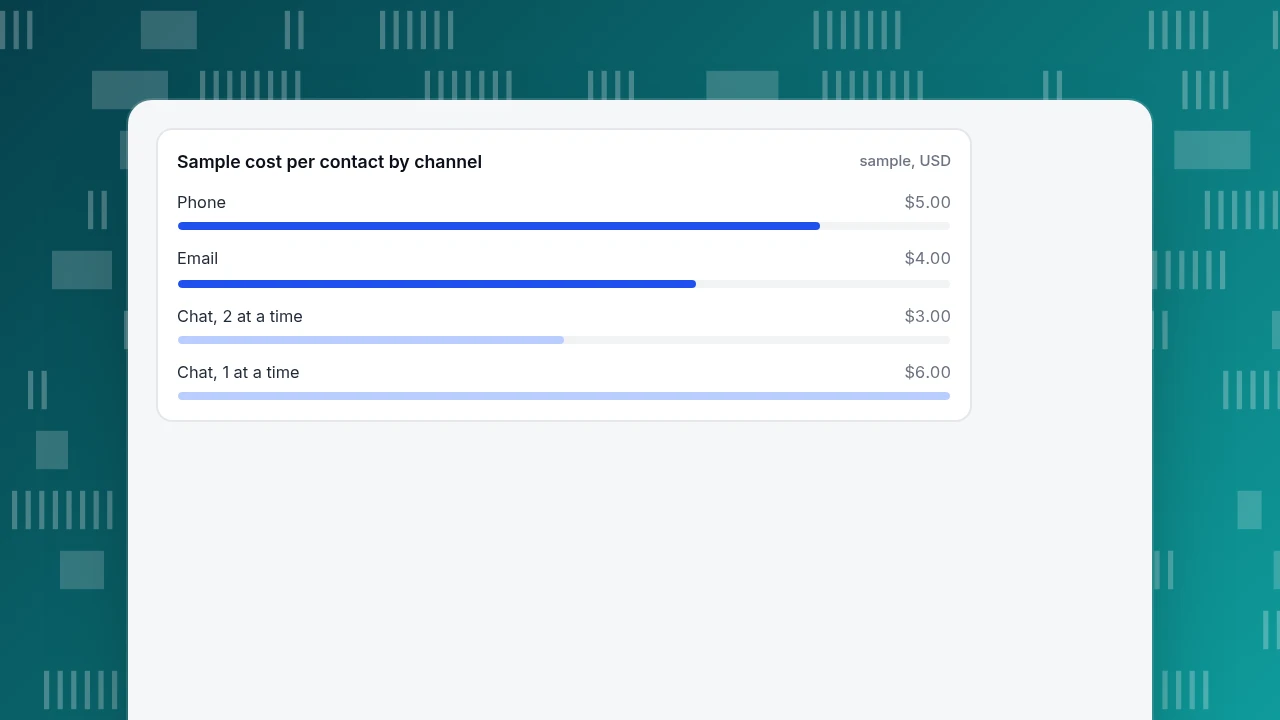
- Email: 30 × 8 ÷ 60 = $4.00
- Chat, two at a time: 30 × 12 ÷ 60 ÷ 2 = $3.00
- Chat, one at a time: 30 × 12 ÷ 60 = $6.00
- Phone: 30 × 10 ÷ 60 = $5.00
Chat is the cheapest assisted channel only when agents can handle two chats at once. If your questions are too complex for that, chat costs more than email. This sample counts labour only. Software, telephony fees and management time are extra, which is one reason the $3 to $6 range sits below Gartner's $8.01 average. Do not read the gap as "we are efficient"; read it as "our sample leaves things out".
Sample cost per contact by channel
sample, USDHow many hours of work does each channel create?
Cost per contact tells you what each answer costs. Workload tells you whether you can afford to staff the channel at all.
Sample data: 1,500 contacts a month, split into 675 email, 375 chat, 225 phone and 225 answered by the help center without a person.
| Channel | Contacts | Minutes of work each | Hours a month |
|---|---|---|---|
| 675 | 8 | 90.0 | |
| Live chat | 375 | 12 ÷ 2 = 6 | 37.5 |
| Phone | 225 | 10 | 37.5 |
| Assisted total | 1,275 | 165.0 |
One full-time agent works about 40 × 4.33 = 173.2 hours a month. Two agents cover 346.4 hours, so 165 hours of work is 165 ÷ 346.4 = 47.6% utilization. That looks comfortable, but not all hours are interchangeable. Chat's 37.5 hours is only 21.7% of one agent's month, and phone is the same. Spread across opening hours, both channels would sit idle most of the time while still needing someone present.
The rule that follows: a real-time channel whose monthly workload is under about a quarter of one agent's hours should run in set windows, not all day. Publish chat hours (say, 10:00 to 14:00 local) and send everything else to an offline form or email. Raise the hours when the channel's workload crosses half an agent.
Which channels should you offer?
Use these rules in order; stop when you hit one that applies.
- Do you have a repeat-question problem? If the top ten questions make up most of your contacts, write those answers first (help center). Each answer a customer finds alone costs a small fraction of an assisted contact.
- Does most of your volume need a paper trail or attachments? Start with email and a shared mailbox (see shared inbox). It is the easiest to staff because the clock is hours, not seconds.
- Do visitors ask questions on pricing or product pages before buying? Add live chat in set hours. Questions asked at the moment of doubt are the ones most likely to change a purchase. The mechanics are covered in live chat customer service.
- Do you handle urgent or sensitive issues (billing disputes, outages, safety)? Offer phone, or at minimum a callback request, for that category only.
- Do customers already message you on a social platform? Answer there, but treat it as a front door, then move to a channel where you can keep the history.
If none of the rules apply, you probably need one channel, not five. Capterra's guidance makes the same point: do a few channels well rather than many inconsistently.
| Your situation | Add first | Why |
|---|---|---|
| Top 10 questions are most of your contacts | Help center | Repeat answers written once; Gartner's poll put self-service near $0.10 a contact |
| Contacts need attachments or a paper trail | Email in a shared mailbox | Clock is hours not seconds, easiest to staff |
| Visitors ask before buying | Live chat in set hours | Questions asked at the moment of doubt |
| Urgent or sensitive issues | Phone or callback for that category | Needs a person right now |
| Customers already message you socially | Reply there, move to a tracked channel | Keeps history |
Rules are applied in order; stop at the first that fits.
In what order should a small team add channels?
A sequence that fits the workload numbers above:
- 1 to 2 people, under 500 contacts a month: help center plus email. Add chat windows only if pre-sale questions are frequent.
- 2 to 4 people, 500 to 2,000 contacts a month: add live chat in windows; keep email as the overflow.
- Over 2,000 contacts a month, or urgent issue types: add phone for those issue types and consider extending chat hours.
The thresholds are judgment calls, not research results; adjust them by redoing the workload table with your own contact counts and handle times. The fixed point is the discipline: add a channel only when its expected monthly workload fits in someone's schedule.
How do you check the channels are working?
Track the same four numbers per channel, monthly:
- Volume. Contacts per channel; a shift means customers are voting with their feet.
- First response vs target. The share of contacts answered inside the target in the table above, not just the average.
- Resolution. Resolved contacts divided by all contacts (not "touched").
- Cost per contact. Recompute with the formula above after any staffing change.
The definition of first response matters. Zendesk, for example, measures it from ticket creation to the first public agent comment, so an automatic acknowledgement does not count. Pick one definition, write it down, and use it across channels so the table compares like with like. Our glossary entry on first response lists the variations.
How to run this in TapCub
TapCub covers one channel from the table: live chat on your website, plus offline messages for when nobody is online. It does not run an email inbox, a phone line or social direct messages, so for those you still need other tools, and TapCub only measures what happens on the site.
- Turn chat on. If the TapCub script is already on your site, switch on the chat toggle in Live chat › Chat settings › Appearance; there is no code change. There is also a standalone chat page link you can put in an email signature or on a social profile.
- Set the chat window. In Live chat › Chat settings › Office hours set the hours by time zone, matching the "set windows" rule above. Outside those hours, visitors can leave an email and a question under Offline messages, which show the statuses New, Replied and Closed.
- Answer the repeat questions first. In Live chat › Knowledge base, add the top questions as Q&A entries; a matching question is answered as written without an AI call. Pinned entries show in the visitor's FAQ and do not create a conversation when opened.
- Read the numbers. Live chat › Reports shows conversations, resolution rate (resolved ÷ conversations), average first response (the agent's first reply, not an AI reply) and satisfaction, so you can compare your chat against the targets above. Knowledge base hit rate shows how much the help-center layer is absorbing.
Because chat and analytics share one visitor ID, the agent sees where the visitor came from and what they browsed in the last two days, which helps decide whether a pricing-page chat belongs in the "pre-sale" bucket.
FAQ
What are the main customer support channels?
Email, live chat, phone, social media messages, self-service (help center) and sometimes in-app messaging or SMS. Group them as assisted versus self-service and real-time versus asynchronous, because those two splits decide how you staff them.
How many support channels should a small business offer?
As few as your volume and staff can keep promises on. For many small teams that is a help center plus email, then live chat in set hours once pre-sale questions justify it. Add a channel only when its monthly workload fits a schedule.
Which support channel is cheapest per contact?
Self-service is cheapest: Gartner's 2019 poll put it near $0.10 per contact against $8.01 for live channels. Among assisted channels, chat can be cheaper than email only when agents handle several chats at once; in our sample two at a time gives $3.00 versus $4.00 for email.
What is a good first response time for email and chat?
Help Scout lists 1 hour (best) and 12 hours (good enough) for email, and under 1 minute (best) and 1.5 minutes (good enough) for chat. LiveChat's report put its average first response at 35 seconds. Treat these as references and confirm with your own customers.
What is the difference between a support channel and a support channel mix?
A channel is one route in; the mix is the set you offer and how contacts are split across them. Reviewing the mix monthly shows whether to add, shorten or drop a channel.
Sources
- Gartner, "Gartner Says Only 9% of Customers Report Solving Their Issue Completely in Self-Service" (press release, 25 September 2019): gartner.com
- Help Scout, "Email customer service: what's an acceptable reply time" (first-response targets, checked 2026-11-20): helpscout.com
- LiveChat, Customer Service Report (35-second average first response, 2024 data): livechat.com
- Zendesk Support, "Tips for lowering first reply time" (definition of first reply time): support.zendesk.com
- Capterra, "How to choose the right support channels for your business": capterra.com
Was this article helpful?
We use your answers to fix and expand this page.
Couldn’t send. Please try again in a minute.
Thanks for the feedback. We’ll use it to improve this page.You’ve already sent feedback on this page. Thanks.

Product Experience Specialist
Writes about product experience, practical workflows, and growth, turning complex processes into clear steps for everyday decisions.