Try it on your own data
Every report in this article is in the free plan. One snippet for web and apps, up to 10 sites.
Start freeA shared inbox is one queue of customer messages that a team works together, with a visible owner and status on every conversation. It works once the team agrees three rules: who claims a conversation, how it is transferred and what closed means. In the worked example, a claim rule cuts about 27 duplicate replies a day to about 1.
What you will learn
- A shared inbox is defined by a visible owner and status on every conversation, not by several people sharing one address
- Write three rules first (claim, transfer, close); the five actions of claim, transfer, note, close and reopen cover everything else
- In the sample, 3 agents and 120 conversations a day lose about 55 minutes to double replies without a claim rule, and about 2 with one
What is a shared inbox?
A shared inbox is one queue of customer messages that a team works together, where every conversation shows who is handling it and what state it is in. The queue can hold email, chat or both. Sharing the queue is the easy part. It only becomes an inbox when ownership and status are visible to everyone, and that is the part most teams skip.
Two documented setups show the range. Microsoft describes a shared mailbox in Exchange Online as a way for a group to monitor and send email from a common account such as support@contoso.com; a reply looks as if the shared mailbox sent it, not the person, and access is granted through Full Access and Send As permissions. Google's Collaborative Inbox in Google Groups goes a step further: members can assign a conversation to themselves or a colleague, mark it resolved as complete, no action needed or duplicate, and apply labels.
Notice the difference. The first setup gives access; the second adds an owner and a status. A team that only has access ends up with two kinds of failure: two people answer the same customer, or nobody does because each assumes a colleague has it. The rest of this guide is about removing both, and the worked example puts a number on the first one.
Shared inbox, shared mailbox or help desk: which do you need?
The three setups below differ in what they record about a message, not in how many people can open it.
| Setup | What it gives you | What it leaves to you | Fits when |
|---|---|---|---|
| Shared mailbox (Exchange Online) | Several people read and send from one address; replies appear to come from that address | The documentation covers access and sending permissions, not assigning a message to a person or marking it done | Low volume, one person usually in charge |
| Collaborative inbox (Google Groups) | Assignment, resolved statuses (complete, no action needed, duplicate) and labels on group conversations | Fixed statuses; any other rule, such as how long a reply may wait, is yours to enforce | A small team that already lives in email groups |
| Chat inbox or help desk | An owner, internal notes, transfer, statuses and reports for each conversation | Writing the rules and keeping them current | Messages arrive in real time, or you must show response times |
Use these three tests to decide:
- If two people could ever answer the same customer, you need an owner on every conversation.
- If a conversation moves between people (support to billing, for example) and the customer must not repeat themselves, you need internal notes and a transfer that carries them.
- If someone will ask how fast you reply, you need timestamps and a report, which a plain mailbox does not give you.
If none of the three applies, a shared mailbox is enough. For the broader set-up of a store's support desk, see ecommerce help desk.
What are the five actions that make a shared inbox work?
Everything a team does in a shared inbox is one of five actions. Each answers one question, and each needs one written rule.
| Action | Question it answers | Rule to write | In TapCub |
|---|---|---|---|
| Claim | Who is on this? | The first person to open an unowned conversation claims it; one owner at a time | Take (or press A) |
| Transfer | Who should do this instead? | Transfer with a note on what was asked and tried, so the customer is not asked again | Transfer to a colleague with an agent-only handoff note |
| Note | What does the team know that the customer does not need to see? | Context goes in notes, not in the customer thread and not in a side chat | Internal note |
| Close | Is this done? | Close when the customer's question is answered, not when you sent a reply | Resolve (or press E) |
| Reopen | Did it come back? | A new message about the same issue goes back to the same conversation | Reopens when the visitor writes again within the reopen window, or via Reopen |
Claim is the action that prevents double replies. The rule is short: if it has no owner and you are about to type, claim it first. Claiming also starts the clock on a good first response, because an unclaimed conversation is waiting time nobody is working on.
Transfer is where context is lost. A transfer to a specialist is an escalation, and what should travel with it is covered in ticket escalation. In a shared inbox the minimum is a note with three lines: what the customer wants, what you already checked, and what you need from the next person.
Note keeps the customer thread clean. If teammates discuss a refund decision in the thread itself, the customer can see it, and if they discuss it in a chat app, the next person cannot find it.
Close is the most abused action. "I replied" and "it is solved" are different states; a conversation closed on reply comes back as a second conversation and distorts every report. Writing "closed means the question was answered or the customer confirmed" takes one sentence and prevents the argument.
Reopen is usually automatic or forgotten. Decide the window (a day is common), and decide whether a message after the window is a new conversation that links back to the old one.
Writing reply text faster is a separate problem from sharing the queue; saved replies are covered in canned responses and are not repeated here.
How many duplicate replies does a missing claim rule cost?
The duplicate problem can be estimated with a small model. The inputs below are assumptions you can replace with your own counts.
Sample data: a team of 3 agents handles 120 conversations in an 8-hour day, and drafting a first reply takes 2 minutes. Assume that, on a new unclaimed conversation, each agent has a probability p of starting a reply before noticing that someone else already has. With no claim rule, the number of agents who start follows a binomial distribution with 3 trials.
Take p = 20%:
- Nobody starts yet: 0.8 × 0.8 × 0.8 = 0.512.
- Exactly one starts: 3 × 0.2 × 0.8 × 0.8 = 0.384.
- Two or more start: 1 − 0.512 − 0.384 = 0.104.
- Among conversations that get at least one reply (1 − 0.512 = 0.488), the share with a duplicate is 0.104 ÷ 0.488 = 21.3%, which is about 25.6 of the 120.
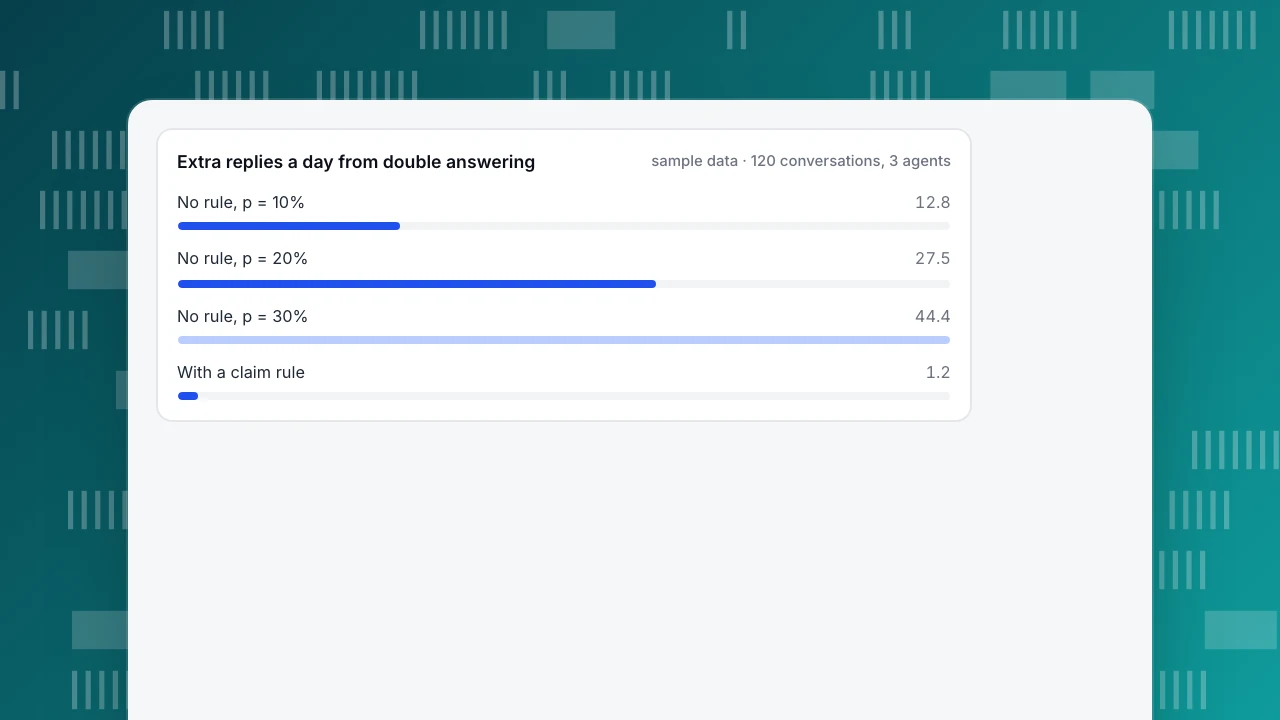
- The expected number of agents who start a reply is 3 × 0.2 = 0.6, so per answered conversation it is 0.6 ÷ 0.488 = 1.2295. That is 0.2295 extra replies per conversation, and 120 × 0.2295 = 27.5 extra replies a day.
- At 2 minutes each, that is 27.5 × 2 = 55 minutes a day. The team has 3 × 8 × 60 = 1,440 agent-minutes, so 55 ÷ 1,440 = 3.8% of capacity goes to answering twice.
The same calculation for other values of p, and for a team with a claim rule, where duplicates need two agents to click at the same moment (assumed here: 1 in 100 conversations):
| Case | Conversations with a duplicate | Extra replies a day | Minutes lost a day | Share of capacity |
|---|---|---|---|---|
| No claim rule, p = 10% | 10.3% | 12.8 | 25.7 | 1.8% |
| No claim rule, p = 20% | 21.3% | 27.5 | 55.1 | 3.8% |
| No claim rule, p = 30% | 32.9% | 44.4 | 88.8 | 6.2% |
| Claim rule (1 in 100) | 1.0% | 1.2 | 2.4 | 0.2% |
Two things the model leaves out make the real cost higher. The customer receives two answers that may disagree, and the opposite failure (a conversation nobody takes because everyone assumes someone else did) adds waiting time that this model counts as zero. To measure your own p, take one day of closed conversations and count how many have replies from two different people within five minutes; that count divided by the total is your duplicate rate.
Extra replies a day from double answering
sample data · 120 conversations, 3 agentsWhich list views does a small team need?
A shared inbox needs four lists, and each one answers a different question for a different person. The table here sets them out.
Two details decide whether the lists work. First, the unclaimed list should be the one everyone checks first when they are free, so a conversation that has waited too long is visible, not buried in "all". Second, "all open" is for supervision and for covering absent colleagues, not for picking work: if people pick from it, they bypass the claim rule.
A fifth view, a search box, matters more than it looks. When a customer writes back with "as I told your colleague yesterday", the agent needs to find yesterday's conversation by the customer or by a phrase, not scroll the closed list.
| View | What it holds | Who checks it | Question it answers |
|---|---|---|---|
| Unclaimed (TapCub: Waiting) | Conversations with no owner | Whoever is free next | What needs someone right now? |
| Mine | Open conversations you own or took part in | The owner | What am I waiting to answer or resolve? |
| All open (TapCub: All) | Every conversation that is not closed | Team lead, or a colleague covering an absence | What is happening across the team, and is anything stuck? |
| Closed (TapCub: Resolved) | Conversations marked done | Anyone handling a follow-up or reviewing satisfaction | Did this come back, and how did the customer rate it? |
The unclaimed list is for picking work; the all-open list is for supervision. If agents pick from all-open, they bypass the claim rule.
Which three rules should you write first?
At small team size, rules beat features. Write these three before buying or configuring anything, and keep each to one line a new colleague can follow on day one.
- Claim rule. "Take it before you type. If it already has an owner, add a note instead of replying." Add an exception for colleagues covering an absent owner, and say who may reassign.
- Transfer rule. "Transfer with a note that has three lines: what the customer wants, what you checked, what you need. Tell the customer who has it now." The customer should never be asked to repeat what they said.
- Close rule. "Close when the question is answered or the customer confirmed. Never close a conversation you are waiting on, and never leave one open that is finished." Add the reopen window, for example one day.
Two optional rules help once the three hold: a wait limit (an unclaimed conversation older than a set number of minutes goes to the team lead) and an absence rule (if an owner goes offline with a customer waiting, the conversation returns to the unclaimed list).
Common shared inbox mistakes
- Treating access as the whole solution. Giving five people the same mailbox login removes the question "who has this?" from nobody; they still need to see an owner.
- Closing on reply. A conversation closed after the first reply comes back as a second conversation when the customer answers, so conversation counts rise and the reported resolution rate looks better than the customer's experience.
- Everyone watching "all". Three agents all scanning the full list will collide at exactly the rate the example estimated.
- Discussing in the customer thread. Internal remarks belong in notes; a note is visible to the team and invisible to the customer.
- No rule for who reassigns. Someone must decide who moves a conversation when its owner is away, or it sits with an offline person.
- Mixing channels without saying so. A shared inbox for chat, a mailbox for email and a form inbox for messages are three queues; decide which one the team watches in which hour.
For the response-time side of a small chat team, see live chat customer service.
How to run a shared inbox in TapCub
The team in the example (3 agents, 120 conversations a day) could run its five actions in TapCub live chat like this. TapCub's inbox holds chat conversations, not email, and the documentation does not describe connecting a support@ mailbox. Messages left while nobody is online are collected separately.
- Give the team one place to look. Live chat › Inbox has four lists: Waiting (no owner), Mine, All (every conversation that is not resolved) and Resolved. After 120 seconds the wait time in Waiting turns red. Members with the Agent only role see just their own and unassigned conversations in All by default, which keeps the supervision list for roles that need it.
- Claim before typing. Click Take or press
Aand you become the owner. If a colleague writes in the same conversation they join as a collaborator and the owner does not change. The top of the thread shows who else has it open. Turn on Auto-assign new conversations to online agents in Live chat › Chat settings › Appearance if you would rather route than claim; choose Least load or Round robin, and set Max concurrent chats per agent. - Transfer with a note. Pick a colleague and add the handoff note that only agents see; the visitor sees a system line, and the move appears on the conversation timeline and the audit log. For discussion inside the conversation, switch the composer to Internal note. Reclaim when owner offline returns a conversation to Waiting if its owner has been offline longer than the minutes you set and the visitor still has unread messages.
- Close and reopen. Resolve (or
E) closes the conversation; the visitor can rate it from 1 to 5 within 24 hours. If the visitor writes again within the Reopen window (default 1,440 minutes) the same conversation reopens; after it, a new conversation opens with the earlier one shown above it. - Check the rules held. Live chat › Reports shows conversations, resolution rate (resolved ÷ conversations), average first response (an agent's first reply; conversations with no agent reply are left out) and a per-agent workload table with transfers out and in. Use the workload table to see whether the claim rule is spreading work across the team. TapCub does not count duplicate replies for you; sample closed conversations as described above.
The side panel of every conversation shows the visitor's source, current page and last two days of browsing, and View in analytics opens the full visitor profile, so a transfer does not need to repeat that background.
FAQ
What is a shared inbox?
A shared inbox is one queue of customer messages that a team works together, with an owner and a status visible on every conversation. It can hold email, chat or both. Sharing access alone is not enough: two people can still answer the same customer, so a claim rule matters more than any feature.
How does a shared inbox prevent duplicate replies?
By making the owner visible before anyone replies. The rule is to claim a conversation before typing; the tool then shows everyone else that it is taken. In the sample here, a team of three that answered 120 conversations a day without a claim rule lost about 55 minutes a day to double replies, against about 2 with one.
What is the difference between a shared inbox and a shared mailbox?
A shared mailbox, as Microsoft documents it, lets a group read and send from one address. A shared inbox adds what that page does not describe: assigning a message to a person and marking it done. Google's Collaborative Inbox adds both. Choose by whether you need an owner, notes and statuses.
Is a shared inbox the same as a help desk?
No. A help desk adds ticket numbers, priorities, deadlines and reporting on top of a shared queue. For a small team handling real-time conversations, a shared inbox with three written rules is often enough, and a help desk becomes necessary when you must track deadlines or hand work between departments.
How many people can use a shared inbox?
There is no fixed limit, but the rules matter more as the team grows. In the model above, with p = 20% and five agents instead of three, the share of answered conversations with a duplicate rises from 21.3% to 39.1%, so a claim rule is worth more the larger the team.
See also: Customer Service Email: Response Times, Triage and When to Move to Chat.
Sources
- Microsoft Learn. Shared mailboxes in Exchange Online — shared mailbox definition, Full Access and Send As permissions. Verified 2026-11-17.
- Google Workspace Admin Help. Collaborative inbox in Google Groups — assigning conversations, resolved statuses, labels. Verified 2026-11-17.
- NIST/SEMATECH e-Handbook of Statistical Methods. Binomial distribution — the model behind the duplicate-reply estimate. Verified 2026-11-17.
Was this article helpful?
We use your answers to fix and expand this page.
Couldn’t send. Please try again in a minute.
Thanks for the feedback. We’ll use it to improve this page.You’ve already sent feedback on this page. Thanks.

Growth Strategist
Explores acquisition channels, activation, and conversion experiments, turning data insights into actionable growth hypotheses and evaluation methods.