Try it on your own data
Every report in this article is in the free plan. One snippet for web and apps, up to 10 sites.
Start freeCanned responses save support teams hours a week and make answers consistent. Done badly, they are why customers feel they are talking to a machine even when they are not. The difference is in the writing and the upkeep: short replies with placeholders for the specific details, one per real situation, reviewed when the product changes and retired when nobody uses them. Below are writing rules, 40 examples you can adapt, and how to manage and measure a library.
What you will learn
- Write each reply for one situation, with placeholders for the customer's specifics
- Always personalise the first line and end with a clear next step
- Review the library monthly: use counts show what to keep, rewrite or retire
What is a canned response?
A canned response is a pre-written reply that a support agent inserts with a shortcut, edits for the specific customer and sends. Different tools call them saved replies, macros, quick replies, snippets or templates. They cover questions that come up again and again: order status, password resets, refund timelines, after-hours messages.
Their value is speed and consistency: the policy is stated the same way every time, and a new agent answers like a senior one. Their risk is sounding robotic. The rest of this guide is about getting the first without the second.
When to use them, and when not
Use canned responses for:
- Repeated questions with stable answers (shipping times, how to reset a password).
- Policy statements that must be worded precisely (refunds, data deletion).
- Process steps (collecting order details, confirming identity).
- Openers and closers that set expectations ("I'm checking now; this takes about 2 minutes").
Write from scratch, or heavily edit, when the customer is upset, when the situation is unusual, or when the reply would be bad news. A canned apology for a serious mistake reads as exactly that; see better ways to say sorry.
How to write canned responses that don't sound canned
- One reply, one situation. "Refund issued" and "refund not possible" are two replies, not one with options.
- Leave slots for specifics.
{name},{order_id},{date}. A reply that mentions the customer's order does not feel like a template. - Short beats complete. Two to four sentences in chat. Link to the help article for details.
- End with the next step. What happens now, and when.
- Match the tone to the moment. Research from Nielsen Norman Group on tone of voice found that tone changes how trustworthy and friendly people judge a company to be; a breezy tone in a serious situation backfires.
- Read it aloud. If you would not say it to a person at a counter, rewrite it.
The table summarises what to do and avoid in each part of a reply.
| Part of a reply | Do | Avoid |
|---|---|---|
| Shortcut | /refund-issued, /reset-link: short, guessable | /r1, /template-final-v2 |
| Opening | A slot for the customer's specifics: 'Thanks, {name}. Your order {order_id}…' | 'Dear valued customer' |
| Body | 2–4 short sentences, one idea each | Paragraphs covering every edge case |
| Links | One link to the exact help article | A list of five 'useful resources' |
| Ending | The next step and when it happens | 'Let me know if you have any other questions!' on every reply |
| Tone | Plain, warm, matched to the situation | The same cheerfulness for a refund and a data loss |
{Curly braces} mark the details an agent fills in before sending.
40 canned response examples
Placeholders are in {braces}.
Greetings and first response
- "Hi {name}, thanks for reaching out. Let me look at this for you."
- "Hi {name}, I'm {agent}. I see you're on the {page} page. What can I help with?"
- "Thanks for your message. I'm checking your account now; this takes about 2 minutes."
- "Hi {name}, good to hear from you again. Is this about your order {order_id}?"
Gathering information
- "To find your order, could you share the email you used at checkout?"
- "Could you send a screenshot of the error? It helps me see exactly what you're seeing."
- "Which browser and device are you using? That tells me where to look."
- "Just to confirm: you'd like to change the delivery address for order {order_id}?"
Troubleshooting
- "Please try a hard refresh (Ctrl+Shift+R, or Cmd+Shift+R on a Mac) and let me know if that fixes it."
- "Here's a reset link: {link}. It's valid for 30 minutes."
- "That error usually means {cause}. Here's how to fix it: {steps}."
- "I've reproduced the problem and passed it to our engineers. I'll update you by {date}."
Waiting and holds
- "Thanks for waiting. I'm still checking with our billing team and will be back within 5 minutes."
- "This needs a closer look. I'll email you at {email} by {date} with the answer."
- "Sorry for the wait. I have your answer now."
- "I'm still here. I just need one more minute to confirm this."
Orders and shipping
- "Your order {order_id} shipped on {date} with {carrier}. Tracking: {link}."
- "Orders to {country} usually arrive in {days} business days."
- "I'm sorry your order is late. The new estimated delivery date is {date}."
- "You can return unused items within {days} days. Here's how: {link}."
Billing and refunds
- "Your refund of {amount} was issued today. It usually shows on your statement in 3–5 business days."
- "I can see the duplicate charge. I've refunded it; you'll get a confirmation email shortly."
- "Your plan renews on {date}. You can change or cancel it any time under {path}."
- "Here's a copy of your invoice: {link}. Let me know if you need any details changed."
Saying no, and feature requests
- "I can't {request}, because {reason}. What I can do is {alternative}."
- "That isn't possible right now. I've shared your use case with our product team."
- "Great idea. I've logged it as a feature request and added your account so we can tell you if it ships."
- "We don't support {integration} yet. Many customers use {workaround} in the meantime: {link}."
Transfers and escalation
- "This needs our billing team. I'm transferring you now; you won't need to repeat anything."
- "I'm bringing in {colleague}, who knows this area best. They can see our conversation."
- "I've escalated this as urgent. You'll hear from us by {time}."
- "Our technical team will follow up by email at {email} within one business day."
Closing
- "Glad that's sorted. Have a good rest of your day, {name}."
- "To recap: {summary}. You'll receive {next_step} by {date}."
- "I'll close this chat now. If anything else comes up, just reply here and it reopens."
- "Thanks for your patience today, {name}."
After hours and offline
- "Thanks for your message. We're offline right now and back at {time} {timezone}. We'll reply to {email}."
- "Our team is away until {time}. In the meantime, this article may help: {link}."
- "We got your message and will reply within {hours} business hours."
- "Our AI assistant can answer common questions now, or leave your email and a person will reply when we're back."
Organising the library
- Name shortcuts by situation, not by number:
/refund-issued,/reset-link,/after-hours. - Group by category so new agents can browse.
- Separate shared and personal replies. Team replies state policy; personal ones are for an agent's own phrasing.
- Give each reply an owner who updates it when the product or policy changes.
- Review monthly: rewrite the most-used replies first, retire the unused ones.
- Keep translations in sync if you support several languages.
Measure which replies help
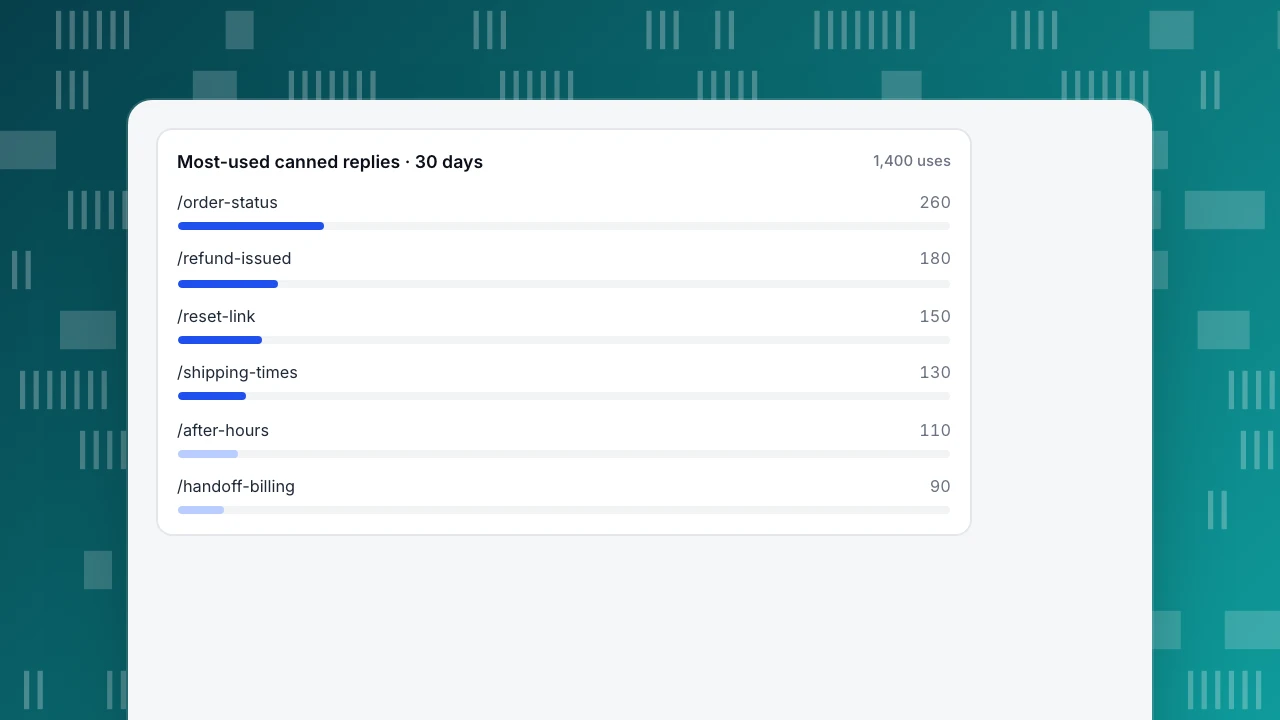
Sample data: a team's library of 48 replies was used 1,400 times in 30 days. The six most-used replies account for 920 uses (65.7%); 14 replies were not used at all. The chart shows the top six. Three actions follow: put the most effort into the six that do most of the work, retire the 14 unused ones (fewer replies are easier to find), and check satisfaction on conversations where the top replies were used. If a reply appears often in low-rated chats, rewrite it first.
Also watch first response time and handling time after changing the library; a better library should make both shorter without lowering satisfaction.
Most-used canned replies · 30 days
1,400 usesCanned responses and AI replies
AI assistants answer from a knowledge base; canned responses are written by people and sent by people. They work together: the questions agents answer most often with canned replies are good candidates for knowledge base entries, so the AI can answer them outside office hours, and the AI's handoff to a person should land on an agent who has a good canned reply ready.
Canned replies in TapCub
In Live chat › Canned replies, each reply has a shortcut (up to 40 characters), a title (80) and content (4,000). Site-level replies are available to every agent who can handle chats; turn on Personal (only visible to me) for your own. Owners, admins and analysts can edit site-level replies; agent-only members cannot by default. A use count shows which replies are actually sent. In the inbox, type / and keep typing the shortcut or title; choosing a reply fills the composer, and you can still edit it before sending. Step by step: use canned replies.
For the AI side, knowledge-base Q&A entries that exactly match a visitor's question are sent as stored without an AI call, and a wrong AI answer can be fixed and saved as a Q&A entry from the inbox.
FAQ
What is a canned response in customer service?
A saved, pre-written reply to a common question that an agent inserts with a shortcut, personalises and sends, used to answer faster and more consistently.
Are canned responses bad for customer experience?
Not when they are short, specific to the situation and personalised before sending. They hurt when one generic reply is pasted for many different problems.
How many canned responses should a team have?
Enough to cover the questions that make up most of your volume, often 20–50. Use counts usually show that a handful do most of the work; retire replies nobody uses.
What is the difference between canned responses and a chatbot?
A canned response is inserted and sent by a person, who decides when it fits. A chatbot or AI assistant replies automatically. Many teams use both.
Sources
- Moran, K. (2016). The Four Dimensions of Tone of Voice. Nielsen Norman Group.
- Mailchimp, Voice and Tone. Mailchimp Content Style Guide.
Was this article helpful?
We use your answers to fix and expand this page.
Couldn’t send. Please try again in a minute.
Thanks for the feedback. We’ll use it to improve this page.You’ve already sent feedback on this page. Thanks.

Growth Strategist
Explores acquisition channels, activation, and conversion experiments, turning data insights into actionable growth hypotheses and evaluation methods.