Try it on your own data
Every report in this article is in the free plan. One snippet for web and apps, up to 10 sites.
Start freeAn ecommerce help desk is the setup an online store uses to answer customers: channels, a shared queue, written answers, order access and rules for who handles what. Most of the workload sits in a few question types (order status, shipping, returns, sizing), so the fastest win is to make those self-service first and keep people for questions that need an order lookup or a calm voice. Below: question types, a 500-question week, setup steps, staffing and metrics.
What you will learn
- Tag one real week of questions before choosing tools; a few types usually make up most of the volume
- Publish exact self-service answers where each question arises and link tracking in every shipping email
- Size the team from the queue left after self-service, and keep people for order lookups and upset customers
What is an ecommerce help desk?
An ecommerce help desk is the setup an online store uses to answer customers: the channels customers write in on, the people who reply, the written answers they rely on, and the rules for who handles what and when. It can be dedicated software, but it does not have to be. A three-person store with a shared inbox, a good FAQ and clear hours has a help desk too.
Whatever the tools, a working ecommerce help desk has six parts:
- Channels — where questions arrive: website chat, email, marketplace messages, social media.
- A shared queue — one place where every open question is visible, with an owner.
- Self-service answers — FAQ, shipping and returns pages, size guides, order tracking links.
- Order access — the people answering can look up an order in the store admin.
- Rules — office hours, reply-time promises, routing, and when to escalate.
- Measurement — volume by question type, response time, resolution, satisfaction.
The parts that matter most depend on what customers actually ask. Ecommerce support has an unusual shape: most of the workload sits in a handful of repetitive question types. That is the argument of this guide: turn those few types into self-service answers first, and keep people for the questions that need an order lookup or a calm human voice. How human agents run live chat on a store day to day is covered in live chat for ecommerce; this guide is about the structure around it.
What questions does an ecommerce help desk handle?
Online stores get the same categories of questions, in roughly the same order, whatever they sell. The table below lists them with the channel that suits each and whether a written answer can resolve it.
Two patterns are worth noticing. First, the questions split into policy questions (same answer for everyone: shipping costs, return rules, sizing) and order questions (need one customer's record: status, changes, refunds). Second, "where is my order?" usually tops the list, and much of it is answerable without a person if the tracking link is easy to find.
| Question type | Typical question | Best channel | Self-serve? |
|---|---|---|---|
| Order status | "Where is my order?" | Tracking link, then chat | Mostly, with a visible tracking link |
| Returns and exchanges | "How do I return this?" | Returns page, chat FAQ | Yes, for the how-to |
| Shipping costs and times | "How long to Canada?" | Cart and shipping page | Yes, with exact figures |
| Sizing and fit | "Should I size up?" | Product page, chat | Often, with a good size guide |
| Product details | "Is it machine-washable?" | Product page, chat | Often |
| Payment and discount codes | "Why won't my code work?" | Chat | Partly; code rules can be written down |
| Damaged or wrong item | "It arrived broken" | Chat or email with photos | No: needs a person |
| Cancel or change an order | "Can I change the address?" | Chat, fast | No: needs order access |
| Wholesale and bulk | "Do you sell in bulk?" | No: sales conversation |
Policy questions (same answer for everyone) can be self-service; order questions need one customer's record.
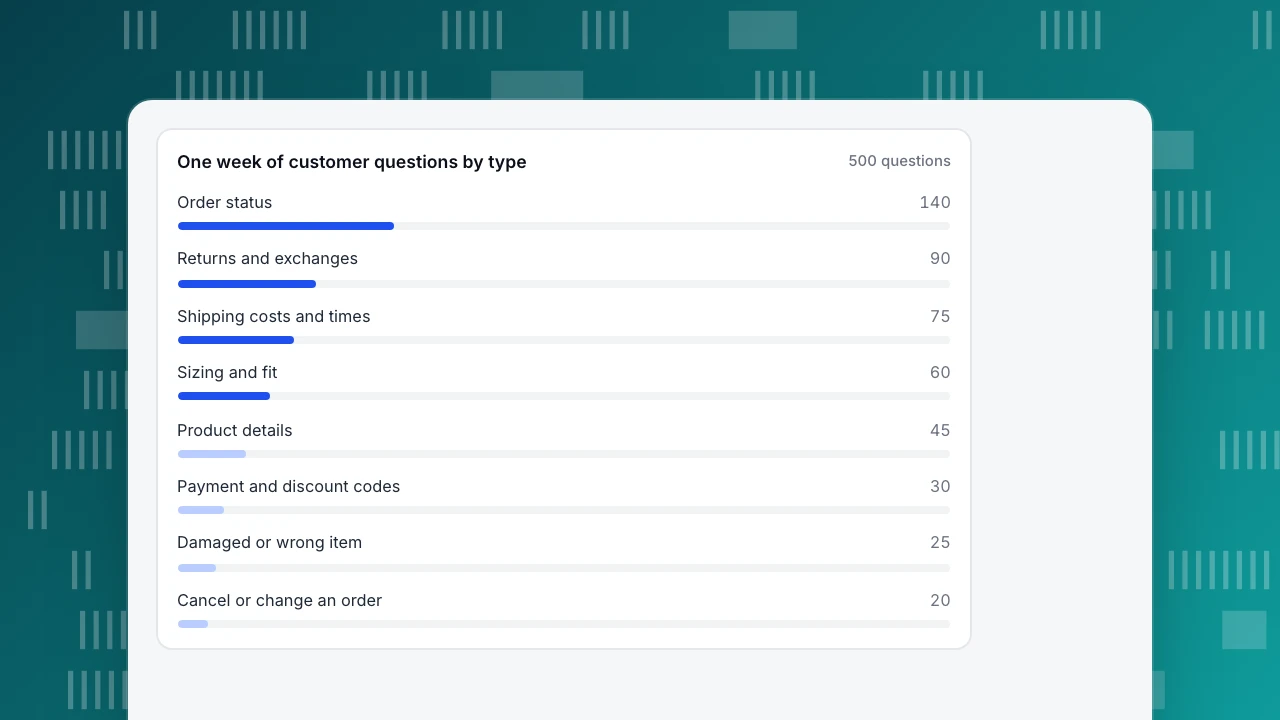
Worked example: one week, 500 questions
Sample data: a store selling clothing and accessories tagged every customer question for one week across chat and email.
| Question type | Questions | Share |
|---|---|---|
| Order status ("where is my order?") | 140 | 28% |
| Returns and exchanges (how to) | 90 | 18% |
| Shipping costs and delivery times | 75 | 15% |
| Sizing and fit | 60 | 12% |
| Product details | 45 | 9% |
| Payment and discount codes | 30 | 6% |
| Damaged or wrong item | 25 | 5% |
| Cancel or change an order | 20 | 4% |
| Other | 15 | 3% |
| Total | 500 | 100% |
Three policy types (returns, shipping, sizing) account for 90 + 75 + 60 = 225 questions, or 45%. Add order status, and four types make up 225 + 140 = 365, or 73% of the week.
Now suppose the store publishes clear self-service answers for the top types and links the tracking page in every shipping email. The share each answer resolves without a person is an assumption here; measure your own after launch:
- Shipping: 75 × 60% = 45 resolved by the answer
- Returns how-to: 90 × 60% = 54
- Sizing: 60 × 50% = 30
- Product details: 45 × 40% = 18
- Order status via tracking link: 140 × 35% = 49
That is 45 + 54 + 30 + 18 + 49 = 196 questions that no longer reach a person, so the human queue falls from 500 to 500 − 196 = 304, a 196 ÷ 500 = 39.2% reduction.
At an average of 6 minutes of agent time per question, the week drops from 500 × 6 = 3,000 minutes (50.0 hours) to 304 × 6 = 1,824 minutes (30.4 hours): 19.6 hours saved every week.
Look at what is left. Of the 304, the 91 remaining order-status questions, 25 damaged items and 20 cancellations (136 in all, 44.7%) genuinely need an order lookup or a judgement call; that is the work people should be doing. The other 168 are policy questions the answers didn't catch. Read them: each one points to a missing detail on a page, and that is the next round of self-service writing.
One week of customer questions by type
500 questionsHow to set up an ecommerce help desk, step by step
- Tag one real week. Export every question from every channel and tag it with one type from the list above. Without this, you will write answers for the questions you imagine rather than the ones you get.
- Write self-service answers for the top three policy types. Use exact numbers and conditions: "Free returns within 30 days of delivery, unworn with tags; sale items exchange only." Vague answers send customers back to you.
- Put the answers where the question arises. Size guide on the product page, shipping costs in the cart, the return steps in the order confirmation email, the tracking link in the shipping email, and the same answers pinned in the chat widget.
- Choose only the channels you can staff. One chat plus email answered well beats five channels answered slowly. Add a channel when you have the people for it.
- Set hours and an honest reply promise. Outside staffed hours, collect the email and question and tell customers when they will hear back.
- Give the answering team order access and saved replies. Decide who can look up and change orders in the store admin, and write canned responses for the questions that remain, so the same question gets the same correct answer.
Self-service first: what to publish and where
Self-service only reduces workload if the answer resolves the question. The share of questions resolved without contacting an agent is called ticket deflection; it is the number to watch for every page you publish. A searchable collection of these answers is a knowledge base; if you put an AI chatbot on top of it, the same policy-versus-order split decides what it may answer, as covered in AI chatbot for ecommerce.
What makes an ecommerce answer deflect:
- Exact figures. "$5.95, free over $75, 3–5 business days" resolves the question; "fast, affordable shipping" creates one.
- Conditions in the answer. Exceptions (sale items, final-sale, personalised products) belong in the same answer, not three clicks away.
- Market-specific rules. If you sell abroad, say which rules apply where. In the EU, the Consumer Rights Directive (2011/83/EU, Article 9) gives consumers 14 days to withdraw from a distance contract, with listed exceptions, so a single "30 days, US only" line can be wrong for EU customers.
- Shipping times you can keep. In the US, the FTC's Mail, Internet, or Telephone Order Merchandise Rule (16 CFR 435.2) requires a reasonable basis for any shipping time you state, and treats 30 days as the default when you state none. Publish the times your fulfilment actually achieves, and update the page when they change.
Staffing and hours for a small team
Size the team from the queue that remains after self-service, not from total volume. Using the example: 304 questions a week at 6 minutes each is 30.4 hours of handling. Agents can't spend every minute handling questions; at 70% of working time on conversations, that is 30.4 ÷ 0.7 = 43.4 agent-hours a week, a little over one full-time person at 40 hours.
Two practical rules for small teams:
- Staff the peaks. Ecommerce questions bunch after shipping emails go out, on Mondays and after promotions. Cover those hours first; the chat staffing calculator estimates agents per hour from your volume.
- Close cleanly outside hours. When nobody is online, an offline form that collects the email and question, with a reply promise you keep, is better than a chat that looks live. In TapCub this is the offline-messages setup described in chat offline messages.
Messages left overnight should be answered first thing, oldest first; a "by 10 am" promise that slips to the afternoon turns a simple question into a complaint. Stating the time matters in itself: David Maister's 1985 essay on waiting lines notes that uncertain and unexplained waits feel longer than known ones.
Metrics for an ecommerce help desk
| Metric | How to calculate it | Why it matters |
|---|---|---|
| Contacts per 100 orders | Customer questions ÷ orders × 100 | Normalises volume as the store grows; 500 ÷ 2,500 orders = 20 |
| Self-service (deflection) rate | Questions resolved by an answer ÷ all questions | Shows whether published answers work |
| First response time | Time to the first human reply, by hour of the week | Long waits drive low satisfaction |
| Resolution rate | Resolved ÷ all conversations | Unresolved chats come back as repeat contacts |
| Satisfaction | Share of 4–5 ratings, or average rating | Read the low scores, not just the average |
| Volume by question type | Weekly count per type | Tells you which answer to improve next |
Contacts per 100 orders is the one to watch over months. If it falls while orders grow, self-service is working; if it rises, a page, a policy or a fulfilment problem is generating questions.
Common mistakes when setting up ecommerce customer support
- Buying software before tagging questions. The tool cannot tell you what to automate; a week of tagged questions can.
- Writing vague answers. "Fast shipping" or "easy returns" create questions instead of answering them.
- Opening every channel at once. Each channel needs coverage; slow replies on five channels are worse than quick replies on two.
- Hiding the tracking link. Order-status questions shrink when the link is in every shipping email and on the order page.
- Measuring only response time. A fast reply that doesn't resolve the question brings the customer back.
How to run an ecommerce help desk in TapCub
Here is the 500-question week above, run with TapCub live chat. One boundary first: TapCub is not a ticketing system and does not connect to your store's order system. It handles website chat and offline messages; order lookups happen in your store admin, and email and marketplace messages stay in the tools you use for them.
- Pin the answers to the top questions. In Live chat › Knowledge base, write Q&A entries for shipping costs, the return steps, the size guide and "where is my order?" (with a pointer to the tracking link), and pin them. Pinned answers appear in the visitor's FAQ inside the chat widget; opening one does not create a conversation or use quota, and only Not solved or a request for a person opens a conversation for an agent. The number of pinned questions depends on the plan (3 on Free up to 10 on Ultra).
- Let the knowledge base answer the rest of the policy questions. Exact Q&A matches are sent as written without an AI call; longer documents such as the full returns policy can be searched and summarised by AI replies if you turn them on. Live chat › Reports shows the knowledge base hit rate, the share of questions answered this way, which is your self-service signal for chat.
- Set hours and the offline queue. In Live chat › Chat settings › Office hours, set your time zone and staffed hours. Outside them, visitors can leave an email and question, which you work through in Live chat › Chat settings › Offline messages (New, Replied, Closed). The report's heatmap of chat starts by weekday and hour shows whether your hours cover the peaks.
- Route what remains to people. In Live chat › Chat settings › Appearance, turn on auto-assignment with least load or round robin and a cap on concurrent chats per agent; agents set themselves online, away or offline. Save the replies for the 136 order and damage questions in Live chat › Canned replies, inserted with
/and edited before sending. - Review weekly. Live chat › Reports shows conversations, resolution rate, average first response and satisfaction against the previous period. Compare the week's volume by question type with your tagged baseline to see whether the 168 leftover policy questions are shrinking.
FAQ
What is an ecommerce help desk?
It is the system an online store uses to answer customers: channels such as chat and email, a shared queue, self-service answers, access to order records, rules for hours and routing, and metrics. It can be dedicated software or a simpler setup; what matters is that every question has an owner and the common ones have written answers.
What are the most common ecommerce customer service questions?
Order status usually comes first, followed by returns and exchanges, shipping costs and delivery times, and sizing. In the sample week in this article, those four types made up 73% of 500 questions. Damaged items, cancellations and payment questions are smaller in volume but more likely to need a person.
How can a small online store handle customer support?
Tag a week of questions, publish exact self-service answers for the top three policy types, and link order tracking in every shipping email. Staff only the channels you can answer quickly, set honest hours with an offline form, and keep people for order lookups and upset customers. In the sample, that cut the human queue by 39.2%.
Do I need help desk software for ecommerce?
Not at first. A shared inbox, a chat widget, clear policy pages and saved replies cover a small store. Dedicated software earns its cost when volume, the number of channels or the number of agents makes it hard to see who owns which question. Tag your questions before choosing a tool, so you know what it needs to handle.
How do I reduce "where is my order" questions?
Put the tracking link in every shipping email and on the order page, send a notice when a parcel is delayed, and pin a short answer explaining where to find tracking. In the sample, a visible tracking link was assumed to resolve 35% of order-status questions. The remaining ones usually need a person to check the carrier.
See also: Shared Inbox: 5 Actions and 3 Rules to Stop Double Replies.
Sources
- eCFR. 16 CFR 435.2 — Mail, Internet, or Telephone Order Merchandise Rule — reasonable basis for stated shipping times; 30-day default when no time is stated. Verified 2026-11-15.
- EUR-Lex. Directive 2011/83/EU on consumer rights — Article 9, 14-day right of withdrawal for distance contracts. Verified 2026-11-15.
- David H. Maister. The Psychology of Waiting Lines (1985) — uncertain and unexplained waits feel longer, the basis for stating reply times. Verified 2026-11-15.
Was this article helpful?
We use your answers to fix and expand this page.
Couldn’t send. Please try again in a minute.
Thanks for the feedback. We’ll use it to improve this page.You’ve already sent feedback on this page. Thanks.

Growth Strategist
Explores acquisition channels, activation, and conversion experiments, turning data insights into actionable growth hypotheses and evaluation methods.