Try it on your own data
Every report in this article is in the free plan. One snippet for web and apps, up to 10 sites.
Start freeAn online shopper with a question has two choices: find the answer quickly or leave. Live chat gives them a third: ask. Done well, it answers the size, shipping, returns and payment questions that stop purchases on product and cart pages, and handles 'where is my order?' without tying up staff. Done badly, it is a pop-up that covers the checkout button. Here is where chat helps a store, what shoppers actually ask, how to staff it through promotions, and how to measure its effect without overstating it.
What you will learn
- Put chat where purchase questions arise: product, cart, shipping and returns pages
- Let AI and order tracking handle 'where is my order'; keep people for pre-sales
- Compare chatters with non-chatters carefully: chatters are more engaged to begin with
Why online stores add live chat
In a physical shop, a customer who is unsure about a size asks someone. Online, that question either gets answered on the page or turns into an abandoned cart. Baymard Institute's long-running checkout research finds that the most common reasons shoppers abandon are unexpected extra costs, delivery that is too slow, having to create an account, and not trusting the site with card details: several of those are questions a quick answer can settle.
Live chat is not a fix for a confusing checkout or hidden shipping fees; those should be fixed on the page. It is for the questions that remain after the page has done its best.
Where to place chat in a store
| Page | What shoppers ask | Chat approach |
|---|---|---|
| Product pages | Size and fit, materials, compatibility, stock | Visible bubble; proactive invite after a dwell time |
| Cart | Shipping cost, delivery date, discount codes | Visible bubble; quick canned answers |
| Checkout / payment step | Payment failures | Keep the widget out of the way; link to help instead of a pop-up |
| Shipping and returns pages | Policy details, exceptions | AI answers from your policies; person on request |
| Order tracking / account | "Where is my order?" | Self-service tracking first, AI second |
| Home and category pages | General browsing | Bubble only, no invites |
The rule of thumb: offer help where a purchase decision is made, and stay quiet where people need to concentrate.
What shoppers actually ask
Sample data: a fashion store coded a month of 600 chats by the main question.
- Shipping cost and delivery time: 27%
- Size and fit: 22%
- Where is my order (WISMO): 18%
- Returns and exchanges: 13%
- Discount codes and payment: 12%
- Product details and stock: 8%
Two lessons. First, more than a quarter of chats ask something the product page could show (shipping cost and delivery date): fix the page and chat volume falls. Second, the WISMO and returns questions (31%) rarely need a person: a tracking link and a clear policy, delivered by AI or self-service, free agents for the pre-sales conversations that actually influence sales. How to code chats like this is described in qualitative data.
Proactive invites that don't annoy
A proactive invite offers help after a shopper has spent time on a page, for example 45 seconds on a product page. Keep it specific ("Questions about sizing? We reply in under a minute."), invite each visitor once, and never trigger it on arrival or on the payment step. Judge each rule by its reply rate and by conversion against comparable visitors who were not invited. More in proactive chat best practices.
"Where is my order?" and AI
Order-status questions spike after promotions and during holiday shipping. They are repetitive and answerable from data. Give shoppers a tracking page linked from every shipping email, and let an AI assistant answer from your shipping and returns policies, handing over to a person for anything it cannot answer. People should spend their time on the questions where a good answer turns into a sale: sizing, product advice, gift questions, bulk orders.
Staffing for peaks
Chat volume in e-commerce follows promotions, not the calendar. A store that handles 20 chats a day may get 150 on a sale day. Three ways to cope:
- Plan staff by hour from last year's peak days and your chat heatmap.
- Prepare canned replies for the sale's terms (dates, codes, exclusions) before it starts; see canned responses.
- Turn on AI-first mode for the peak, so routine questions are answered instantly and agents handle handoffs.
Cross-border stores add a language problem; two-way translation lets agents answer in their own language while shoppers read theirs.
How to measure live chat's effect on sales
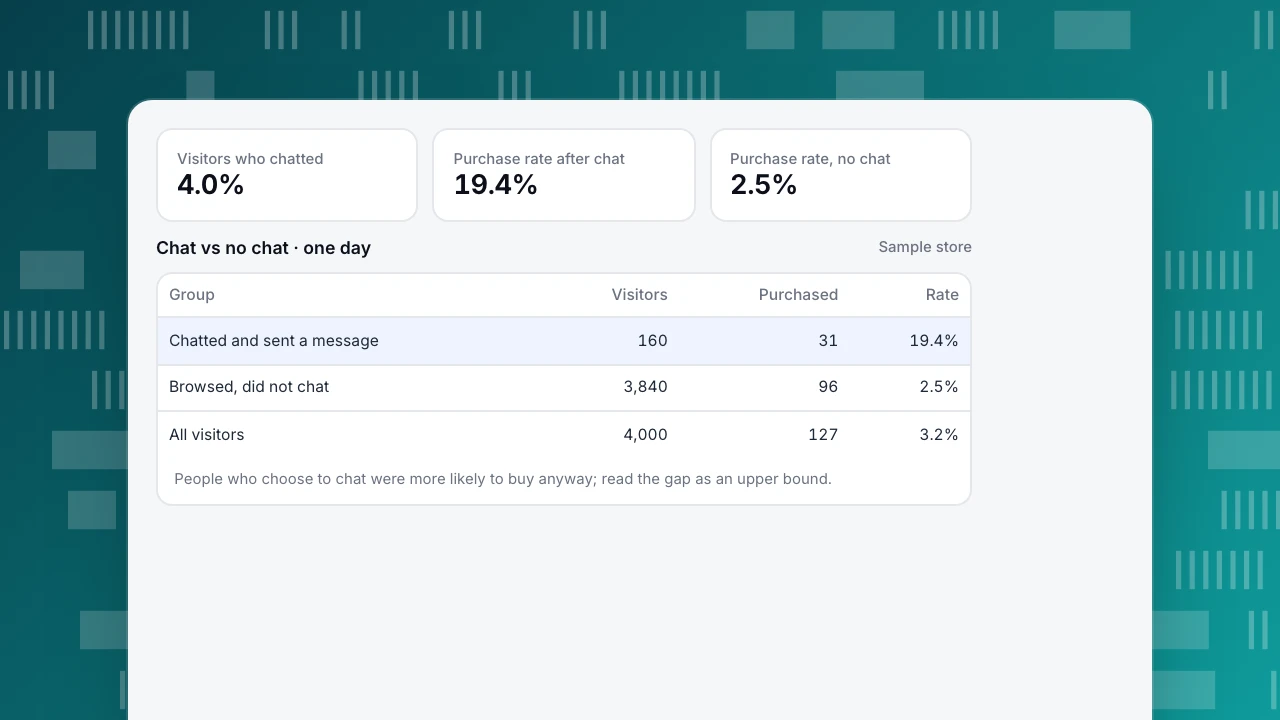
The tempting comparison is shoppers who chatted against those who did not. In the sample day in the table, 31 of 160 chatters bought (19.4%) against 96 of 3,840 non-chatters (2.5%): a relative lift of 6.75 times. That number is mostly selection: people who take the trouble to ask are already more interested. Read it as an upper bound, and watch its trend rather than its size.
Fairer ways to estimate the effect:
- Holdout on proactive invites: show the invite to a random 80% of eligible visitors and not to 20%, then compare purchase rates between the two groups.
- Compare like with like: same pages, same traffic sources, same days.
- Look beyond conversion: average order value after chat, return rates for chat-assisted orders, repeat purchase.
More on the method in does live chat increase conversions? and on store metrics in ecommerce conversion rate.
Visitors who chatted
4.0%
Purchase rate after chat
19.4%
Purchase rate, no chat
2.5%
Chat vs no chat · one day
Sample store| Group | Visitors | Purchased | Rate |
|---|---|---|---|
| Chatted and sent a message | 160 | 31 | 19.4% |
| Browsed, did not chat | 3,840 | 96 | 2.5% |
| All visitors | 4,000 | 127 | 3.2% |
People who choose to chat were more likely to buy anyway; read the gap as an upper bound.
Setup checklist
The table lists the steps for a store, from canned replies to defining a purchase goal. One more item for accessibility: the widget should be usable by keyboard and screen reader, and should not cover buttons on small screens.
| Setup step | Why it matters |
|---|---|
| Write 10–15 canned replies for shipping, returns, sizing and payment | Covers most pre-sales questions in seconds |
| Load shipping and returns policies into the knowledge base | AI can answer after hours and during peaks |
| Set office hours and an offline form | Shoppers know when a person will reply |
| Add one proactive invite on product pages after a dwell time | Reaches undecided shoppers without interrupting everyone |
| Hide or quiet the widget on the payment step | Avoids covering buttons where focus matters most |
| Turn on masking for card and phone numbers | Keeps payment details out of transcripts |
| Define a purchase goal in analytics | Lets you compare chat and no-chat conversion |
A small store can do all of this in an afternoon.
Live chat for stores in TapCub
- Install once. On a store that loads the TapCub analytics script (for example via the Shopify setup), one switch shows the chat bubble.
- See what the shopper was doing. The inbox drawer shows the landing page, referrer, current page and recent browsing, so agents know which product a question is about.
- Proactive invites match pages by path or pattern after a dwell time of 3 to 600 seconds, invite each visitor once by default, and record impressions, open rate and reply rate per rule.
- AI replies, two-way translation and office hours cover peaks, other languages and nights.
- Sensitive data masking keeps card and phone numbers out of transcripts (only the last four digits are stored).
- Conversion attribution in Live chat › Reports compares, per day, the goal rate of visitors who chatted with visitors who browsed without chatting, and warns when fewer than 30 visitors chatted.
FAQ
Does live chat increase ecommerce sales?
It can, mainly by answering questions that would otherwise end a visit. Raw comparisons overstate the effect because motivated shoppers chat more; measure it with a holdout on proactive invites.
Where should live chat appear on an online store?
On product, cart, shipping and returns pages, where purchase questions arise. Keep it unobtrusive on the payment step and avoid invites on the home page.
Can a small store offer live chat without full-time staff?
Yes. Set office hours, use an offline form, answer common questions with canned replies, and let an AI assistant answer from your policies outside those hours.
What should an ecommerce chatbot handle and what should people handle?
Bots and AI handle order status, shipping times, returns policy and discount rules. People handle sizing advice, product recommendations, complaints and anything that needs judgement.
Sources
- Baymard Institute, Cart & Checkout Abandonment Rate Statistics.
- W3C, Web Content Accessibility Guidelines (WCAG) 2.2.
Was this article helpful?
We use your answers to fix and expand this page.
Couldn’t send. Please try again in a minute.
Thanks for the feedback. We’ll use it to improve this page.You’ve already sent feedback on this page. Thanks.

Data Engineer
Writes about event design, data quality, and collection workflows, with verifiable implementation methods for reliable analytics.