Try it on your own data
Every report in this article is in the free plan. One snippet for web and apps, up to 10 sites.
Start freePrepare one task study that another researcher can reproduce: define the audience, script, stopping rules and coding before observing a participant.
What you will learn
- Choose one journey and a testable question
- Use neutral tasks and predefined stopping rules
- Report independent and assisted success separately
- Connect observed obstacles with production events
Mobile app usability testing observes representative people completing realistic tasks on a phone or tablet. Define success before the session, use neutral instructions, record assistance separately and distinguish usability problems from functional defects. Then connect the observed obstacles to production analytics and retest a specific change rather than declaring the app “easy to use.”
Choose the question a study can answer
A checkout funnel can show that people stop after selecting delivery. It cannot, by itself, tell you whether they misunderstand the fee, miss the continue button or encounter an error. A usability study lets you observe those possibilities directly. It is different from automated checks that confirm a button executes the expected code.
For a focused study, write one question: “Can a new customer select a pickup location, understand the collection time and reach order review without help?” This is specific enough to choose participants and judge outcomes. “Find everything wrong with our app” usually produces observations that are difficult to prioritize.
Nielsen Norman Group’s introduction describes a study in terms of participants, tasks and facilitation. The plan below applies those elements to mobile constraints and supplies an original recording sheet. It does not report a study conducted by TapCub.
Pick a method that fits the uncertainty
| Method | Useful when | Main limitation to plan around |
|---|---|---|
| Moderated session | You need to understand an unfamiliar workflow or unexpected hesitation | The facilitator can unintentionally guide the participant |
| Unmoderated task study | Tasks are clear and independent completion matters | You cannot clarify an ambiguous instruction during the task |
| In-person observation | Grip, reach, gestures or physical context are central | The test environment may differ from normal use |
| Remote session on the participant’s device | Device familiarity and ordinary settings matter | Screen sharing and recording may affect behavior |
Moderation and location are separate choices. A remote test can be moderated; an in-person test can use a standardized script. Do not treat “remote” as a synonym for “unmoderated.”
A clickable prototype is useful for testing labels and information architecture. A real build is needed when the question involves keyboard behavior, permissions, loading, assistive technology or recovery from network loss. Record exactly which prototype or build was tested so later readers know what the findings cover.
Recruit for the task, not convenience
Define the relevant experience before inviting people: previous purchase behavior, familiarity with this service and any constraints that matter to the journey. Separate new customers from experienced ones when learning is part of the question. Colleagues who helped design the flow can reveal implementation problems, but they cannot stand in for unfamiliar users.
List device and accessibility requirements explicitly. Record operating system, screen size, text scaling and input or assistive technology where they affect the task. Recruit participants who use those configurations in practice instead of asking a researcher to impersonate their experience.
There is no universal participant count that certifies an app as usable. A small exploratory round can reveal specific obstacles; estimating a population success rate requires a different sampling and analysis plan. Keep claims proportional to what you actually observed. Five observed failures demonstrate five observations, not a market-wide failure percentage.
Use test accounts and non-sensitive records. Explain what will be recorded, obtain the appropriate consent, and keep identity details outside the analysis sheet. If a task might reveal a personal message, payment credential or private notification, redesign the task or pause recording rather than collecting it unnecessarily.
Write neutral tasks and success rules
The instruction should describe a goal and context without giving away the interface route.
| Leading instruction | Neutral alternative | Predefined success |
|---|---|---|
| Tap the pickup tab and choose Central | You need to collect your order near Central after work | Correct location and collection slot appear at order review |
| Use the filter icon to find a blue item | Find a blue jacket available in your size | A suitable in-stock item reaches the basket |
| Open settings and turn on alerts | You want to be notified when the order is ready | The relevant notification preference is enabled and understood |
Specify a stopping rule. For example, stop after the participant reaches order review, explicitly gives up or reaches a time limit selected for this study. Explain how interruptions and technical failures are logged. A disconnected screen-share is not automatically a usability failure.
Distinguish independent success, assisted success, failure and technical interruption. Agree beforehand what counts as assistance. “What are you thinking?” invites explanation; “Try the icon at the top right” reveals the route. Once the facilitator gives that hint, the attempt cannot remain independently successful.
Run a pilot before the study
Use a pilot to check that accounts work, task wording is understandable, the intended state exists and the recording captures what you need. Check keyboard overlap, permission prompts, loading and the return path after switching apps. If the script changes materially after the pilot, keep pilot observations separate from the final task totals.
During the study, read the same instruction, observe quietly and ask neutral follow-up questions. Do not defend the design or explain what the participant “should” have done. Record the action and context before writing an interpretation: “tapped the collection date three times” is an observation; “did not trust the date” is a hypothesis to ask about.
Record timestamps for task start, critical obstacle and end. Also record assistance, errors and outcome. If thinking aloud affects timing, label those timings as study observations rather than normal production speed.
Use a sheet with reproducible metrics
The following is sample data, invented to demonstrate coding and calculation. It is not a user study result or an industry benchmark. Times are seconds from task start to stop.
| Participant code | Outcome | Time | Assistance | Observation |
|---|---|---|---|---|
| P01 | Independent success | 70 | None | Completed pickup selection |
| P02 | Independent success | 85 | None | Rechecked the collection date |
| P03 | Assisted success | 120 | Location hint | Missed the location control |
| P04 | Failure | 180 | None | Stopped without reaching review |
| P05 | Independent success | 95 | None | Recovered from one wrong selection |
| P06 | Independent success | 110 | None | Paused at the fee explanation |
| P07 | Assisted success | 150 | Navigation hint | Could not find the next step |
| P08 | Failure | 180 | None | Chose to stop at the limit |
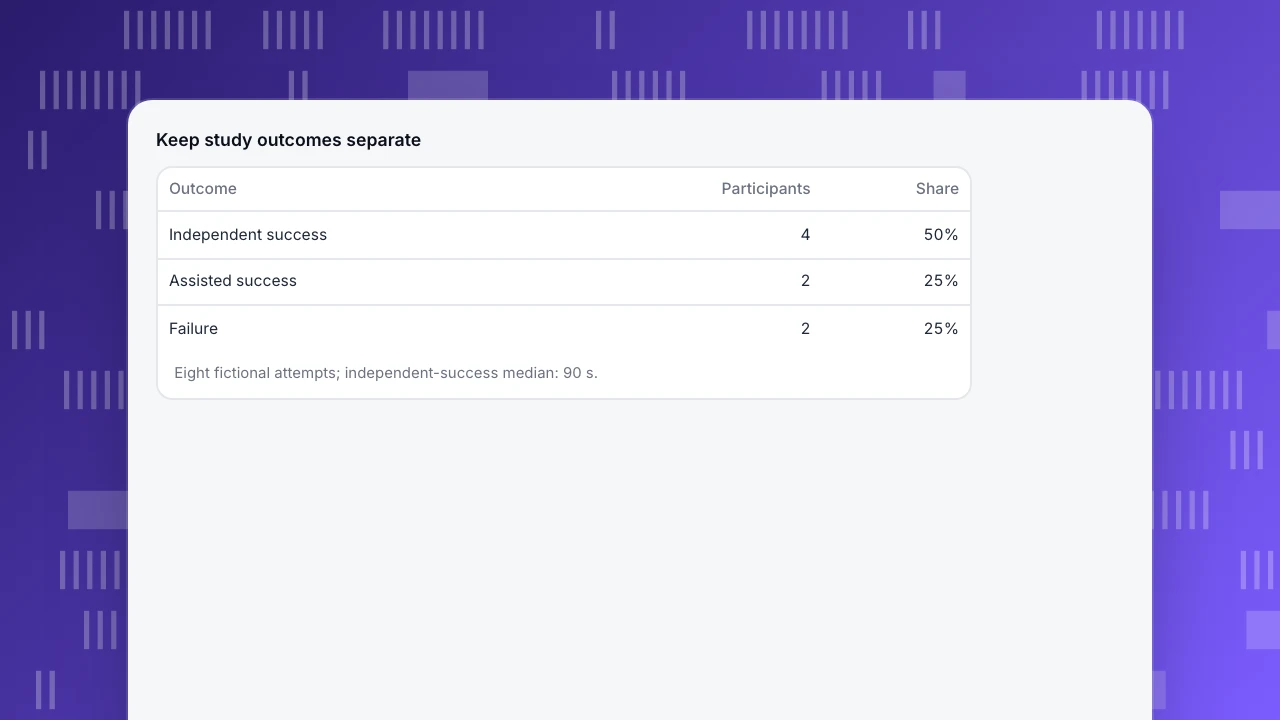
Independent success is 4 / 8 = 50%. Assisted completion is 2 / 8 = 25%. Total completion with or without help is 6 / 8 = 75%. These are different metrics; do not publish 75% as unassisted success.
For independently successful attempts, sorted times are 70, 85, 95 and 110 seconds. Their median is (85 + 95) / 2 = 90 seconds. That is the median among independent successes, not among all attempts. Failures ending at a time limit should not be silently combined into that measure as if they completed.
Add a field for the metric’s inclusion rule. If a later study includes assisted times while this one excludes them, the results are not directly comparable. Keep individual rows available to the research team so a reviewer can reproduce every total without exposing participant identities.
Keep study outcomes separate
| Outcome | Participants | Share |
|---|---|---|
| Independent success | 4 | 50% |
| Assisted success | 2 | 25% |
| Failure | 2 | 25% |
Eight fictional attempts; independent-success median: 90 s.
Include accessibility and mobile-specific checks
Test the important journey with the conditions that matter to your audience: larger text, interrupted connectivity, one-handed use, the on-screen keyboard and app permission choices. These are candidates for a device matrix, not a promise that one participant must test every combination.
Android’s accessibility testing documentation distinguishes manual, tool-based, automated and user testing. It includes checking whether screen-reader navigation reaches controls and communicates their purpose. Automated scans help find some issues; they do not replace observing people using the relevant accessibility configuration.
Separate a blocked control from an unclear one. A tap that never reaches its handler is a functional problem; a correctly working label that nobody understands is a usability problem. Both can prevent task completion, and each needs an owner with a suitable verification method.
Turn observations into a retest plan
Write each finding as evidence, consequence, proposed action and follow-up. “P03 and P07 needed navigation help at the same control” is more useful than “navigation is bad.” Prioritize severe blockers, the affected task and exposure in real use; do not rank only by the number of comments.
Use production data to locate exposure and direction, not to pretend the study sample is representative. In TapCub, All-platform analytics › Behavior › Event analysis supports event trends, while the behavior builder includes funnels and retention. The analysis guide documents those models. Track explicit mobile events for the journey you need; do not assume website replay or heatmap capabilities automatically record native-app research sessions.
For the pickup example, production events might distinguish task started, location confirmed and order review reached. A study suggests a label problem; funnel data shows how often the affected transition occurs. After changing the control, retest the task with the same outcome rules and watch the app engagement metrics. A before-and-after improvement alone does not establish causation.
FAQ
Is mobile app usability testing the same as QA?
No. Functional QA checks whether behavior meets requirements. Usability research asks whether intended users can achieve their goals and understand what happens. A flow can pass its functional tests while confusing its audience.
Can analytics replace a usability study?
Analytics identifies patterns and where journeys stop. Observing task attempts helps explain obstacles and misunderstandings. Use them together, with clear limits on what each can establish.
Should assisted attempts count as success?
Record them as assisted success. You can report total completion as an additional metric, but preserve independent success separately and explain what help was provided.
Can I test a prototype instead of the live app?
Yes, for questions the prototype can represent. Use a real build when device behavior, accessibility, permissions, latency or error recovery is central. State the tested artifact in the findings.
Sources and next step
Sources checked on November 7, 2026: NN/g: usability testing, Android: accessibility testing and TapCub: analysis models. The sample tasks, recording sheet and arithmetic were created for this guide. Use the UX audit guide to choose a journey, then pilot one neutral task before recruiting the full round.
Was this article helpful?
We use your answers to fix and expand this page.
Couldn’t send. Please try again in a minute.
Thanks for the feedback. We’ll use it to improve this page.You’ve already sent feedback on this page. Thanks.

Product Adoption Consultant
Explores customer onboarding, live conversations, and self-service, turning common usage questions into practical guidance and improvements.