Try it on your own data
Every report in this article is in the free plan. One snippet for web and apps, up to 10 sites.
Start freeAn AI chatbot for ecommerce answers shoppers' questions from your own policies, size guides and product pages, and hands off what it can't answer. It is worth it when it answers the frequent pre-sale questions (sizing, shipping costs, return rules) accurately. Order status and refunds are different: connect the bot to your order system or route them to a person, never let the model guess. Below: what to automate, a 200-question example, launch steps and metrics.
What you will learn
- Split questions into policy answers anyone can read and order-specific ones; only the first group is safe for a bot without integration
- Sort 200 real questions and test every common one before launch; most wrong answers come from outdated store content
- Order status, refunds and exceptions go to a lookup or a person: the store is responsible for what its bot promises
What should an AI chatbot for ecommerce do?
An AI chatbot for ecommerce is a chat assistant on your store that answers shoppers' questions from your own content (policies, size guides, product pages) and hands the conversation to a person when it can't. The useful kind is narrow: it answers the questions that have one correct answer written down somewhere, and it knows which questions it must not answer on its own.
Shopper questions fall into two groups, and the split decides how you set the bot up:
- Policy and catalogue questions. "Do you ship to Canada?", "Does the medium run small?", "Can I return sale items?" The answer is the same for every shopper and lives in a page you control. A bot can answer these well, provided the source text is accurate.
- Account-specific questions. "Where is my order?", "Can I change my address?", "Has my refund gone through?" The answer depends on one shopper's order record. A language model cannot know it from your help pages. Either the bot is connected to your order system and looks it up, or the question goes to a person.
That split is the main argument of this guide: an ecommerce AI chatbot is worth it when it answers the high-frequency pre-sale questions accurately, and it is a liability when it improvises answers about orders and refunds. How rule-based, AI and hybrid bots differ in general is covered in types of chatbots; how human agents use chat on a store is in live chat for ecommerce.
Which questions suit an AI chatbot, and which don't
The table below sorts common store questions by where the correct answer lives and who should give it. Two rules decide each row:
- If the answer is written down and the same for everyone, the bot can answer it. Put the exact text in the knowledge base and test it.
- If the answer needs an order record or a decision, the bot should not compose it. Connect a lookup, link to the self-service page that has the record, or hand off.
Exceptions belong with people too: a damaged parcel, a discount request outside the rules, a customer who is upset. A bot can collect the order number and the photo, but the decision is a person's.
| Question type | Example | Where the answer lives | Who should answer |
|---|---|---|---|
| Shipping costs and times | "How much is shipping to Texas?" | Shipping policy page | AI, from an exact entry |
| Sizing and fit | "Does the medium run small?" | Size guide, product notes | AI, from the size guide |
| Return and exchange rules | "Can I return sale items?" | Returns policy | AI, exact text per market |
| Product details | "Is this jacket waterproof?" | Product page | AI, from the product page |
| Stock and restocks | "When is size 8 back?" | Inventory system | Person, or a link to back-in-stock alerts |
| Order status | "Where is my order?" | Order record | Order lookup, tracking link or person |
| Refund, cancel, address change | "Can I change my address?" | Order record plus a decision | Person |
| Damaged or wrong item | "My parcel arrived broken" | Photos plus a decision | Person; bot may collect order number |
| Discount exceptions | "Can you match this price?" | Your pricing rules | Exact entry with the policy, then person |
Rule of thumb: written down and the same for everyone → bot; needs a record or a decision → lookup or person.
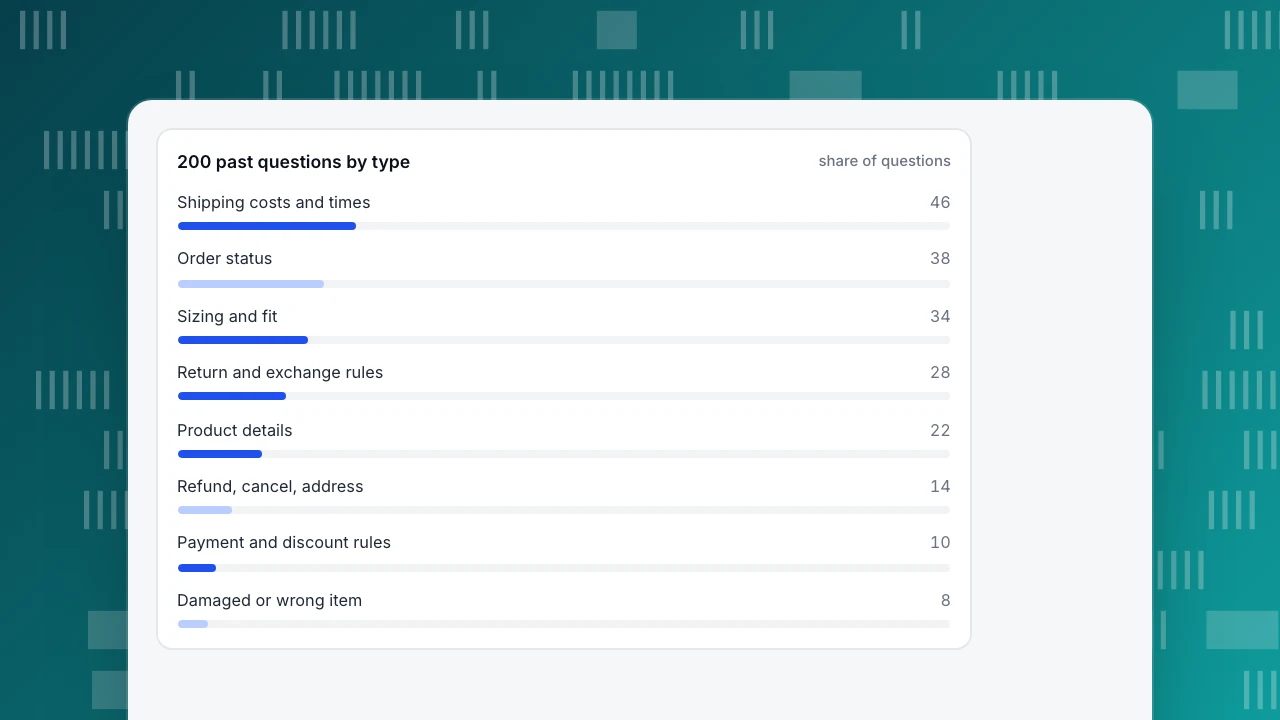
Worked example: sorting 200 past questions
Before choosing a tool or writing a single entry, sort a sample of real questions. Sample data: a clothing store exported the last 200 shopper questions from chat and email and tagged each one.
Answerable from policy or catalogue text: 140 questions
- Shipping costs and delivery times: 46 (23%)
- Sizing and fit: 34 (17%)
- Return and exchange rules: 28 (14%)
- Product details and materials: 22 (11%)
- Payment methods and discount-code rules: 10 (5%)
Needs an order record or a decision: 60 questions
- Order status ("where is my order?"): 38 (19%)
- Refund, cancellation or address change: 14 (7%)
- Damaged or wrong item: 8 (4%)
So the ceiling for an AI chatbot without an order integration is 140 ÷ 200 = 70% of questions. The remaining 60 ÷ 200 = 30% should be handed off or pointed to a tracking page.
The store then wrote knowledge-base entries for the 140 and ran every one through a test before launch:
- 119 answered correctly: 119 ÷ 140 = 85.0%
- 14 found no matching material and handed off: 14 ÷ 140 = 10.0%
- 7 answered wrongly or incompletely: 7 ÷ 140 = 5.0%
The 7 wrong answers were the important finding. Five came from an old shipping page that still listed last year's rates; two mixed up the return window for sale items. After fixing the source text and adding exact entries for those questions, all 7 passed on retest: 119 + 7 = 126 correct, or 126 ÷ 200 = 63% of the original sample. The 14 no-match questions became the next batch of entries to write.
Two things to take from this. First, the realistic automation share comes from your own question mix, not from a vendor's average. Second, the testing step found errors in the store's content, not in the model: a bot repeats whatever your pages say, including the outdated parts.
200 past questions by type
share of questionsHow to launch an ecommerce AI chatbot in five steps
- Collect and tag 200 real questions. Use chat transcripts, emails and contact-form messages from the last one to three months. Tag them into the two groups above. This tells you the ceiling and which entries to write first.
- Write exact answers for the top questions, longer documents for the rest. Short, fixed answers ("Standard shipping to the US is $5.95, free over $75, 3–5 business days") work best as question-and-answer entries. Longer material, such as the full returns policy or a size guide, works as documents the bot searches and quotes. A knowledge base organised this way is also easier to keep current.
- Write the handoff rules before the bot goes live. At minimum: order status, refunds, cancellations, address changes, damaged items, anything legal, and any time the shopper asks for a person. Decide what the bot says during the handoff and what happens outside office hours.
- Test every common question, then the awkward ones. Run the tagged questions through the bot and check each answer against your policy. Then try what shoppers actually do: typos, two questions in one message, "I want a discount", a question in another language.
- Launch in a limited mode first. Let the bot answer only when no agent is online for the first weeks, read every AI conversation, and widen it once the wrong-answer rate is low. Step-by-step setup in TapCub is in set up AI chat replies; the general playbook for an AI support agent is in AI support agent.
Order status and refunds: connect or hand off, never improvise
The 30% of questions that need order data are where a store bot does damage. A model that does not have the order record will still produce a fluent answer if nothing stops it: "Your order has shipped and should arrive in 2–3 days." That sentence is a promise.
Two pieces of law and one decision show why this matters:
- You are responsible for what your bot says. In Moffatt v. Air Canada (2024 BCCRT 149), British Columbia's Civil Resolution Tribunal rejected the airline's argument that its chatbot was responsible for its own answers. The tribunal held that the company is responsible for all the information on its website, whether it comes from a static page or a chatbot, and ordered Air Canada to pay $812.02 in damages, interest and fees.
- Shipping promises need a basis. The US FTC's Mail, Internet, or Telephone Order Merchandise Rule (16 CFR 435.2) requires a seller to have a reasonable basis to expect it can ship within the time it states, or within 30 days if no time is stated, and a reasonable basis for any revised shipping date. A bot inventing delivery dates is exactly the kind of statement that needs that basis.
- Return rules differ by market. In the EU, the Consumer Rights Directive (2011/83/EU, Article 9) gives consumers 14 days to withdraw from a distance contract, with listed exceptions. If you sell into several markets, your returns answers must say which rules apply where, not one generic line.
What to do instead, in order of preference:
- Connect an order lookup if your chatbot product supports it and you trust the integration; then the answer comes from the record, not the model.
- Point to the self-service page that already has the record: "You can see live tracking with the link in your shipping email, or on the order page after you sign in."
- Hand off with the order number collected, so the agent starts with what they need.
How to measure an ecommerce chatbot
Measure the bot on accuracy and outcomes, not on how many messages it sent.
| Metric | How to calculate it | What to do with it |
|---|---|---|
| Knowledge hit rate | Questions answered from an entry or document ÷ all questions the bot saw | A falling rate means new questions you haven't written answers for |
| Handoff rate and reasons | Handoffs ÷ AI conversations, split by reason | "No match" handoffs are your writing backlog; "asked for a person" is fine |
| Wrong-answer rate | Wrong answers found in review ÷ AI answers reviewed | Fix the source text first, then add exact entries |
| Satisfaction on AI-answered chats | Average rating where only the AI replied | Compare with agent-answered chats on the same topics |
| Repeat contact | Shoppers who come back about the same issue within a few days | Answers that sounded right but didn't solve it |
| Conversion, chatted vs not | Goal rate of shoppers who chatted vs those who didn't | Observational: shoppers who chat are often closer to buying |
The last row needs care. Shoppers who start a chat on a product page are often already closer to buying, so a higher conversion rate among chatters does not prove the bot caused it. How to separate the bot's own contribution, and how to add up savings and extra margin, is covered in chatbot ROI.
Common risks and how to avoid them
- Stale content. The bot repeats last season's shipping rates or a sale that ended. Put an owner and a review date on every policy page the bot reads, and update entries when promotions change.
- Answers that mix markets. "Free returns within 30 days" may be true for one country and wrong for another. Write market-specific entries or keep the answer to the strictest rule plus a link.
- Discount coaxing. Shoppers will ask the bot for a code or a price match. Write an exact entry with your real policy so the model doesn't improvise generosity.
- No way to reach a person. A bot that loops is worse than no bot. Make "talk to a person" always work, and show an offline form with a reply time when nobody is online.
- Hidden automation. Tell shoppers they are talking to an AI before it answers. Label AI messages.
- Units and sizes in translation. A size chart translated by a model can turn EU sizes into US sizes incorrectly. Keep size charts as exact tables or images per market, not free text.
How to run an ecommerce AI chatbot in TapCub
Take the 200-question sample above. Here is how the clothing store sets it up in TapCub live chat.
- Write the 140 policy questions as exact entries. In Live chat › Knowledge base, a Q&A entry is sent word for word when the shopper's question matches, and it does not use an AI call, so shipping rates and the sale-item return window always come out exactly as written. The longer returns policy and the size guide go in as documents: TapCub splits them into passages of about 600 characters, finds the best passages with a full-text search (not a vector store), and the model drafts the reply from them. Pin the top questions so they show in the shopper's FAQ; opening a pinned answer does not create a conversation or use quota.
- Test all 140 before launch. The knowledge base Playground runs the same path as a real chat, spends no quota and creates no conversation, which is where the store in the example found its 7 wrong answers. On Draft inbox, Generate from conversations turns the last 30 days of resolved chats into Q&A drafts that go live only when you approve them.
- Route the 60 order questions to people. TapCub's AI only drafts replies from the knowledge base; it cannot look up an order, change an address or issue a refund, and TapCub does not connect to your store's order system. Write a Q&A entry that points to your tracking page, and let everything else hand off. The inbox labels each handoff reason (no knowledge match, model can't answer, visitor asked, turn limit, agent took over), and Max AI turns per conversation (1–20, default 6) caps loops.
- Start in the limited mode. In Live chat › Chat settings › AI assistant, choose "only when all agents are offline" first, so people answer during staffed hours and the AI covers nights. Switch to "AI answers first" once the reviews look clean. Shoppers are told they are talking to an AI before the first reply, and that notice cannot be turned off. When an answer is wrong, Fix & save in the inbox stores the correct one as a Q&A entry.
- Read the results. Live chat › Reports shows the knowledge base hit rate, and Live chat › Reports › Conversion attribution compares the goal rate of visitors who chatted with visitors who didn't, shows the relative lift (chatted rate ÷ no-chat rate − 1) and warns when fewer than 30 visitors chatted. Read that lift as an upper bound, for the self-selection reason above.
FAQ
What is an AI chatbot for ecommerce?
It is a chat assistant on an online store that answers shoppers' questions from the store's own content, such as shipping rates, size guides and return rules, and passes the conversation to a person when it can't answer. Good ones answer only what is written down and hand off anything that needs an order record or a decision.
Can an AI chatbot answer "where is my order?"
Only if it is connected to your order system and reads the real record. Without that connection, a language model has no way to know the status and may invent a plausible answer, which becomes a promise you have to keep. Point shoppers to your tracking page instead, or hand the question to a person with the order number collected.
How much of ecommerce support can an AI chatbot handle?
It depends on your own question mix, so measure it rather than borrowing a benchmark. Sort 200 recent questions: in the sample here, 70% were answerable from policy text and 63% passed testing after fixes. Questions about orders, refunds and damaged items made up the other 30% and went to people.
How do I stop an ecommerce chatbot from making things up?
Give it exact answers for high-frequency questions, keep source pages current, and write handoff rules for orders, refunds and exceptions before launch. Test every common question against your policy, start in a limited mode, and review AI conversations weekly. When you find a wrong answer, fix the source text first, then store the correct reply.
Do I have to tell shoppers they are talking to a bot?
Tell them anyway. Disclosure sets the right expectations, makes it obvious that a person is available, and protects trust when the bot hands off. Rules vary by jurisdiction, so check the ones that apply to your markets. Label AI messages, and make sure "talk to a person" always works.
See also: Retail Chatbot: Automate Orders, Shipping and Returns First.
Sources
- Civil Resolution Tribunal of British Columbia. Moffatt v. Air Canada, 2024 BCCRT 149 — paragraphs 27–28 on responsibility for chatbot information; paragraph 44 on the $812.02 order. Verified 2026-11-15.
- eCFR. 16 CFR 435.2 — Mail, Internet, or Telephone Order Merchandise Rule — reasonable basis for stated and revised shipping times; 30-day default. Verified 2026-11-15.
- EUR-Lex. Directive 2011/83/EU on consumer rights — Article 9, 14-day right of withdrawal for distance contracts. Verified 2026-11-15.
Was this article helpful?
We use your answers to fix and expand this page.
Couldn’t send. Please try again in a minute.
Thanks for the feedback. We’ll use it to improve this page.You’ve already sent feedback on this page. Thanks.

Data Engineer
Writes about event design, data quality, and collection workflows, with verifiable implementation methods for reliable analytics.