Try it on your own data
Every report in this article is in the free plan. One snippet for web and apps, up to 10 sites.
Start freeAn AI support agent is software that answers customer questions automatically, drafting replies from your knowledge base and handing off to a human when it cannot answer. In practice the model matters less than two things you control: the material it answers from, and the rule for when it steps aside. This guide covers what an agent can and cannot do, how to prepare the knowledge base, when to hand off, how to launch, and how to measure it with a recomputable sample week.
What you will learn
- An AI support agent drafts replies from your knowledge base; a replies-only agent answers questions but never refunds, changes orders or calls other systems
- Prepare the knowledge base before launch: exact Q&A entries for top questions, documents for the long tail, and a handoff path when material is missing
- Read KB hit rate, handoff rate, resolution and CSAT together — in the sample week, 68% KB hit and 44% handoff still produced 88% overall resolution
What is an AI support agent?
An AI support agent is software that answers customer questions automatically: it retrieves relevant material from your knowledge base, drafts a reply with a language model, and hands the conversation to a human when it cannot answer. Intercom's Fin AI Agent documentation describes this pattern in production: answer from support content, escalate when the answer is missing or the customer asks for a person.
Two neighbours are often confused with it. A rule-based bot follows fixed scripts and keyword triggers, so it only handles paths someone designed. An agent copilot drafts suggestions for a human agent, who still sends every reply. The table below compares all three.
Chatbots themselves come in several flavours — rule-based, AI-powered, hybrid — and vendor labels overlap. For the full taxonomy, see types of chatbots; this guide stays on the AI support agent: who writes the reply, who sends it, and what happens when it fails.
| Type | How it replies | Who it talks to | Limits |
|---|---|---|---|
| Rule-based bot | Fixed scripts and keyword triggers; the same answer every time | Visitors, automatically | Only handles paths someone designed; off-script questions fail |
| AI support agent | Retrieves knowledge-base material and drafts an answer; handles rephrased questions | Visitors, automatically, with handoff to humans | Answers from stored material; a replies-only agent cannot change orders or issue refunds |
| Agent copilot | Suggests drafts and summaries to a human agent | The agent, not the visitor | A person still sends every reply; throughput is bounded by staffing |
One product can combine all three; what matters is who writes the reply and who sends it.
What an AI support agent can and cannot do
The dividing line is answering versus acting.
A replies-only AI support agent can:
- Answer questions from stored material, including rephrased questions and several questions in one message.
- Keep answering outside office hours, without anyone on shift.
- Hand the conversation to a human when it cannot answer.
What it cannot do is execute operations. Microsoft's Copilot Studio documentation describes a different class of agent: one that uses tools and connected systems to take actions. A support agent wired only to a knowledge base has no such tools — it can explain your refund policy, but it cannot issue the refund, change an order, look up a shipment, or send an email.
TapCub's AI assistant is replies-only by design: it generates replies and nothing else — no refunds, no order changes, no logistics lookups, no emails, no calls to other systems. When a visitor needs an action, the conversation goes to a human who can perform it.
Prepare the knowledge base first
An AI support agent is only as good as the material it can retrieve. The technique behind most of them — retrieval-augmented generation, introduced by Lewis et al. (2020) — retrieves relevant passages first and lets the model draft an answer from them. No relevant passage, no grounded answer.
Prepare two kinds of material:
- Exact Q&A entries for your highest-frequency questions: shipping times, password-reset steps, refund policy. In TapCub, a Q&A entry whose question matches is sent as stored, without an AI call — fast, quota-free and word-for-word controlled.
- Documents for the long tail: help articles, policy pages, product specs. TapCub splits documents into chunks of about 600 characters, finds relevant chunks with database full-text search, and has the model draft the reply.
Start from your actual question log, not from what you assume people ask. The replies your team sends most often are the best seed material — see canned responses for how to organise them. Write each chunk so it stands alone: a passage that only makes sense next to its neighbours retrieves badly. And give every entry an owner: when a policy changes, the entry changes the same day.
When to hand off to a human
Handoff is part of the design, not a failure mode. Four situations should always reach a person:
- The material is missing or insufficient. The agent should say so and transfer, not improvise. TapCub hands off automatically when the knowledge base has no usable material; Intercom's Fin documentation describes the same escalation rule.
- The visitor asks for a human. Honour it immediately. In TapCub's AI-first mode, a request for a person stops the AI.
- The request involves an action. Refunds, order changes, account operations — a replies-only agent cannot execute them.
- The visitor is upset or the situation is unusual. A drafted apology in a serious moment reads as exactly that.
One more rule: tell visitors they are talking to AI. The EU's AI Act includes transparency obligations for AI systems that interact with people — users should know they are interacting with AI. A simple "our AI assistant can answer common questions, or I can bring in a person" sets the expectation and makes the handoff feel natural.
How to launch an AI support agent
Launch in this order — each step protects the next:
- Prepare the knowledge base (above). Cover your top questions before any visitor meets the AI.
- Choose when the AI answers. Only when all agents are offline, or AI-first with humans watching. Starting offline-only is the low-risk route: the AI answers when nobody is there, and any mistake reaches a small audience.
- Test before launch. Run your real question log against the knowledge base in a test environment. In TapCub, Playground tests cost no quota.
- Set the offline fallback. Outside working hours, visitors who cannot get an answer should be able to leave an email and a question, with someone owning the reply.
- Go live and review. Choose AI-first only if someone can watch the inbox, then review the numbers below after the first week.
How to measure an AI support agent
Four metrics, four different questions:
- Knowledge base hit rate — conversations answered from the KB ÷ all conversations. Did the AI have material?
- Handoff rate — conversations passed to a human ÷ all conversations. How often did it need help?
- Resolution rate — resolved conversations ÷ all conversations. Did the problem get solved? Intercom's Fin documentation defines resolution rate as conversations resolved without human involvement; overall resolution including human-handled chats is a separate, equally useful number.
- CSAT — positive ratings ÷ all ratings. Zendesk's CSAT documentation uses a 1–5 scale where 4–5 count as positive. Note the base: ratings, not conversations.
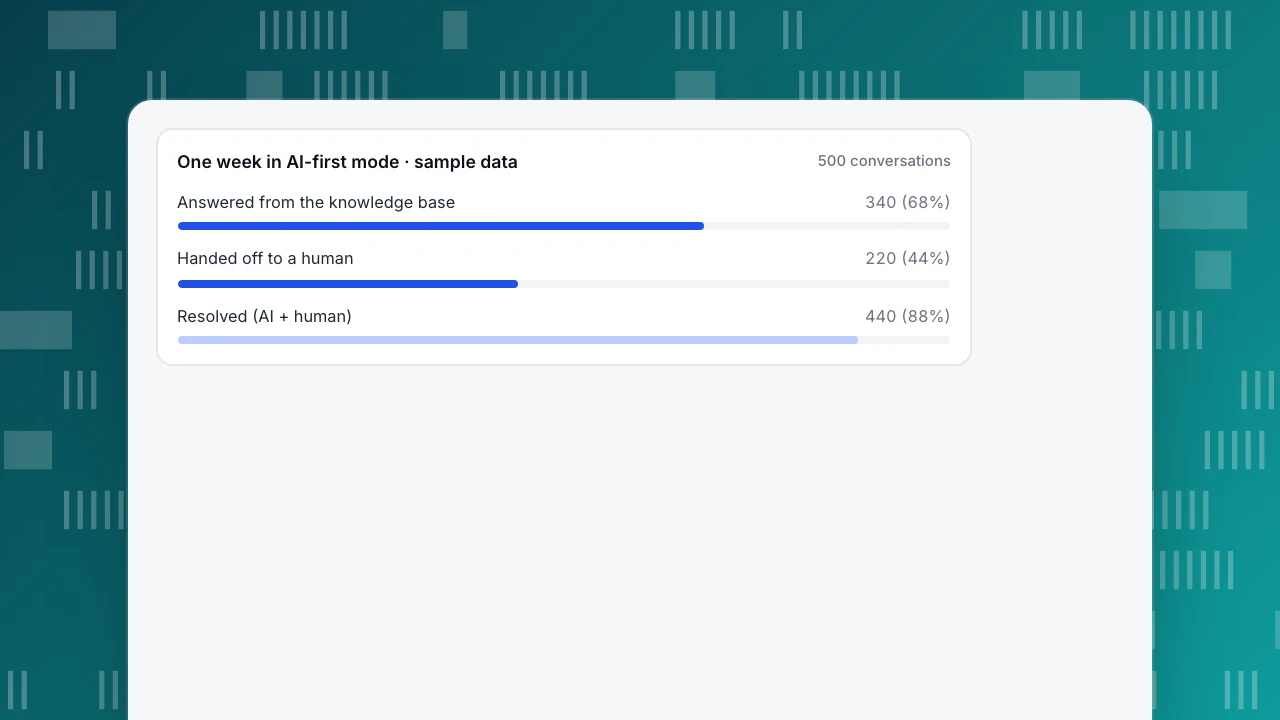
Sample data: one week in AI-first mode, 500 conversations (offline messages excluded).
- The KB answered 340: 220 exact Q&A matches sent as stored, plus 120 model drafts from documents. KB hit rate: 340 ÷ 500 = 68%.
- 160 conversations had no usable material and went straight to a human; 60 of the 340 KB-answered conversations also needed a person. Handoff rate: (160 + 60) ÷ 500 = 220 ÷ 500 = 44%. The other 280 (56%) stayed AI-only.
- 250 of the 280 AI-only conversations were resolved, and humans resolved 190 of the 220 they took. Overall resolution: (250 + 190) ÷ 500 = 440 ÷ 500 = 88%. AI-only resolution: 250 ÷ 500 = 50%.
- CSAT: 96 of 120 rated AI-only conversations were positive (96 ÷ 120 = 80%), and 68 of 80 rated human conversations (68 ÷ 80 = 85%). Overall: (96 + 68) ÷ (120 + 80) = 164 ÷ 200 = 82%.
Two readings matter. First, 68% KB hit is not 88% resolution: the hit rate measures whether the AI had material to answer, while resolution counts problems actually solved — many of them by humans. A conversation can be deflected from the queue and still be unresolved; see ticket deflection for why those numbers must be kept apart. Second, a 44% handoff rate is not failure: humans resolved 190 of those 220 conversations. Read handoff together with resolution and CSAT, never alone.
One week in AI-first mode · sample data
500 conversationsHow to set up AI replies in TapCub
TapCub's AI assistant is deliberately replies-only, and it follows the split this guide recommends: exact answers for the top questions, retrieval for the long tail, and a person whenever the material runs out.
- Seed the knowledge base from real chats. In Live chat › Knowledge base, add Q&A entries for your top questions. When a visitor's message matches, the stored answer is sent word for word with no AI call; in the sample week, that is the 220 exact matches. Add help pages as documents for the long tail: TapCub splits them into passages of about 600 characters, finds the best ones with full-text search and lets the model draft from them. The knowledge base can also turn past conversations into draft entries for you to review.
- Rehearse in the Playground. It runs the same answer path, uses no quota and creates no conversation. Paste last month's most common questions and fix every miss before a visitor sees it.
- Start offline-only. In Live chat › Chat settings › AI assistant, choose Only when all agents are offline, the low-risk route from the launch section. Move to AI answers first once someone watches the inbox; the AI then stops as soon as an agent takes the chat, replies in person, or the visitor asks for a person.
- Make handoff land somewhere. When the material is not enough, the reply carries an internal handoff mark the visitor never sees, and the chat goes to Live chat › Inbox. With nobody online, the visitor gets the offline form instead of a dead end.
- Read the numbers together. Live chat › Reports shows knowledge base hit rate (questions answered by an exact Q&A match or a retrieved answer), resolution rate, first response and satisfaction. Pin your most-asked Q&A entries as well: they appear in the visitor-side FAQ, and opening one answers the question without creating a conversation at all. That is ticket deflection in its simplest form.
How live calls count against the plan: how AI chat calls are counted. Full walkthrough: set up AI chat replies.
FAQ
What is an AI support agent?
An AI support agent is software that answers customer questions automatically. Instead of following fixed scripts, it retrieves relevant material from your knowledge base and drafts a reply with a language model, then hands the conversation to a human when it cannot answer. Most support deployments are replies-only: they answer questions but do not change orders or issue refunds.
What is the difference between an AI agent and a chatbot?
A traditional chatbot follows rules: keyword triggers, button menus and pre-written replies, so it only handles paths someone designed. An AI agent understands rephrased questions, drafts answers from your knowledge base and decides when to hand off. The line is blurring — many products called chatbots now use AI — so check what actually writes the reply.
Can AI replace customer support agents?
Not for most teams. A replies-only AI agent handles repetitive questions covered by the knowledge base, but it cannot issue refunds, change orders or make judgment calls, and it must hand off when material is missing or the visitor asks for a person. In the sample week above, humans still resolved 190 conversations. AI changes what agents spend time on, not whether you need them.
What is a good AI resolution rate?
There is no universal benchmark — it depends on your question mix and knowledge base. Intercom defines resolution rate as conversations resolved without human involvement; in the sample week above that was 250 of 500 (50%), while overall resolution including humans was 88%. Track your own baseline week over week, and read it together with handoff rate and CSAT rather than alone.
Does testing AI replies use up my quota?
In TapCub, no: Playground tests do not consume AI quota, so you can try questions against your knowledge base before launch. Live visitor conversations do count — exact Q&A matches are sent as stored without an AI call, while model-drafted answers from documents use AI calls. Details: how AI chat calls are counted.
Sources
- Lewis, P. et al. (2020). Retrieval-Augmented Generation for Knowledge-Intensive NLP Tasks. arXiv. Verified 2026-11-14.
- Microsoft. What is Copilot Studio? — agents, tools and actions. Verified 2026-11-14.
- Intercom. Fin AI Agent outcomes — resolution definitions and escalation. Verified 2026-11-14.
- Zendesk. Viewing your CSAT (customer satisfaction) score and ratings. Verified 2026-11-14.
- European Commission. Regulatory framework for AI — AI Act transparency obligations. Verified 2026-11-14.
Was this article helpful?
We use your answers to fix and expand this page.
Couldn’t send. Please try again in a minute.
Thanks for the feedback. We’ll use it to improve this page.You’ve already sent feedback on this page. Thanks.

Data Engineer
Writes about event design, data quality, and collection workflows, with verifiable implementation methods for reliable analytics.