Try it on your own data
Every report in this article is in the free plan. One snippet for web and apps, up to 10 sites.
Start freeA 'chatbot' can be a menu of three buttons, a keyword matcher, an FAQ lookup or a large language model answering from your help center. They behave very differently, cost differently and fail differently. The most useful way to compare them is by how they produce an answer, and the most useful question to ask of any of them is: what happens when it cannot answer? Below: the main types, how retrieval-augmented AI works in plain terms, and a month of numbers from an AI-first support setup.
What you will learn
- Classify bots by how they answer: menus, rules, stored FAQ matches or grounded AI
- Most website bots today are hybrids: stored answers first, AI next, a person last
- Judge a bot by what it resolves and how cleanly it hands over, not by how human it sounds
What is a chatbot?
A chatbot is software that holds a conversation with people in text (or voice), usually to answer questions or complete simple tasks. On websites and apps it typically sits inside the chat widget, answering before, or instead of, a person.
The idea is old. Joseph Weizenbaum's ELIZA (1966) imitated a therapist by matching patterns in what people typed and reflecting them back. Most bots for the next fifty years worked the same way, with rules. Large language models changed what bots can say; they did not change the most important design question, which is what the bot does when it does not know.
Types of chatbots by how they answer
The table compares the six types you will meet, from button menus to retrieval-augmented AI. In short:
- Menu or button bots never misunderstand, because visitors can only click what is offered.
- Rule or keyword bots reply when a message contains certain words. They are easy to control and easy to break: "cancel my plan" and "stop billing me" may not match the same rule.
- FAQ retrieval bots match a question to a stored question-and-answer pair and send the stored answer word for word. Exact and safe, but limited to what you have written.
- Generative AI bots use a large language model to write a new answer. They handle varied wording, but without grounding they can state things that are not true.
- Retrieval-augmented (RAG) bots search your documents for relevant passages first, then ask the model to answer from those passages only. This is how most support bots built on a knowledge base work.
- Hybrid bots combine any of the above with a handoff to a person.
| Type | How it answers | Strength | Weakness | Good for |
|---|---|---|---|---|
| Menu / button bot | Visitor clicks predefined options | Predictable, cheap | Cannot handle anything off-menu | Routing, simple flows |
| Rule / keyword bot | If the message contains X, reply Y | Easy to control | Brittle; misses rephrasings | Small, stable FAQ sets |
| FAQ retrieval bot | Matches the question to stored Q&A | Answers exactly as written | Only knows what is stored | Policies, prices, hours |
| Generative AI (LLM) | Writes a new answer | Handles varied wording | Can invent facts if ungrounded | Open-ended questions with oversight |
| Retrieval-augmented AI (RAG) | Finds relevant passages in your docs, then writes from them | Grounded in your content | Only as good as the docs | Support from a knowledge base |
| Hybrid (bot + human) | Bot first, person on handoff | Covers volume and edge cases | Needs staffed handoff | Most customer support |
Voice assistants use the same approaches with speech in and out.
Types of chatbots by purpose
- Customer support: answering policy, product and account questions.
- Sales and lead generation: qualifying visitors, booking demos, collecting contact details.
- Transactional: checking order status, rescheduling, resetting passwords, by calling your systems' APIs.
- Internal: answering employees' HR or IT questions.
A transactional bot needs secure access to your systems; a support bot that only answers questions does not. Know which one you are building before choosing a tool.
Rule-based vs AI chatbots
| Rule-based | AI (retrieval-augmented) | |
|---|---|---|
| Setup | Write flows and rules | Write or import knowledge; configure handoff |
| Handles new wording | Poorly | Well |
| Predictability | High | Lower; needs guardrails |
| Risk | Dead ends, frustration | Wrong answers if knowledge is missing or vague |
| Maintenance | Update every rule | Update the knowledge base |
In practice the best setups combine them: stored answers for questions that must be worded exactly (prices, legal terms), AI for everything else that the documents cover, and a person for the rest.
How retrieval-augmented AI works
Retrieval-augmented generation was described by Lewis and colleagues in 2020. For a support bot it works in four steps:
- Split your help articles and policies into short passages.
- Search those passages for the ones most relevant to the visitor's question.
- Generate an answer with a language model that is instructed to use only those passages.
- Hand over when the search finds nothing relevant or the model says the material is not enough.
The quality ceiling is your documentation. If the refund policy is not written down, the bot cannot answer it, and a good bot should say so and hand over rather than guess.
A worked example: one month of AI-first support
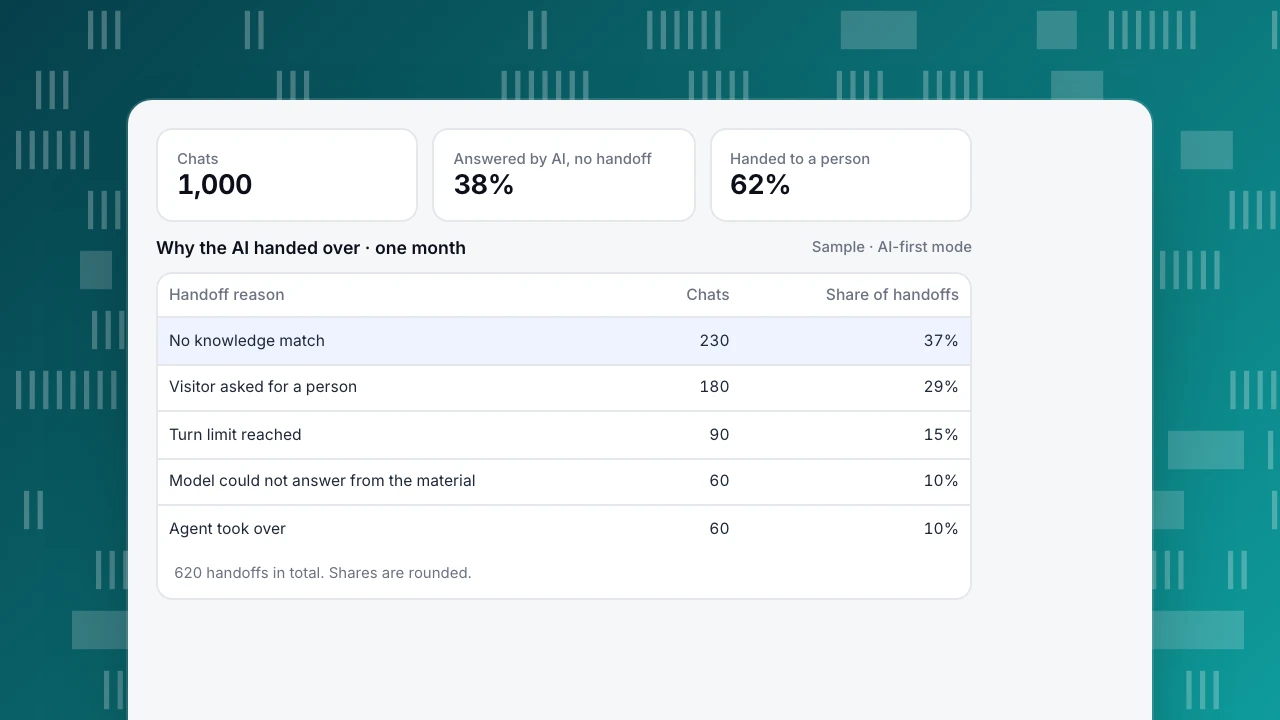
Sample data: a store runs its chat in AI-first mode for a month. Of 1,000 conversations, 380 (38%) were answered by the AI without a handoff. The other 620 went to a person, and the table shows why. The biggest reason, no knowledge match (230 chats, 37% of handoffs), is fixable: the team reads those questions, writes 15 new Q&A entries and two articles, and the next month's no-match handoffs fall. "Visitor asked for a person" (29%) is not a failure; people should always be able to ask.
The numbers to watch are the share answered without handoff, satisfaction on AI-answered chats compared with agent-answered ones, and repeat contacts on the same topic within a few days, which reveal answers that sounded right but did not solve the problem.
Chats
1,000
Answered by AI, no handoff
38%
Handed to a person
62%
Why the AI handed over · one month
Sample · AI-first mode| Handoff reason | Chats | Share of handoffs |
|---|---|---|
| No knowledge match | 230 | 37% |
| Visitor asked for a person | 180 | 29% |
| Turn limit reached | 90 | 15% |
| Model could not answer from the material | 60 | 10% |
| Agent took over | 60 | 10% |
620 handoffs in total. Shares are rounded.
How to choose
- List your top 30 questions from past chats. If most have one correct answer, start with stored Q&A.
- Check your documentation. RAG needs complete, current articles; write them first.
- Decide what the bot may do. Answering is low risk; taking actions (refunds, cancellations) needs integration and controls.
- Design the handoff before the bot. Who receives it, at what hours, and what the visitor sees when nobody is online.
- Measure monthly and feed unanswered questions back into the knowledge base.
Common mistakes
- No way to reach a person. The fastest way to make a bot hated.
- Pretending to be human. California's bot disclosure law (SB 1001) and the EU AI Act (Article 50) require telling people when they interact with an automated system in many situations. Disclose it plainly.
- Stale knowledge. A bot quoting last year's prices does more damage than no bot.
- Endless loops. Cap the number of bot turns, then hand over.
- Measuring "deflection" only. A chat the bot ended is not a problem solved.
Chatbot replies in TapCub
TapCub's AI replies are a hybrid of FAQ retrieval and retrieval-augmented generation, with a person behind it:
- Q&A entries in Live chat › Knowledge base are sent exactly as written when the visitor's question matches, without an AI call. Documents are split into passages of about 600 characters; when no Q&A matches, a full-text search (not a vector store) finds the best passages and the model drafts from them.
- Three modes in Live chat › Chat settings › AI assistant: off, only when all agents are offline, or AI first. See set up AI chat replies.
- Disclosure before the first reply that the visitor is talking to an AI cannot be turned off, and AI messages are labelled.
- Handoff after a configurable number of turns (1–20, default 6), when the material is not enough, or on request; the inbox labels the reason. If quota runs out or a model call fails, the visitor sees no error, just a handoff.
- It answers; it does not act. The assistant cannot change orders, send email or call other systems.
- Learning loop: generate Q&A drafts from resolved conversations, and use Fix & save on a wrong answer to store the correct one. How AI calls count against your plan is in how AI chat calls are counted.
FAQ
What are the main types of chatbots?
By how they answer: menu or button bots, rule or keyword bots, FAQ retrieval bots, generative AI bots, retrieval-augmented AI bots, and hybrids that hand over to people.
What is the difference between a rule-based chatbot and an AI chatbot?
A rule-based bot follows fixed flows and keyword rules written by people. An AI chatbot uses a language model to understand varied wording and write answers, ideally grounded in your own documents.
Which type of chatbot is best for customer service?
A hybrid: stored answers for questions that must be exact, retrieval-augmented AI for questions your documentation covers, and a clear handoff to a person for everything else.
Do I have to tell visitors they are talking to a bot?
In many places, yes, and it is good practice everywhere. California's SB 1001 and the EU AI Act both include disclosure requirements for automated interactions.
Sources
- Weizenbaum, J. (1966). ELIZA: A Computer Program for the Study of Natural Language Communication Between Man and Machine. Communications of the ACM, 9(1), 36–45.
- Lewis, P. et al. (2020). Retrieval-Augmented Generation for Knowledge-Intensive NLP Tasks. NeurIPS 2020.
- California Legislature, SB 1001: Bots: disclosure (2018).
- European Union, Regulation (EU) 2024/1689 (AI Act), Article 50.
Was this article helpful?
We use your answers to fix and expand this page.
Couldn’t send. Please try again in a minute.
Thanks for the feedback. We’ll use it to improve this page.You’ve already sent feedback on this page. Thanks.

Customer Experience Consultant
Writes about live chat, visitor conversations, and self-service, sharing practical ways to make customer communication clearer and more effective.