Try it on your own data
Every report in this article is in the free plan. One snippet for web and apps, up to 10 sites.
Start freeChatbot ROI compares what a bot brings in with what it costs: (benefits − costs) ÷ costs. The benefits come in two halves. Labour saved is conversations the bot fully resolved × the cost of a human-handled conversation. Extra sales must come from a chatted-versus-not comparison that corrects for selection bias, because shoppers who chat were already closer to buying. Below: the formula, a worked month, the bias and a cost checklist.
What you will learn
- Count labour saved only from conversations the bot fully resolved, excluding handoffs and repeat contacts
- Value extra sales at gross margin and against a matched baseline; the raw chatted-vs-not gap overstates it
- Check whether the labour half alone covers costs; that makes the decision robust to an uncertain conversion estimate
What does chatbot ROI measure?
Chatbot ROI (return on investment) compares what a chatbot brings in with what it costs to run, over the same period:
ROI = (benefits − costs) ÷ costs
The hard part is the benefits, and they come in two halves that need different methods:
- Labour saved. Conversations the bot resolved on its own, so no agent had to handle them, multiplied by what a human-handled conversation costs. This half is fairly easy to measure from your own support data.
- Extra conversions. Shoppers or leads who converted because the bot answered their question. This half is easy to overstate, because the people who start a chat are often already closer to buying.
That is the core of this guide: compute the first half from resolved conversations and real costs, and compute the second half with a chatted-versus-not-chatted comparison that guards against selection bias. Mixing the two, or taking the raw conversion gap at face value, is how chatbot business cases end up claiming returns nobody can find later. Which kind of bot you are evaluating (rule-based, AI or hybrid) is covered in types of chatbots; the ROI of human live chat has its own live chat ROI calculator. Which store questions a bot can safely take on is covered in AI chatbot for ecommerce.
The chatbot ROI formula, in three parts
Write the calculation out in three parts so each number can be checked separately:
Labour saved = conversations fully resolved by the bot × cost per human-handled conversation
Extra margin = incremental orders × average order value × gross margin
Costs = software + AI usage + setup (spread over its useful life) + upkeep time + escalation overhead
ROI = (labour saved + extra margin − costs) ÷ costs
Three choices in that formula change the answer a lot:
- "Fully resolved", not "handled". A conversation the bot touched and then handed off saved nothing; one that came back two days later saved nothing either.
- Margin, not revenue. An extra $60 order with a 40% gross margin is worth $24 to the business, not $60.
- Incremental, not all. Only orders that would not have happened without the bot count. That is where selection bias comes in.
Worked example: one month of chatbot ROI
Sample data: an online store runs an AI chatbot in front of its human agents for one month.
Labour saved
- 3,000 chat conversations in the month, one per visitor for simplicity.
- 1,200 ended without a handoff. Of those, 150 came back about the same issue within seven days, so they weren't really resolved: 1,200 − 150 = 1,050 fully resolved, 1,050 ÷ 3,000 = 35%.
- Cost per human-handled conversation: a fully loaded agent cost of $28 an hour ÷ 7 conversations an hour = $4.00.
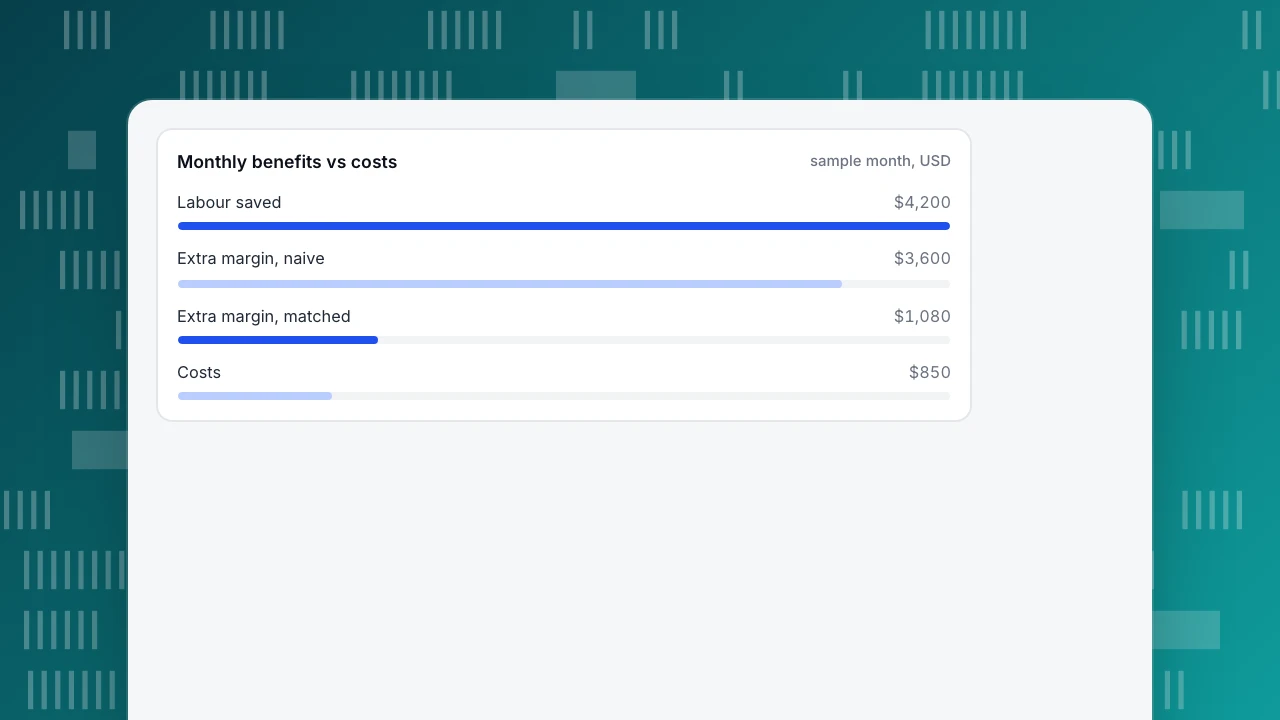
- Labour saved: 1,050 × $4.00 = $4,200 a month.
Costs
- Software: $300 a month.
- AI usage: $100 a month.
- Upkeep: 10 hours a month writing and fixing answers × $30 = $300.
- Setup: 60 hours × $30 = $1,800, spread over 12 months = $150 a month.
- Total: 300 + 100 + 300 + 150 = $850 a month.
Extra margin, naive version
- 60,000 visitors in the month. Of the 3,000 who chatted, 240 bought: 240 ÷ 3,000 = 8.0%. Of the 57,000 who did not chat, 1,710 bought: 1,710 ÷ 57,000 = 3.0%.
- Raw relative lift: 8.0% ÷ 3.0% − 1 = 166.7%.
- If chatters had converted at 3.0% without the bot, the bot added 3,000 × (8.0% − 3.0%) = 150 orders. At a $60 average order and 40% gross margin, that is 150 × $24 = $3,600.
Extra margin, matched version
Chatters are not typical visitors: most start a chat on a product or checkout page, already shopping. A fairer baseline is visitors who viewed the same pages and didn't chat. Suppose 12,000 such visitors bought 780 times: 780 ÷ 12,000 = 6.5%. Then the bot added 3,000 × (8.0% − 6.5%) = 45 orders, or 45 × $24 = $1,080.
ROI three ways
| Version | Benefits | Costs | ROI |
|---|---|---|---|
| Labour saved only | $4,200 | $850 | (4,200 − 850) ÷ 850 = 394% |
| Labour + naive extra margin | $4,200 + $3,600 = $7,800 | $850 | (7,800 − 850) ÷ 850 = 818% |
| Labour + matched extra margin | $4,200 + $1,080 = $5,280 | $850 | (5,280 − 850) ÷ 850 = 521% |
The matched comparison shrinks the conversion half from $3,600 to $1,080, a (3,600 − 1,080) ÷ 3,600 = 70% cut. The labour half did not change. That is the general pattern: savings from resolved conversations hold up under scrutiny; conversion claims built on a raw chatted-versus-not gap usually don't.
Monthly benefits vs costs
sample month, USDThe labour-savings half: what counts as resolved by the bot
Labour saved is the more reliable half, but only if the count is strict. The concept is the same as ticket deflection: a question resolved without an agent.
Rules for counting:
- Exclude handoffs. Any conversation that reached a person counts as handled by a person, even if the bot answered part of it.
- Exclude repeat contacts. If the same visitor returns about the same issue within a set window (seven days is common), the first conversation wasn't resolved. In the example this removed 150 of 1,200.
- Count self-service views separately. A shopper reading a pinned FAQ answer without opening a chat may well have saved you a conversation, but you can't know whether they would have asked. Report it next to ROI, not inside it.
- Use a real cost per conversation. Fully loaded hourly cost (wage, taxes, tools, management time) ÷ conversations handled per hour. Don't use a vendor's average.
One more distinction matters for finance. If no hours or headcount actually change, the saving is capacity, not cash: the same team handles more volume or spends time on harder cases. Both are real, but say which one you are claiming. The same logic applies when AI assists agents instead of answering customers: in a staggered rollout to 5,179 support agents, Brynjolfsson, Li and Raymond found that access to a generative AI assistant raised issues resolved per hour by about 14% on average and about 34% for novice workers. That lowers the cost per human-handled conversation, which is a different line in the formula from conversations the bot resolves itself.
The conversion half: chatted versus not, and selection bias
The raw comparison (8.0% for chatters versus 3.0% for everyone else) mixes two things: whatever the bot did, and the fact that people who choose to chat were different to begin with. That second effect is selection bias, and in chat it almost always inflates the bot's apparent effect.
Ways to reduce it, from strongest to weakest:
- Randomised holdout. Show the bot to a random half of visitors and compare conversion between halves. Randomisation removes self-selection, but you need a tool that can split traffic.
- Matched comparison. Compare chatters with non-chatters who looked similar before the chat: same pages, same traffic source, similar engagement. Rosenbaum and Rubin's work on propensity scores formalised this idea of comparing like with like on observed characteristics. It reduces bias from what you can observe, not from intent you can't see.
- Natural comparison periods. Compare similar weeks with the bot on and off (for example a planned pause), watching for seasonality and promotions.
- Raw gap as an upper bound. If you can do none of the above, report the raw lift but label it an upper bound, as in the example's naive row.
Also check sample size: a conversion rate from a few dozen chatters moves a lot from day to day. Wait for a few hundred chatters before trusting the gap.
Chatbot cost checklist
The table below lists the cost items to include. The two most often left out are upkeep time and the cost of wrong answers.
Wrong answers are a real cost, not just a reputational one. In Moffatt v. Air Canada (2024 BCCRT 149), a Canadian tribunal held the airline responsible for information its chatbot gave, ruling that it makes no difference whether information comes from a static page or a chatbot, and ordered it to pay $812.02 in damages, interest and fees. A small amount, but a clear principle: budget review time to catch wrong answers before customers rely on them.
| Cost item | One-off or monthly | How to estimate it |
|---|---|---|
| Software subscription | Monthly | Plan price at your expected conversation volume |
| AI usage | Monthly | AI calls × unit price; exact-match answers may not count |
| Setup | One-off, spread over useful life | Hours to collect questions, write answers and test × hourly cost |
| Upkeep | Monthly | Hours writing, fixing and reviewing answers × hourly cost |
| Escalation overhead | Monthly | Extra agent time when handed-off chats arrive mid-conversation |
| Wrong-answer risk | Ongoing | Review time to catch errors; refunds or goodwill when one slips through |
| Integration | One-off plus upkeep | Developer time if the bot connects to order or account systems |
Include every line even if small; upkeep and wrong-answer review are the ones most often left out.
Common mistakes in chatbot ROI calculations
- Counting every bot conversation as a saving. Only fully resolved ones count; in the example, 3,000 conversations produced 1,050 savings.
- Using revenue instead of margin. It inflates the conversion half by the inverse of your margin: 2.5 times at 40%.
- Taking the raw chatted-versus-not gap as the bot's effect. In the example it overstated the extra margin by more than three times ($3,600 versus $1,080).
- Leaving out upkeep. Knowledge bases go stale; someone has to keep answers current, and that time is a monthly cost.
- Borrowing a vendor benchmark. A "typical ROI" from someone else's customers says nothing about your question mix, prices or margins.
- Measuring too early. The first month includes setup effort and untuned answers; recompute after three months.
How to measure chatbot ROI in TapCub
Here is how the store in the example would get its inputs from TapCub live chat. TapCub supplies the counts and the raw comparison; the cost figures and the matched baseline are yours.
- Count what the knowledge base answered. Live chat › Reports shows the knowledge base hit rate: the share of questions answered by a direct Q&A match or a retrieved answer. An exact Q&A match is sent as written and does not use an AI call, which keeps the AI-usage line of your costs down.
- Separate handoffs and self-service views. In Live chat › Inbox, every handoff is labelled with its reason (no knowledge match, model can't answer, visitor asked, turn limit, agent took over), so you can exclude handed-off conversations from the labour saving. Pinned FAQ answers open without creating a conversation and don't use quota; only Not solved or a request for a person opens one. Report those views beside the ROI, not inside it.
- Spot conversations that weren't really resolved. A visitor who writes again after the reopen window gets a new conversation tagged as returning, with the earlier one shown above it. Use these to remove false resolutions, as the example did with 150 conversations. TapCub does not produce a ready-made repeat-contact count, so tally them in your review.
- Read the raw comparison as an upper bound. Live chat › Reports › Conversion attribution shows, per day, the goal rate of visitors who chatted versus visitors who browsed without chatting, the relative lift (chatted rate ÷ no-chat rate − 1) and the pages where chats started, and warns when fewer than 30 visitors chatted. That lift is the naive row in the example. Use the list of pages where chats start to choose the pages for your matched baseline, and build that baseline yourself.
- Know the boundary. TapCub does not split traffic for a randomised holdout, so the strongest design in the selection-bias section needs a separate experimentation tool. Costs, margins and the final ROI live in your own spreadsheet.
FAQ
How do you calculate chatbot ROI?
ROI = (benefits − costs) ÷ costs. Benefits have two parts: conversations the bot fully resolved × the cost of a human-handled conversation, plus incremental orders × average order value × gross margin. Costs include software, AI usage, setup spread over its life, upkeep time and escalation overhead. In the sample here, that gave 521% with a matched conversion baseline.
What is a good ROI for a chatbot?
There is no reliable universal figure; it depends on your question mix, conversation cost and margins. A better test is whether the labour-savings half alone covers the costs. In the sample, labour saved gave 394% before counting any extra sales, which makes the decision robust even if the conversion estimate is uncertain.
Why is the chatted vs not-chatted conversion gap misleading?
Because people who choose to chat are different: they are often on product or checkout pages and already closer to buying. Comparing them with all other visitors attributes that intent to the bot. Compare with similar visitors who didn't chat, or use a randomised holdout, and treat the raw gap as an upper bound.
What costs should be included in chatbot ROI?
Software subscription, AI usage, setup time spread over the bot's useful life, monthly upkeep (writing and fixing answers, reviewing transcripts) and the overhead of handoffs to people. Include a review budget for catching wrong answers too; a tribunal has held a company responsible for what its chatbot told a customer.
How long does it take for a chatbot to show ROI?
Setup costs land in the first months while answers are still being tuned, so first-month figures understate the return. Recompute after about three months, when the knowledge base covers your common questions and you have enough chatters, a few hundred, for the conversion comparison to stop swinging from day to day.
See also: Customer Service Chatbot: What to Automate First and How to Launch It.
See also: How Much Do Chatbots Cost? Pricing Models and Cost per Resolution.
Sources
- Paul R. Rosenbaum & Donald B. Rubin. The central role of the propensity score in observational studies for causal effects. Biometrika 70(1), 1983 — comparing like with like on observed characteristics. Verified 2026-11-15.
- Erik Brynjolfsson, Danielle Li & Lindsey R. Raymond. Generative AI at Work. NBER Working Paper 31161, 2023 — 14% average and 34% novice-worker gains in issues resolved per hour. Verified 2026-11-15.
- Civil Resolution Tribunal of British Columbia. Moffatt v. Air Canada, 2024 BCCRT 149 — paragraphs 27–28 on responsibility for chatbot information; paragraph 44 on the $812.02 order. Verified 2026-11-15.
Was this article helpful?
We use your answers to fix and expand this page.
Couldn’t send. Please try again in a minute.
Thanks for the feedback. We’ll use it to improve this page.You’ve already sent feedback on this page. Thanks.

Product Experience Specialist
Explores usability, user journeys, and feature adoption through practical examples of onboarding and everyday product use.