Try it on your own data
Every report in this article is in the free plan. One snippet for web and apps, up to 10 sites.
Start freeLive chat lead generation means turning website visitors into contactable, qualified prospects through chat: invite conversations on high-intent pages, capture an email during or after the chat, qualify with natural questions, and hand off to sales fast. The step most teams get wrong is the last one: a chat lead goes cold in hours, not days. This guide covers each step and a fully worked sample month you can recompute.
What you will learn
- A lead is a visitor who left contact details — an email in chat or an offline message; a chat alone is not a lead, and qualification is a human judgment
- Invite on high-intent pages, ask for the email once after you have helped, and cover after-hours demand with an offline form that collects email + question
- Follow up within one business day and measure stage by stage; the chatted vs non-chatted conversion gap is observational, not proof of cause
What counts as a chat lead?
In live chat lead generation, a lead is a visitor who gave you a way to continue the conversation — usually an email address, captured in chat or in an offline message. A chat by itself is not a lead: an anonymous pricing question is a buying signal, not a contact you can follow up with. A qualified lead goes one step further: someone on your team has judged that the visitor's need, fit and timing are worth a sales conversation. The definition and the marketing-to-sales criteria are covered in marketing qualified lead.
Keep six stages separate, because each has its own rate:
- Visitor — anonymous, browsing.
- Chat — a conversation starts, from an invite or the visitor.
- Lead — an email is captured, in chat or offline.
- Qualified — a human judges it worth pursuing.
- Followed up — sales makes contact within the agreed window.
- Closed — a deal is won and recorded in your CRM.
Counting chats as leads overstates what chat produced; the worked example below keeps every stage separate.
Where should you invite chats, and what should you say?
Invite where a question is blocking a decision, not everywhere at once. The pages that earn a proactive message:
- Pricing — plan confusion is the classic blocker. "Comparing plans? Tell me your team size and I'll point you to the right one."
- Demo or trial signup — "Want a 10-minute walkthrough of the part you care about? I can set it up."
- Comparison and integration pages — visitors are checking fit. "Migrating from another tool? I can tell you what carries over."
- Checkout or booking — last-minute hesitation. Answer the question, don't push.
Two rules for the opening line: name what the visitor is looking at, and offer one specific thing. A generic "How can I help you?" fired on every page trains visitors to close the bubble. Start with two or three pages, watch which invites turn into conversations, then expand. Trigger settings — pages, dwell time, frequency caps — are covered in proactive chat invites.
Pre-chat form or ask in chat: where should you capture the email?
There are three capture points, and the right one depends on what you can afford to lose.
A pre-chat form collects the email before the first message. You keep the contact even if the visitor abandons the chat, which matters when follow-up is your bottleneck. The price is friction: every extra field lowers the number of people who start chatting at all.
Asking in chat works after you have answered something useful. The request has a reason: "I can send you the comparison sheet — what email should I use?" Ask once, say what the email is for, and move on if the answer is no. You will lose some contacts, but the conversation — and the qualification information in it — stays intact.
An offline message captures email and question when nobody is online; it is covered in the after-hours section.
The table below compares the three capture points. If you are unsure, start by asking in chat: it is the easiest to reverse, and you can add a pre-chat form later if too many conversations end without a contact.
| Capture point | When it fires | What you gain | What it costs |
|---|---|---|---|
| Pre-chat form | Before the first message | Email secured even if the chat drops | Friction: fewer visitors start a chat |
| Ask in chat | After you have answered something useful | Natural request; the conversation and its context stay intact | Some visitors leave without giving an email |
| Offline message | Outside office hours or no agent online | Email + question from after-hours demand | Reply is delayed; set and keep a time expectation |
Ask once, say what the email is for, and never require a phone number to start a chat.
What qualification questions sound natural in chat?
Qualification in chat is a conversation, not a survey. Four dimensions cover most decisions; ask them one at a time, woven into your answers:
- Need — "What are you trying to solve right now?" Ask first; everything else depends on the answer.
- Fit — "How big is your team, and what are you using today?" Tells you whether your product actually fits.
- Timeline — "Is this for this quarter, or are you exploring for later?" Separates buyers from researchers without insulting either.
- Budget — "Do you have a range in mind, or should I show the options?" Ask last, and only if the conversation has earned it.
Three rules keep it natural. Never fire questions in a row — answer, then ask. Record the answers with the lead, not in someone's memory. And treat qualification as a human judgment: the agent decides whether this is worth a sales conversation and writes down why. Scoring models can come later, in your CRM; the chat itself should feel like help.
How do you capture emails when nobody is online?
Outside office hours, the chat should not dead-end. Show an offline form that collects two things — an email and the question — and set a reply expectation you can keep, such as "We reply by the next business day." Someone must own that queue: each message moves from new to replied to closed, and a message that sits in "new" for three days is a lost lead with extra steps. Office-hours and offline setup is covered in add live chat to website.
One compliance note before you reuse those emails. Answering the visitor's question is fine; adding them to marketing emails is a separate decision with legal requirements. In the US, the CAN-SPAM Rule (16 CFR Part 316) requires a working opt-out that charges nothing and asks for no information beyond the email address and opt-out preferences (§316.5). In the UK, the ICO's PECR guidance requires consent or a "soft opt-in" that meets all its conditions for marketing emails to individual subscribers. Check the rules that apply to your recipients before the first campaign.
How do you hand leads to sales — and how fast?
A handoff without context wastes the chat. Pass the transcript or a short summary, the page and source the visitor came from, the qualification answers, and a named owner on the sales side. Agree on one follow-up window and write it down.
Speed is where much of the value sits. A 2011 Harvard Business Review study by Oldroyd, McElheran and Elkington audited 2,241 US companies: only 37% contacted a web lead within an hour, 23% never responded at all, and among those that did respond the average took 42 hours. In a companion study of 1.25 million leads, contacting within an hour made a lead nearly 7 times more likely to be qualified than waiting even one hour longer, and more than 60 times more likely than waiting 24 hours or more.
The study looked at online leads generally, not chat specifically — but chat leads arrive warm, with the question still fresh, so the decay argument applies at least as strongly. A realistic target for a small team: follow up within one business day, and measure the share you actually hit. Tracking that follow-through is covered in lead tracking.
How do you measure live chat lead generation?
Track each stage of the funnel separately, then look at one comparison. The stage rates tell you where leads leak; the comparison tells you whether visitors who chatted convert differently.
Sample data: one month on a B2B website.
- 20,000 visitors; 600 opened a chat: 600 ÷ 20,000 = 3.0% chat start rate.
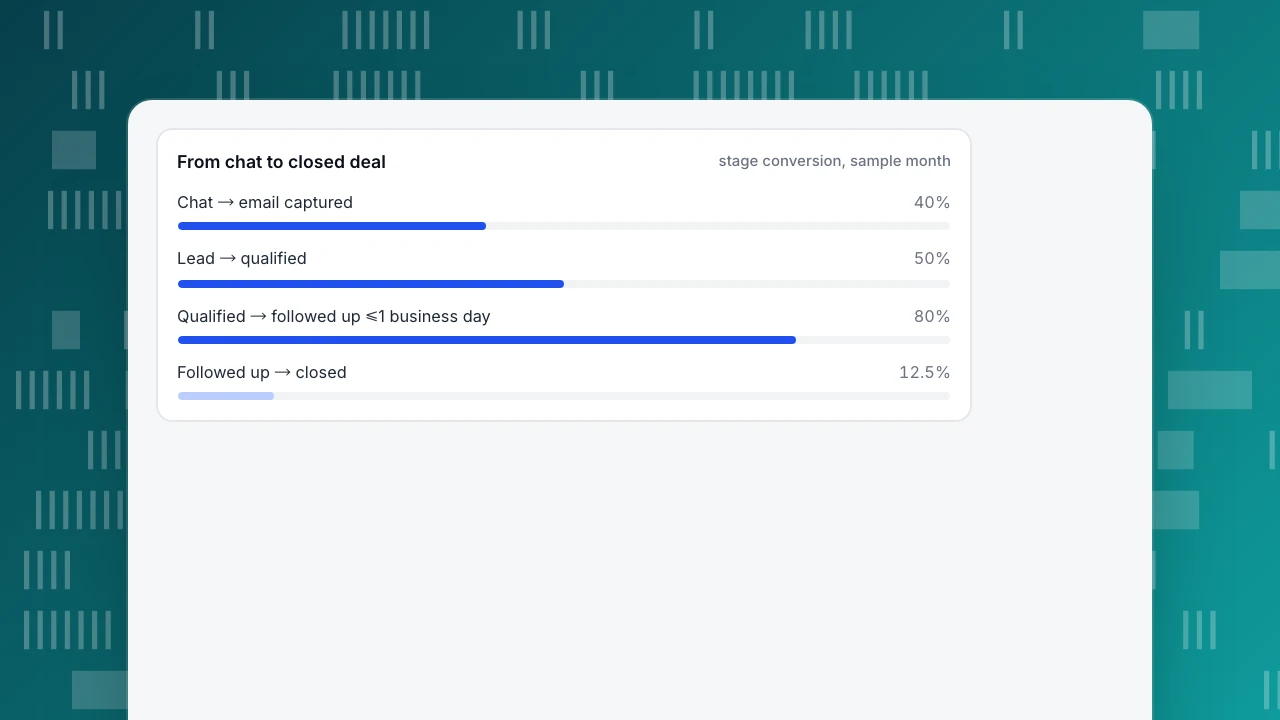
- 240 of the 600 chats left an email: 240 ÷ 600 = 40% chat-to-email capture.
- Another 100 visitors left offline messages outside office hours. Total leads: 240 + 100 = 340, or 340 ÷ 20,000 = 1.7% of visitors.
- 170 qualified: 120 of the 240 in-chat leads plus 50 of the 100 offline leads — 120 ÷ 240 = 50% and 50 ÷ 100 = 50%, so 170 ÷ 340 = 50% overall.
- 136 of the 170 qualified leads were followed up within one business day: 136 ÷ 170 = 80%.
- 17 closed: 17 ÷ 170 = 10% of qualified leads, 17 ÷ 340 = 5% of all leads, 17 ÷ 20,000 = 0.085% of visitors. Of the 136 followed up, 17 ÷ 136 = 12.5% closed.
Now the comparison. In the same month, 66 of the 600 visitors who chatted completed the site's goal: 66 ÷ 600 = 11.0%. Of the 19,400 who did not chat, 485 completed it: 485 ÷ 19,400 = 2.5%. Overall, 551 ÷ 20,000 = 2.755%.
Read that gap carefully. It is an observational comparison, not an experiment: visitors who choose to chat are often further along in their decision, so the gap overstates what chat alone caused. Do not turn it into "chat lifted conversion by X" — what the evidence actually supports is discussed in does live chat increase conversions. And the 17 closed deals come from the CRM, not from chat analytics; how to compute the lead-to-customer rate itself is in lead conversion rate.
From chat to closed deal
stage conversion, sample monthHow to capture leads with live chat in TapCub
TapCub runs chat on the same visitor ID as its analytics. The two hardest parts of this playbook, knowing what a visitor looked at and checking whether chat helped, need no integration work.
- Invite where intent is. Live chat › Chat settings › Proactive invites triggers on a page plus seconds spent on it, for example the pricing page after 30 seconds. You can also message visitors who are browsing right now.
- Capture the email in the conversation. TapCub's widget has no pre-chat form, so use the ask-in-chat route described above. If the visitor is logged in on your site, identify them with
tapcub.loginon the analytics script and the agent knows who they are without asking. After hours, the offline form in Live chat › Chat settings › Offline messages collects an email and the question; work that queue from new to replied to closed. - Qualify from context. In Live chat › Inbox, the side panel shows the current page, the source and the last two days of browsing, and View in analytics opens the full visitor profile. A visitor who read pricing twice and then the integrations page needs a different conversation from a first-time blog reader.
- Hand off to your CRM. TapCub is not a CRM and does no lead scoring. Copy the transcript, source and qualification answers into your CRM with a named owner.
- Measure the comparison, not just the volume. Live chat › Reports › Conversion attribution compares visitors who chatted and then reached a goal with visitors who browsed without chatting, shows the relative lift (chatted rate ÷ no-chat rate − 1) and lists the pages where chats started. In the sample month, 11.0% versus 2.5% is a relative lift of 340% (11.0 ÷ 2.5 − 1 = 3.4), and it is still observational for the reasons above. The report flags fewer than 30 chatters as too small to rely on. Closed deals still come from your CRM.
FAQ
Should I use a pre-chat form to collect email addresses?
Use one when follow-up matters more than chat volume: a pre-chat form secures the email even if the visitor abandons the conversation, but the extra step means fewer people start chatting. If your team answers quickly, ask for the email in chat after you have helped with something — the request feels earned, and you keep the qualification context in the same conversation.
Should a chatbot or a human handle lead generation chats?
A bot can greet, answer repetitive questions and collect emails around the clock; a human should take over for qualification and anything commercial. The handoff works when the bot passes the full transcript so the visitor never repeats themselves. If you cannot staff the handoff, keep the bot to capture and set a clear expectation for when a person will reply.
Should marketing or sales own live chat lead generation?
Split it by stage: marketing owns the invites, the capture and the definition of a qualified lead; sales owns follow-up speed and the close. Write the handoff down — which fields transfer, who replies, within what window — and review the funnel together monthly. Without one owner per stage, leads sit in the gap between the two teams.
What is a good chat-to-lead conversion rate?
There is no universal benchmark; it depends on your traffic, your pages and your offer. Use your own baseline: in the sample month above, 240 of 600 chats left an email, a 40% capture rate. Track the trend and the quality behind it — a lower capture rate that yields more qualified leads can beat a higher one full of dead ends.
Can a small team run lead-gen chat without missing leads?
Yes, if you narrow the scope: invite on two or three high-intent pages only, set honest office hours, and let the offline form collect email and question outside them. Give the offline queue one owner and a follow-up window you can actually keep — one business day, reliably, beats an ambitious hour that you miss.
Sources
- Oldroyd, McElheran & Elkington. The Short Life of Online Sales Leads. Harvard Business Review, March 2011 — 2,241-company response audit and 1.25M-lead qualification study. Verified 2026-11-14.
- eCFR. 16 CFR Part 316 — CAN-SPAM Rule — §316.5 opt-out mechanism requirements. Verified 2026-11-14.
- ICO. How do we comply with the PECR electronic mail marketing rules? — consent and soft opt-in for electronic mail marketing. Verified 2026-11-14.
Was this article helpful?
We use your answers to fix and expand this page.
Couldn’t send. Please try again in a minute.
Thanks for the feedback. We’ll use it to improve this page.You’ve already sent feedback on this page. Thanks.

Product Experience Specialist
Explores usability, user journeys, and feature adoption through practical examples of onboarding and everyday product use.