Try it on your own data
Every report in this article is in the free plan. One snippet for web and apps, up to 10 sites.
Start freeLead tracking connects each lead to its source and to what happened next. This guide shows how to capture the source on the website, pass it with the form, send qualified and closed stages from your server, and compare channels by deals instead of lead counts.
What you will learn
- Capture the source when the visitor lands, not at the form
- Send qualified and closed stages from the server with the same lead ID
- Compare channels on lead-to-deal rate and revenue, not lead counts
What lead tracking needs to answer
Lead tracking answers two questions for every lead: where did it come from, and what happened to it. Most setups answer the first one at the moment of the form and lose the second, because qualification and deals happen later in a CRM or by phone. Without the second, every channel is judged by how many forms it produces, which is the number that misleads most.
So the goal is one chain: landing source → form submit → qualified → deal, with the same lead ID at each step.
Five steps to set it up
- Capture the source at landing. UTM tags, ad click IDs, referrer and landing page. Do this when the visitor arrives, not at the form, because the form is often several pages later.
- Record the submit and pass the source with the form. Send a lead event in the browser and include the captured source in the form data so it is stored with the lead in your backend or CRM.
- Give the lead an ID. Use your CRM or database lead ID, not the email address, and identify the visitor with it so earlier browsing joins the lead.
- Send later stages from the server. When sales qualifies or closes the lead, send an event with the same ID from your backend. Include the amount on the deal and a unique key so retries do not double count.
- Report by channel to deals. Group leads, qualified leads, deals and revenue by source channel.
// On submit: read the landing source and record the lead
const source = tapcub.getAttribution(); // utm_*, click_id, referrer, landing_url
tapcub.track('lead_submit', { form_id: 'demo-request' });

// Store the source with the lead in your backend
await fetch('/api/leads', {
  method: 'POST',
  headers: { 'Content-Type': 'application/json' },
  body: JSON.stringify({ ...formData, source }),
});
Stages and events
The table lists a minimal set of stages, the event for each and where to send it from. Browser events are fine for what happens on the page; anything decided by people or systems later should come from the server, where it cannot be blocked and carries the real amount.
| Stage | Event | Send from | Key properties |
|---|---|---|---|
| Form viewed | lead_form_view | Browser | form_id |
| Lead submitted | lead_submit | Browser (and server) | form_id; source from landing |
| Qualified | lead_qualified | Server / CRM | lead_id |
| Deal closed | deal_closed | Server | amount; unique key |
| Lost | lead_lost | Server / CRM | lead_id |
Event names follow the TapCub lead generation pack; use your own if you already have them.
Report by deals, not by leads
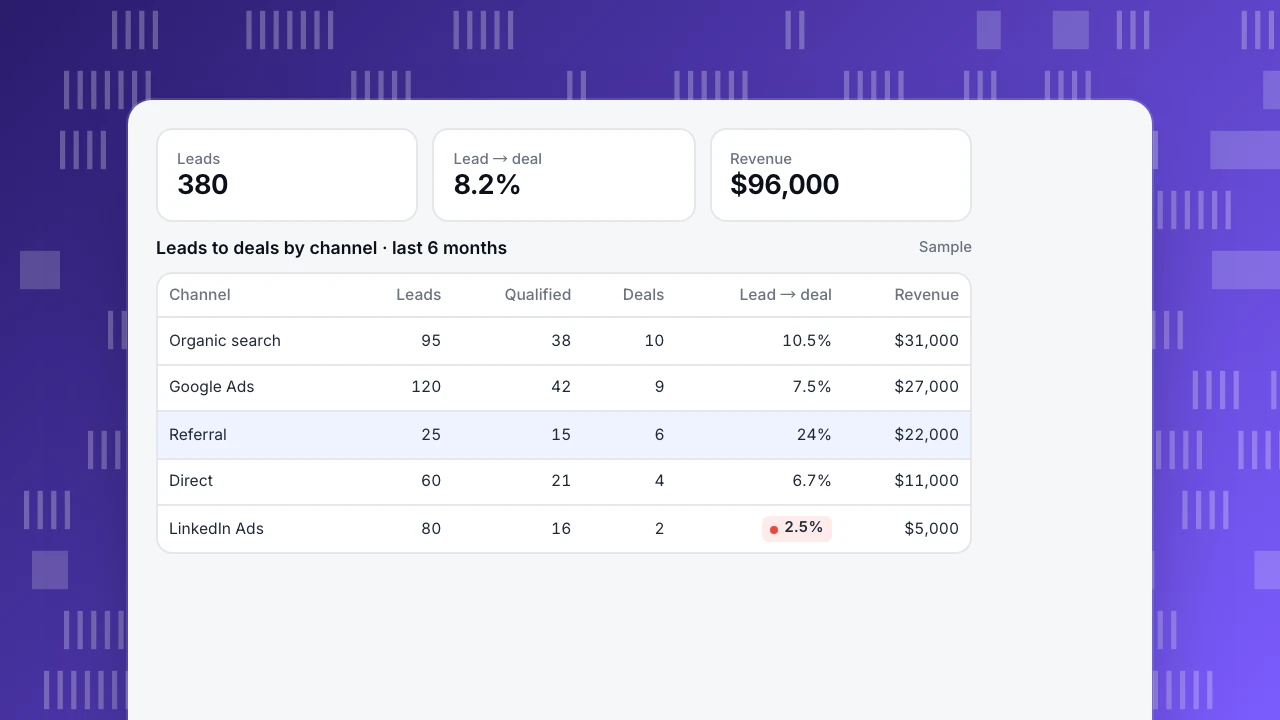
In the example, LinkedIn ads produced 80 leads, more than referrals (25), but only 2 deals against 6. Judged by leads, LinkedIn looks strong; judged by deals and revenue, it is the weakest channel and referrals are the strongest. Organic search has the most deals.
This is the reason to send stages back: lead counts reward channels that produce many low-intent forms. Compare channels on lead-to-deal rate and revenue, and look at enough months for deal counts to settle, since a channel with 2 deals can swing a lot. See marketing KPIs for how lead metrics fit with the rest.
Leads
380
Lead → deal
8.2%
Revenue
$96,000
Leads to deals by channel · last 6 months
Sample| Channel | Leads | Qualified | Deals | Lead → deal | Revenue |
|---|---|---|---|---|---|
| Organic search | 95 | 38 | 10 | 10.5% | $31,000 |
| Google Ads | 120 | 42 | 9 | 7.5% | $27,000 |
| Referral | 25 | 15 | 6 | 24% | $22,000 |
| Direct | 60 | 21 | 4 | 6.7% | $11,000 |
| LinkedIn Ads | 80 | 16 | 2 | 2.5% | $5,000 |
Common mistakes
- Capturing the source at the form. By then the UTM tags are often gone from the URL.
- Using email as the ID in analytics. Use a lead ID; keep contact details in the CRM.
- Sending the deal from the browser. Thank-you pages are reloaded, blocked or never reached.
- No unique key. Retries and duplicate webhooks inflate deals.
- Last touch only. If you also store the first landing source, you can compare both views.
Lead tracking in TapCub
With data-attribution on the website script, tapcub.getAttribution() returns the source of the landing: source, medium, campaign, term, content, promo code, click ID, landing URL, referrer and landing time. Send it with the form and pass it unchanged as context.campaign on the server event; when an event first identifies a person by login_id, TapCub records that acquisition source and keeps it. Plain emails and phone numbers sent in identity fields are hashed, and insert_id dedupes retries (server events).
The lead generation industry pack installs the stage events (lead_submit and deal_closed with amount required; form view, consult, qualified, callback, appointment and lost optional), plus metrics, funnels, goals and a lead dashboard; the pack recommends sending the deal amount from the server (industry packs). More in conversion tracking and UTM.
FAQ
What is lead tracking?
Recording where each lead came from and what happened to it next, from first visit through qualification to a closed deal.
How do I track where my leads come from?
Capture UTM tags, click IDs and referrer when the visitor lands, and pass them with the form so they are stored with the lead.
Should I track leads in analytics or in a CRM?
Both, joined by one lead ID. The CRM holds contact details and sales stages; analytics holds the source and the website behavior.
Why do my lead numbers not match my CRM?
Duplicate submits, spam, blocked scripts and leads created by phone or chat. Send the submit from the server too, with a unique key, if exact counts matter.
Which metric should I compare channels on?
Lead-to-deal rate and revenue per channel, over enough months for deal counts to be stable.
Was this article helpful?
We use your answers to fix and expand this page.
Couldn’t send. Please try again in a minute.
Thanks for the feedback. We’ll use it to improve this page.You’ve already sent feedback on this page. Thanks.

Growth Strategist
Explores acquisition channels, activation, and conversion experiments, turning data insights into actionable growth hypotheses and evaluation methods.