Try it on your own data
Every report in this article is in the free plan. One snippet for web and apps, up to 10 sites.
Start freeConversion tracking sounds like a single setting but is really a short list of decisions. This guide covers what to count, whether to record each conversion as a page goal, client event or server event, how to stop double counts, how to verify the numbers, and how site conversions relate to ad-platform tags.
What you will learn
- Record important conversions as events fired on success, not as thank-you page views
- Use the server for money and give every order an id to deduplicate
- Verify against your backend; ad-platform conversions are a separate layer for bidding
What counts as a conversion
Conversion tracking records the moments a visitor does something you care about: signs up, buys, books a demo, starts a trial. It sounds like one setting, but in practice it is a short list of decisions: which actions count, where each one is recorded, how to stop it being counted twice, and how to check it works.
Start with a short list. Most sites need one primary conversion (purchase, sign-up or qualified lead) and two to four secondary ones (demo request, trial start, newsletter sign-up). Write each down with its name, the moment it fires and the properties you will break it down by. That list is your tracking plan for conversions.
Choose how to record each conversion
There are three ways to record a conversion on your site, and each fits different cases:
- Page goal: the visitor reaches a URL, such as
/thank-you. No code, but it counts reloads and direct visits to the page, and breaks if the URL changes. - Client event: your page code sends an event when the action succeeds. Precise, carries properties, but can be blocked or lost if the page closes first.
- Server event: your backend sends the event after the action is confirmed (payment captured, account created). The source of truth for money; it needs an id to join with the visit.
The table summarises when to use each. A common pattern: page goals for content milestones, client events for sign-ups and form submissions, server events for purchases and subscriptions.
| Method | Fits | Watch out for |
|---|---|---|
| Page goal | Content milestones, simple thank-you pages | Reloads, direct visits, URL changes |
| Client event | Sign-ups, form submissions, key clicks | Fire on success; blockers can drop some |
| Automatic form event | Quick coverage of many forms | Off by default; records form id, not success |
| Server event | Purchases, subscriptions, refunds | Needs an id to join the visit; dedupe by order id |
| Ad-platform tag | Bid optimisation inside the platform | Its own attribution; not your record |
Pick one source per conversion. For money, the server.
Record a conversion event
Fire the event when the action has succeeded, not on the button click: a click on "Sign up" that fails validation is not a sign-up. The example records a sign-up with the plan and method as properties, and queues it if the script has not loaded yet.
Use one name for the same action on web and app, and add only properties you will break down by. Never put the email or other form input in a property.
// after the sign-up request succeeds
tapcub.track('signed_up', { plan: 'pro', method: 'email' });

// before the script loads, queue it instead
window.__tcq = window.__tcq || [];
window.__tcq.push(['track', 'signed_up', { plan: 'pro' }]);
Avoid double counts
Conversions get counted twice more often than they get lost:
- Reloads and back-navigation re-trigger page goals on thank-you pages. Prefer events for anything that matters.
- Client and server both send the same purchase. Pick one source per conversion; for money, the server.
- Retries send the same purchase again. Give every order an order id and use it as the dedupe key.
- Several tools count the same conversion with different rules. That is expected; compare trends, not totals.
Verify before you trust it
After setup, check each conversion:
- Do the action yourself and watch it arrive in realtime.
- Compare a week of conversions with your backend (sign-ups in the database, orders in billing). A gap of a few percent is normal for client events; a large gap means something is wrong.
- Check the rate: a conversion rate above the share of visitors who could reach that step usually means a page goal is firing on the wrong page.
- Check the properties: no empty plan names, no personal data.
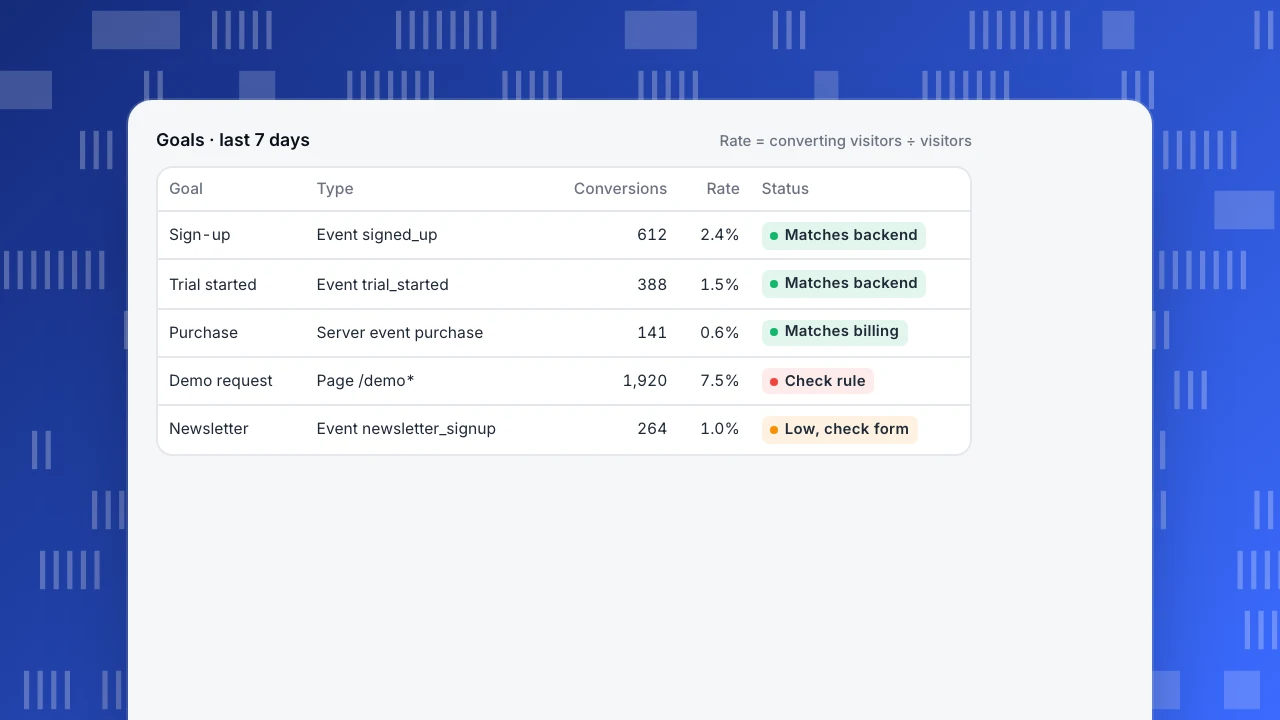
The example shows a goals table after a week. The demo request rate is suspiciously high, a sign the page goal also matches a blog URL.
Goals · last 7 days
Rate = converting visitors ÷ visitors| Goal | Type | Conversions | Rate | Status |
|---|---|---|---|---|
| Sign-up | Event signed_up | 612 | 2.4% | Matches backend |
| Trial started | Event trial_started | 388 | 1.5% | Matches backend |
| Purchase | Server event purchase | 141 | 0.6% | Matches billing |
| Demo request | Page /demo* | 1,920 | 7.5% | Check rule |
| Newsletter | Event newsletter_signup | 264 | 1.0% | Low, check form |
Site conversions vs ad-platform conversions
Ad platforms have their own conversion tags so they can optimise bidding. Those numbers serve the platform: they use the platform's attribution windows and include view-through credit, so they rarely match your site. Keep your site's conversion tracking as the record of what happened, and treat ad-platform conversions as an input for bidding. Keeping ad click IDs on landing pages lets your site attribute conversions to paid search correctly. See marketing KPIs for how the two layers fit.
Conversion tracking in TapCub
On the website, tapcub.track(name, props) records an event; props keep up to 20 keys, and calls pushed onto window.__tcq before the script loads are sent when it runs. The collector drops a repeat from the same visitor on the same path within one second when name and properties match (custom events). Form submits can be captured automatically, but that is off by default: add data-forms="true" to the script, and only form id, name and action are stored, never field values.
Goals turn a page (exact, prefix or wildcard) or an event (with optional property filters) into a conversion. The conversion rate divides by unique visitors in the date range, and a goal can sum a revenue property (goals). For purchases, send a server event with an order id (server events); see server-side tracking and event tracking. To compare rates, try the conversion rate calculator.
FAQ
What is conversion tracking?
Recording the actions on your site that you count as success (sign-ups, purchases, leads) so you can measure how many happen and where they come from.
How do I set up conversion tracking on my website?
List your conversions, record each as a page goal, client event or server event, add an id to prevent double counts, then verify against your backend.
Should I track conversions with a thank-you page or an event?
An event, for anything important. Thank-you pages are counted again on reloads and direct visits.
Why don't my conversions match Google Ads?
Ad platforms use their own attribution windows and include view-through conversions. Your site counts each conversion once by its own rules.
Can I track form submissions without code?
Some tools capture form submits automatically. In TapCub this is opt-in with a script attribute and stores the form's id, name and action, not what was typed.
Was this article helpful?
We use your answers to fix and expand this page.
Couldn’t send. Please try again in a minute.
Thanks for the feedback. We’ll use it to improve this page.You’ve already sent feedback on this page. Thanks.

Product Experience Specialist
Explores usability, user journeys, and feature adoption through practical examples of onboarding and everyday product use.