Try it on your own data
Every report in this article is in the free plan. One snippet for web and apps, up to 10 sites.
Start freeServer-side tracking is often sold as a fix for lost data. It is better understood as the right place to send some events: confirmed outcomes your server already knows. This guide separates the two meanings of the term, shows a hybrid split between browser and server, and explains how to keep source and session attached without double counting.
What you will learn
- Send behaviour from the browser and confirmed outcomes from the server, never the same event from both
- Server-side tracking does not change consent obligations or get around blockers
- Pass the browser source and session to the server, and give server events a unique ID
Two meanings of server-side tracking
"Server-side tracking" is used for two different setups:
- Server-side tagging. The browser still sends data, but to a server you control instead of directly to each vendor. That server then forwards it. Google Tag Manager's server container works this way (Google: server-side tagging).
- Backend events. Your application server sends events itself, for things it knows directly: an order paid, a subscription renewed, an account created through an API.
Both move work off the browser, but they solve different problems. Most of this guide is about the second, which is where the reliability gains are.
What it is good for, and what it is not
Server-side tracking is good for:
- Confirmed outcomes. Payments, renewals, refunds and sign-ups happen on the server. Sending them from there avoids lost thank-you pages and double fires on reload; see revenue tracking.
- Events with no browser. API calls, background jobs, webhooks, emails sent.
- Data control. You decide exactly which fields leave your systems, which fits a first-party data strategy.
It is not a way around consent or ad blockers. Consent requirements apply to what you collect and why, regardless of where the request is sent from. Forum discussions of server-side tracking sold as a fix for "lost data" show the skepticism; treat that claim with care. Server events also cannot see browser behaviour on their own: scrolls, clicks, page views and sessions belong in the browser.
Split events between browser and server
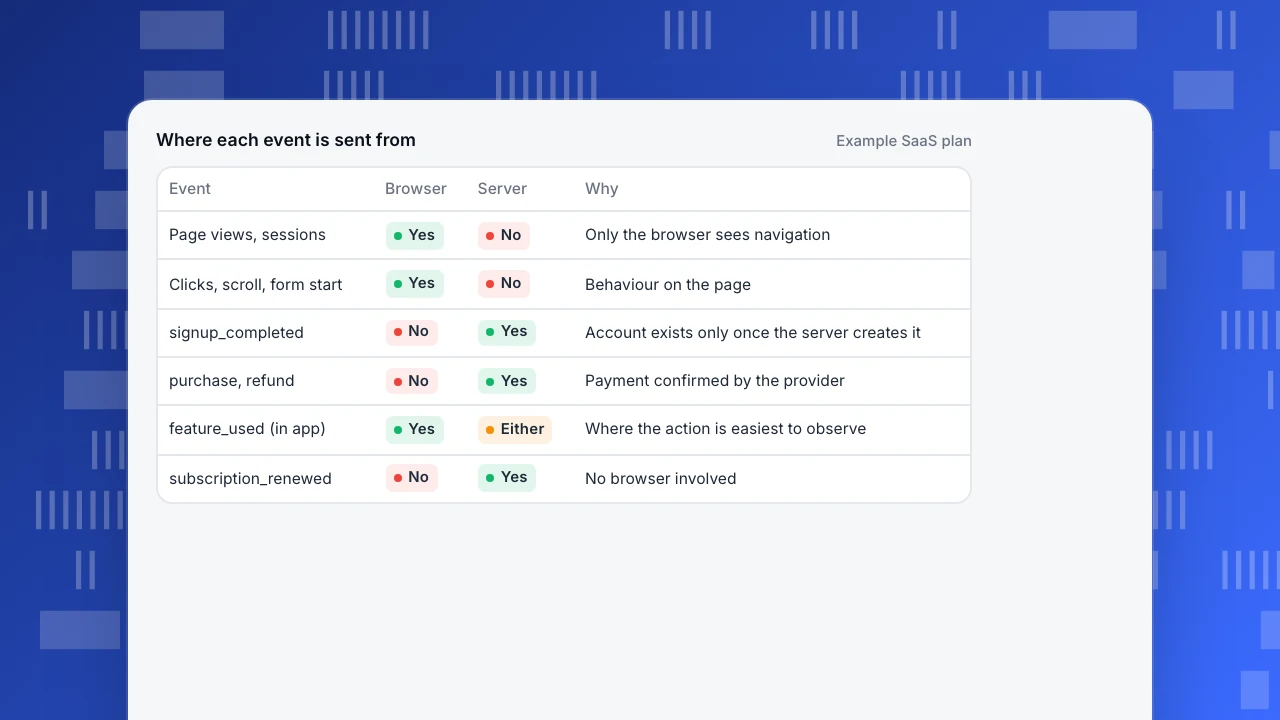
A hybrid setup sends each event from where it is known best. The example shows a typical split for a SaaS product. The rule of thumb: behaviour from the browser, outcomes from the server, and never the same event from both.
Where each event is sent from
Example SaaS plan| Event | Browser | Server | Why |
|---|---|---|---|
| Page views, sessions | Yes | No | Only the browser sees navigation |
| Clicks, scroll, form start | Yes | No | Behaviour on the page |
| signup_completed | No | Yes | Account exists only once the server creates it |
| purchase, refund | No | Yes | Payment confirmed by the provider |
| feature_used (in app) | Yes | Either | Where the action is easiest to observe |
| subscription_renewed | No | Yes | No browser involved |
Client-side vs server-side tracking
The table compares the two on the points that usually decide where an event goes. Neither is better overall; the right answer differs per event.
| Client-side (browser) | Server-side | |
|---|---|---|
| Sees page views, clicks, sessions | Yes | No, unless passed from the browser |
| Reliability for payments and sign-ups | Lost on early close, double on reload | Fires once when confirmed |
| Source and UTM | Automatic | Must be passed from the browser |
| Affected by blockers | Yes | Not for backend events |
| Consent requirements | Apply | Apply equally |
| Effort | Script tag and events | Backend code per event |
Choose per event, not per company.
Keep the source and session on server events
A server event on its own has no referrer, no UTM tags and no session. Unless you pass them along, a sign-up sent from the server looks like it came from nowhere, and every attribution report shows it as direct.
The fix is to capture the source in the browser and send it to your backend with the form or the order, then include it in the server event. The example shows this with TapCub: getAttribution() in the browser, passed through unchanged in context.campaign on the server event. Include the visitor or session identifier too, so the server event joins the browser session, and call identify with your user ID so later events from both sides belong to the same person.
// browser: script tag has data-attribution
const source = tapcub.getAttribution();
await fetch("/api/signup", {
  method: "POST",
  body: JSON.stringify({ email, password, source })
});

// server: after the account is created
await track({
  type: "track_signup",
  event: "signed_up",
  login_id: user.id,
  insert_id: "signup_" + user.id,
  time: Date.now(),
  context: { campaign: body.source }
});
Avoid double counting
- One source per event. If the browser sends
signup_completed, the server should not send it as well. Decide per event in the tracking plan. - Give server events an ID. Use the order or record ID as the event ID so a retried request is ignored instead of counted twice.
- Send the real time. Use the time the action happened, in milliseconds, not the time the job ran, especially for queued or batched events.
- Keep page views in the browser. Sending page views from the server as well doubles traffic.
Server-side tracking in TapCub
TapCub accepts behaviour events from servers on the track endpoint with a project-bound key. Each event can carry insert_id (required for updates and overwrites), a millisecond time (more than 72 hours from the server clock is rewritten to now with a warning) and a session_id; events without a session ID do not join session metrics. Emails or phone numbers that are not already hashed are hashed before storage (server events).
For attribution, the browser script with data-attribution exposes tapcub.getAttribution(); pass its result unchanged in context.campaign and the source, medium, campaign, click ID and landing page are kept on the person. If no source is passed but the event has an IP and user agent, TapCub looks for a matching visit from the same network and browser within 7 days (same day in strict mode) and marks the result as inferred. Human page views should stay on the browser script, and TapCub does not try to bypass blockers or Do Not Track (CSP and blockers). Bot traffic from server logs uses a separate endpoint; see the AI crawler ledger.
FAQ
What is server-side tracking?
Sending analytics events from a server instead of, or in addition to, the visitor's browser: either by routing browser data through your own server, or by having your backend send events it knows directly.
Is server-side tracking better than client-side tracking?
Neither is better overall. Server-side is more reliable for confirmed outcomes; client-side is the only way to see browser behaviour such as page views, clicks and sessions.
Does server-side tracking get around ad blockers and consent?
It should not be used that way. Consent rules apply to what you collect, wherever it is sent from.
How do I keep attribution with server-side events?
Capture the source in the browser, send it to your backend with the form or order, and include it on the server event along with the visitor or session ID.
How do I avoid counting an event twice?
Send each event from one side only, and give server events a unique ID (such as the order ID) so retries are ignored.
Was this article helpful?
We use your answers to fix and expand this page.
Couldn’t send. Please try again in a minute.
Thanks for the feedback. We’ll use it to improve this page.You’ve already sent feedback on this page. Thanks.

Technical Engineer
Focuses on tracking code, SDKs, and API integrations, with practical guidance on implementation checks and troubleshooting.