Try it on your own data
Every report in this article is in the free plan. One snippet for web and apps, up to 10 sites.
Start freeWith third-party cookies restricted in major browsers, what you know about your audience increasingly comes from your own site and product. A first-party data strategy is not about collecting more of it. This guide defines the data types, plans collection around decisions, and sets identity, consent and retention defaults you can defend.
What you will learn
- First-party data comes from your own relationship with people; zero-party data is the part they give on purpose
- Plan collection from decisions: data, purpose, identity level and retention per row
- Use the lowest identity level that answers the question, and keep less for shorter
Zero-, first-, second- and third-party data
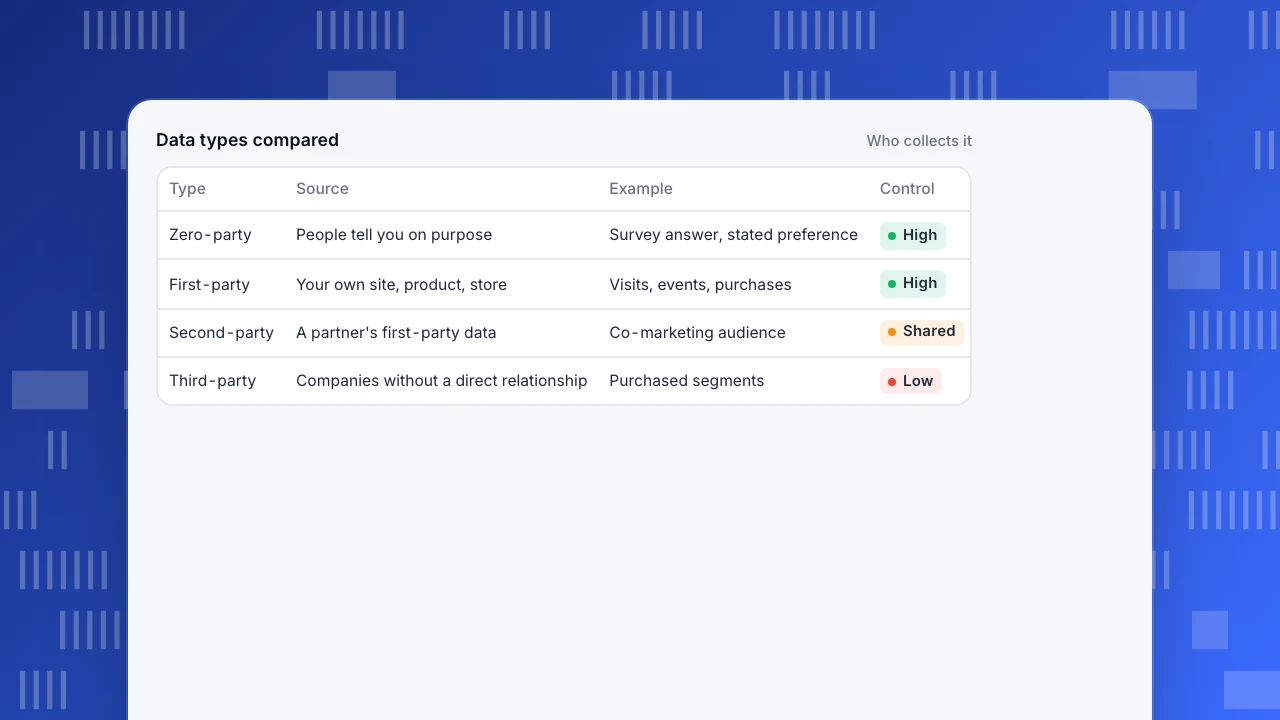
First-party data is data you collect directly from people who interact with you: visits to your site, actions in your product, purchases, support conversations, newsletter sign-ups. Zero-party data is a subset that people give you on purpose, such as preferences in a survey or a profile. Second-party data is another company's first-party data shared with you under an agreement. Third-party data is collected by companies with no direct relationship to the people in it, usually aggregated and sold.
The comparison shows why a first-party data strategy is attractive: you know how the data was collected, you control how long it is kept, and you can explain it to the people it describes.
Data types compared
Who collects it| Type | Source | Example | Control |
|---|---|---|---|
| Zero-party | People tell you on purpose | Survey answer, stated preference | High |
| First-party | Your own site, product, store | Visits, events, purchases | High |
| Second-party | A partner's first-party data | Co-marketing audience | Shared |
| Third-party | Companies without a direct relationship | Purchased segments | Low |
Why first-party data matters more now
Third-party cookies, the main way ad tech followed people across sites, are restricted in major browsers. Safari blocks them by default (WebKit) and Firefox isolates cookies per site by default (Mozilla). Consent rules in many regions add further limits. The practical consequence: what you know about your audience increasingly has to come from your own site and product.
That does not mean collecting everything. A first-party data strategy that hoards data creates risk and cost without better decisions. The rest of this guide is about collecting what you will use.
Start from decisions, not from data
List the decisions you make regularly, then the data each one needs. The table is an example collection plan for a SaaS company with a marketing site. Each row names the data, the decision it serves, the identity level it needs and how long it is worth keeping.
Two things usually fall out of this exercise. First, most marketing and product decisions need behaviour, not identity: which channels bring sign-ups, which pages lead to activation. Second, some data you collect today serves no decision and can be dropped.
| Data | Decision it serves | Identity level | Keep for |
|---|---|---|---|
| Page views and sources | Which channels and pages work | Pseudonymous | 12 months |
| Sign-up and activation events | Where onboarding loses people | Pseudonymous, then identified | 12–24 months |
| Feature usage by account | Adoption, PQLs, churn risk | Identified (user and account ID) | 24 months |
| Purchases and refunds | Revenue by channel, LTV | Identified, order ID | As finance requires |
| Autocaptured clicks | Finding events to define | Pseudonymous | 90 days |
| Survey answers (zero-party) | Segmenting by stated need | Identified, with consent | Until withdrawn |
Example plan for a SaaS company; set your own periods with your counsel.
Choose an identity level per use
Identity is the most sensitive part of first-party data. Use the lowest level that answers the question:
- Anonymous aggregate: counts without any persistent visitor ID. Enough for traffic, top pages and channel totals.
- Pseudonymous: a visitor ID that separates people without naming them, for example a cookieless hash. Enough for funnels, new vs returning visitors and conversion rates.
- Identified: your own user ID, set with identify after login. Needed for cross-device journeys, account-level analysis and connecting product use to revenue.
Keep emails and phone numbers out of analytics events; if you must match records, use a one-way hash or your internal ID.
Consent and regional rules
Whether you need consent, and for which purposes, depends on where your visitors are and what you collect. Plan for regional differences from the start: a stricter default for visitors from regions that require consent, a way to honour browser signals such as Global Privacy Control, and a record of consent choices. Laws such as the GDPR set the framework; your counsel decides what applies to you.
Collect less, keep less
- Truncate IP addresses before use and do not store them on events.
- Strip personal data that slips into URLs and form fields (emails in query strings are common).
- Set retention by data type: raw events for a year may be enough; autocaptured clicks need far less.
- Plan for deletion and access requests, so you can find and remove one person's data.
The cookieless analytics explainer shows how much analysis is possible with pseudonymous data alone.
First-party data in TapCub
TapCub collects first-party data on your own domain and lets you choose the identity level per project and region. Tier 1 keeps no persistent ID and rotates the salt daily; tier 2, the default, separates visitors with an HMAC of address and user agent and writes no cookie; tier 3 allows a device ID and login. When a region requires consent and the visitor has not given it, collection falls back to tier 1, and Global Privacy Control and Do Not Track are honoured by default (privacy).
The IP address is never written on the event: by default the last two bytes are truncated before a city lookup, and the address is discarded after geography and the visitor hash. Strings that look like emails or phone numbers are replaced with a placeholder. Default retention is 365 days for events, 90 for autocapture and 730 for profiles, capped by your plan, and access, erasure, restriction and portability requests can be handled from the console. The collection tiers help page explains how to choose.
FAQ
What is first-party data?
Data you collect directly from people who interact with your site, product or service, such as visits, actions, purchases and sign-ups.
What is the difference between first-party and third-party data?
First-party data comes from your own relationship with people. Third-party data is collected by companies without a direct relationship and is usually bought.
What is zero-party data?
Information people share with you intentionally, such as preferences, survey answers or profile details. It is a subset of first-party data.
Are first-party cookies affected by browser restrictions?
Browsers mainly restrict third-party cookies. First-party cookies still work, but some browsers limit how long script-set cookies last, which affects returning-visitor counts.
Does a first-party data strategy mean collecting more data?
No. It means relying on data you collect yourself, for decisions you actually make, at the lowest identity level and for the shortest time that serves them.
See also: Zero-party data.
Was this article helpful?
We use your answers to fix and expand this page.
Couldn’t send. Please try again in a minute.
Thanks for the feedback. We’ll use it to improve this page.You’ve already sent feedback on this page. Thanks.

Data Engineer
Writes about event design, data quality, and collection workflows, with verifiable implementation methods for reliable analytics.