Try it on your own data
Every report in this article is in the free plan. One snippet for web and apps, up to 10 sites.
Start freeYour payment system knows how much you earned. Analytics should tell you where it came from. That only works if revenue arrives as well-designed events: confirmed on the server, deduplicated by order id, with currency and refunds handled. This guide covers the events, the properties, the rules and the metrics they produce.
What you will learn
- Send purchases from the server when payment is confirmed, with order id, amount and currency
- Deduplicate by order id, send refunds as their own events and convert currency on the order date
- AOV, ARPU, paying rate, repeat rate and LTV all follow from clean purchase events
What revenue tracking means in analytics
Revenue tracking in an analytics tool means sending each purchase and refund as an event with its amount, so revenue can be split by the same dimensions as everything else: channel, campaign, landing page, device, cohort. Your payment system already knows how much you earned; analytics tells you where it came from and which behaviour led to it.
That only works if the revenue events are designed carefully. A missing order id, a browser-only purchase event or a mix of currencies produces revenue figures that nobody trusts, and then the finance team's spreadsheet wins every argument.
Events and properties to send
Two events cover most businesses: a purchase when payment succeeds, and a refund with the same order id when money goes back. Subscriptions add a renewal (often just another purchase) and, if you need it, plan changes. The table lists the properties that make these events useful.
Browse, add-to-cart and checkout events are behavioural; they feed the funnel but carry no revenue. Only a confirmed payment should create revenue.
| Property | Example | Why it matters |
|---|---|---|
| order_id | ord_1001 | Dedupe key; links refunds to purchases |
| revenue | 49.00 | Amount of the purchase or refund |
| currency | USD | Needed to convert to one base currency |
| items | [{sku, category, price, quantity}] | Item, category and brand rankings |
| coupon, plan | SPRING10, pro | Split revenue by offer or plan |
| visitor or session id | From the browser, passed to the server | Keeps the source and session of the buyer |
Use the same order_id on the refund event.
Send purchases from the server
Send the purchase event from your server, at the moment the payment provider confirms the payment, not from the browser's thank-you page. Browser events are lost when the tab closes early, are blocked by some extensions and can fire twice on reload. The server knows the payment really happened.
To keep the purchase connected to the visitor's source and session, pass the visitor or session identifier from the browser to your backend with the order, and include it in the server event. Logged-in buyers can be tied to their user ID with identify. The example shows a server event in TapCub's format, with the order id as insert_id.
{
  "events": [{
    "type": "track",
    "event": "purchase",
    "login_id": "user_8f21",
    "insert_id": "ord_1001",
    "time": 1762214400000,
    "session_id": "sess_7d2c",
    "properties": {
      "order_id": "ord_1001",
      "revenue": 49.00,
      "currency": "USD",
      "items": [{ "sku": "pro-annual", "price": 49.00, "quantity": 1 }]
    }
  }]
}
Deduplicate, handle refunds, convert currency
Three rules prevent most revenue discrepancies:
- Use the order id as the dedupe key. Payment webhooks retry. If a retry sends the same purchase again, the order id must make the second copy a no-op, not a second order.
- Send refunds as their own events. Do not delete or edit the original purchase. Report refunds next to revenue, so gross and net are both visible.
- Always send the currency. Convert to one base currency at the rate of the order date, and flag orders whose currency cannot be converted instead of guessing.
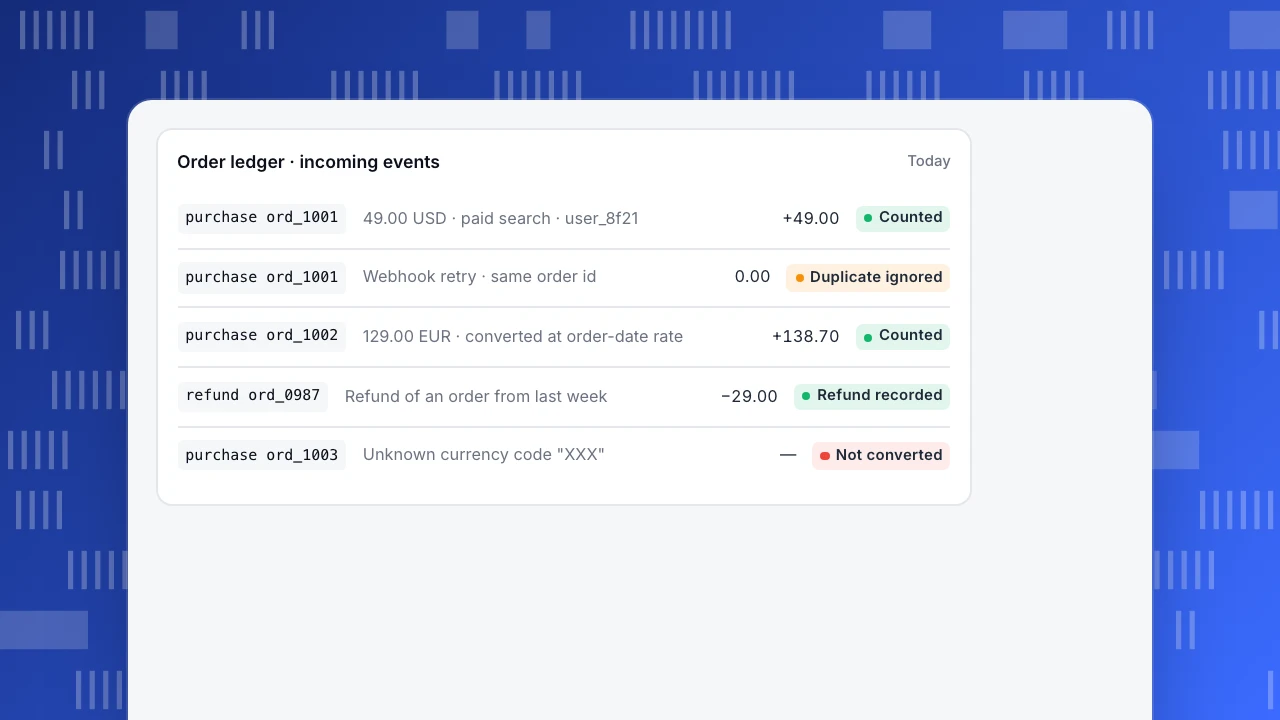
The example ledger shows these rules in action: a retried webhook is ignored, a refund is recorded against its order, and an order in an unexpected currency is flagged.
Order ledger · incoming events
Todaypurchase ord_100149.00 USD · paid search · user_8f21+49.00Countedpurchase ord_1001Webhook retry · same order id0.00Duplicate ignoredpurchase ord_1002129.00 EUR · converted at order-date rate+138.70Countedrefund ord_0987Refund of an order from last week−29.00Refund recordedpurchase ord_1003Unknown currency code "XXX"—Not converted
Revenue metrics you get from these events
With clean purchase and refund events, most revenue metrics follow without extra tracking:
- Revenue and orders: sum and count of purchases; refunds reported separately.
- Average order value: revenue ÷ orders.
- Paying rate: buyers ÷ active users in the period.
- ARPU and revenue per buyer: revenue ÷ active users, and revenue ÷ buyers.
- Repeat purchase rate: people with two or more purchases ÷ buyers.
- LTV by cohort: cumulative revenue per person, grouped by first-purchase month.
Each of these can be split by acquisition channel, which is the reason to track revenue in analytics at all. For subscription businesses, add revenue retention as described in churn rate vs retention rate.
Reconcile with the payment system
Analytics revenue will rarely match the payment system to the cent: test orders, currency rounding, chargebacks and timing all differ. Reconcile monthly: compare order counts first (they should match closely if every payment sends an event), then amounts. A gap in order counts means events are missing; a gap only in amounts usually means currency or refunds are handled differently.
Revenue tracking in TapCub
TapCub builds an order ledger from purchase and refund events. The default names are purchase, refund, revenue, currency and order_id, and can be changed in business settings. Amounts are converted to the site's base currency at the rate on the order date, orders that cannot be converted are called out, and refunds are reported separately rather than subtracted. The order id is the dedupe key, and an items array on the purchase gives item, category and brand rankings (commerce and revenue).
From the ledger, the commerce report shows revenue, orders, buyers, average order, paying rate, revenue per user and per buyer, first buyers, repeat rate, refunds, and lifetime value by first-purchase month. Server events go to the track endpoint with insert_id and milliseconds time (server events). Goal revenue, which sums a property on goal events, is a different number from the ledger and should not be compared with it. The event tracking guide covers the rest of the tracking plan.
FAQ
What is revenue tracking?
Recording each purchase and refund as an analytics event with its amount and currency, so revenue can be analysed by channel, campaign, page and cohort.
Should purchase events be sent from the browser or the server?
From the server, when the payment is confirmed. Browser events can be lost, blocked or duplicated.
How do I avoid counting the same order twice?
Use the order id as the event's dedupe key, so a retried webhook or reloaded page does not create a second order.
Should refunds be subtracted from revenue?
Report them separately next to revenue so both gross and net are visible, and send them as their own events with the original order id.
Why does analytics revenue not match my payment system?
Test orders, currency conversion, refunds, chargebacks and timing differ. Compare order counts first, then amounts.
Was this article helpful?
We use your answers to fix and expand this page.
Couldn’t send. Please try again in a minute.
Thanks for the feedback. We’ll use it to improve this page.You’ve already sent feedback on this page. Thanks.

Data Engineer
Writes about event design, data quality, and collection workflows, with verifiable implementation methods for reliable analytics.