Try it on your own data
Every report in this article is in the free plan. One snippet for web and apps, up to 10 sites.
Start freePageviews show where people went. Events show what they did. This guide sets up event tracking in five steps: a starter event plan with properties, naming rules, the code, the events your snippet already sends, and a verification pass that catches double fires and missing properties before anyone builds a report on them.
What you will learn
- A starter event plan of ten events with properties and the question each answers
- Code, limits and the automatic events you do not need to add yourself
- A verification pass and the server-side rule for money events
What event tracking is
Event tracking records the actions a pageview does not capture: a sign-up, a click on "start trial", a video play, a purchase. Each event has a name (what happened) and properties (details you will later break the event down by, such as plan or price). Pageviews tell you where people went; events tell you what they did there.
Most tools group events the same way. Google Analytics 4 separates automatically collected events, enhanced measurement events, recommended events and custom events (Google: About events). The practical split is simpler: events your snippet sends on its own, and events you add in code because only you know they matter. This guide is about the second kind, done in five steps.
Step 1: Plan the events
Write the plan before anyone writes code. A plan is a short list of events, when each fires, its properties and the question it answers. Start with ten or fewer; the first version of a tracking plan should fit on one screen.
The starter plan below suits a SaaS website. A store would swap the middle rows for product views, add-to-cart and checkout steps.
Keep two rules for properties. Only add a property you will break a report down by; "button colour" rarely qualifies. And never put raw text that a person typed into a property: it is useless for grouping and it can contain personal data. More on event properties in the glossary.
| Event | Fires when | Properties | Answers |
|---|---|---|---|
signup_completed | Account is created | plan, source | How many sign-ups, from where? |
email_verified | Verification link clicked | — | Where does sign-up stall? |
project_created | First project saved | template | Do new users reach the first step? |
invite_sent | A teammate is invited | role | Do accounts spread inside teams? |
feature_used | A key feature is used | feature | Which features drive retention? |
checkout_started | Pricing checkout opens | plan, interval | How many try to pay? |
purchase_completed | Payment confirmed (server) | plan, value, currency, order_id | Revenue and conversion |
subscription_cancelled | Cancellation confirmed (server) | plan, reason | Churn and why |
Start with ten or fewer events; add one only when a question needs it.
Step 2: Name the events
Names are keys in your data. Once reports, funnels and goals depend on signup_completed, renaming it breaks history. Pick one convention and keep it: lowercase snake_case, object then action, past tense for things that finished. Segment's specification recommends the same object-action pattern for track calls (Segment: Track spec). The full rules, with examples, are in event naming conventions.
In TapCub, names registered in the event catalog must be snake_case, start with a letter, be at most 40 characters and must not start with $, _ or tc_. Use the same name for the same action on web, app and mini program, so cross-platform reports put them together.
Step 3: Add the code
On a website, one call records an event: tapcub.track(name, props). If the call can run before the script has loaded (for example in an inline script near the top of the page), push it onto the queue instead; it is sent when the script runs.
A few limits worth knowing before you design properties: the name is cut at 100 characters, an event keeps at most 20 property keys, keys are cut at 50 characters and string values at 200, and only strings, numbers and booleans are stored. Objects and arrays are dropped. A failed call never throws on the page, and an identical event from the same visitor on the same page within one second is treated as a double fire and dropped (custom events).
When people log in, call identify once with your own user ID. Without it, events stay attached to an anonymous visitor and you cannot follow one person across devices (identify).
// before the script loads: queue the call
window.__tcq = window.__tcq || [];
window.__tcq.push(['track', 'signup_completed', { plan: 'pro', source: 'pricing' }]);

// after the script has loaded
tapcub.track('project_created', { template: 'blank' });
tapcub.track('invite_sent', { role: 'editor' });

// once the person logs in
tapcub.identify('user_8f21', { plan: 'pro' });
Step 4: Use the automatic events
Before adding custom events for every click, check what the snippet already sends. TapCub's web script records outbound link clicks, file downloads, 404 pages, Web Vitals and site-search queries automatically. Form submits are available too, but off by default: you switch them on with a script attribute. All of these can be turned off together with data-auto-track="false".
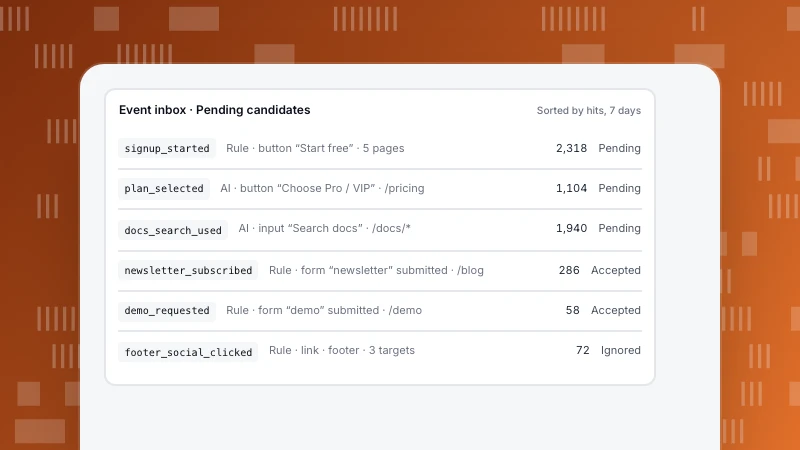
For clicks you never tagged, autocapture records clickable elements (never password fields or anything inside a data-tc-ignore block) and turns them into candidates. A candidate becomes an event only after someone accepts and names it in the event inbox; accepting it backfills the last 90 days (reviewing event candidates).
Step 5: Verify before anyone builds a report
Most tracking bugs are found by the first person who builds a funnel, weeks after release. Find them in an afternoon instead:
- Open the site with the realtime view on and trigger each event yourself, once.
- Check every event arrives once, with the expected name and every property filled.
- Check the counts the next day against something you trust: sign-ups against your database, purchases against your payment provider.
- Mark each event "verified" in the plan, with the date.
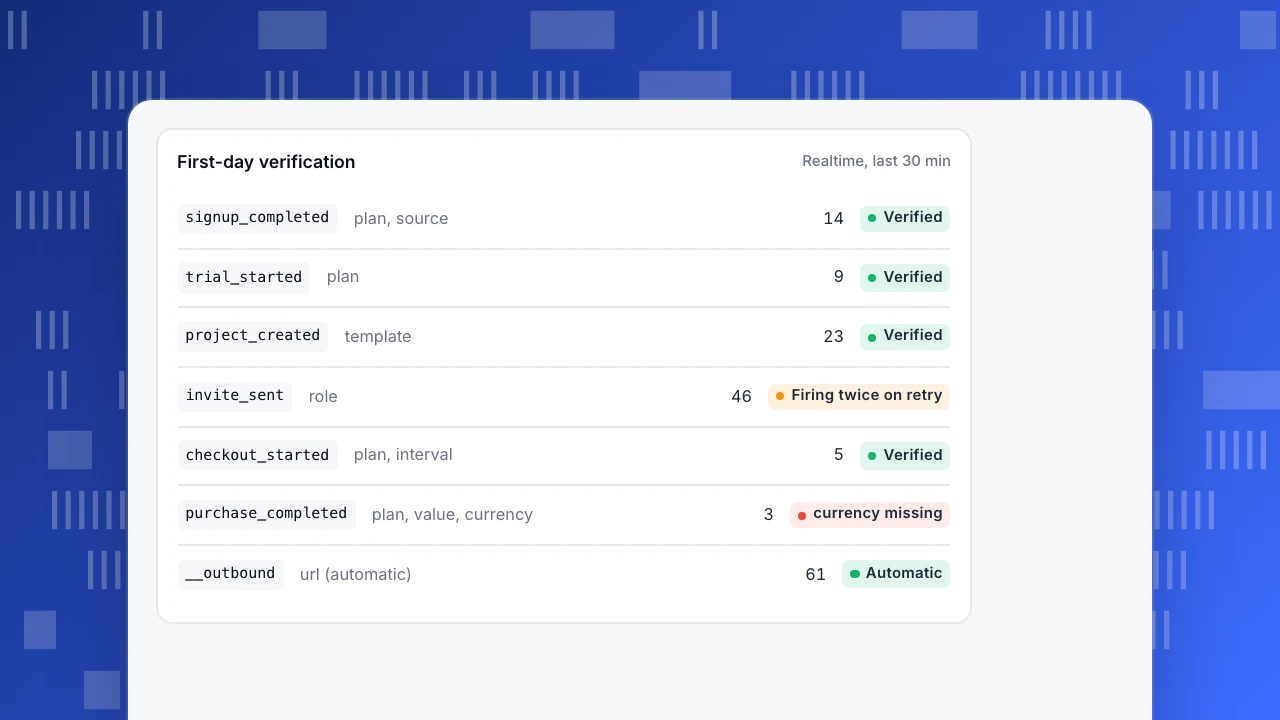
The list in the example is what a first check typically looks like: most events are fine, one is firing twice, one property is missing.
First-day verification
Realtime, last 30 minsignup_completedplan, source14Verifiedtrial_startedplan9Verifiedproject_createdtemplate23Verifiedinvite_sentrole46Firing twice on retrycheckout_startedplan, interval5Verifiedpurchase_completedplan, value, currency3currency missing__outboundurl (automatic)61Automatic
Send money from the server
Amounts, refunds and subscription changes belong on the server. A browser event fires when the thank-you page loads, which is not the same as a payment succeeding, and it can be blocked or fire twice. Send revenue events from the backend after the payment provider confirms, with an order ID so duplicates can be found (server events).
Common event tracking mistakes
- Tracking everything. A hundred events nobody reads make the useful ten hard to find.
- One event per button.
signup_button_header_clickedandsignup_button_footer_clickedshould be one event with alocationproperty. - Changing names silently. Rename the display label, not the event key.
- Free text in properties. Search terms, messages and form inputs fragment reports and may contain personal data.
- No owner. Every event needs someone who knows why it exists and notices when it stops.
FAQ
What is the difference between a pageview and an event?
A pageview records that a page loaded. An event records an action on the page, such as a click, a form submit or a purchase, with properties that describe it.
How many events should I track?
Start with ten or fewer that map to decisions: sign-up, activation, purchase and the two or three steps in between. Add more when a question cannot be answered without them.
Do I need a developer to set up event tracking?
For custom events, usually yes, because someone has to add the calls. Automatic events and autocapture need no code; they only need someone to review and name what was captured.
What is user behavior tracking?
It is the umbrella term for recording what people do on a site or app: pageviews, events, sessions and the paths between them. Event tracking is the part that captures specific actions.
How do I check that events are tracked correctly?
Trigger each event yourself with the realtime view open, confirm it arrives once with all properties, then compare the next day's counts with your database or payment provider.
See also: Create a tracking plan.
See also: User behavior tracking, Implementing web analytics.
Was this article helpful?
We use your answers to fix and expand this page.
Couldn’t send. Please try again in a minute.
Thanks for the feedback. We’ll use it to improve this page.You’ve already sent feedback on this page. Thanks.

Technical Engineer
Focuses on tracking code, SDKs, and API integrations, with practical guidance on implementation checks and troubleshooting.