Try it on your own data
Every report in this article is in the free plan. One snippet for web and apps, up to 10 sites.
Start freeUser behavior tracking records what people do on a site or in an app: views, clicks, scrolls, form interactions, feature use and errors. This guide lists the behaviors worth tracking, compares six methods from pageview scripts to session replay, covers privacy, and shows a setup flow where tracking found a disabled link and an API key error behind a 38% completion rate.
What you will learn
- Track behaviors that answer specific questions
- Combine autocapture, custom and server-side events
- Use heatmaps and replay for diagnosis, sampled
- Mask inputs and avoid personal data in events
- Validate events after every release
What is user behavior tracking?
User behavior tracking is the collection of data about what people do on a website or in an app: pages and screens they view, what they click and type into, how far they scroll, which features they use, where they hesitate and where they leave. The data is recorded as events (each with a time and properties) and grouped into sessions and, where allowed, into users.
Tracking is the input; behavioral analytics is what you do with it (funnels, paths, retention, segments). Good tracking is planned, minimal and privacy-aware: you collect what answers your questions, not everything that can be captured.
What behavior to track
| Behavior | Example events | Questions it answers |
|---|---|---|
| Navigation | Pageview / screen view, entry and exit page | Which content draws people in, where do they leave? |
| Clicks and taps | Button clicks, link clicks, outbound links, downloads | Which calls to action work? What looks clickable but is not? |
| Scrolling | Scroll depth at 25/50/75/100% | Is content below the fold seen? |
| Forms | Form start, field interaction, validation error, submit | Which field makes people quit? |
| Feature use | report_created, filter_applied, export_downloaded | Which features drive retention? |
| Conversions | signup_completed, purchase with revenue | Is the product meeting business goals? |
| Frustration | Rage clicks, dead clicks, JavaScript errors | Where is the experience broken? |
| Session context | Device, browser, country, referrer, campaign | Who has which problem? |
Tracking methods compared
| Method | How it works | Strengths | Limits |
|---|---|---|---|
| Pageview script | A script records each page or route view | Quick to install, covers navigation | No detail inside a page |
| Autocapture | Script records clicks, form submits and inputs automatically | No code per event; history from day one | Noisy; needs naming and review |
| Custom events | Developers call track('event', props) | Precise, carries business properties | Needs engineering and a tracking plan |
| Server-side events | Your backend sends events (orders, renewals) | Reliable, not blocked by ad blockers | Misses purely client-side behavior |
| Heatmaps | Aggregate click and scroll positions per page | Visual, fast to read | Page-level only, no sequence |
| Session replay | Reconstructs individual sessions from DOM changes | Shows exactly what happened | Storage and privacy cost; sample it |
Most teams combine a pageview script with autocapture for discovery, custom and server-side events for business actions, and heatmaps or replay for diagnosis.
| Never collect | Why |
|---|---|
| Passwords and payment fields | Security and PCI requirements |
| Free-text inputs in replays | May contain personal data |
| Personal data in event properties | Hard to delete, often unnecessary |
| Identifiers without a lawful basis | GDPR and ePrivacy rules |
Data minimization makes tracking safer and analysis faster.
How to set up user behavior tracking
1. List the questions
"Where do trial users drop out of setup?", "Which help articles reduce support contacts?" Each tracked behavior should serve one of these questions.
2. Write a tracking plan
Name events consistently, list their properties, and mark which ones are goals. Decide what you will not collect: free text, passwords, payment fields and personal data you do not need.
3. Install and configure
Install the script or SDK, enable autocapture if available, and add custom events for key actions. For single-page apps, make sure route changes are tracked.
4. Respect privacy
Mask input values, avoid recording personal data in event properties, honor consent where required, and set retention periods. Cookieless and anonymous modes reduce what you store about individuals.
5. Verify and maintain
Trigger events yourself, check them in real time, compare conversions with your backend, and review new or unexpected events regularly.
Worked example: tracking a setup flow
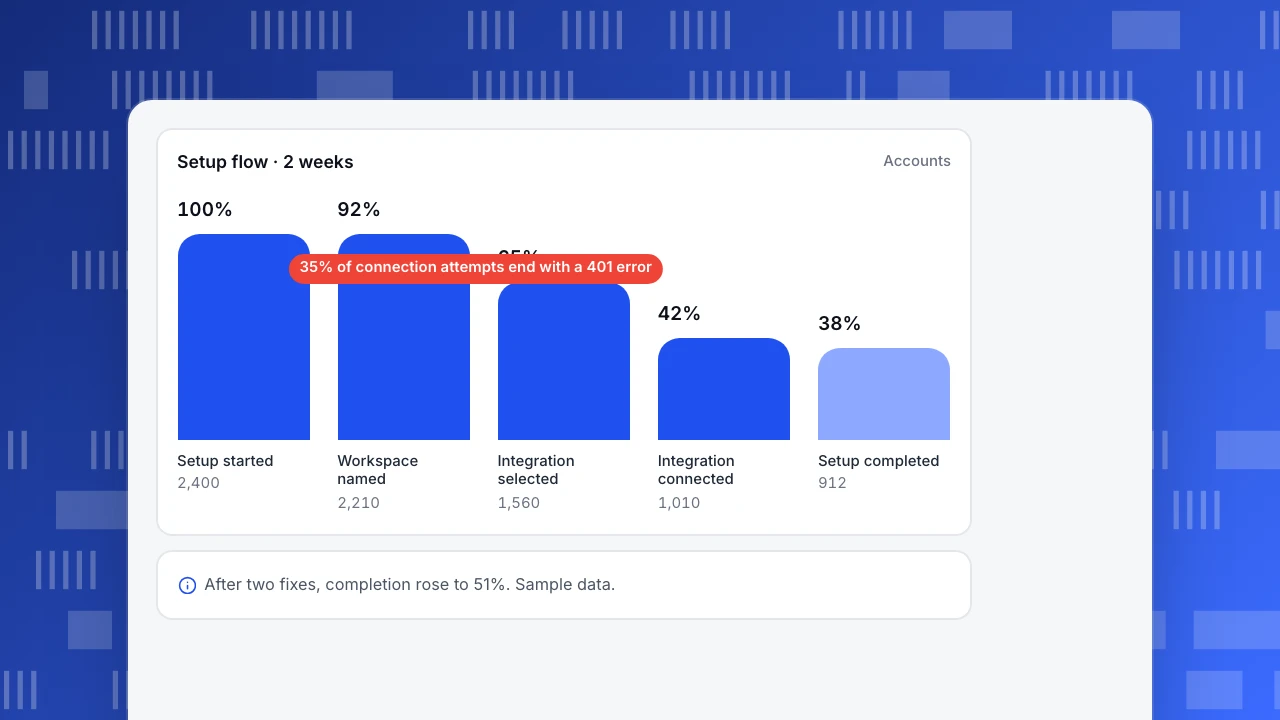
A SaaS product (sample data) wanted to know why only 38% of new accounts finished setup. The team tracked five steps as custom events and enabled autocapture on the setup pages for two weeks:
| Step | Accounts | Signal from tracking |
|---|---|---|
| setup_started | 2,400 | — |
| workspace_named | 2,210 | — |
| integration_selected | 1,560 | 29% dropped; heatmap shows many clicks on a disabled "Skip" link |
| integration_connected | 1,010 | 35% of attempts end with error code 401 |
| setup_completed | 912 | — |
Two fixes followed: enabling "Skip for now" and adding a clear message for expired API keys. Setup completion rose from 38% to 51% in the next two weeks.
Setup flow · 2 weeks
AccountsSetup started
2,400
Workspace named
2,210
Integration selected
1,560
Integration connected
1,010
Setup completed
912
Privacy and compliance
Behavior tracking is personal data processing when it can be linked to a person (cookies, device IDs, user IDs, IP addresses). Under the GDPR and ePrivacy rules, non-essential tracking that stores or reads information on the device generally needs consent. Aggregate, cookieless measurement reduces that burden, but you still need a lawful basis, a privacy notice and data minimization. Never record passwords, payment card fields or free-text inputs in replays or event properties.
Common mistakes
- Tracking everything. Too many events make analysis slower and increase privacy risk.
- Inconsistent naming. Duplicates like "signup" and "sign_up" split your data.
- No review of autocaptured events. Unnamed clicks pile up and nobody uses them.
- Recording sensitive inputs. Mask by default.
- Never validating. Check events against reality after every release.
User behavior tracking in TapCub
- Pageviews and autocapture: the web script records pageviews (including SPA routes), clicks and form submissions; new event names go to an event inbox for review. See how autocapture works.
- Custom and server events: track custom events and send server-side events.
- Scroll, clicks, forms: track scroll depth, button clicks and form submissions.
- Heatmaps and replay: click and scroll heatmaps; session replay is off by default, samples 10% when enabled and masks inputs.
- Privacy: cookieless counting by default; anonymous mode stores nothing on the device. See keep personal data out.
Related: behavioral analytics, event tracking, autocapture, tracking plan.
FAQ
Is user behavior tracking legal? Yes, when done lawfully: with a legal basis, transparency, data minimization and, where required, consent. Requirements differ by country.
What is the difference between behavior tracking and behavioral analytics? Tracking collects the events. Behavioral analytics analyzes them with funnels, paths, retention and segments.
Do I need session replay? Not always. Funnels and heatmaps often show where the problem is; replay helps explain why. Sample it and mask inputs.
Can I track user behavior without cookies? Yes. Cookieless analytics counts visits and behavior without storing identifiers on the device, with less precision for returning users.
Sources
- European Data Protection Board. Guidelines 2/2023 on the technical scope of Art. 5(3) of the ePrivacy Directive.
- W3C. Beacon API.
- Nielsen Norman Group. Scrolling and attention.
Was this article helpful?
We use your answers to fix and expand this page.
Couldn’t send. Please try again in a minute.
Thanks for the feedback. We’ll use it to improve this page.You’ve already sent feedback on this page. Thanks.

Product Experience Specialist
Writes about product experience, practical workflows, and growth, turning complex processes into clear steps for everyday decisions.