Quick answer
A user ID is a stable, unique identifier your product assigns to a signed-in person and sends to analytics, so their activity on every device and in every session counts as one user. It is not the username they type to sign in.
What a user ID means in analytics
Ask "what is a user ID?" on a sign-in screen and the answer is the name you log in with. In product and web analytics the term is narrower: a user ID is the identifier your own system already uses for a customer account, such as the database key u_123, sent to the analytics tool after sign-in. Every event from that person then carries the same user identifier, whatever device they are on.
An analytics tool cannot know who someone is on its own. Before sign-in it only sees a browser or an app install. The user ID is how you tell it, and it is the only identifier that survives a change of device. That makes it the basis of cross-device tracking: without it, one customer on a laptop, a phone and a tablet is three users.
User ID vs visitor ID, device ID and session ID
Analytics tools keep several IDs at once. They answer different questions, and mixing them up is the most common reason two reports disagree.
| ID | Who creates it | When it appears | How long it lasts | What it counts |
|---|---|---|---|---|
| Visitor ID | The analytics tool | First pageview | Depends on the tool; a day or longer | Unique visitors |
| Device ID | The tracking SDK, stored on the device | First event after tracking is allowed | Until storage is cleared or the app is reinstalled | Devices |
| User ID | Your product | When the person signs in | As long as the account exists | People |
| Session ID | The analytics tool | Start of a visit | Ends after inactivity or an account switch | Visits |
In TapCub, for example, the visitor ID is a hash of a site salt with address and browser data, with no cookie; under the strict privacy setting the salt rotates every day, so the same browser is a new visitor tomorrow. A device ID is written only when identified mode is on and the person has given analytics consent. A session groups one visit. Only the user ID is yours.
When a user ID is attached
A typical person goes through five states:
- Anonymous. They browse without signing in. Events carry a visitor ID and, if allowed, a device ID.
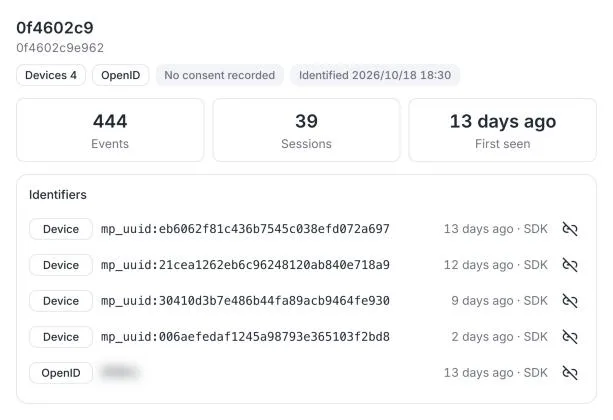
- First sign-in on a device. Your code passes the user ID. TapCub backfills that device's earlier anonymous events to the person, so the first visit and the acquisition source are not lost. Google Analytics does the same for events earlier in the session.
- Sign-in on another device. The same user ID joins the new device to the same person. This is the cross-device merge.
- Account switch on a shared device. Events already attributed stay with the first person. The device now points at the second person and a new session starts.
- Sign-out. You clear the ID. Later events in that browser are anonymous until the next sign-in.
How a tool links devices to people is called identity resolution; the user ID is its input.
How to set a user ID
Call the tool's identify or login method right after sign-in succeeds, with the ID from your own account system. With the TapCub web script:
<script>
  // after sign-in succeeds
  tapcub.login('u_123', { $name: 'Ada' });
</script>
On sign-out:
<script>
  tapcub.logout();
</script>
login takes the ID (up to 200 characters) and optional profile fields; bind adds other identifiers to the same person, such as a WeChat UnionID. The full reference is in Identify users in code.
In Google Analytics the equivalent is the user_id parameter. Google's User-ID guide asks you to create the ID yourself, keep it under 256 characters, and send null after sign-out.
Rules for a good user ID
- Stable. It never changes for the account. Email addresses and phone numbers change, so they make poor IDs.
- Unique and never reused. Do not hand a deleted account's ID to a new customer, or their histories merge.
- No personal data inside it. Google's guide says the ID must not contain information a third party could use to identify the person. Use an internal key, not an email or a name.
- Never a placeholder. Sending
0,-1,nullorguestfor logged-out people would merge every anonymous visitor into one giant "user". TapCub rejectsnull,undefined,anonymous,guest, all zeros,-1,NaN,trueandfalse, and shows each rejection as a warning on the identity map. - The same on every platform. Web, app, mini program and server events must send the same value, or one customer becomes several people.
If you also want to match people by email or phone, send those as extra identifiers rather than as the user ID. TapCub normalizes them and stores them hashed. One person keeps one login ID, up to five each of email, mobile and UnionID, and 50 devices by default; past that, the oldest device is unbound and the log records it.
How user IDs change your numbers
Turning on user IDs changes what "users" means, so expect your counts to move:

- Unique users drop. Devices that belong to one person are counted once. On the demo project above, that removed about a quarter of the device count for the day.
- Retention improves. A person who comes back on a new device is now returning, not new.
- Cross-device funnels complete. Someone who adds to cart on a phone and pays on a laptop finishes one funnel instead of two half ones.
- Per-person value becomes possible. LTV and revenue per user need a person to divide by.
Visitor counts do not change, because they never used the user ID. When you compare periods before and after enabling identification, compare devices or visitors, not users.
User IDs and privacy
A user ID ties behavior to a known account, so treat it as personal data. The GDPR's definition of personal data in Article 4 names "an online identifier" explicitly. In practice:
- Say in your privacy policy that you send an account identifier to analytics.
- Collect it only where you have consent or another legal basis. In TapCub, identified mode needs analytics consent and is off by default.
- Be able to find and erase one person's data on request. TapCub marks people under an erasure or restriction request and drops their new events.
Common mistakes
- Using an email address as the user ID. It changes, and it puts personal data into every event.
- Different formats per platform.
123on the app andu_123on the web are two people. - Calling login before the tracking script loads. The call is lost. In TapCub, queue it on
window.__tcq. - Forgetting sign-out on shared devices. The next person's visits merge into the previous account.
- Expecting profiles for people who never sign in. They stay in aggregate counts; only a user ID creates a person.
Related guides: Server-Side Tracking and New vs Returning Users.
Was this explanation clear?
We use your answers to fix and expand this page.
Couldn’t send. Please try again in a minute.
Thanks for the feedback. We’ll use it to improve this page.You’ve already sent feedback on this page. Thanks.

Technical Engineer
Focuses on tracking code, SDKs, and API integrations, with practical guidance on implementation checks and troubleshooting.