Try it on your own data
Every report in this article is in the free plan. One snippet for web and apps, up to 10 sites.
Start freeThe new vs returning split looks like the simplest report in analytics, and it raises more questions than any other: why the two groups add up to more than the total, why new visitors jump without a campaign, what a good ratio is. The answer to all three is the same: the split measures whether your tool recognised someone, not whether they visited before.
What you will learn
- New vs returning measures recognition, not history
- Why the two groups exceed the total, and what makes returning people look new
- Compare how the groups behave by page and channel instead of chasing a ratio
New vs returning users: the definitions
A new user is someone your analytics tool has not seen before; a returning user is someone it recognises from an earlier visit. In Google Analytics 4, new users are users who logged a first visit (or first open, in apps), and returning users are users who started at least one previous session (Google: dimensions and metrics).
The important word is recognises. The split does not measure whether a person has been to your site before; it measures whether your tool could tell. That depends on the identity the tool uses (a cookie, a device ID, a server-side hash or a login), and every one of them can lose track of people. Read the split as "recognised versus not recognised" and most of its oddities make sense.
Why new and returning do not add up
A common surprise, and a frequent forum question: new users plus returning users is larger than total users. Nothing is broken. A person who visits for the first time on Monday and comes back on Thursday is a new user (Monday) and a returning user (Thursday) within the same week, so they appear in both groups but only once in the total.
The longer the date range, the bigger the overlap. If you want groups that add up, look at one day at a time, or segment people by "first seen before this period" instead of by session.
What makes returning people look new
Every identity method has blind spots, and they all push in the same direction: returning people get counted as new. The table lists the usual causes. None of them affect pageviews or sessions; they only move people from "returning" to "new" and inflate unique visitors over longer ranges.
Two practical consequences follow. First, the new-visitor share is always an upper bound; the real share of first-time visitors is lower. Second, a sudden jump in new visitors with no campaign behind it is more often an identity change (a consent banner update, a browser release, a switch of tracking method) than a wave of new people.
| Cause | What happens | Effect on the split |
|---|---|---|
| Cleared cookies or storage | Cookie-based tools lose the ID | Returning person counted as new |
| New device or browser | No shared identifier without a login | Counted as new on each device |
| Private browsing | Storage is discarded after the session | Every private session is new |
| Network change (cookieless hash) | The hash includes the truncated IP | A new network looks like a new visitor |
| Daily-rotating identity | No match across days by design | No returning visitors across days |
| Login with a user ID | Sessions tie to your own ID | Returning people recognised across devices |
All causes push in one direction: the new-visitor share is an upper bound.
Compare the two groups, not the ratio
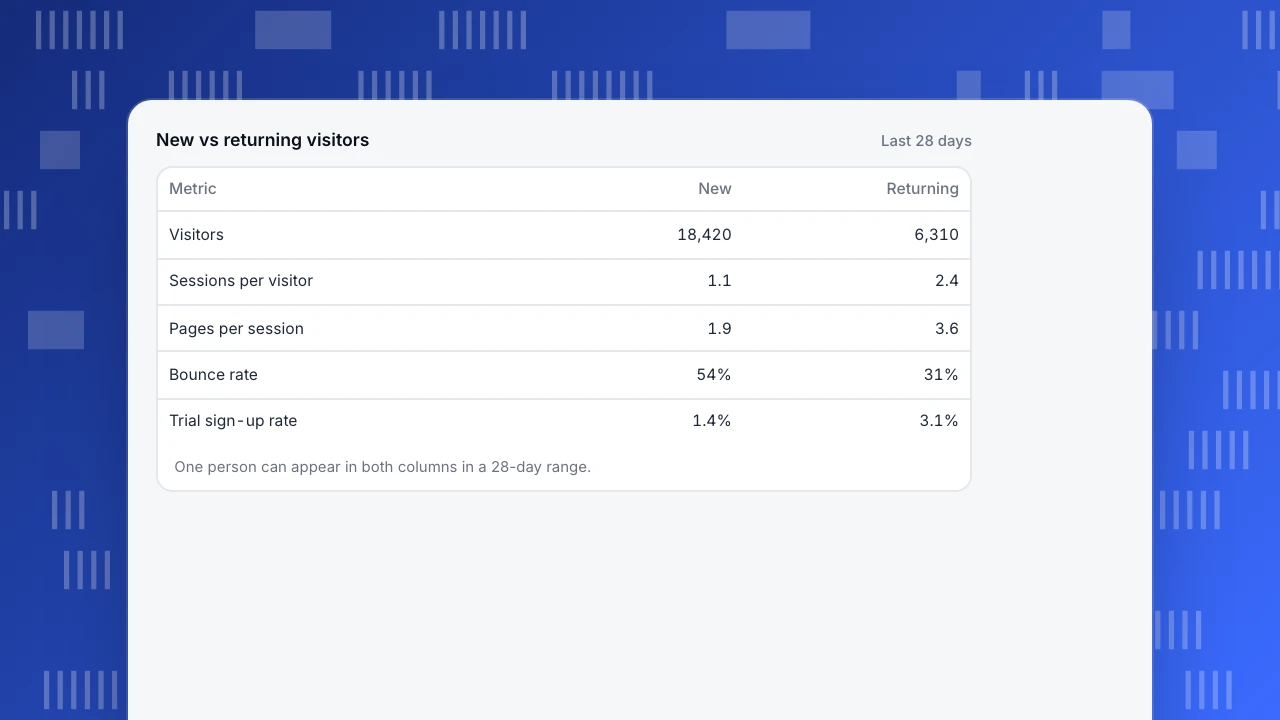
The ratio of new to returning visitors on its own says little. What helps is comparing how the two groups behave. In the example, returning visitors view more pages, bounce less and convert at roughly twice the rate of new visitors, which is the typical pattern for a site with a free trial: people come back to decide.
New vs returning visitors
Last 28 days| Metric | New | Returning |
|---|---|---|
| Visitors | 18,420 | 6,310 |
| Sessions per visitor | 1.1 | 2.4 |
| Pages per session | 1.9 | 3.6 |
| Bounce rate | 54% | 31% |
| Trial sign-up rate | 1.4% | 3.1% |
One person can appear in both columns in a 28-day range.
Is there a good new vs returning ratio?
No universal one. A news site or documentation site lives on returning readers; a store running acquisition campaigns will be mostly new; a SaaS site sits in between, with new visitors on the marketing pages and returning visitors in docs and pricing. Compare your ratio with your own history and with the goal of each page, not with another company's.
Useful questions instead of a target ratio:
- Do returning visitors convert better than new ones? If not, what brings them back is not the thing you sell.
- Which pages do new visitors land on, and do those pages lead anywhere?
- Which channels bring returning visitors (email, direct, branded search) and are they growing?
How to use the split
- By landing page. A high bounce rate among new visitors on a landing page means the page does not match what the ad or search result promised.
- By channel. Paid traffic should be mostly new. If a paid campaign brings mainly returning visitors, you are paying for people who would have come anyway.
- By conversion step. If returning visitors make up most sign-ups, shorten the path for new visitors or give them a reason to return, such as a newsletter or a saved cart.
- Over time, daily. Track the daily new-visitor share for trend; ignore the absolute level.
New and returning visitors in TapCub
TapCub counts unique visitors without cookies by default. A new visitor is a person whose session is marked as first seen, and the audience report shows visitors, sessions, pageviews, duration, bounce and conversions for new and returning visitors side by side (audience).
Whether returning people can be recognised depends on the privacy mode. In the balanced mode, a site-stable salt means the same browser on the same network gets the same visitor ID on the next visit. In the strict mode, the salt changes every day, so nobody can be matched across days and the new-versus-returning comparison is hidden. For people who log in, calling identify ties sessions to your own user ID, which follows them across devices and browsers. The cookieless analytics explainer covers the trade-off in more detail.
FAQ
What is a returning visitor?
A visitor the analytics tool recognises from an earlier session, usually by a cookie, a device ID, a server-side hash or a login. Someone who returns on a new device without logging in is counted as new.
Why are new users plus returning users more than total users?
Because one person can be new and returning in the same date range: new on their first day, returning on later days. They appear in both groups but once in the total.
What is a good ratio of new to returning visitors?
There is no universal benchmark. It depends on the site's purpose and channels. Compare with your own history and look at how each group converts.
Why did new visitors suddenly increase?
Check for an identity change before celebrating: a consent banner update, cleared cookies after a browser release, a new tracking setup or a privacy mode change. A real increase usually has a campaign or a source behind it.
Can cookieless analytics tell new from returning visitors?
Yes, if the identity stays stable across days. In TapCub's balanced mode it does; in strict mode the identity changes daily, so new versus returning is not shown.
Was this article helpful?
We use your answers to fix and expand this page.
Couldn’t send. Please try again in a minute.
Thanks for the feedback. We’ll use it to improve this page.You’ve already sent feedback on this page. Thanks.

Data Analyst
Explores traffic sources, conversion funnels, and retention, using clear metric definitions and concrete examples to explain what the numbers mean.