Try it on your own data
Every report in this article is in the free plan. One snippet for web and apps, up to 10 sites.
Start freeCrawl budget is how much a search engine can and wants to crawl on your site. This guide covers when it matters, what wastes it, and how to read server logs to see where search and AI crawlers actually spend their requests.
What you will learn
- Crawl budget mostly matters for very large or fast-changing sites
- Server errors cut the capacity limit; dead and duplicate URLs waste demand
- noindex does not save crawling; use robots.txt and 404 or 410
Does crawl budget matter for your site?
For most sites, no. Google's own guide on crawl budget says it is written mainly for large sites (about a million or more unique pages changing weekly), medium sites (about 10,000 or more pages changing daily), and sites where many URLs sit in Search Console as "Discovered – currently not indexed". It calls these rough estimates, not thresholds (Google crawl budget guide).
If your site is smaller and new pages get crawled within days, crawl budget is not your problem; content and links are. The rest of this article is for when it might be, and for checking that crawlers are not wasting requests on URLs that should not exist.
How a crawl budget is set
Google describes two parts. The crawl capacity limit is how much it can crawl without overloading your server; it goes up when the site responds quickly and down when it slows or returns errors. Crawl demand is how much it wants to crawl, based on how popular and how fresh your URLs are, and how many it knows about. Budget is per hostname, so www and a subdomain are counted separately.
Two consequences matter in practice: server errors and slow responses cut the capacity limit, and every useless URL that crawlers know about competes with your real pages.
What wastes it
The table lists the common sources of wasted crawling and the fix Google's guide recommends for each. One detail surprises many people: noindex does not save crawl budget, because the page still has to be requested before the tag is seen. To stop crawling of unimportant URLs, use robots.txt; to drop removed pages, return 404 or 410.
| Waste | Example | Fix |
|---|---|---|
| Duplicate URLs | Sorted, filtered or tracking-parameter variants | Canonical URL; consolidate |
| Endless URL spaces | Faceted combinations, calendars, internal search | Block in robots.txt |
| Soft 404s | Empty category returns 200 | Return a real 404 |
| Removed pages | Old products, expired posts | 404 or 410; remove internal links |
| Redirect chains | A → B → C | Link and redirect straight to the final URL |
| Slow or failing server | Timeouts, 5xx | Fix errors; cache; support 304 |
| noindex used to save crawling | Faceted pages with noindex | robots.txt instead; noindex still costs a fetch |
Fixes follow Google's crawl budget guide.
See where crawlers actually spend
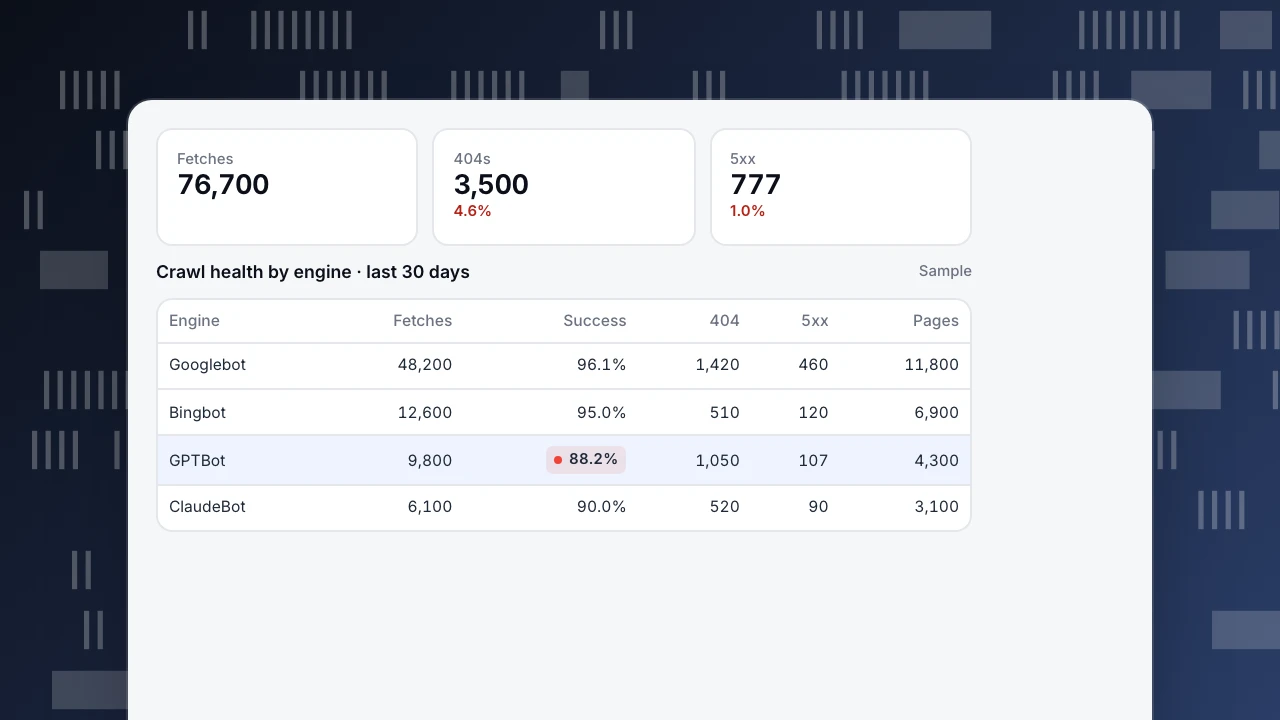
Search Console shows Google's view. Server logs show every crawler, including AI crawlers, which use the same server capacity. Group fetches by engine and look at success rate, 404s, 5xx and how many distinct pages each one fetched.
In the example, GPTBot spent more than one in ten requests on 404s, mostly old URLs. Googlebot's 460 server errors matter more: errors lower the capacity limit for the whole host. The fix order is: 5xx first, then 404s that crawlers keep requesting (redirect the ones with a real successor, let the rest return 404 or 410), then duplicate and parameter URLs. For the AI side, see GPTBot, ClaudeBot and the AI crawler ledger.
Fetches
76,700
404s
3,500
4.6%
5xx
777
1.0%
Crawl health by engine · last 30 days
Sample| Engine | Fetches | Success | 404 | 5xx | Pages |
|---|---|---|---|---|---|
| Googlebot | 48,200 | 96.1% | 1,420 | 460 | 11,800 |
| Bingbot | 12,600 | 95.0% | 510 | 120 | 6,900 |
| GPTBot | 9,800 | 88.2% | 1,050 | 107 | 4,300 |
| ClaudeBot | 6,100 | 90.0% | 520 | 90 | 3,100 |
A fix order that works
- Stop server errors. 5xx and timeouts reduce how much any crawler will fetch.
- Clean up dead URLs. Remove internal links to them; return 404 or 410.
- Consolidate duplicates. Canonical URLs for sorted, filtered and tracking-parameter variants.
- Block endless spaces. Faceted combinations, calendars and internal search in robots.txt.
- Keep sitemaps current with
lastmod, and avoid redirect chains. - Check again in two weeks, by engine.
Crawl health in TapCub
Crawl reports need server-side records, since a page script cannot see status codes or crawlers that skip JavaScript; send them through log import or server events. Crawl health shows total fetches, success rate (status below 400), distinct pages, 404s and 5xx, split by engine, with each crawler's most fetched pages. With a sitemap URL set, it compares sitemap URLs with what was fetched and shows how long new pages from the last 30 days waited for each engine's first fetch. Crawler compliance compares real fetches with your robots.txt and flags three violation types: fetched while blocked globally, fetched a disallowed path, and fetched sooner than the declared delay. A crawl anomaly alert fires when one engine's 24-hour fetches drop below 30% of its 7-day daily average (crawl health & compliance). More in bot and AI crawler.
FAQ
What is crawl budget?
The number of URLs a search engine can and wants to crawl on a site in a given time, set by the server's capacity and the engine's demand for its pages.
Does crawl budget matter for small sites?
Rarely. Google's guide targets sites with very many pages or very frequent changes.
Does noindex save crawl budget?
No. The page is still requested before the tag is read. Use robots.txt for URLs you do not want crawled.
Do AI crawlers use my crawl budget?
They do not use Google's budget, but they use the same server capacity. If they cause errors or slow responses, that affects how much Google crawls.
How do I check my crawl budget?
Use the Crawl Stats report in Search Console for Google, and server logs grouped by engine for everything else.
See also
Was this article helpful?
We use your answers to fix and expand this page.
Couldn’t send. Please try again in a minute.
Thanks for the feedback. We’ll use it to improve this page.You’ve already sent feedback on this page. Thanks.

Customer Experience Consultant
Writes about live chat, visitor conversations, and self-service, sharing practical ways to make customer communication clearer and more effective.