Try it on your own data
Every report in this article is in the free plan. One snippet for web and apps, up to 10 sites.
Start freeCrawlers decide whether your pages get indexed, used by AI models or cited in AI answers, and some of them are not who they say they are. This guide explains how crawlers work, the types you will see in your logs, and how to verify and control them, with a worked week of real-looking log data.
What you will learn
- A crawler fetches pages, extracts links and follows them
- Robots.txt is a request; scrapers ignore it
- AI training and AI search crawlers need different decisions
- Verify crawlers with reverse DNS or published IP lists
- Many AI crawlers do not run JavaScript
What is a web crawler?
A web crawler (also called a spider or bot) is a program that visits web pages automatically, downloads them, extracts the links they contain and follows those links to find more pages. Search engines use crawlers to build their index; AI companies use them to collect training data and to fetch pages for answers; SEO tools, uptime monitors and price scrapers use them too.
On a typical website, automated requests are a large share of all traffic. Knowing which crawlers visit, what they fetch and whether they are who they claim to be is part of both SEO and security.
How a web crawler works
- Seed URLs. The crawler starts from known URLs: previously crawled pages, sitemaps, links submitted by site owners.
- Crawl frontier. URLs waiting to be fetched sit in a queue, prioritized by importance, freshness and how often the page changes.
- Robots check. Before fetching, a well-behaved crawler reads
/robots.txtfor the host and skips disallowed paths (the Robots Exclusion Protocol, standardized as RFC 9309). - Fetch. It requests the page with its own user-agent string, respecting rate limits so the server is not overloaded.
- Parse and render. It extracts text, links and metadata. Some crawlers, such as Googlebot, also render JavaScript in a later pass; many AI crawlers do not.
- Store and schedule. Content goes to an index or dataset; new links join the frontier; the page is scheduled for a revisit.
Types of web crawlers
| Type | Purpose | Examples (user-agent token) |
|---|---|---|
| Search engine | Build and refresh a search index | Googlebot, Bingbot, Applebot, YandexBot, Baiduspider |
| AI training | Collect content to train models | GPTBot, ClaudeBot, CCBot, Bytespider, Google-Extended (a robots.txt token, not a separate bot) |
| AI search and user-triggered | Fetch pages to answer a question or cite a source | OAI-SearchBot, ChatGPT-User, PerplexityBot, Claude-User |
| SEO tools | Map links and rankings for tool users | AhrefsBot, SemrushBot, MJ12bot |
| Monitoring | Uptime, performance and synthetic checks | Pingdom, UptimeRobot, Lighthouse runners |
| Scrapers and unknown | Price scraping, content copying, vulnerability scanning | Often fake or generic user agents |
The difference between AI training and AI search crawlers matters for decisions: blocking a training crawler keeps your content out of a model's training data; blocking a search or user-triggered crawler removes you from that assistant's answers and the visits they send.
| Type | Decision if blocked |
|---|---|
| Search engine | Pages drop out of search |
| AI training | Content kept out of model training |
| AI search / user-triggered | Lost from AI answers and their visits |
| SEO tools | Less data in third-party tools |
| Scrapers | Block by verified identity |
Decide per user-agent token in robots.txt.
Worked example: seven days of crawler traffic
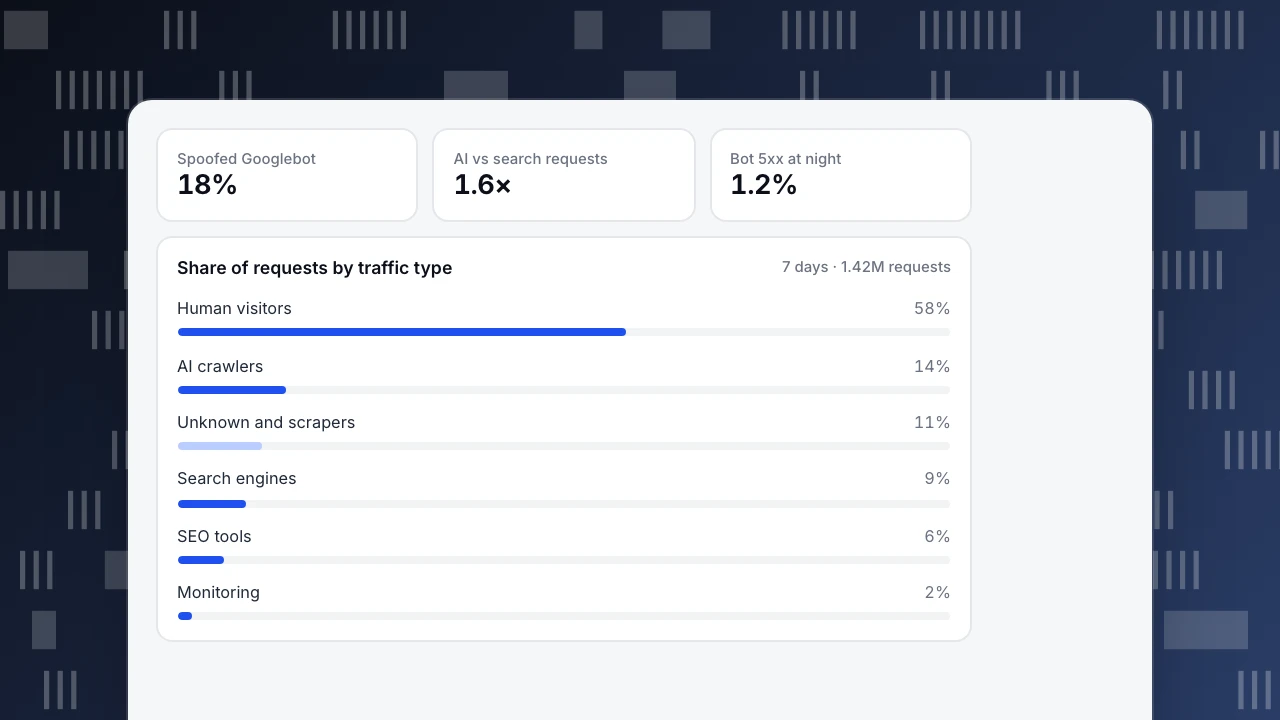
A content site analyzed 7 days of server logs, 1,420,000 requests in total (sample figures):
| Traffic type | Share of requests | Requests |
|---|---|---|
| Human visitors | 58% | 823,600 |
| AI crawlers (training and answer) | 14% | 198,800 |
| Unknown and scrapers | 11% | 156,200 |
| Search engine crawlers | 9% | 127,800 |
| SEO tools | 6% | 85,200 |
| Monitoring | 2% | 28,400 |
What the logs showed:
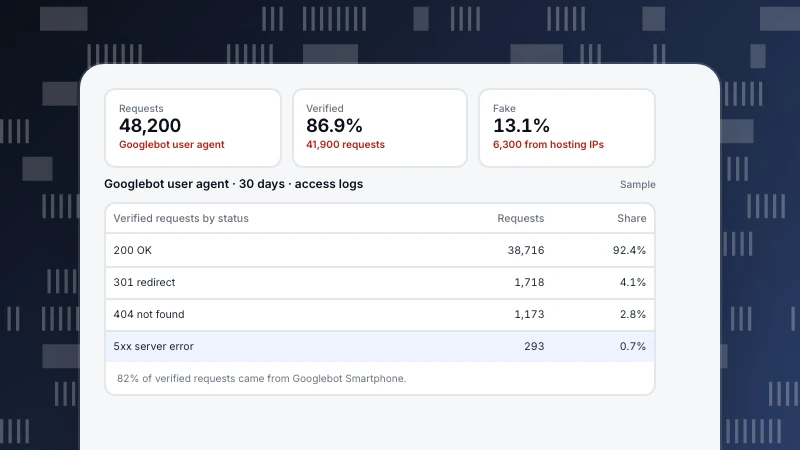
- Not every "Googlebot" was Google. 21,400 requests carried a Googlebot user agent; 3,900 of them (18%) came from IPs that failed reverse DNS verification. Those were scrapers using a trusted name to avoid blocks.
- AI crawlers outnumbered search crawlers. AI bots made 1.6 times as many requests as search engines, but most of their fetches went to old archive pages.
- One SEO tool was crawling faceted URLs. 41% of SEO-tool requests hit filter combinations like
?color=red&size=m, which the site does not want indexed anyway. - Errors hid in bot traffic. Search crawlers got 5xx errors on 1.2% of requests during a nightly backup window; humans rarely visited at that hour, so nobody had noticed.
Actions: block the spoofed Googlebot IPs, add a Disallow for faceted parameters, move the backup out of peak crawl hours, and keep AI search bots allowed while reviewing the training bots.
Spoofed Googlebot
18%
AI vs search requests
1.6×
Bot 5xx at night
1.2%
Share of requests by traffic type
7 days · 1.42M requestsHow to identify and verify crawlers
- User agent: the first clue, but trivially faked.
- Reverse DNS: look up the requesting IP, check the hostname ends in the operator's domain (for Google,
googlebot.com,google.comorgoogleusercontent.com), then do a forward lookup to confirm it resolves back to the same IP. - Published IP ranges: Google, Bing, OpenAI and others publish JSON lists of crawler IPs. Match against them.
- Behavior: request rate, whether it fetches robots.txt, whether it runs JavaScript, which paths it requests.
How to control crawlers
- robots.txt to allow or disallow paths per user-agent token. It is a request, not access control: well-behaved crawlers obey, scrapers do not.
- Meta robots and X-Robots-Tag to keep a crawled page out of the index (
noindex) or stop links being followed. - Sitemaps to point crawlers at the URLs you want found, with last-modified dates.
- Rate limiting and WAF rules for crawlers that ignore robots.txt or overload the server; block by verified identity, not user agent alone.
- Server-side rendering for content you want AI crawlers to read, since many do not execute JavaScript.
Seeing crawlers in TapCub
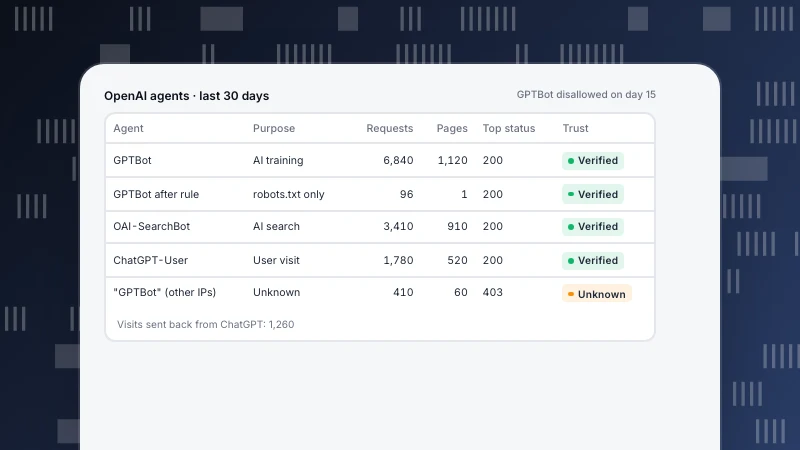
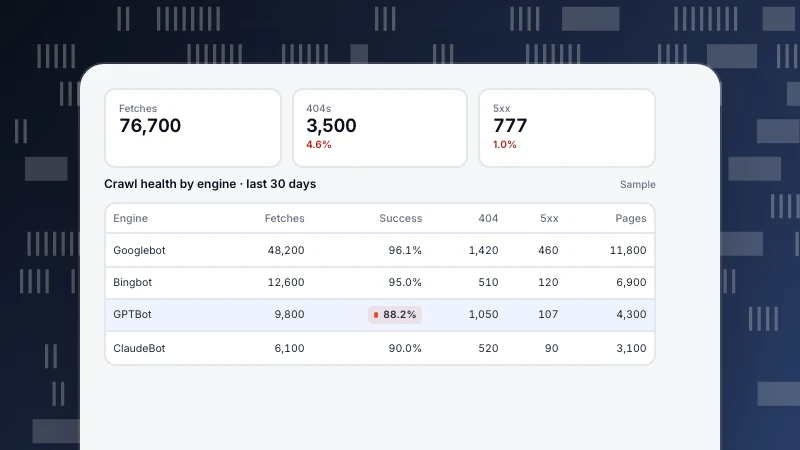
Web analytics › Bots separates recognized bots from human traffic by default. All bots lists each crawler's name, operator, purpose (search, AI training, AI answer engine, monitoring), requests, pages, most common status code, trust level (verified, suspected or unknown) and the detection layers it matched (How bot detection works). Monitoring › Crawl health checks success rates and whether fetches followed your robots.txt (Check crawl health).
With only the page script, you see only crawlers that execute JavaScript. Most search and AI crawlers fetch HTML without running scripts, so add server collection or import server logs for full coverage. For specific crawlers, see Googlebot and GPTBot; for using logs in SEO, Log file analysis.
Sources
- IETF, RFC 9309: Robots Exclusion Protocol (2022).
- Google Search Central, Verifying Googlebot and other Google crawlers.
- Google Search Central, Overview of Google crawlers and fetchers.
Was this article helpful?
We use your answers to fix and expand this page.
Couldn’t send. Please try again in a minute.
Thanks for the feedback. We’ll use it to improve this page.You’ve already sent feedback on this page. Thanks.

Customer Experience Consultant
Writes about live chat, visitor conversations, and self-service, sharing practical ways to make customer communication clearer and more effective.