Try it on your own data
Every report in this article is in the free plan. One snippet for web and apps, up to 10 sites.
Start freeEvery page that ranks in Google was first fetched by Googlebot, and a good share of the "Googlebot" requests in your logs are not Google at all. This guide explains how Googlebot crawls and renders, which other Google crawlers you will see, how to verify a real one, and what a month of logs looks like.
What you will learn
- Googlebot Smartphone does most crawling; the user agent string alone proves nothing
- Verify with reverse DNS (googlebot.com or google.com) plus a forward lookup, or Google’s published IP ranges
- Fast, stable responses keep crawling healthy; 5xx errors make Googlebot back off
What is Googlebot?
Googlebot is the web crawler Google uses to discover and fetch pages for Google Search. It follows links and sitemaps, downloads pages, renders them, and passes the content to Google's indexing systems. If Googlebot cannot fetch a page, that page cannot rank.
There are two main versions:
- Googlebot Smartphone crawls most sites, because Google indexes the mobile version of pages first.
- Googlebot Desktop still crawls, but much less often on most sites.
Both identify themselves with "Googlebot" in the user agent string, but the user agent alone proves nothing: anyone can copy it.
How Googlebot crawls and renders
- Discovery: links from pages it already knows, sitemaps, and URLs submitted in Search Console.
- Robots rules: before fetching, it checks robots.txt and skips disallowed paths. It ignores the crawl-delay directive.
- Fetch: it downloads the HTML (Google documents a limit of the first 15 MB of each file) and the resources needed to render.
- Render: a recent version of Chromium runs the JavaScript, so content added by scripts can be indexed, sometimes with a delay.
- Crawl rate: Google adjusts how fast it crawls based on how quickly your server responds and how much it wants your content. Slow responses and 5xx errors make it back off. See how often Google crawls.
Other Google crawlers
Googlebot is not the only Google crawler in your logs. The table below lists the ones you will meet most often and how to address them in robots.txt.
| Crawler | What it fetches | robots.txt token |
|---|---|---|
| Googlebot Smartphone / Desktop | Pages for Google Search | Googlebot |
| Googlebot Image | Images for Search and Images | Googlebot-Image |
| Googlebot Video | Video files and pages | Googlebot-Video |
| Google-InspectionTool | Live tests from Search Console | Googlebot rules apply |
| GoogleOther | Internal research and one-off crawls | GoogleOther |
| AdsBot-Google | Ad landing page quality checks | AdsBot-Google (ignores * rules) |
| Google-Extended | Not a separate crawler: a token that controls use for Gemini models | Google-Extended |
Check Google’s crawler overview for the current list; tokens and names change.
How to verify a real Googlebot
Fake Googlebots are common: scrapers and vulnerability scanners copy the user agent to avoid being blocked. To verify an IP address:
- Reverse DNS: look up the hostname of the IP (for example
host 66.249.66.1). A real Googlebot resolves to a name ending in googlebot.com or google.com. - Forward DNS: look up that hostname and check that it returns the same IP.
- Or compare with Google's published IP ranges, which Google provides as JSON files for its crawlers.
Do not block by user agent alone, and do not trust it alone either.
A sample month in the logs
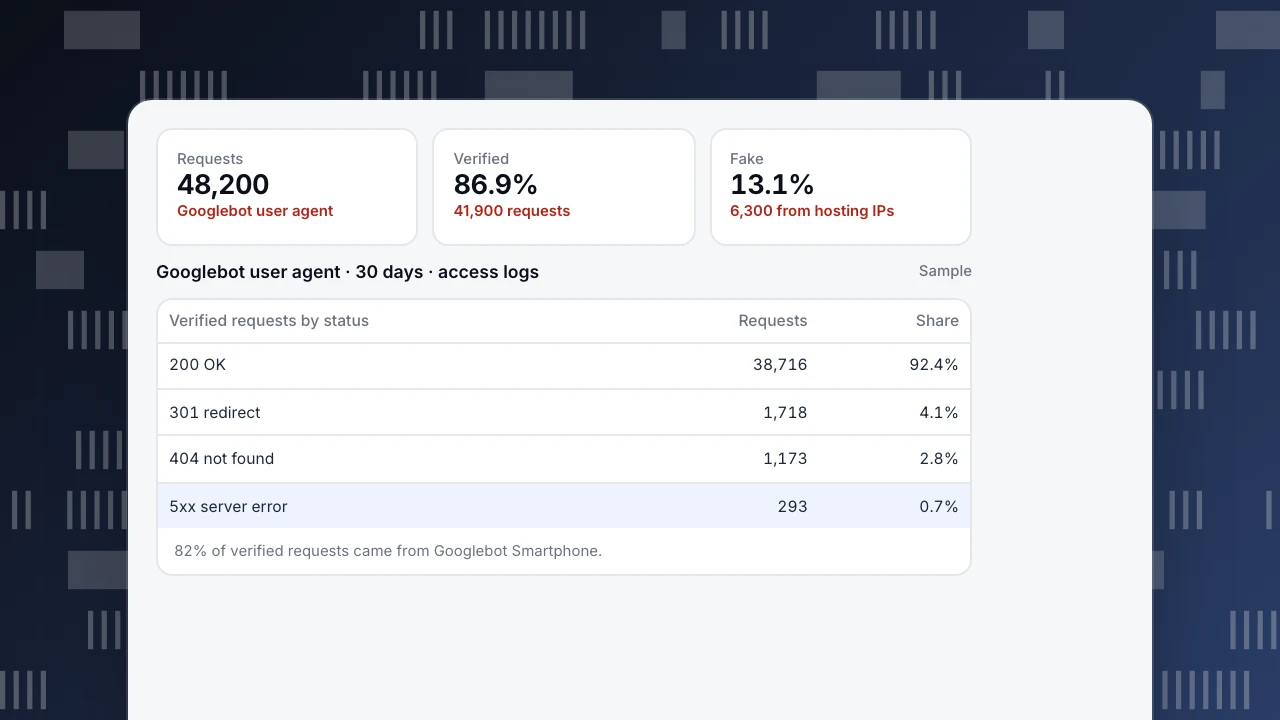
A content site imports 30 days of access logs (sample numbers):
- 48,200 requests carry a Googlebot user agent.
- 41,900 (86.9%) verify as Google; 6,300 (13.1%) come from hosting providers and are fake. Most fake requests target login pages and old plugin paths.
- Of the verified requests, 92.4% returned 200, 4.1% were 301 redirects, 2.8% were 404s and 0.7% were 5xx errors.
- 82% of verified requests came from Googlebot Smartphone.
Actions: block the fake requests at the firewall by IP, fix the redirect chains, and look at what the 404s were linked from. The 0.7% of 5xx errors deserves attention, because repeated server errors slow down crawling.
Requests
48,200
Googlebot user agent
Verified
86.9%
41,900 requests
Fake
13.1%
6,300 from hosting IPs
Googlebot user agent · 30 days · access logs
Sample| Verified requests by status | Requests | Share |
|---|---|---|
| 200 OK | 38,716 | 92.4% |
| 301 redirect | 1,718 | 4.1% |
| 404 not found | 1,173 | 2.8% |
| 5xx server error | 293 | 0.7% |
82% of verified requests came from Googlebot Smartphone.
Controlling Googlebot
- robots.txt controls crawling, not indexing. A blocked URL can still appear in results if other pages link to it. See robots.txt disallow all.
- noindex (meta tag or X-Robots-Tag header) keeps a page out of the index; Googlebot must be able to crawl the page to see it.
- Crawl rate: you cannot set it directly. Fast, stable responses let Google crawl more; returning 503 or 429 temporarily slows it down.
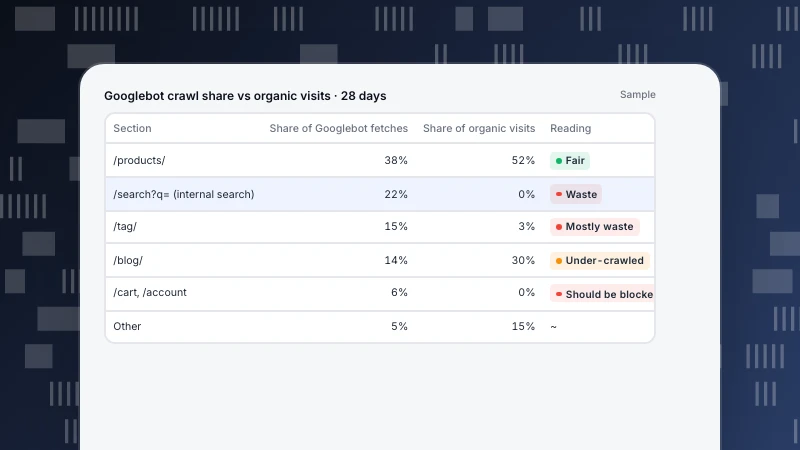
- Crawl budget matters mainly for large sites; see crawl budget.
Seeing Googlebot in TapCub
- Web analytics › Bots, on the All bots tab, lists each crawler with its operator, purpose, requests, pages, most common status code, last seen and trust level (verified, suspected or unknown). Recognised bots are kept out of your human visitor numbers by default.
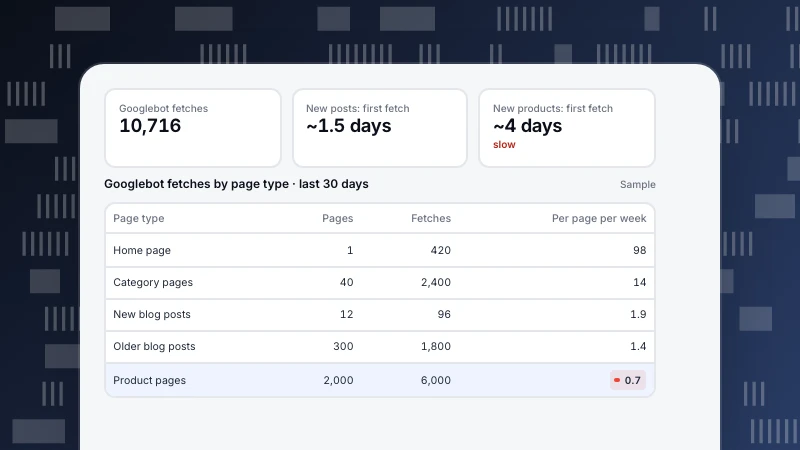
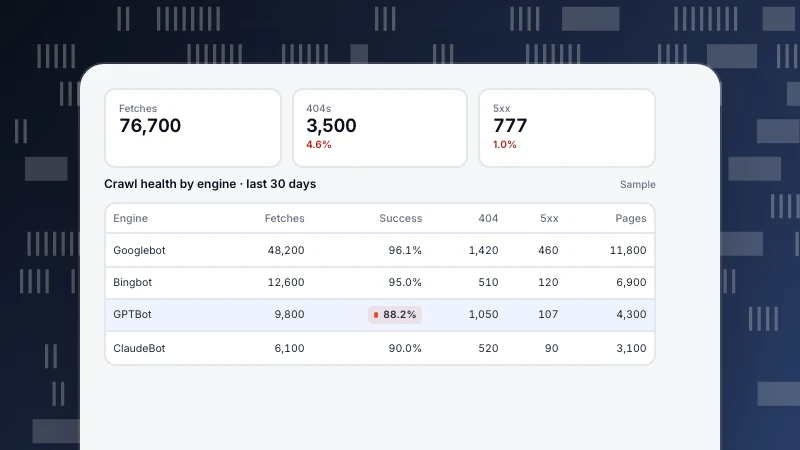
- Monitoring › Crawl health shows fetches, success rate, distinct pages, 404s and 5xx per search engine, and, with a sitemap set, how long new pages waited for their first fetch. Turn on the Crawl anomaly notification to hear when an engine's 24-hour fetches fall below 30% of its 7-day daily average.
- Googlebot rarely runs your analytics script, so status codes and full crawl counts need server events or a log import. See log file analysis for SEO.
See also
Was this article helpful?
We use your answers to fix and expand this page.
Couldn’t send. Please try again in a minute.
Thanks for the feedback. We’ll use it to improve this page.You’ve already sent feedback on this page. Thanks.

Customer Experience Consultant
Writes about live chat, visitor conversations, and self-service, sharing practical ways to make customer communication clearer and more effective.