Try it on your own data
Every report in this article is in the free plan. One snippet for web and apps, up to 10 sites.
Start freeGoogle has no fixed crawl schedule; frequency differs for every page. This guide shows how to measure crawl frequency on your own site by page type and new-page wait, and which methods actually get pages crawled sooner.
What you will learn
- Crawl frequency is per URL, not per site
- Measure fetches per page type and the wait for new pages
- Internal links from often-crawled pages beat repeated requests
The short answer
There is no fixed schedule, and no single number for a site. Google decides per URL: popular pages that change often, such as a home page or a busy category, can be fetched many times a day, while deep pages that rarely change may wait weeks. For a new or changed page, Google says crawling can take from a few days to a few weeks (Ask Google to recrawl your URLs).
So the useful question is "how often does Google crawl each kind of page on my site, and how long do new pages wait?" Both can be measured.
What decides how often a page is crawled
- Demand: how important the page looks (links to it, traffic) and how often it has changed in the past.
- Discovery: whether Google can find new URLs quickly, through internal links and sitemaps.
- Capacity: how fast and reliably your server responds; errors and slow responses reduce crawling for the whole host. See crawl budget.
Measure crawl frequency on your site
Use server logs or Search Console's Crawl Stats report. From logs, filter verified Googlebot requests and group them by page type, then divide fetches by the number of pages and weeks. Separately, for pages published in the last month, measure the time from publishing to the first Googlebot fetch.
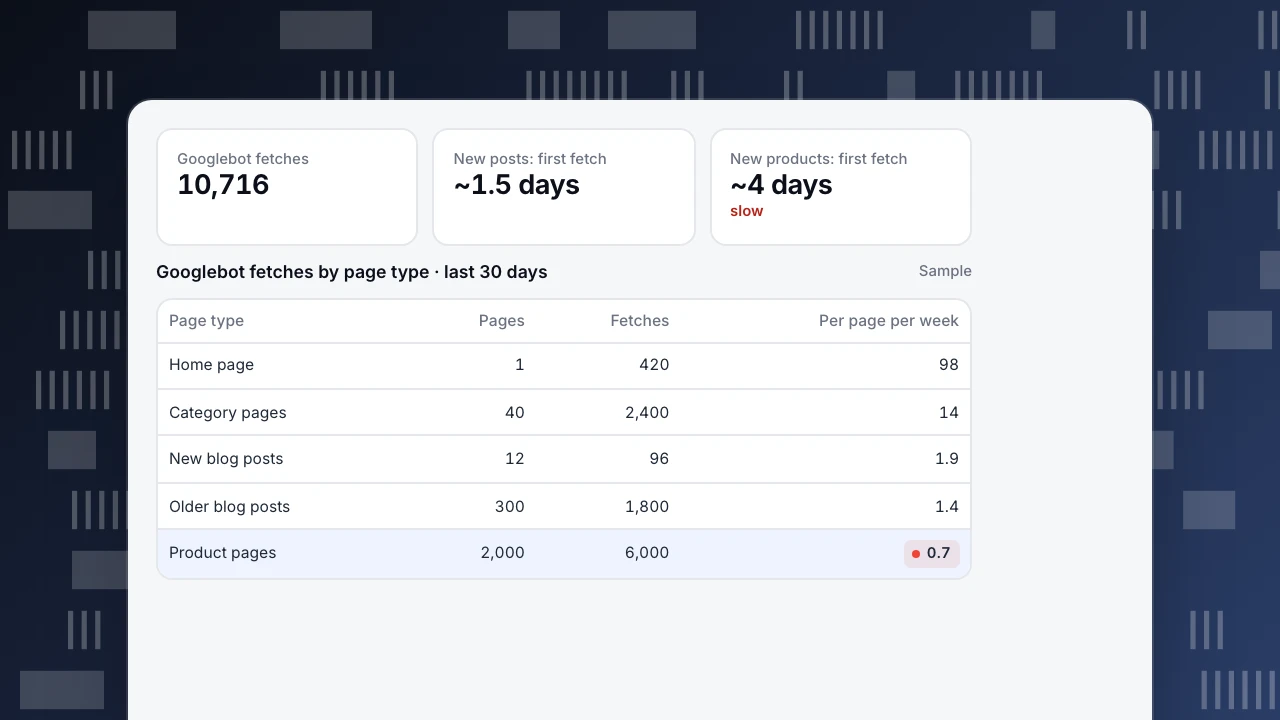
In the example, the home page is fetched about 98 times a week and categories 14 times, while product pages average less than one fetch per page per week and new products wait about four days. New blog posts get fetched within about a day and a half because they are linked from the home page. That points straight at the fix: link new products from frequently crawled pages.
Googlebot fetches
10,716
New posts: first fetch
~1.5 days
New products: first fetch
~4 days
slow
Googlebot fetches by page type · last 30 days
Sample| Page type | Pages | Fetches | Per page per week |
|---|---|---|---|
| Home page | 1 | 420 | 98 |
| Category pages | 40 | 2,400 | 14 |
| New blog posts | 12 | 96 | 1.9 |
| Older blog posts | 300 | 1,800 | 1.4 |
| Product pages | 2,000 | 6,000 | 0.7 |
How to get pages crawled sooner
The table compares the methods that help, with the limits Google states. Internal links from frequently crawled pages are usually the most effective and cost nothing. Sitemaps help for many URLs, but Google uses lastmod only when it is consistently and verifiably accurate, and ignores priority and changefreq (build and submit a sitemap).
| Method | Best for | Limit |
|---|---|---|
| Internal links from often-crawled pages | Every new page | Links must be visible and crawlable |
| XML sitemap with lastmod | Many URLs at once | lastmod used only if accurate |
| URL Inspection: request indexing | A few important URLs | Quota; repeats do not help |
| Fast, error-free server | Whole site | Errors reduce crawling for the host |
| Removing dead and duplicate URLs | Large sites | Frees demand for real pages |
Limits as stated in Google's recrawl and sitemap docs.
What does not help
- Requesting the same URL again and again. Google says repeated requests will not make it faster, and the inspection tool has a quota.
- Setting every
lastmodto today. Inaccurate dates teach Google to ignore them. - Changing
changefreqorpriority. Google ignores both. - Publishing pages with no internal links. Orphan pages depend on the sitemap alone.
Watching crawl frequency in TapCub
Crawl reports need server-side records, sent through log import or server events, because a page script cannot see crawlers that skip JavaScript. Crawl health splits fetches by engine and lists each crawler's most fetched pages. With a sitemap URL set, it compares sitemap URLs with what was fetched and shows how long new pages from the last 30 days waited between first appearing and each engine's first fetch. The crawl anomaly alert notifies you when one engine's 24-hour fetches fall below 30% of its 7-day daily average, which is often the first sign of a blocking rule or server problem (crawl health & compliance). To see whether pages that were crawled are actually gaining traffic, see content performance metrics; for crawler basics, bot.
FAQ
How often does Google crawl a website?
There is no fixed interval. Important, frequently changing pages may be crawled several times a day; deep pages that rarely change, every few weeks.
How long does it take Google to crawl a new page?
Google says from a few days to a few weeks. Pages linked from frequently crawled pages are usually found much sooner.
How can I check when Google last crawled my page?
Use the URL Inspection tool in Search Console for one page, or your server logs for every page.
Can I make Google crawl my site every day?
You cannot set a frequency. You can make important pages easy to find, keep the server fast, and keep sitemaps accurate.
Does requesting indexing speed up crawling?
For a few important URLs it can help once. Repeating the request does not, and there is a quota.
Was this article helpful?
We use your answers to fix and expand this page.
Couldn’t send. Please try again in a minute.
Thanks for the feedback. We’ll use it to improve this page.You’ve already sent feedback on this page. Thanks.

Customer Experience Consultant
Writes about live chat, visitor conversations, and self-service, sharing practical ways to make customer communication clearer and more effective.