Try it on your own data
Every report in this article is in the free plan. One snippet for web and apps, up to 10 sites.
Start freeThe click-through rate formula fits in one line: clicks divided by impressions. The trouble is that "impressions" means something different for an ad, a search result, an email and a button on your site. This guide works through all four with numbers, shows how to pick the denominator, and explains how CTR differs from conversion rate.
What you will learn
- CTR = clicks ÷ impressions, but each channel defines impressions differently
- Pick and state the denominator: delivered vs opened emails, page views vs visible views
- Bots, link scanners and duplicate clicks inflate CTR; filter them before comparing
The CTR formula
Click-through rate (CTR) is the share of people who clicked something after seeing it:
CTR = clicks ÷ impressions × 100%
Google Ads defines it the same way: the number of clicks an ad receives divided by the number of times it is shown (Google Ads Help). The formula is simple. The hard part is the denominator, because "impressions" means something different in ads, search results, email and on your own site.
Worked examples in four contexts
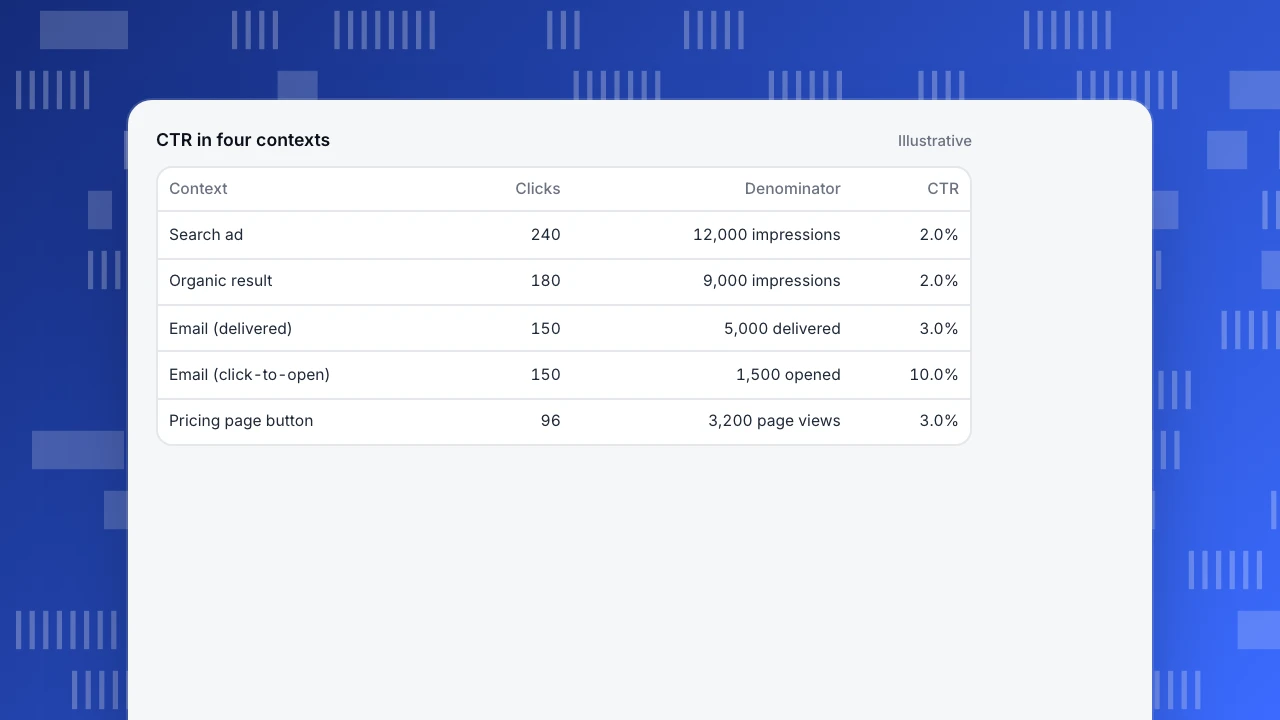
The example table calculates CTR in four places with round numbers:
- Search or display ad: 240 clicks from 12,000 impressions = 2.0%.
- Organic search result: Search Console counts an impression when your result appears and a click when someone opens it (Search Console Help). 180 clicks from 9,000 impressions = 2.0%.
- Email: 150 unique clickers from 5,000 delivered emails = 3.0% click rate. The same 150 clickers from 1,500 openers = 10% click-to-open rate. Both are called CTR in different tools.
- On-site button: 96 clicks on "Start free trial" from 3,200 views of the pricing page = 3.0%.
Same formula, four different denominators, and the numbers are not comparable across rows.
CTR in four contexts
Illustrative| Context | Clicks | Denominator | CTR |
|---|---|---|---|
| Search ad | 240 | 12,000 impressions | 2.0% |
| Organic result | 180 | 9,000 impressions | 2.0% |
| Email (delivered) | 150 | 5,000 delivered | 3.0% |
| Email (click-to-open) | 150 | 1,500 opened | 10.0% |
| Pricing page button | 96 | 3,200 page views | 3.0% |
Choose the right denominator
- Ads and search: impressions as reported by the platform. A result shown far down the page counts as an impression even if nobody scrolled to it, which is why CTR falls with position.
- Email: prefer delivered emails over opens. Open tracking is unreliable because some mail apps load images automatically, which inflates opens and makes click-to-open look worse.
- On-site elements: views of the page that contains the element, or better, views where the element was actually visible. Using all sessions as the denominator understates the CTR of anything below the fold.
- Unique or total clicks: decide once. Unique clickers ÷ unique viewers is a share of people; total clicks ÷ total impressions is a rate of events. Report which.
CTR vs conversion rate
CTR and conversion rate measure different steps. CTR measures interest at one click; conversion rate measures whether the person completed the goal afterwards. A high CTR with a low conversion rate usually means the ad or button promised something the next page did not deliver. The table compares them; the conversion rate calculator handles the second.
| CTR | Conversion rate | |
|---|---|---|
| Measures | Interest in one link or element | Completion of a goal |
| Formula | Clicks ÷ impressions | Conversions ÷ visitors or sessions |
| Step | Before the visit or the next page | After the click, at the goal |
| High value means | The message attracts clicks | The page delivers on the promise |
| Typical trap | Bots and scanners inflate clicks | Denominator mixes visitors and sessions |
High CTR with low conversion usually means the click was promised something the page did not give.
What inflates CTR
- Bots and link scanners: email security tools click every link to check it, and some crawlers follow ad links. Filter known bots and look for clicks within a second of delivery.
- Duplicate clicks: double clicks and repeated taps on a slow button. Count unique clickers per view where possible.
- Accidental clicks: on mobile, small or moving elements get mis-tapped. A high CTR followed by an immediate back is a sign.
- Changed denominators: switching from delivered to opened emails, or from sessions to page views, changes CTR without any change in behaviour.
Measure on-site CTR
For links and buttons on your own site, CTR needs two numbers: how often the element was seen and how often it was clicked. Two ways to get them:
- Track click events on the elements that matter (sign-up, add to cart, contact) and divide by views of the page; see the event tracking guide.
- Use autocapture and heatmaps to see clicks on every clickable element without defining events first, then promote the important ones to named events. Autocapture and a heatmap answer "what do people click on this page"; events answer "how often, over time, by channel".
Look at CTR by traffic source too. A button with 3% CTR overall may have 6% for returning visitors and 1% for paid social, which is a different problem.
CTR in TapCub
In TapCub, on-site CTR comes from events and page views. Custom click events give the numerator, and page views of the page give the denominator; a saved formula metric divides one by the other and can be broken down by channel or device. Outbound link clicks are recorded automatically as an event, so clicks to external sites need no extra code.
With autocapture on (Pro plan and above), the heatmap shows clicks, rage clicks and scroll reach per page template, and an element table lists the most clicked controls with their share of clicks (heatmaps). Scroll reach helps pick a fairer denominator for elements far down the page. Bot traffic is filtered from human reports.
FAQ
How do you calculate CTR?
Divide clicks by impressions and multiply by 100. For an ad with 240 clicks and 12,000 impressions, CTR is 2%.
What is the difference between CTR and click-to-open rate?
CTR in email usually divides clicks by delivered emails; click-to-open rate divides clicks by opened emails. Click-to-open is always higher.
What is a good CTR?
It depends on the channel, position, audience and offer. Compare with your own history in the same channel rather than with a cross-industry average.
Is CTR the same as conversion rate?
No. CTR measures clicks on one element; conversion rate measures completed goals. A visitor can click and not convert.
How do I calculate CTR for a button on my website?
Clicks on the button divided by views of the page that contains it. Use unique clickers and unique viewers if you want a share of people.
Was this article helpful?
We use your answers to fix and expand this page.
Couldn’t send. Please try again in a minute.
Thanks for the feedback. We’ll use it to improve this page.You’ve already sent feedback on this page. Thanks.

Data Analyst
Explores traffic sources, conversion funnels, and retention, using clear metric definitions and concrete examples to explain what the numbers mean.