Try it on your own data
Every report in this article is in the free plan. One snippet for web and apps, up to 10 sites.
Start freeBingbot crawls the web for Bing, and Bing’s index also feeds other products, so it is often the second most important crawler on a site. This guide covers its user agents, how to verify it, a worked week comparing it with Googlebot, crawl rate control and IndexNow.
What you will learn
- Verify Bingbot by reverse DNS (*.search.msn.com) and a matching forward lookup; the user agent alone proves nothing
- Bing honours Crawl-delay and offers hourly crawl control in Bing Webmaster Tools
- IndexNow lets you tell Bing about new or changed URLs instead of waiting for the next crawl
What Bingbot is
Bingbot is the web crawler Microsoft uses to discover and refresh pages for the Bing search index. It matters beyond Bing itself: Bing's index also serves other Microsoft products such as Copilot, and other search engines license Bing results.
For many sites Bingbot is the second-busiest search crawler after Googlebot.
Bing's crawlers and user agents
The table below lists the main crawlers Bing documents. The user agent of the standard Bingbot contains bingbot/2.0, for example:
Mozilla/5.0 AppleWebKit/537.36 (KHTML, like Gecko; compatible; bingbot/2.0; +http://www.bing.com/bingbot.htm) Chrome/W.X.Y.Z Safari/537.36The Chrome version in the string changes as Bing updates its rendering engine.
| Crawler | Purpose | User agent contains |
|---|---|---|
| Bingbot | Standard crawl for the Bing index | bingbot/2.0 |
| AdIdxBot | Checks landing pages of Bing ads | adidxbot |
| MicrosoftPreview | Generates page previews and snapshots | MicrosoftPreview |
Verify all Microsoft crawlers the same way: reverse DNS to search.msn.com.
How to verify real Bingbot
Anyone can put "bingbot" in a user agent. To verify a request:
- Take the IP address and do a reverse DNS lookup. Real Bingbot resolves to a host ending in
.search.msn.com. - Do a forward DNS lookup on that host name and check it returns the same IP.
- Or paste the IP into Bing's Verify Bingbot tool in Bing Webmaster Tools.
Requests that claim to be Bingbot but fail this check are fake: often scrapers hoping you will not block a search engine.
A worked week: Bingbot next to Googlebot
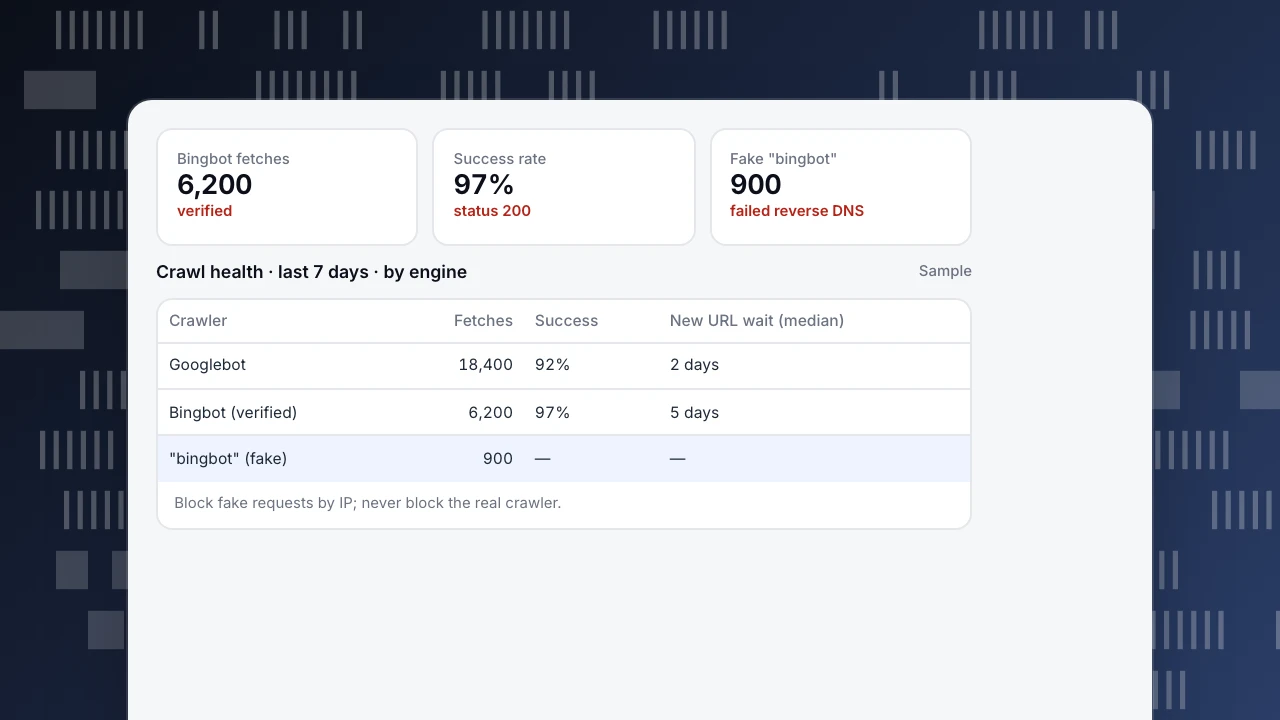
Server-side crawl data for one site over 7 days (sample numbers):
- Googlebot: 18,400 fetches
- Bingbot (verified): 6,200 fetches, 97% returned 200
- "Bingbot" that failed verification: 900 requests, mostly to search and product listing URLs, from hosting provider IPs
- New sitemap URLs: median wait for a first fetch, 2 days for Google and 5 days for Bing
What to do:
- Block or rate-limit the 900 fake requests at the firewall by IP; do not block the Bingbot user agent.
- To speed up Bing discovery, submit new URLs with IndexNow (below) and keep the sitemap's
lastmodaccurate.
Bingbot fetches
6,200
verified
Success rate
97%
status 200
Fake "bingbot"
900
failed reverse DNS
Crawl health · last 7 days · by engine
Sample| Crawler | Fetches | Success | New URL wait (median) |
|---|---|---|---|
| Googlebot | 18,400 | 92% | 2 days |
| Bingbot (verified) | 6,200 | 97% | 5 days |
| "bingbot" (fake) | 900 | — | — |
Block fake requests by IP; never block the real crawler.
Controlling Bingbot's crawling
- robots.txt: Bingbot follows
Disallowrules forUser-agent: bingbotor*. Bing also honoursCrawl-delay, unlike Google. - Crawl control in Bing Webmaster Tools: set crawl rate by hour of day, for example less during your busiest hours.
- Server errors slow it down. Like Google, Bing reduces crawling when it sees many 5xx or timeouts; see crawl errors.
- Do not block it to save load. Blocking Bingbot removes you from Bing and the products that use its index.
IndexNow
IndexNow is an open protocol, supported by Bing and some other search engines, that lets you notify them when a URL is added, updated or deleted. You host a key file on your site and send the changed URLs to an IndexNow endpoint. Many CMS and CDN platforms offer it as a setting. It does not replace a sitemap, but it shortens the wait for new and updated pages.
Seeing Bingbot in TapCub
- Web analytics › Bots separates verified, suspected and unknown bots, and excludes bots from human data by default, so fake Bingbot traffic does not inflate visitors.
- Monitoring › Crawl health shows fetches, success rate, distinct pages, 404 and 5xx by engine, plus how long new sitemap URLs waited for each engine's first fetch.
- Monitoring › Search performance connects Bing Webmaster for clicks, impressions, CTR and position next to Google.
Related: Googlebot, crawl budget and how often Google crawls.
Was this article helpful?
We use your answers to fix and expand this page.
Couldn’t send. Please try again in a minute.
Thanks for the feedback. We’ll use it to improve this page.You’ve already sent feedback on this page. Thanks.

Customer Experience Consultant
Writes about live chat, visitor conversations, and self-service, sharing practical ways to make customer communication clearer and more effective.