Try it on your own data
Every report in this article is in the free plan. One snippet for web and apps, up to 10 sites.
Start freeSearches for your name and searches for the problem you solve behave so differently that reporting them together hides what SEO is doing. This guide defines both, compares them, works through a one-month split, and shows what to report.
What you will learn
- Branded queries come from people who already know you; non-branded ones are where SEO wins new visitors
- Branded clicks can be a small share of impressions but a large share of clicks, and they rise with brand demand
- Report non-branded clicks as SEO growth and branded clicks separately as brand demand
Definitions
A branded keyword contains your brand or product name, including misspellings and your domain: "acme analytics", "acme pricing", "acme login", "acmeapp".
A non-branded keyword describes the need without naming you: "website analytics tool", "how to track form submissions", "what is a good bounce rate".
The split matters because the two come from different people. Branded searchers already know you. Non-branded searchers are discovering options, which is what most SEO work is meant to win.
How they differ
The table below compares the two on the points that affect reporting.
| Branded | Non-branded | |
|---|---|---|
| Example | "acme pricing" | "website analytics tool" |
| Searcher | Already knows you | Looking for options or answers |
| Typical CTR | Very high (you rank first) | Low to moderate |
| Driven by | Brand awareness, word of mouth, ads | Content, SEO, links |
| Use in reporting | Brand demand | SEO growth |
| Risk if mixed | Brand spikes look like SEO gains | Real SEO progress hidden by brand dips |
Keep a written brand-term list so the split is the same every month.
A worked example: one month of search clicks
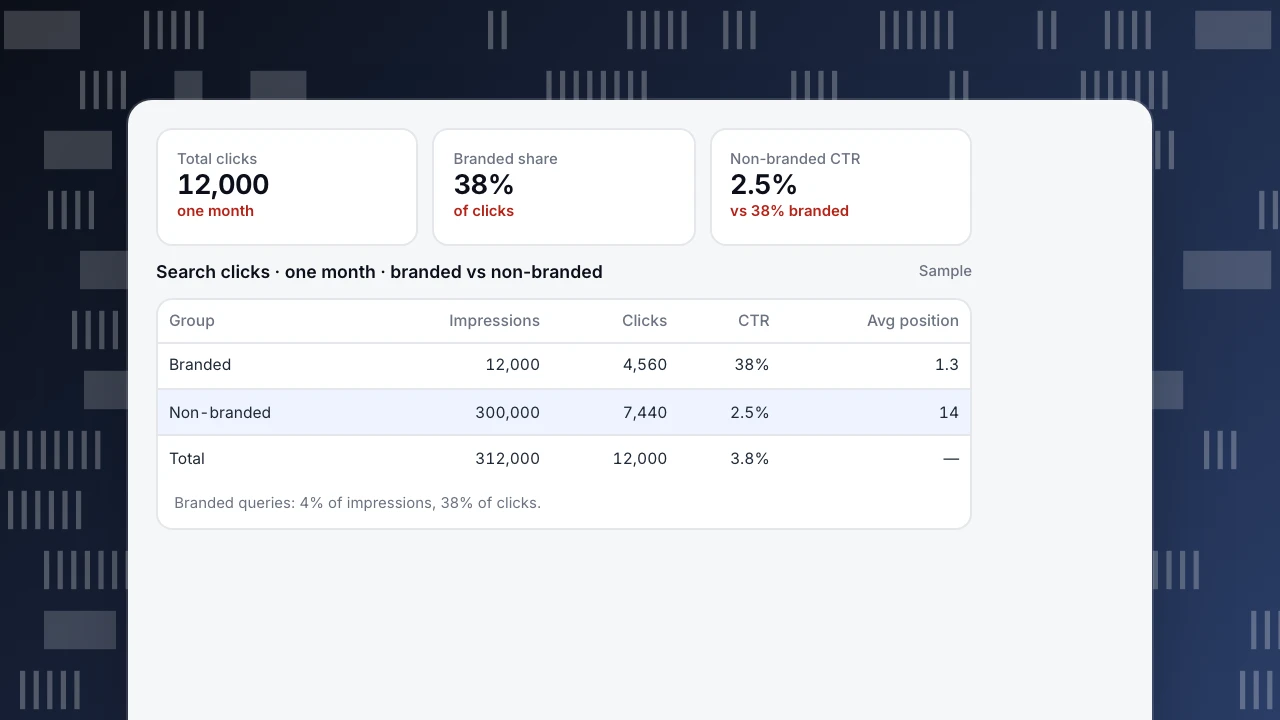
A site's Search Console data for one month (sample numbers):
- Branded queries: 12,000 impressions, 4,560 clicks, CTR 38%, average position 1.3
- Non-branded queries: 300,000 impressions, 7,440 clicks, CTR 2.5%, average position 14
Total: 12,000 clicks, of which 38% are branded.
Two things stand out. Branded queries are 4% of impressions but 38% of clicks, because people searching your name click your result. And if branded clicks rise after a product launch or a podcast appearance, total organic clicks rise too, even if no SEO work improved. Reporting only the total would credit SEO for brand growth.
Total clicks
12,000
one month
Branded share
38%
of clicks
Non-branded CTR
2.5%
vs 38% branded
Search clicks · one month · branded vs non-branded
Sample| Group | Impressions | Clicks | CTR | Avg position |
|---|---|---|---|---|
| Branded | 12,000 | 4,560 | 38% | 1.3 |
| Non-branded | 300,000 | 7,440 | 2.5% | 14 |
| Total | 312,000 | 12,000 | 3.8% | — |
Branded queries: 4% of impressions, 38% of clicks.
How to build your brand-term list
- Brand name and spacing variants: "acme", "acme analytics", "acmeanalytics".
- Common misspellings: "acmee", "acne analytics" (check the query report for real ones).
- Product and feature names that only you use.
- Domain and app names: "acme.com", "acmeapp".
- Founder or company names if people search them.
Exclude generic words that happen to be in your name. Review the list each quarter.
What to report
- Non-branded clicks and impressions as the main SEO growth metric.
- Branded clicks as a signal of brand demand, reported separately.
- Branded share of clicks: a falling share with rising totals usually means non-branded SEO is working.
- Non-branded CTR by page: where you rank but do not get clicked, titles and snippets need work. See how to calculate CTR.
More metrics are in SEO KPIs.
Paid search note
In paid search, branded campaigns are cheap and convert well, so they make the account ROAS look strong. Report branded and non-branded campaigns separately there too, and check whether branded ads add clicks you would have got organically.
Doing it in TapCub
Connect Google Search Console (and Bing) in Monitoring › Search performance. It shows clicks, impressions, CTR and position by page, query and country. In the query breakdown, group the queries that contain your brand terms, and compare the two groups month over month. Pages in the top 10 with CTR below the median are flagged, which is a good place to start on non-branded snippets. For the full picture of organic visits, see organic traffic.
Was this article helpful?
We use your answers to fix and expand this page.
Couldn’t send. Please try again in a minute.
Thanks for the feedback. We’ll use it to improve this page.You’ve already sent feedback on this page. Thanks.

Customer Experience Consultant
Writes about live chat, visitor conversations, and self-service, sharing practical ways to make customer communication clearer and more effective.