Try it on your own data
Every report in this article is in the free plan. One snippet for web and apps, up to 10 sites.
Start freeOrganic traffic is the visits that arrive from unpaid search results, such as a Google or Bing results page, rather than from ads, links on other sites or a typed address. It is usually the channel that grows slowest and lasts longest. This guide explains how analytics decides a visit is organic, how to measure it by engine and landing page, and what to check when it moves.
What organic traffic is
Organic traffic is visits that come from unpaid search results. Someone types a question into Google, Bing or another engine, sees your page in the normal results, and clicks. No ad was involved, so you do not pay per visit.
It matters because it compounds. A page that ranks keeps bringing visitors for months without new spend, which is why many sites treat it as the base layer under paid campaigns.
How analytics decides a visit is organic
Your analytics tool sees the visit, not the search. It labels it organic by looking at two things:
- The referrer. When the browser says the visitor came from a known search engine domain.
- The absence of paid signals. No ad click ID in the URL and no UTM tags marking it as paid.
The full rules TapCub uses are on how channels are decided. Two consequences are worth knowing:
- Search terms are mostly missing. Search engines rarely pass the query to the site. TapCub shows a search term only when the referrer carried it, so for queries use the engine's own console.
- Some organic visits look direct. Privacy settings and some apps strip the referrer, which moves those visits into direct traffic.
Organic vs paid and other channels
The table lists how each channel arrives and how it is recognised. If you tag ads with UTM parameters, keep the medium consistent (for example cpc), otherwise paid visits can be counted as organic.
| Channel | How the visit arrives | How it is recognised |
|---|---|---|
| Organic search | Unpaid result on a search engine | Search engine referrer, no paid click ID or paid UTM |
| Paid search | Ad on a results page | Ad click ID or UTM medium such as cpc |
| Direct | Typed address, bookmark, some apps | No referrer and no campaign tags |
| Referral | Link on another site | Referrer from a site that is not a search engine or social network |
| AI sources | Link in an AI assistant answer | Referrer from a known AI assistant |
Exact rules vary by tool; check how yours decides channels.
How to measure it
Open the sources report and read three cuts:
- By engine. Most sites see one engine dominate; a change in a smaller one is easy to miss in the total.
- By landing page. Organic traffic is earned page by page, so the landing-page list tells you which pages rank.
- Over time, against the previous period. Weekly seasonality is strong; compare full weeks.
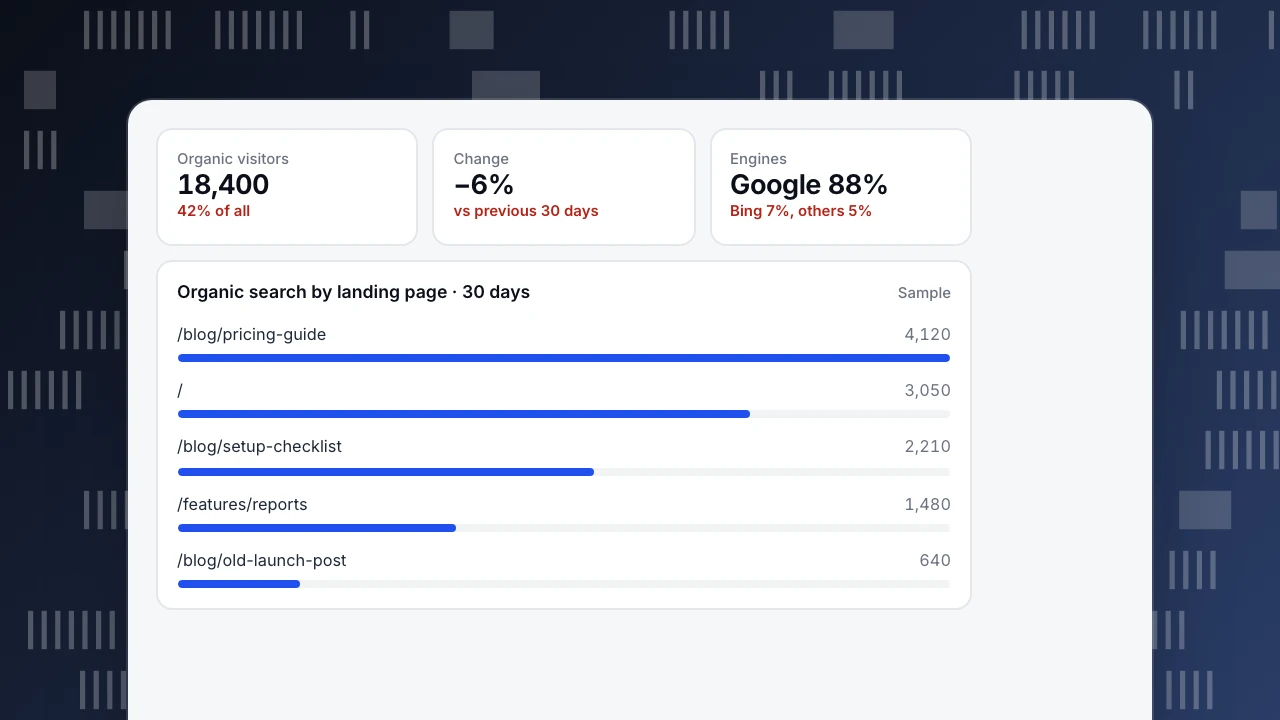
In the sample, organic visits fell 6% in 30 days. Splitting by landing page shows that one old launch post lost most of it, while the other pages held. That points to a ranking change on one page, not a site-wide problem.
Organic visitors
18,400
42% of all
Change
−6%
vs previous 30 days
Engines
Google 88%
Bing 7%, others 5%
Organic search by landing page · 30 days
SampleHow to grow organic traffic
- Answer real questions. Pages built around a question people search for, with a direct answer near the top, tend to earn clicks.
- Refresh pages that are slipping. Update facts, examples and dates on pages that used to bring visitors.
- Link internally. Point related pages at each other with descriptive anchor text.
- Keep pages fast. Slow pages lose visitors before the first view is recorded.
- Check that engines can crawl you. A blocked path in robots.txt or a noindex tag stops growth before it starts.
When organic traffic drops
- Check whether tracking changed (a removed script, a consent change).
- Split by engine and device to find where the drop sits.
- Find the landing pages that lost the most visits.
- Compare with the search console for those pages: impressions down means ranking or demand; clicks down with steady impressions means the result looks less attractive.
FAQ
What counts as organic traffic?
Visits from unpaid search engine results. Visits from ads, social posts, email and links on other sites belong to other channels.
Why can I not see the keywords people searched?
Search engines rarely pass the query to the site you land on. Use the engine's search console for queries and your analytics for what visitors did after landing.
Is organic traffic free?
You do not pay per click, but it costs time and work to create and maintain pages that rank.
How long does it take to grow organic traffic?
Usually months rather than weeks. New pages need to be crawled, indexed and trusted before they bring steady visits.
See also: Zero-click searches, SEO for startups.
Was this article helpful?
We use your answers to fix and expand this page.
Couldn’t send. Please try again in a minute.
Thanks for the feedback. We’ll use it to improve this page.You’ve already sent feedback on this page. Thanks.

Customer Experience Consultant
Writes about live chat, visitor conversations, and self-service, sharing practical ways to make customer communication clearer and more effective.