Try it on your own data
Every report in this article is in the free plan. One snippet for web and apps, up to 10 sites.
Start freeAn orphan page is live on your site, but no other page links to it. Search engines rarely value such pages and visitors seldom find them. This guide shows how to find orphans by comparing URL lists, works through an example of 150 orphans, and explains when to link, redirect or remove each one.
What you will learn
- Orphans are known URLs that a crawl of internal links does not reach
- Use several URL sources: sitemap, analytics, crawl data and Search Console
- Link the useful ones, redirect those with a clear replacement, and remove the rest from the sitemap
What an orphan page is
An orphan page is a page on your site that no other page links to. It may be in the sitemap, it may get visits from old emails or ads, but you cannot reach it by clicking through the site.
Common sources:
- Campaign landing pages built for ads and never linked
- Products or categories removed from navigation but left live
- Blog posts that fell out of lists after a redesign
- Pages created by a CMS automatically (tags, filters, test pages)
Why orphans matter
- Search engines find pages mostly through links. A sitemap helps them discover a URL, but a page with no internal links looks unimportant and may be crawled rarely or not indexed.
- No link equity flows to it. Internal links pass relevance; an orphan gets none.
- Visitors cannot find it. If the page is useful, people who would want it never see it.
- Some orphans should not exist. Old campaign pages with outdated prices are a risk, not an asset.
How to find orphan pages
The method is a comparison of two lists:
- Linked URLs: crawl the site from the home page, following internal links. Every URL found has at least one link.
- Known URLs: everything you know exists, from several sources:
- the XML sitemap
- pages that received visits in your analytics over the last 3–12 months
- URLs search engines fetched (server logs or crawl data)
- URLs with impressions in Search Console
- Orphans = known URLs that are not in the linked list.
Normalise both lists first: same protocol, host, trailing slash, and no tracking parameters, or every URL will look different.
A worked example
A content site (sample numbers):
- Sitemap: 1,200 URLs
- Crawl from the home page: 1,050 URLs linked
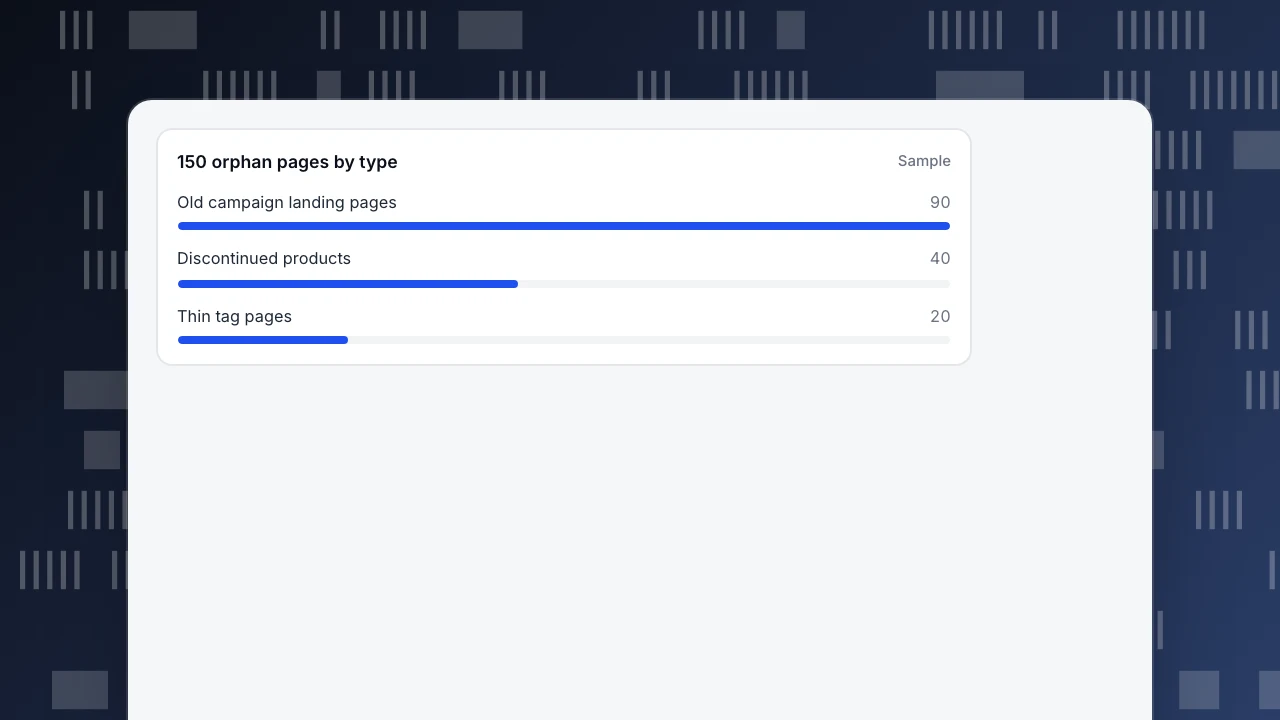
- In the sitemap but not linked: 150 orphans
Sorting the 150:
- 90 old campaign landing pages. 6 of them still get organic visits. Redirect those 6 to the current offer page; return 410 for the other 84 and remove them from the sitemap.
- 40 products from a discontinued category. Redirect to the nearest live category.
- 20 tag pages with one or two posts each. Mark noindex and drop from the sitemap, or merge into broader tags.
Analytics also shows 12 orphans with organic visits that were not in the sitemap: older guides still ranking. Those are worth keeping: link them from related articles and add them back to the sitemap.
150 orphan pages by type
SampleLink, redirect or remove
The table below gives the decision for each kind of orphan.
| Orphan type | Signal | Action |
|---|---|---|
| Useful page, still relevant | Organic visits or impressions | Add internal links from related pages; keep in sitemap |
| Outdated, with a replacement | Some visits, old content | 301 to the replacement |
| Outdated, no replacement | No visits, no links from outside | 410 or 404; remove from sitemap |
| Thin or auto-generated | Tags, filters, tests | noindex or remove; drop from sitemap |
| Intentionally unlinked | Ad landing page, thank-you page | Keep, but noindex and exclude from sitemap |
Check external backlinks before removing a page: a redirect keeps their value.
Preventing new orphans
- Make "add at least two internal links" part of publishing.
- When removing a page from navigation, decide at the same time: link elsewhere, redirect or remove.
- Re-run the comparison every quarter, or after a redesign or migration.
- Keep the sitemap generated from live, indexable pages only.
Doing it in TapCub
TapCub does not crawl your links, so use a site crawler for the linked list. TapCub supplies the known-URL side:
- Web analytics › Pages lists every path that received pageviews in the date range, with entries; its 404 tab shows missing pages and the page that sent visitors there.
- Monitoring › Crawl health: when a sitemap URL is set, it compares sitemap URLs with what search engines actually fetched, and shows how long new pages waited for a first fetch. Sitemap URLs that are rarely or never fetched are often orphans.
- Monitoring › Search performance lists pages with impressions from Search Console and Bing.
Related: crawl errors, crawl budget and content audit.
Was this article helpful?
We use your answers to fix and expand this page.
Couldn’t send. Please try again in a minute.
Thanks for the feedback. We’ll use it to improve this page.You’ve already sent feedback on this page. Thanks.

Customer Experience Consultant
Writes about live chat, visitor conversations, and self-service, sharing practical ways to make customer communication clearer and more effective.