Try it on your own data
Every report in this article is in the free plan. One snippet for web and apps, up to 10 sites.
Start freeA growing site collects pages nobody looks at and pages that slowly lose traffic. A content audit reviews each one with data and decides what to do. This guide lists the data to collect, gives decision rules and walks through a sample audit of 120 posts.
What you will learn
- Collect traffic, conversions, search data, links and trend for every URL in one sheet
- Decide keep, update, merge or remove with simple rules, then apply judgement
- Updates to pages with impressions but falling clicks usually pay back fastest
What a content audit is
A content audit is a structured review of every page on your site, or every page in a section such as the blog, with the data needed to decide what happens to each one: keep it as is, update it, merge it into another page, or redirect and remove it.
It differs from a content inventory, which only lists what exists. The audit adds performance data and a decision.
When to run one
- Organic traffic has flattened or fallen for several months.
- The library has grown past 50–100 pages and nobody knows what is in it.
- Before a redesign or migration, so you do not move pages nobody needs.
- Once a year as routine for an active blog or help center.
The data to collect for each URL
- URL, title, type (blog, help, landing page) and publish / last update date
- Organic sessions over the last 12 months, and the trend (rising, stable, falling)
- Conversions from those sessions (sign-ups, leads, purchases)
- Search data: clicks, impressions, average position, main query
- Backlinks: number of referring domains
- Overlap: another page targeting the same query? See keyword cannibalization
- Quality notes: outdated facts, broken screenshots, wrong product names
Deciding what to do with each page
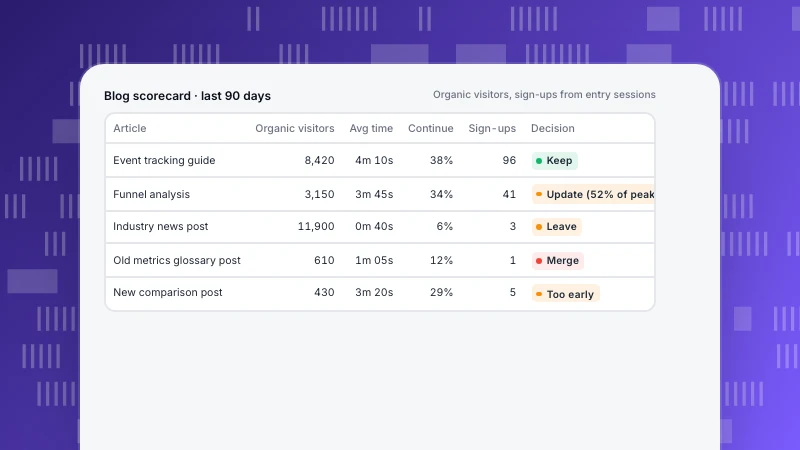
Use simple rules first, then judgement. The table below gives a starting set.
| Decision | Typical signals | Action |
|---|---|---|
| Keep | Traffic stable or growing, converts, accurate | Leave it; check again next audit |
| Update | Impressions but falling clicks, outdated facts, decaying trend | Refresh content, title and description; keep the URL |
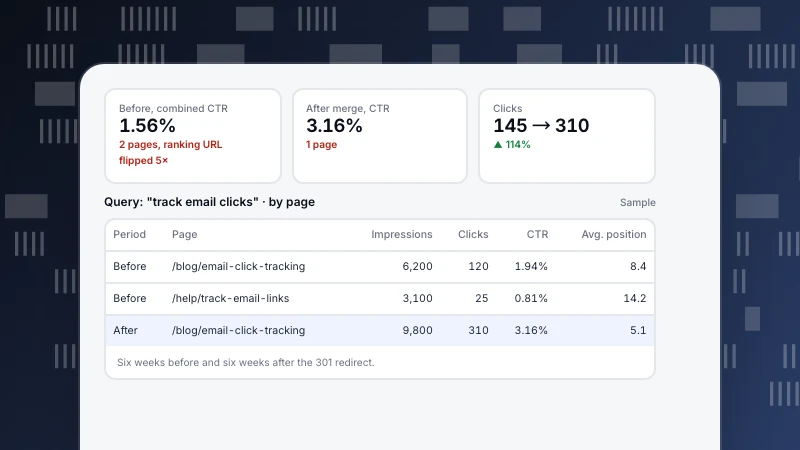
| Merge | Two pages on the same query or intent, both weak | Combine into the stronger page, 301 the other |
| Redirect | Little traffic, but has backlinks or a close replacement | 301 to the closest relevant page |
| Remove | No traffic, no links, no conversions, no purpose | Delete or noindex; redirect if anything links to it |
Thresholds depend on your site. A page with 20 visits a month that converts well is a keeper.
A worked example: 120 blog posts
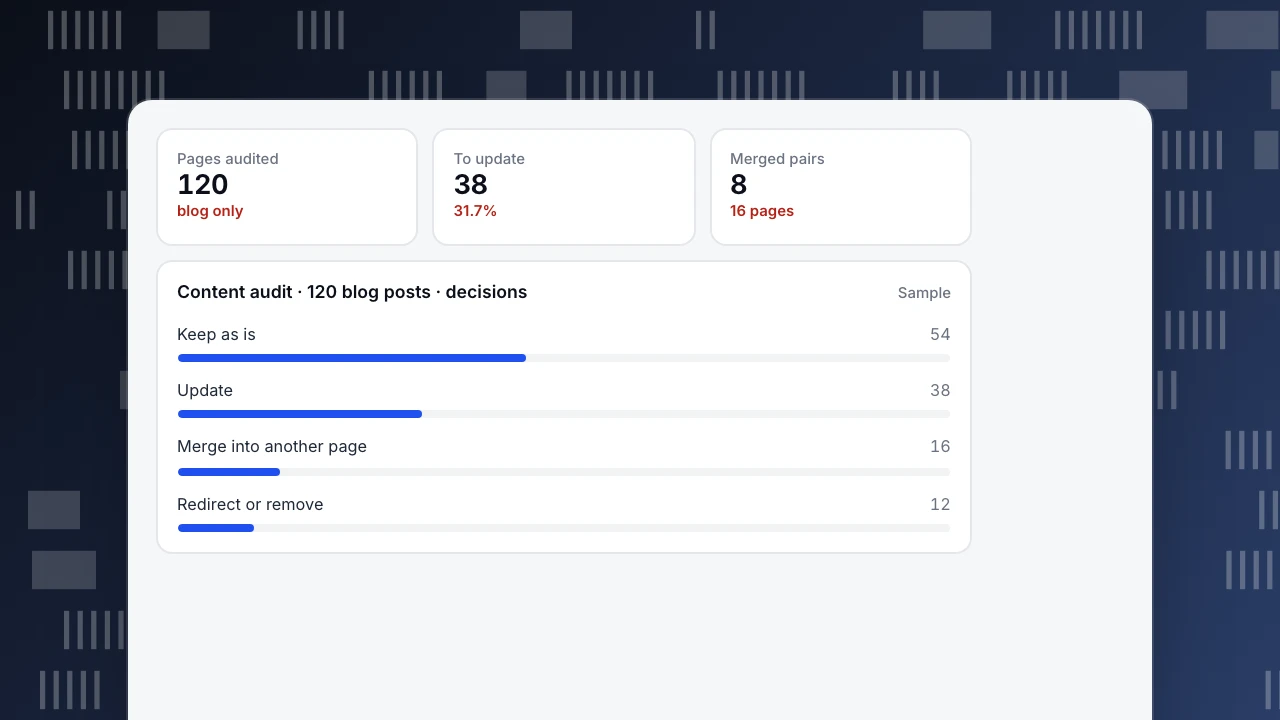
A SaaS blog audits its 120 posts (sample numbers):
- Keep (54, 45%): stable or growing traffic, still accurate.
- Update (38, 31.7%): decent impressions but falling clicks, or outdated content. Most of the near-term gains come from here.
- Merge (16, 13.3%): eight pairs of posts on the same topic; the weaker of each pair is merged into the stronger and redirected.
- Redirect or remove (12, 10%): no traffic, no links, no conversions, and no reason to exist, such as old event announcements.
Updating 38 pages took less time than writing 38 new ones, and the merged pages had backlinks working for them from day one.
Pages audited
120
blog only
To update
38
31.7%
Merged pairs
8
16 pages
Content audit · 120 blog posts · decisions
SampleThe process step by step
- Export the URL list from your sitemap or CMS.
- Join the data: analytics sessions and conversions, search data, backlinks. One row per URL in a spreadsheet.
- Apply the rules and add a decision and an owner per row.
- Prioritise: updates to pages with high impressions and falling clicks first; they recover fastest.
- Do the work in batches, with 301 redirects for every merged or removed URL.
- Annotate the date of each batch so you can see the effect later.
- Check after 6–12 weeks: clicks, sessions and conversions for the changed pages.
Pulling the numbers from TapCub
- Sessions and conversions per page: in Web analytics, look at landing pages and filter to organic search, then add goals.
- Clicks, impressions and position per page: Monitoring › Search performance after connecting Google Search Console or Bing Webmaster. Pages in the top 10 with a CTR below the median are flagged as quick title and description fixes.
- Trend: Monitoring › Content decay marks each page as growing, stable, decaying or severely decaying by comparing its peak four weeks with the latest four over 13 weeks. Decaying pages with impressions are your update list.
For which numbers to judge a page by, see content performance metrics.
See also
Was this article helpful?
We use your answers to fix and expand this page.
Couldn’t send. Please try again in a minute.
Thanks for the feedback. We’ll use it to improve this page.You’ve already sent feedback on this page. Thanks.

Customer Experience Consultant
Writes about live chat, visitor conversations, and self-service, sharing practical ways to make customer communication clearer and more effective.