Try it on your own data
Every report in this article is in the free plan. One snippet for web and apps, up to 10 sites.
Start freeLarge content libraries collect outdated, thin and overlapping pages. Pruning reviews them and decides what to keep, update, merge or remove. This guide gives decision rules that combine traffic, links, conversions and relevance, works through a 600-post example, and explains how to remove pages without losing value.
What you will learn
- Pruning is mostly updating and merging; removal is the last option
- Decide with four criteria together: traffic, backlinks, conversions and relevance
- Redirect pages with backlinks, return 410 for the rest, and annotate each batch
What content pruning is
Content pruning is reviewing the pages on your site and deciding, for each low performer, whether to keep, update, merge or remove it. The goal is a site where most pages are useful, current and clearly about one thing.
Pruning is not mass deletion. Removing pages is the last option, used when a page has no traffic, no links, no conversions and no reason to exist. Most of the gain usually comes from updating and merging.
Why it can help
- Quality signals: search engines assess sites as a whole; many thin or outdated pages can weigh down the rest.
- Less competition with yourself: several weak pages on one topic split rankings; one strong page wins more often. See keyword cannibalization.
- Crawling: fewer low-value URLs leave more crawling for pages that matter.
- Visitors: fewer dead ends and outdated answers.
Four actions
- Keep: the page performs or serves a clear purpose.
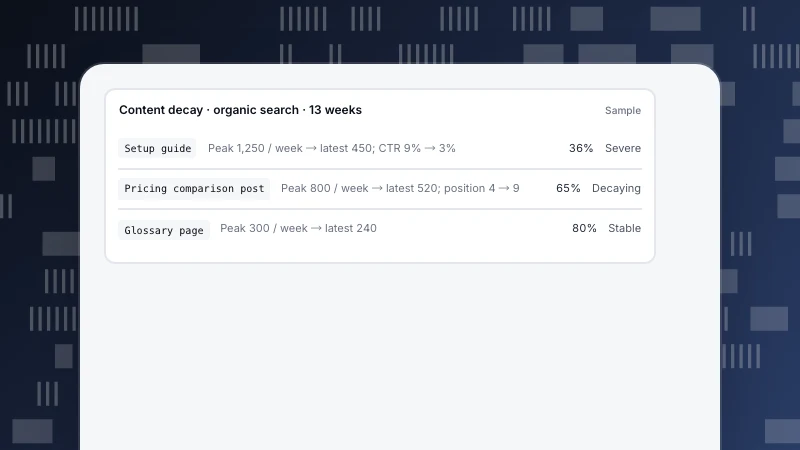
- Update: the topic still matters but the page is out of date or thin. See content decay.
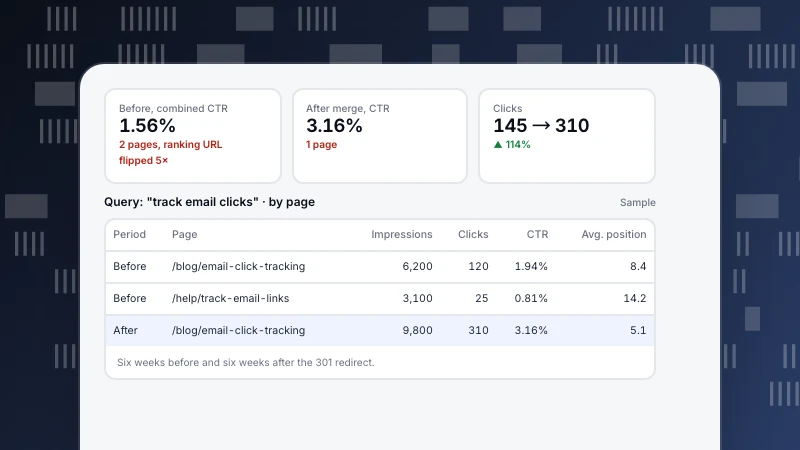
- Merge: several pages cover the same topic; combine them into the best one and redirect the rest.
- Remove: no traffic, no links, no conversions, no relevance. Return 410 (or 404), or redirect if there is a close replacement.
How to decide
The table below gives the decision rules using four criteria together.
| Traffic | Backlinks | Conversions | Relevant today | Action |
|---|---|---|---|---|
| Good | Any | Any | Yes | Keep |
| Low or falling | Any | Some | Yes | Update |
| Low | Any | Any | Yes, overlaps another page | Merge and redirect |
| None | Yes | None | No | Redirect to closest page |
| None | None | None | No | Remove (410) |
| None | None | None | Needed for users (e.g. legal, support) | Keep, consider noindex |
Use 12 months of data so seasonal pages are not removed by mistake.
A worked pruning of 600 posts
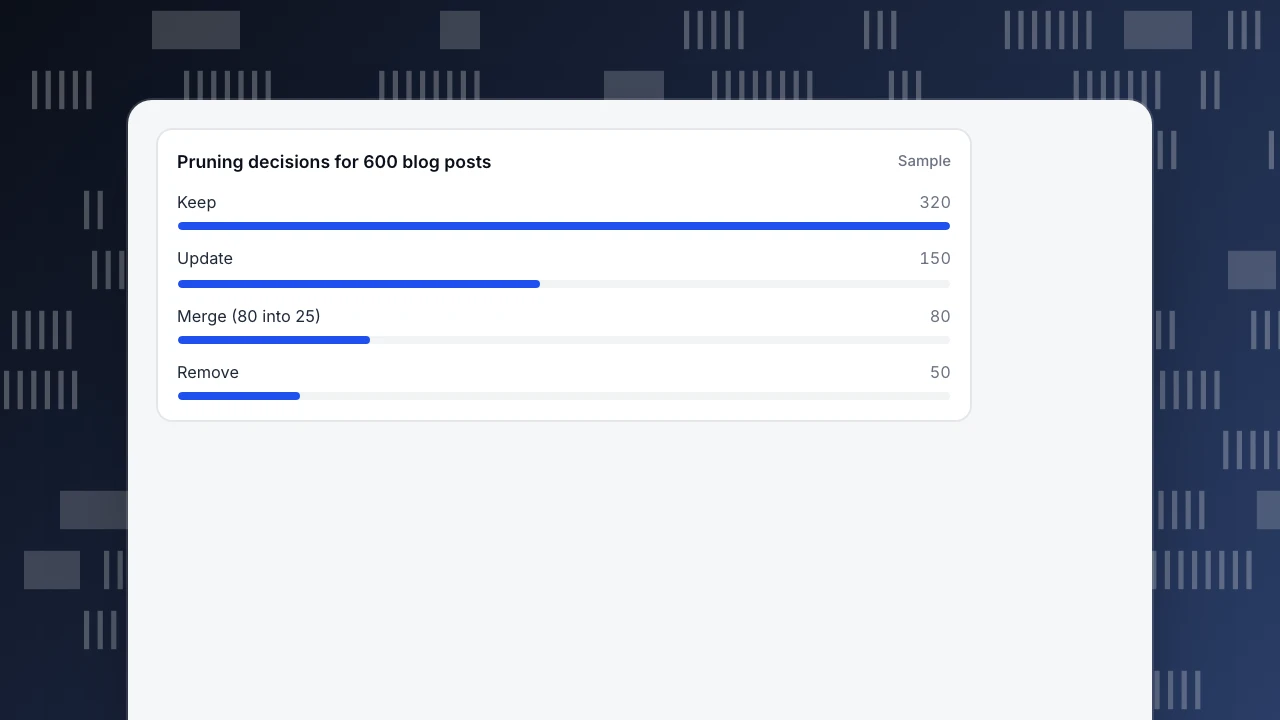
A software company's blog has 600 posts written over eight years (sample numbers). For each, the team collected 12 months of organic visitors, external backlinks, sign-ups attributed to the post, and whether the topic still fits the product.
- Keep 320: steady traffic or sign-ups.
- Update 150: relevant topic, falling or low traffic, outdated screenshots or facts.
- Merge 80 into 25: groups of two to five posts on the same question, combined into one stronger post each; the others redirect to it.
- Remove 50: announcements of retired features and event recaps with no traffic or links. 44 return 410; 6 with backlinks redirect to the closest live page.
Three months later, blog organic visitors are 46,500 a month, up from 42,000. Some of that comes from the updates themselves, not only the removals, so the team tracks updated, merged and kept pages as separate groups.
Pruning decisions for 600 blog posts
SampleRemoving pages safely
- Check backlinks first. A page with links from other sites should redirect to the nearest relevant page, not disappear.
- Do not redirect everything to the home page; search engines treat that like a 404.
- Update internal links to point at the final URL, and drop removed URLs from the sitemap.
- Remove in batches and annotate the dates, so you can tell if something went wrong.
- Keep a list of what you removed and why.
Data for each criterion in TapCub
- Traffic: Web analytics › Pages lists every path with pageviews, visitors and entries for any date range; filter by organic search in Sources.
- Trend: Monitoring › Content decay labels pages as growing, stable, decaying or severely decaying over 13 weeks.
- Search: Monitoring › Search performance shows clicks, impressions and position per page from Search Console and Bing.
- Conversions: goals in Web analytics › Goals, filtered by entry page, show which posts lead to sign-ups.
- Backlinks come from an SEO tool or Search Console's Links report.
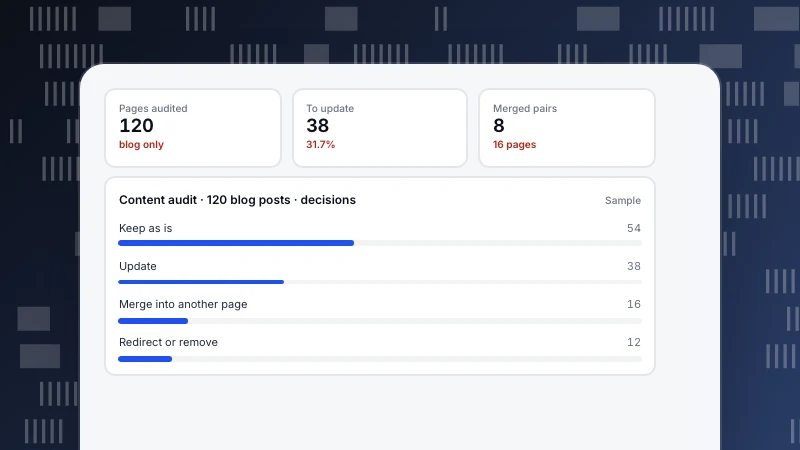
Before pruning, run a content audit; after, check for orphan pages left behind.
Was this article helpful?
We use your answers to fix and expand this page.
Couldn’t send. Please try again in a minute.
Thanks for the feedback. We’ll use it to improve this page.You’ve already sent feedback on this page. Thanks.

Customer Experience Consultant
Writes about live chat, visitor conversations, and self-service, sharing practical ways to make customer communication clearer and more effective.