Try it on your own data
Every report in this article is in the free plan. One snippet for web and apps, up to 10 sites.
Start freeWhen two of your pages chase the same query, both can rank worse than one would. This guide shows how to tell real keyword cannibalization from harmless overlap, walks through a sample where merging two pages roughly doubled clicks, and explains which fix to use.
What you will learn
- Cannibalization means same query and same intent, with the ranking URL flipping between pages
- Confirm it with pages-per-query data and weekly history before changing anything
- Merge and 301 when you only need one page; differentiate when both serve a real purpose
What keyword cannibalization is
Keyword cannibalization happens when two or more pages on your site target the same search query and the same intent, so search engines keep switching between them. Instead of one strong page ranking well, you get two weaker ones sharing impressions, links and clicks.
It is common on sites that publish a lot: a blog post and a help article on the same task, a 2023 and a 2025 version of a guide, or a category page and a product page with near-identical titles.
What it is not
Two of your pages showing for one query is not automatically a problem.
- Different intents. "Email tracking" can mean a how-to guide and a feature page. If both rank on page one and get clicks, you hold two spots.
- Brand queries. Several of your pages appearing for your brand name is normal.
- Low-volume long tail. Overlap on queries with a handful of impressions is not worth fixing.
The signs of a real problem are rank flipping (the ranking URL changes week to week), both pages stuck below the top five and a combined click-through rate lower than either page would get alone.
How to check for cannibalization
- Pick queries that matter. Start with queries that have real impressions and an average position between 5 and 20.
- Look at pages per query. In Google Search Console, filter the performance report by the exact query and open the Pages tab. Two or more pages with meaningful impressions is a candidate.
- Check the history. Compare weeks. If page A ranked in weeks 1–3 and page B in weeks 4–6, search engines cannot decide.
- Read both pages. Same intent and same answer? That is cannibalization. Different jobs? Make the difference clearer instead of merging.
- Search your own site for the term (site:example.com "keyword") to find older pages you forgot about.
A worked example
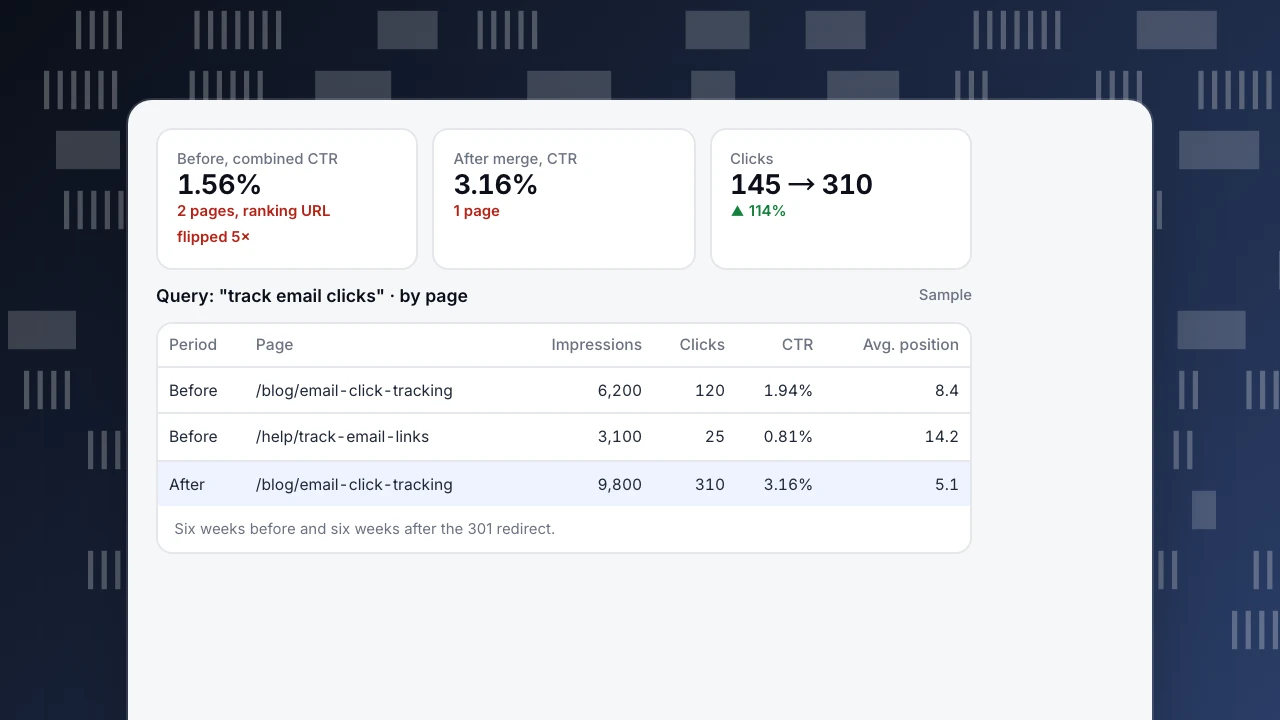
A SaaS blog has a guide at /blog/email-click-tracking and an older help article at /help/track-email-links. Both answer "how do I track email clicks". Over eight weeks the ranking URL flips five times (sample numbers):
- Guide: 6,200 impressions, 120 clicks (1.94% CTR), average position 8.4
- Help article: 3,100 impressions, 25 clicks (0.81% CTR), average position 14.2
- Combined: 9,300 impressions, 145 clicks, 1.56% CTR
The team merges the useful steps from the help article into the guide and adds a 301 redirect. Six weeks later the guide alone has 9,800 impressions, 310 clicks (3.16% CTR) and an average position of 5.1. Clicks for the query roughly doubled.
Before, combined CTR
1.56%
2 pages, ranking URL flipped 5×
After merge, CTR
3.16%
1 page
Clicks
145 → 310
▲ 114%
Query: "track email clicks" · by page
Sample| Period | Page | Impressions | Clicks | CTR | Avg. position |
|---|---|---|---|---|---|
| Before | /blog/email-click-tracking | 6,200 | 120 | 1.94% | 8.4 |
| Before | /help/track-email-links | 3,100 | 25 | 0.81% | 14.2 |
| After | /blog/email-click-tracking | 9,800 | 310 | 3.16% | 5.1 |
Six weeks before and six weeks after the 301 redirect.
How to fix it
Pick the fix by asking whether you need both pages. The table below lists the usual options.
A few rules apply whichever you choose:
- Choose the winner by evidence: more links, better engagement, closer match to intent. Not by which page is newer.
- Update internal links to point at the winner, with the target query in the anchor text.
- Redirect, do not delete. A removed page with links pointing to it wastes them. For headers that keep pages out of the index, see X-Robots-Tag.
| Fix | When to use it | What to do |
|---|---|---|
| Merge and 301 redirect | Both pages answer the same question | Move the best parts into the stronger page, redirect the other |
| Differentiate | The pages serve different intents | Rewrite titles, headings and focus so each targets its own query |
| Canonical tag | You must keep near-duplicates (filters, print versions) | Point the duplicate to the main page with rel=canonical |
| Noindex | A page is useful to visitors but not for search | Keep it, add noindex, keep internal links pointing to the main page |
| Re-link internally | Signals are mixed but content is distinct | Point internal links for the query to the page you want to rank |
| Leave it | Both rank in the top five and both get clicks | Do nothing; you hold two positions |
Decide by intent first. Merging two pages that serve different jobs loses traffic.
How to prevent it
- Keep a simple list of target queries and which URL owns each one. Check it before writing a new page.
- When you refresh a guide, update the existing URL instead of publishing a new dated version.
- Give help articles task-specific titles ("Track email clicks with UTM tags") and keep broad explainers on the blog.
Watching the result in TapCub
Connect Google Search Console or Bing Webmaster in Monitoring › Search performance. You get clicks, impressions, CTR and average position split by page and by query, so you can follow both URLs before and after the change. Pages in the top 10 with a CTR below the median are flagged as the set where a better title and description pays off first. Monitoring › Content decay compares each page's peak four weeks of organic visitors with the latest four; after a merge, the losing URL should drop off and the winner should move toward "growing". See also organic traffic.
Was this article helpful?
We use your answers to fix and expand this page.
Couldn’t send. Please try again in a minute.
Thanks for the feedback. We’ll use it to improve this page.You’ve already sent feedback on this page. Thanks.

Customer Experience Consultant
Writes about live chat, visitor conversations, and self-service, sharing practical ways to make customer communication clearer and more effective.