Try it on your own data
Every report in this article is in the free plan. One snippet for web and apps, up to 10 sites.
Start freeCrawl errors are search engine requests that fail. A few are normal; a run of server errors or a large group of 404s on important pages is not. This guide explains the types, the usual causes, a priority order, and a worked week of Googlebot data.
What you will learn
- Site-level errors (DNS, timeouts, robots.txt, 5xx runs) are urgent because they slow crawling of the whole site
- Group 404s by path pattern: one redirect rule often fixes hundreds
- Use server-side fetch data to see what search engines actually requested, not just what a crawler finds
What a crawl error is
A crawl error is a request from a search engine bot that does not return the page it asked for. The bot may get no answer (DNS failure, timeout), a server error (5xx), a "not found" (404), or a redirect that goes nowhere useful.
Some errors are normal. Every site has a few 404s from old links. What matters is the type, the volume, and whether important pages are affected.
Site-level vs URL-level errors
- Site-level errors stop the bot reaching the site at all: DNS failures, the server refusing connections, timeouts, or robots.txt returning an error. They are urgent, because search engines slow down crawling the whole site when they see them. Google treats a 5xx on robots.txt as a reason to pause crawling.
- URL-level errors affect single pages: 404, soft 404, 401/403, redirect chains and loops. They matter most when they hit pages you want indexed.
Main types and fixes
The table below lists the common types, what usually causes them and how to fix them.
| Type | Level | Usual cause | Fix |
|---|---|---|---|
| DNS error | Site | Expired domain, DNS provider outage | Check DNS records and provider status |
| Timeout / connection refused | Site | Overloaded server, firewall blocking bots | Add capacity, allow verified bots |
| robots.txt unreachable (5xx) | Site | robots.txt route erroring | Serve robots.txt as a static 200 |
| 5xx server error | Site or URL | Deploys, crashes, slow database | Zero-downtime deploys, 503 + Retry-After for maintenance |
| 404 not found | URL | Deleted or moved pages, broken links | 301 if there is a replacement; otherwise leave 404 |
| Soft 404 | URL | Empty pages that return 200 | Return 404/410, or add real content |
| 401/403 | URL | Login walls, IP blocks | Make public pages public, unblock verified bots |
| Redirect chain or loop | URL | Layered rules (http, www, slash) | Link and redirect straight to the final URL |
Blocked by robots.txt is a choice, not an error; check it only if the page should be indexed.
A worked example: one week of Googlebot fetches
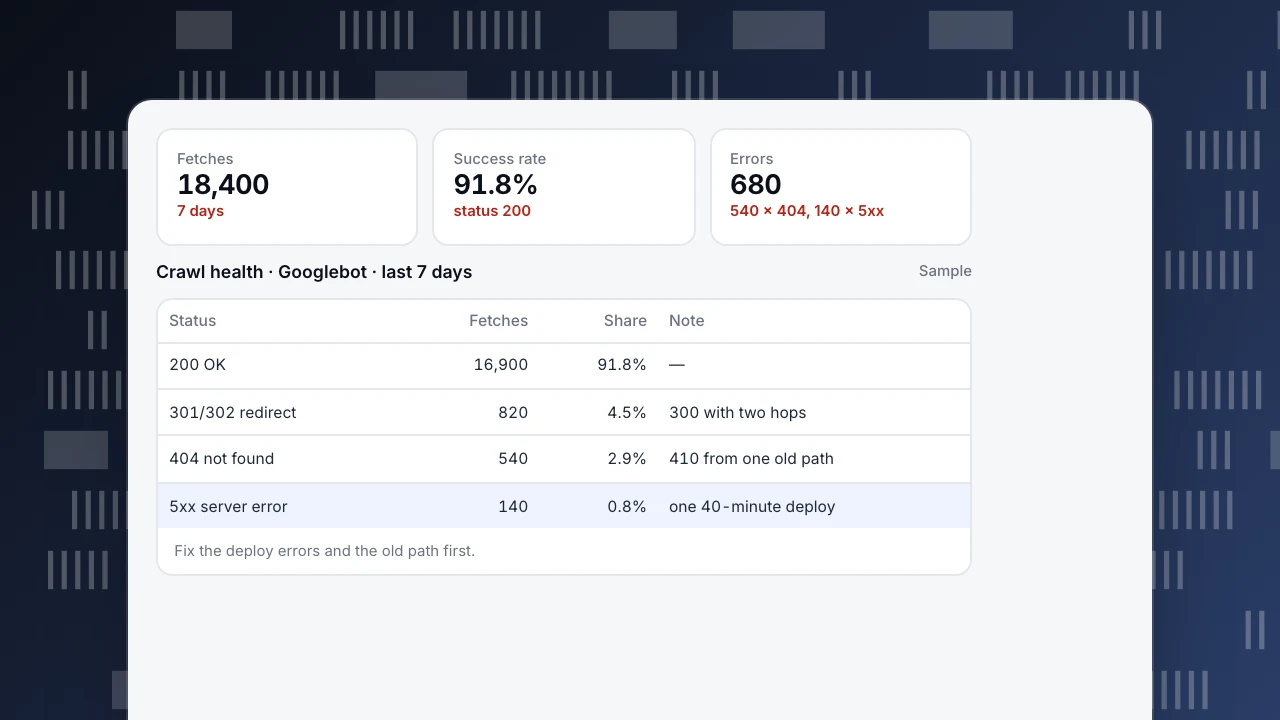
Server-side data for one site over 7 days (sample numbers):
- 18,400 fetches by Googlebot
- 16,900 returned 200 (success rate 91.8%)
- 820 returned a redirect (301/302)
- 540 returned 404
- 140 returned 5xx
Reading it:
- The 140 server errors all fall within a 40-minute window during a deploy. That is a deploy problem, not a capacity problem: deploy without downtime, or return 503 with Retry-After during maintenance.
- Of the 540 404s, 410 come from one old category path removed in a redesign. Those deserve 301 redirects to the new category. The other 130 are scattered, mostly old typo links, and can stay 404.
- The 820 redirects include 300 that pass through two hops (http → https → trailing slash). Update internal links and the sitemap to the final URL.
After the fixes, the next week shows a 96% success rate. More of Googlebot's visits now land on real pages; see crawl budget.
Fetches
18,400
7 days
Success rate
91.8%
status 200
Errors
680
540 × 404, 140 × 5xx
Crawl health · Googlebot · last 7 days
Sample| Status | Fetches | Share | Note |
|---|---|---|---|
| 200 OK | 16,900 | 91.8% | — |
| 301/302 redirect | 820 | 4.5% | 300 with two hops |
| 404 not found | 540 | 2.9% | 410 from one old path |
| 5xx server error | 140 | 0.8% | one 40-minute deploy |
Fix the deploy errors and the old path first.
What to fix first
- Site-level errors (DNS, timeouts, robots.txt failures, a run of 5xx).
- Errors on important pages: anything in your sitemap or linked from navigation.
- High-volume 404s from one path pattern: one redirect rule fixes many.
- Redirect chains and loops in internal links and the sitemap.
- Soft 404s: empty search or category pages that return 200.
- Leave scattered 404s for removed content alone; 404 is the correct answer.
Where to find crawl errors
- Google Search Console › Pages and Crawl stats shows what Google reports, with a delay of a few days.
- Server logs show every request as it happens; see log file analysis for SEO.
- A site crawler finds broken links and redirect chains, but it shows what a crawler sees, not what search engines actually requested.
Doing it in TapCub
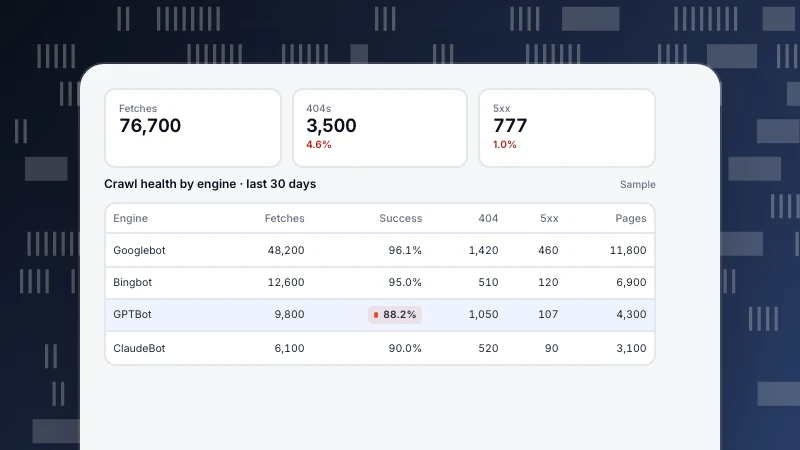
Monitoring › Crawl health counts search engine fetches from the server side, by engine: total fetches, success rate, distinct pages, 404 and 5xx, plus how long new sitemap URLs wait for a first crawl. A "Crawl anomaly" notification fires when fetches in the last 24 hours fall below 30% of the 7-day average, which often follows a run of server errors. Which bots are real is shown in Web analytics › Bots (verified, suspected, unknown). For how Google's crawler behaves, see Googlebot and how often Google crawls.
See also
Was this article helpful?
We use your answers to fix and expand this page.
Couldn’t send. Please try again in a minute.
Thanks for the feedback. We’ll use it to improve this page.You’ve already sent feedback on this page. Thanks.

Customer Experience Consultant
Writes about live chat, visitor conversations, and self-service, sharing practical ways to make customer communication clearer and more effective.