Try it on your own data
Every report in this article is in the free plan. One snippet for web and apps, up to 10 sites.
Start freeGoogle-Extended appears in many robots.txt guides, but it is not a crawler and you will never see it in your logs. It is a token that tells Google whether crawled content may be used for Gemini and certain other AI products. This guide explains what it controls, what it does not, and how to set it safely.
What you will learn
- Google-Extended is a robots.txt product token; Google still crawls with Googlebot
- Blocking it does not affect Google Search rankings or crawling
- It does not control AI Overviews in Search; those follow Search snippet controls
Google-Extended is a token, not a crawler
Google-Extended is a product token you can name in robots.txt. It is not a separate bot: Google fetches pages with its existing crawlers, such as Googlebot, and the Google-Extended rule tells Google whether content it has crawled may be used for certain AI purposes.
Google's documentation says the token lets publishers manage whether their content helps train future Gemini models and is used for grounding in Gemini apps and some other Google AI products. Check the current wording in Google's crawler documentation, since the list of covered products changes.
That is why you will never see "Google-Extended" in your server logs: no request ever carries that user agent.
What it controls and what it does not
The table below summarises the effect of the token.
| Area | Controlled by Google-Extended? | How to control it instead |
|---|---|---|
| Use of content to train future Gemini models | Yes | User-agent: Google-Extended |
| Grounding in Gemini apps and certain AI products | Yes (per Google’s list) | User-agent: Google-Extended |
| Google Search crawling and indexing | No | User-agent: Googlebot rules, noindex |
| AI Overviews in Search | No | nosnippet, max-snippet (affect all snippets) |
| Other companies’ AI crawlers | No | Their own user-agent groups |
Google updates the list of covered products; check its crawler documentation.
A worked robots.txt
A publisher wants to stay in Google Search but opt out of Gemini training. Its robots.txt (sample):
User-agent: Google-Extended
Disallow: /

User-agent: *
Disallow: /admin/
What happens afterwards (sample numbers):
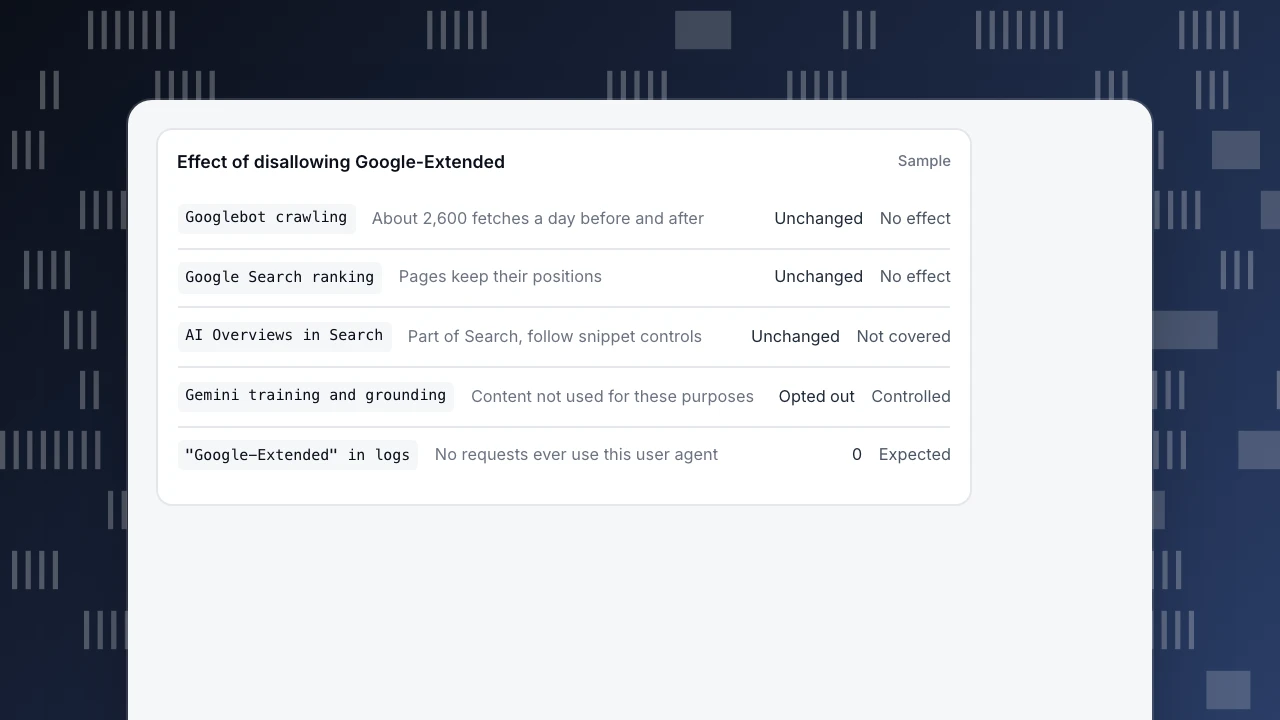
- Googlebot fetches stay at about 2,600 a day before and after the change: crawling and Search are unaffected.
- No request with a Google-Extended user agent appears, as expected.
- Pages keep their Search rankings and can still appear in AI Overviews, because those are part of Search.
A common mistake: writing User-agent: Google-Extended with Disallow: / and also, by accident, a wildcard group that blocks everything (User-agent: * / Disallow: /) with no Googlebot group of its own. Googlebot follows the wildcard group, and the whole site drops out of Search. Always check which group each crawler will follow: a crawler obeys only the most specific group that names it, so a separate Googlebot group would also need its own Disallow lines.
Effect of disallowing Google-Extended
SampleGooglebot crawlingAbout 2,600 fetches a day before and afterUnchangedNo effectGoogle Search rankingPages keep their positionsUnchangedNo effectAI Overviews in SearchPart of Search, follow snippet controlsUnchangedNot coveredGemini training and groundingContent not used for these purposesOpted outControlled"Google-Extended" in logsNo requests ever use this user agent0Expected
Should you use it?
- Opt out if you do not want your content used to train or ground Gemini models, for licensing, competitive or editorial reasons.
- Stay in if being used and cited by Google's AI products matters to you more than control.
- Either way, the choice does not change your Search ranking.
- If your concern is how your content appears in AI Overviews in Search, Google-Extended is not the control. The options there are Search controls such as
nosnippetormax-snippet, which also affect regular snippets.
Other AI crawlers are separate
Google-Extended only covers Google. Other companies run their own crawlers with their own names, such as GPTBot, ClaudeBot and Meta-ExternalAgent, and each needs its own robots.txt group. See Meta-ExternalAgent, GPTBot and ClaudeBot.
Monitoring in TapCub
Because Google-Extended never fetches, there is nothing to count for it. What you can watch:
- Monitoring › Crawl health: Googlebot fetches, success rate and errors, to confirm a robots.txt change did not reduce crawling.
- Monitoring › Crawler compliance: compares real fetches with your rules file and lists violations; its generator drafts rules such as "block training crawlers" for you to review and publish.
- Web analytics › Sources › AI sources: human visits referred by AI assistants, to see what you gain or lose from each choice.
Related: Googlebot and the AI crawler ledger.
Was this article helpful?
We use your answers to fix and expand this page.
Couldn’t send. Please try again in a minute.
Thanks for the feedback. We’ll use it to improve this page.You’ve already sent feedback on this page. Thanks.

Customer Experience Consultant
Writes about live chat, visitor conversations, and self-service, sharing practical ways to make customer communication clearer and more effective.