Try it on your own data
Every report in this article is in the free plan. One snippet for web and apps, up to 10 sites.
Start freeMeta-ExternalAgent shows up in many server logs as one of the busiest AI crawlers. This guide explains what it does, how it differs from the crawler behind Facebook link previews, how to verify it, and how to decide whether to allow it by comparing what it reads with the visitors Meta sends back.
What you will learn
- Meta-ExternalAgent collects content for AI training and indexing; facebookexternalhit fetches link previews
- Block the training crawler with robots.txt if you choose, but keep facebookexternalhit for link previews
- Compare reads with visitors sent back before deciding, and enforce at the server if rules are ignored
What Meta-ExternalAgent is
Meta-ExternalAgent is a web crawler run by Meta. Meta's documentation says it crawls the web for uses such as training AI models and improving products by indexing content directly. Its user agent contains meta-externalagent, for example:
meta-externalagent/1.1 (+https://developers.facebook.com/docs/sharing/webmasters/crawler)On many sites it has become one of the busiest AI crawlers, which is why people search for it after seeing it in their logs.
Meta's three crawlers
Meta documents several crawlers with different jobs. The table below compares them. The distinction matters: blocking the wrong one can break link previews when people share your pages on Facebook, Instagram or WhatsApp.
| Crawler | What it does | robots.txt | If you block it |
|---|---|---|---|
| Meta-ExternalAgent | Crawls for AI training and indexing | Follows it, per Meta | Content not collected for those uses |
| FacebookExternalHit | Fetches title, image and description for link previews | May bypass for preview and integrity checks | Shared links may show no preview |
| Meta-ExternalFetcher | Fetches a page when a user asks (e.g. an AI assistant request) | May not apply, as it acts for a user | The assistant cannot read the page for that user |
Check Meta’s documentation for the current list; crawler names and purposes change.
How to verify it
User agents can be faked. Meta's documentation gives a way to list the IP ranges its crawlers use, based on Meta's network (AS32934):
whois -h whois.radb.net -- '-i origin AS32934' | grep ^routeRequests with a Meta user agent from IPs outside those ranges are not from Meta.
A worked month: reads vs visitors sent back
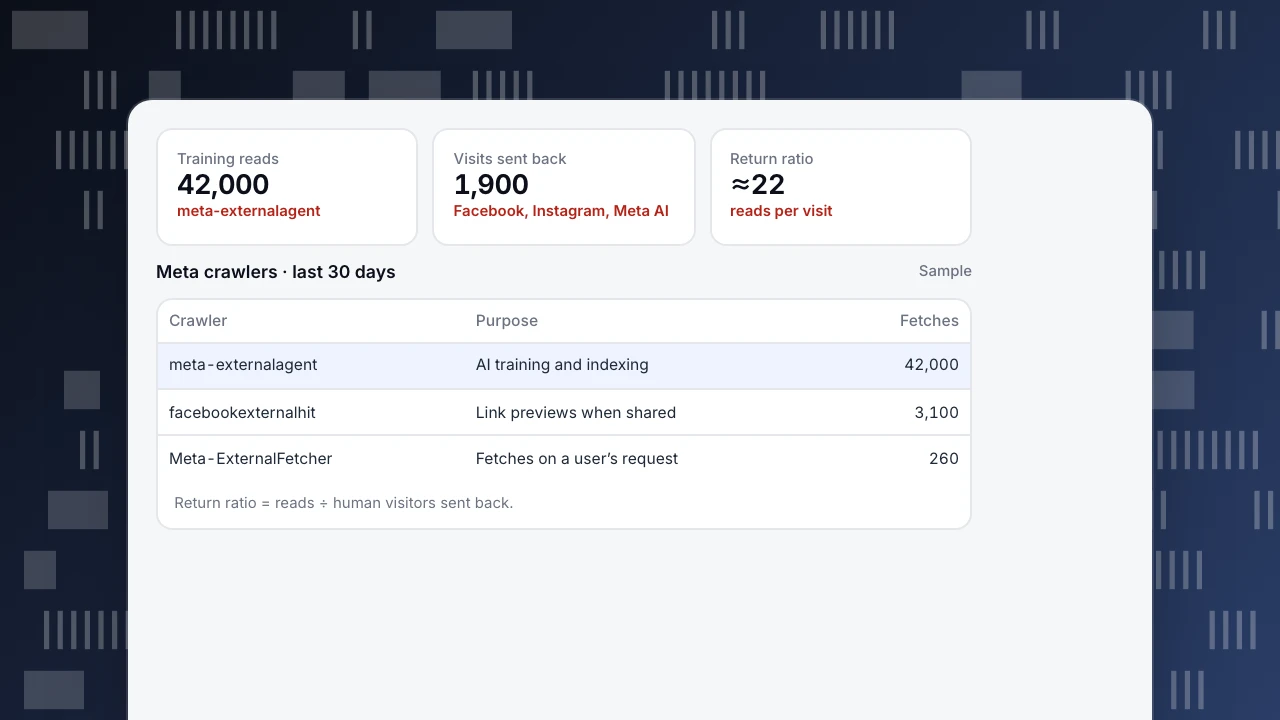
A content site's 30 days of server-side data (sample numbers):
- meta-externalagent: 42,000 fetches, mostly blog and documentation pages
- facebookexternalhit: 3,100 fetches, triggered by people sharing links
- Meta-ExternalFetcher: 260 fetches
- Human visits from Facebook, Instagram and Meta AI: 1,900
Reading it: Meta's training crawler reads about 22 pages for every visitor Meta sends back (42,000 ÷ 1,900). The link preview crawler, by contrast, serves visitors directly: every share that shows a preview makes a click more likely.
The site decides to block Meta-ExternalAgent for its paid documentation, keep it allowed on the public blog, and leave facebookexternalhit alone.
Training reads
42,000
meta-externalagent
Visits sent back
1,900
Facebook, Instagram, Meta AI
Return ratio
≈22
reads per visit
Meta crawlers · last 30 days
Sample| Crawler | Purpose | Fetches |
|---|---|---|
| meta-externalagent | AI training and indexing | 42,000 |
| facebookexternalhit | Link previews when shared | 3,100 |
| Meta-ExternalFetcher | Fetches on a user’s request | 260 |
Return ratio = reads ÷ human visitors sent back.
Controlling it with robots.txt
Meta states that Meta-ExternalAgent follows robots.txt. To block it from the whole site:
User-agent: meta-externalagent
Disallow: /
To block only part of the site:
User-agent: meta-externalagent
Disallow: /docs/
Disallow: /members/
Keep facebookexternalhit allowed if you want link previews. Meta notes that its fetchers acting on a user's request, and link preview checks, may not follow robots.txt in the same way.
If a crawler does not follow your rules, block it at the server, CDN or firewall by verified IP range and user agent. robots.txt is a request, not an enforcement mechanism.
Seeing Meta's crawlers in TapCub
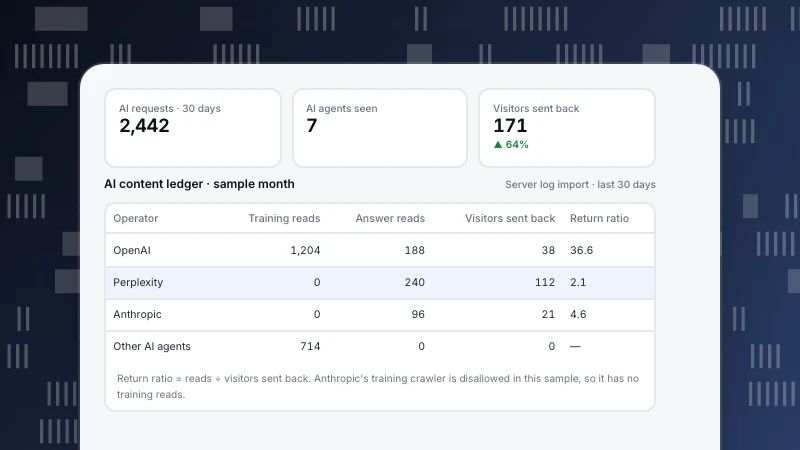
- Web analytics › Bots › AI & agents: the AI content ledger lists each operator's reads (training crawlers and answer engines in separate columns), human visitors sent back and a return ratio (reads ÷ visitors sent back).
- Web analytics › Bots › All bots: each crawler's pages, most common status code and trust level (verified, suspected, unknown).
- Monitoring › Crawler compliance: compares real fetches with your robots.txt and lists violations, such as a crawler fetching a disallowed path; a generator drafts rules such as "block training crawlers" for you to publish.
Crawlers that do not run JavaScript appear only with server collection or a log import. Related: GPTBot, ClaudeBot and the AI crawler ledger.
Was this article helpful?
We use your answers to fix and expand this page.
Couldn’t send. Please try again in a minute.
Thanks for the feedback. We’ll use it to improve this page.You’ve already sent feedback on this page. Thanks.

Customer Experience Consultant
Writes about live chat, visitor conversations, and self-service, sharing practical ways to make customer communication clearer and more effective.