Try it on your own data
Every report in this article is in the free plan. One snippet for web and apps, up to 10 sites.
Start freeClaudeBot is Anthropic's training crawler, but it is not the only Anthropic agent that visits your site. This guide covers the three agents and what blocking each changes, robots.txt rules for common goals, verifying requests against Anthropic's published IP list, and seeing ClaudeBot in your own data.
What you will learn
- ClaudeBot (training), Claude-User (user fetches) and Claude-SearchBot (search) are controlled separately
- Use robots.txt to opt out; blocking IPs can stop the bot from reading your rules
- Verify by source IP against Anthropic's published list, and compare rules with actual fetches
What ClaudeBot is
ClaudeBot is the web crawler Anthropic uses to collect public web content that could contribute to training its models. It is one of three user agents Anthropic lists for its web access, and the three behave differently, so blocking "Claude" in one line can have effects you did not intend (Anthropic help).
Anthropic states that its bots honour robots.txt "do not crawl" rules and respect anti-circumvention technology; for example, they will not try to bypass CAPTCHAs.
Three Anthropic agents
According to Anthropic's help article:
- ClaudeBot collects public content for possible model training. Blocking it signals that your future content should be excluded from training data.
- Claude-User fetches a page when a Claude user asks a question that needs it. Blocking it stops those user-requested fetches, which may reduce how your site shows up when people ask Claude.
- Claude-SearchBot crawls to improve search result quality. Blocking it stops that indexing, which may reduce your visibility in search results within Claude.
The table puts the three side by side. The practical question is rarely "block Claude or not" but which of the three you want.
| Agent | What it does | If you block it |
|---|---|---|
| ClaudeBot | Collects public content that may be used for training | Future content signalled as excluded from training |
| Claude-User | Fetches a page when a Claude user asks | Those fetches stop; may reduce visibility in answers |
| Claude-SearchBot | Crawls to improve search results | Indexing stops; may reduce visibility in search results |
Source: Anthropic help article, updated 2026-04-07. Each agent has its own robots.txt group.
robots.txt rules
robots.txt is the opt-out Anthropic supports. Put it at the root of each host, and repeat it for every subdomain you want to cover. Each agent gets its own group:
The example blocks training but keeps user fetches and search. Anthropic also supports the non-standard Crawl-delay rule for ClaudeBot "where appropriate", so if the concern is load rather than training, slowing it down is an option.
Anthropic notes that blocking its IP addresses instead may not work as an opt-out, because the bot can then not read your robots.txt. Use robots.txt for the decision and rate limiting for load.
# Opt out of training, keep answers and search
User-agent: ClaudeBot
Disallow: /

User-agent: Claude-SearchBot
Allow: /

User-agent: Claude-User
Allow: /

# Or slow ClaudeBot down instead of blocking it
# User-agent: ClaudeBot
# Crawl-delay: 1
Verify that a request is really ClaudeBot
Anyone can send a user agent string that says ClaudeBot. Anthropic publishes the IP ranges its crawlers use as a JSON file at claude.com/crawling/bots.json; a request from an address on that list is from Anthropic. Check the source address of a few requests in your server logs against the list. Requests that claim ClaudeBot from other addresses are not Anthropic and should be handled like any other unknown bot.
See ClaudeBot in your own data
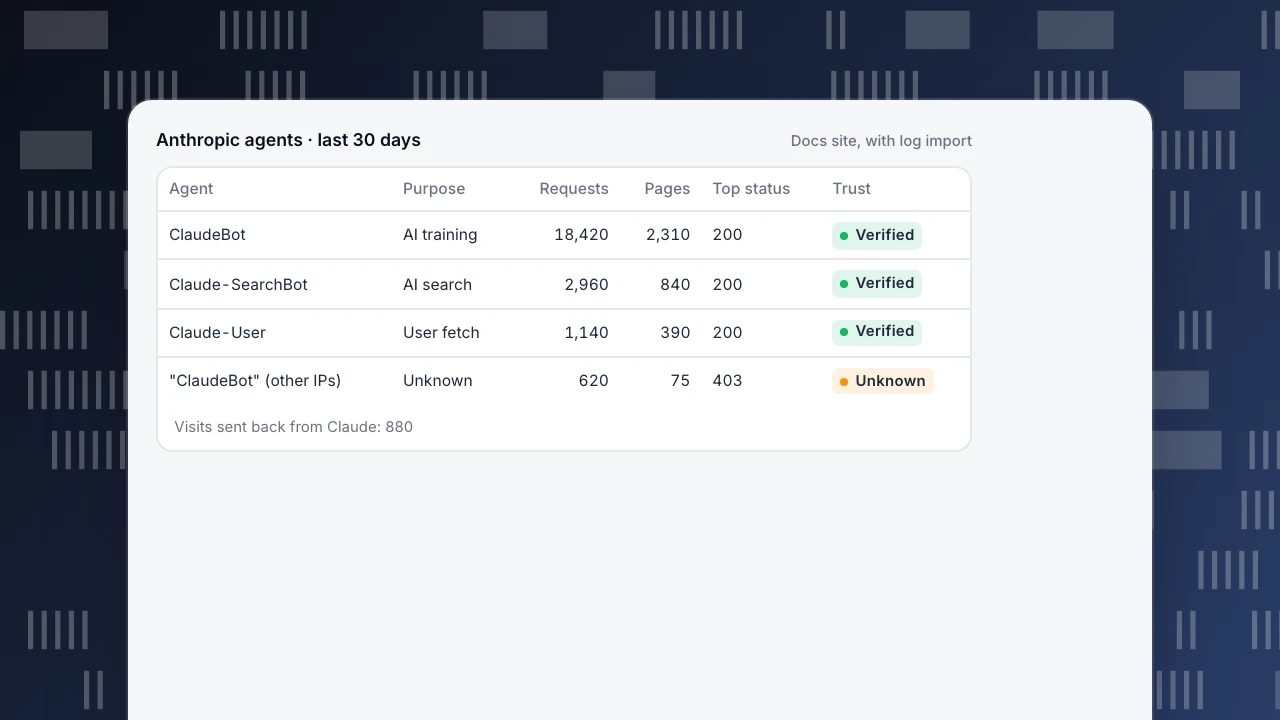
Before deciding, look at what it actually reads. Useful numbers per agent: requests, distinct pages, the status codes it gets, and how many human visitors arrive from Claude in return. The example shows a month on a documentation site: ClaudeBot reads far more than the other two, while Claude-User fetches line up with visits sent back from Claude.
Most AI crawlers do not run JavaScript, so a page-script analytics tool sees few or none of them. Server logs or a log import are needed for complete counts. See the AI crawler ledger for comparing reads with visits sent back.
Anthropic agents · last 30 days
Docs site, with log import| Agent | Purpose | Requests | Pages | Top status | Trust |
|---|---|---|---|---|---|
| ClaudeBot | AI training | 18,420 | 2,310 | 200 | Verified |
| Claude-SearchBot | AI search | 2,960 | 840 | 200 | Verified |
| Claude-User | User fetch | 1,140 | 390 | 200 | Verified |
| "ClaudeBot" (other IPs) | Unknown | 620 | 75 | 403 | Unknown |
Visits sent back from Claude: 880
Should you block ClaudeBot?
It depends on what you publish and what you want from AI assistants. Sites that sell their content often block training crawlers and keep user fetches. Sites that want to be cited in answers usually allow Claude-User and Claude-SearchBot, and may allow ClaudeBot too. Sites with load problems can use Crawl-delay. Whatever you choose, check that it is applied: a robots.txt rule only states your wish, so compare it with actual fetches. Related: llms.txt, AI crawler and the AI crawler checker.
ClaudeBot in TapCub
The Bots report lists each bot with operator, purpose (search, AI training, AI answer engines, monitoring), requests, pages, the most common status code, last seen and trust level (verified, suspected or unknown). The AI content ledger shows reads per operator next to human visitors sent back (bots). Recognised bots are kept out of human reports by default. With only the page script, you see only bots that execute JavaScript; status codes and non-JavaScript crawlers need server collection or a log import.
Crawler compliance fetches your robots.txt and compares it with real fetches, flagging three violation types: fetched while blocked, fetched a disallowed path, and fetched sooner than the declared delay. A generator drafts rules such as "block training crawlers" or "block answer engines" for you to publish (crawl health & compliance).
FAQ
What is ClaudeBot?
Anthropic's web crawler for collecting public content that could contribute to model training. Anthropic also runs Claude-User and Claude-SearchBot.
How do I block ClaudeBot?
Add User-agent: ClaudeBot and Disallow: / to robots.txt at the root of each host and subdomain.
Does blocking ClaudeBot remove my site from Claude's answers?
Not by itself. User-requested fetches use Claude-User and search uses Claude-SearchBot; each is controlled by its own robots.txt group.
Does ClaudeBot respect Crawl-delay?
Anthropic says it supports the non-standard Crawl-delay extension for ClaudeBot where appropriate.
How can I tell if ClaudeBot is real?
Compare the request's source IP with the list Anthropic publishes at claude.com/crawling/bots.json.
See also
Was this article helpful?
We use your answers to fix and expand this page.
Couldn’t send. Please try again in a minute.
Thanks for the feedback. We’ll use it to improve this page.You’ve already sent feedback on this page. Thanks.

Customer Experience Consultant
Writes about live chat, visitor conversations, and self-service, sharing practical ways to make customer communication clearer and more effective.