Try it on your own data
Every report in this article is in the free plan. One snippet for web and apps, up to 10 sites.
Start freeMost customer service training is a slide deck about empathy and a week of shadowing. It produces agents who know the right words but not the product, the tools or what to do when a customer is angry and the answer is no. A useful programme covers six skill areas, practises them on real conversations, and is measured with the same numbers you use to run the team. Here is what to cover, a 30-day plan for a new chat agent, and how to tell whether it worked.
What you will learn
- Train product, tools and process as seriously as tone and empathy
- Practise on real (anonymised) conversations, not invented scripts
- Judge training by behaviour and results: first response, resolution, satisfaction and QA scores
What customer service training is for
Customer service training prepares people to solve customers' problems well: correctly, quickly and in a way that leaves the customer willing to come back. It covers knowledge (the product and policies), skills (writing, de-escalation, troubleshooting) and habits (using tools and following process). It applies to new hires, to existing agents when the product or policy changes, and to everyone who occasionally answers customers, such as founders and engineers on rotation.
Two things it is not. It is not a script: scripts break on the first unusual question. And it is not a one-off: the product changes every month, so training has to as well.
The skills to cover
Most programmes over-invest in tone and under-invest in the product. Customers forgive a slightly stiff sentence; they do not forgive a wrong answer or being transferred three times. Cover six areas, and decide up front how you will measure each.
The table below lists them with how to practise and measure each. Two notes on the soft skills. Empathy in support means acknowledging the specific problem and owning it, not adding "I understand your frustration" to every reply; see better ways to say sorry. And de-escalation is mostly about speed and clarity: research on customer effort (Dixon, Freeman and Toman, 2010) found that reducing the effort it takes to get a problem solved does more for loyalty than trying to delight.
| Skill area | What good looks like | How to practise | How to measure |
|---|---|---|---|
| Product knowledge | Answers common questions without escalating | Use the product as a customer; answer 20 past questions | Escalation rate, knowledge quiz |
| Tools and process | Tags, routes, transfers and resolves correctly | Sandbox inbox; shadow then reverse-shadow | QA checklist, transfers in and out |
| Writing for chat | Short, specific, one question at a time | Rewrite real replies; peer review | QA tone score, satisfaction |
| Empathy and de-escalation | Names the problem, owns it, offers repair | Role-play angry customers | Satisfaction on complaint chats |
| Problem solving and escalation | Knows when and how to hand over | Case studies of escalations | Reopen and repeat-contact rate |
| Policy and privacy | Applies refunds, discounts and data rules consistently | Scenario quiz | QA audit, policy exceptions |
Adapt the areas to your product; keep the measurement column.
A 30-day onboarding plan for a new chat agent
Week 1: Product and context. Use the product as a customer would, end to end. Read the knowledge base and the 50 most recent resolved chats. Answer 20 past questions in writing; a senior agent reviews them. Exit check: passes a product quiz; answers are correct and specific.
Week 2: Tools and shadowing. Learn the inbox: statuses, assignment, transfers, internal notes, canned replies, visitor context. Shadow a senior agent for two days, then reverse-shadow: the new agent drafts, the senior agent approves before sending. Exit check: handles a full conversation from assignment to resolve without help.
Week 3: Live, with a safety net. Take live chats during busy hours with one chat at a time, a senior agent available, and every conversation reviewed the same day. Role-play two difficult scenarios (an angry customer, a refund you must decline). Exit check: first response within the team target on most chats; no policy errors in reviews.
Week 4: Full load. Move to normal concurrency (often two or three chats), all hours. Reviews drop to a weekly sample. Exit check: resolution rate and satisfaction within a few points of the team; QA score above threshold.
At day 30, review the numbers with the agent and agree what to work on next.
Training methods compared
| Method | Good for | Weakness |
|---|---|---|
| Shadowing | Seeing tools and judgement in action | Passive; quality depends on who you shadow |
| Reverse shadowing | Safe practice on real customers | Slows the senior agent |
| Role-play | Difficult conversations, de-escalation | Feels artificial unless based on real cases |
| Reviewing real conversations (QA) | Specific, ongoing feedback | Needs a consistent scorecard |
| Knowledge base and e-learning | Product facts, policy | Knowing is not doing |
| Calibration sessions | Consistency across reviewers and agents | Takes the whole team's time |
The most effective programmes combine shadowing for the first days, reverse shadowing to bridge into live work, and weekly reviews of real conversations from then on.
Skills specific to live chat
Chat is not phone support in writing, and not email in real time. Train these explicitly:
- Acknowledge fast, answer fully. A quick "Let me check that for you" within a minute keeps the visitor; the full answer can follow.
- Short messages, one question at a time. Long paragraphs get skimmed.
- Use the context you have. The page the visitor is on and where they came from often answer the first question before you ask it.
- Handle concurrency. Two or three chats at once without mixing them up; use internal notes to keep track.
- Take over from AI gracefully. When an AI assistant hands over, read what it already said and do not make the customer repeat themselves.
- Close clearly. Summarise what was done and what happens next before resolving.
How to measure whether training worked
The Kirkpatrick model evaluates training at four levels:
- Reaction: did trainees find it useful? (Survey after training.)
- Learning: do they know more? (Quizzes, graded practice answers.)
- Behaviour: do they work differently? (QA scores on real conversations, use of canned replies and correct process.)
- Results: did support outcomes improve? (First response, resolution rate, satisfaction, repeat contacts.)
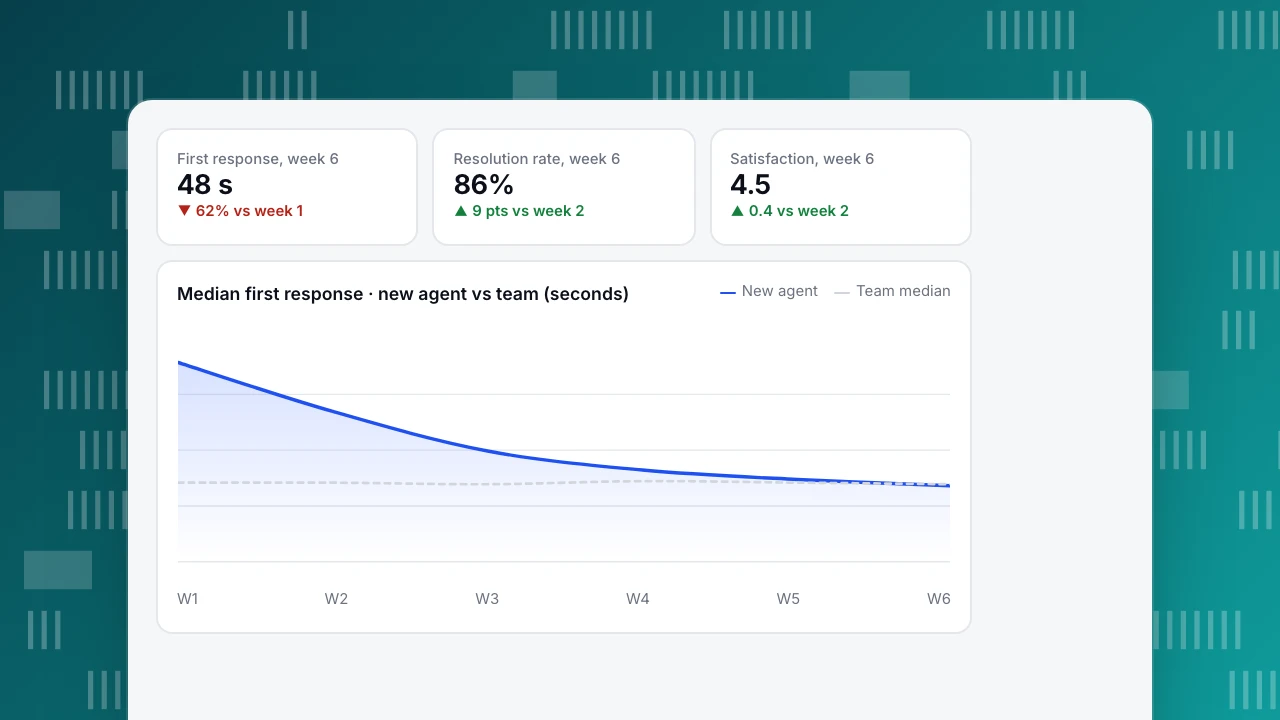
Most teams stop at level 1. Levels 3 and 4 are where support data does the work. Sample data for one new agent: median first response fell from 126 seconds in week 1 to 48 seconds in week 6, against a team median of about 50 seconds; resolution rate rose from 77% in week 2 to 86% in week 6; satisfaction from 4.1 to 4.5. The chart shows the response curve. Read the three together: a fast agent with falling satisfaction is rushing, not improving.
For a programme rather than one person, compare cohorts: agents onboarded with the new plan against those onboarded before it, on the same metrics at day 30 and day 60.
First response, week 6
48 s
▼ 62% vs week 1
Resolution rate, week 6
86%
▲ 9 pts vs week 2
Satisfaction, week 6
4.5
▲ 0.4 vs week 2
Median first response · new agent vs team (seconds)
New agentTeam medianKeep training after onboarding
- Weekly reviews of a few conversations per agent with a shared scorecard.
- Monthly calibration: everyone scores the same five chats, then discusses differences.
- Release briefings before product or policy changes go live, with the new canned replies ready.
- Knowledge base upkeep: when agents answer the same new question twice, it becomes an article or Q&A entry.
- Coaching from data: an agent with many transfers out needs product depth; one with low satisfaction on complaints needs de-escalation practice.
In TapCub, Live chat › Reports includes agent workload for each person: chats handled and resolved, replies, average first response, satisfaction, and transfers out and in. Internal notes in the inbox are visible only to agents, which makes them useful for coaching on a live conversation. Agent-only members see only their own handling by default; an owner can change that. See chat roles explained.
FAQ
How long should customer service training take?
Initial onboarding for a chat or email agent typically takes two to four weeks before full workload, depending on product complexity. Training does not end there: weekly reviews and release briefings continue.
What are the most important customer service skills to train?
Product knowledge and problem solving first, because wrong answers do the most damage. Then clear writing, empathy that names and owns the problem, de-escalation, and knowing when to escalate.
How do you train customer service employees on a small team?
Use real conversations: have new hires answer past questions, reverse-shadow live chats, and review a few conversations each week. A shared set of canned replies and a small knowledge base carry most of the consistency.
How do you measure customer service training?
Look beyond trainee feedback. Check knowledge with quizzes, behaviour with QA scores on real conversations, and results with first response, resolution rate, satisfaction and repeat contacts compared with the team.
Sources
- Kirkpatrick, J. D. and Kirkpatrick, W. K. (2016). Kirkpatrick's Four Levels of Training Evaluation. ATD Press.
- Dixon, M., Freeman, K. and Toman, N. (2010). Stop Trying to Delight Your Customers. Harvard Business Review.
Was this article helpful?
We use your answers to fix and expand this page.
Couldn’t send. Please try again in a minute.
Thanks for the feedback. We’ll use it to improve this page.You’ve already sent feedback on this page. Thanks.

Customer Experience Consultant
Writes about live chat, visitor conversations, and self-service, sharing practical ways to make customer communication clearer and more effective.