Try it on your own data
Every report in this article is in the free plan. One snippet for web and apps, up to 10 sites.
Start freeAsynchronous messaging is customer support in which neither side has to be online at the same moment: the thread stays open and each party replies when free. It can cut peak staffing but only if customers accept waiting. In our worked example async saves 5.7% of agent-hours at a 79-minute worst wait and costs more than live chat once the promise drops to about 15 minutes.
What you will learn
- Async changes who waits, not how much work there is: a 5-agent team halves peak headcount from 10 to 5
- Tightening the promise erases the saving: a 16-minute wait needs 56 agent-hours against 46 for live chat
- Keep urgent, mid-purchase issues on live chat and send research-heavy or off-hours questions to async
What counts as asynchronous messaging in support?
Asynchronous messaging is a support conversation that does not need both sides online at the same moment. Zendesk describes it as a conversation that starts, pauses and resumes at the customer's convenience, with the whole history kept in one thread so nobody repeats themselves. Email, Slack and WhatsApp fit that description; a phone line and a traditional live chat session do not, because both end when someone walks away.
Three properties separate it from live chat, and each one has a consequence for how you run the team:
- The thread persists. A customer can send a question, close the tab and read the answer hours later. Your tooling has to keep the thread and notify the customer when you reply.
- The agent is not tied to one person. While a customer is away, the agent can work other threads, which is where the capacity argument for async comes from.
- Waiting is allowed. Silence between messages is normal, so you cannot measure success by "answered within a minute". You need a first-reply target and a resolution target instead.
Live chat is covered in live chat customer service, and the human-versus-bot question in chatbot vs live chat. This guide answers a narrower question: if you move part of your support to async, what response times can you promise and how many people does it take?
How does asynchronous messaging compare with live chat?
| Live chat (synchronous) | Asynchronous messaging | |
|---|---|---|
| Both sides online together | Yes | No |
| Conversation ends when | The visitor closes the window or the agent resolves it | The issue is resolved; the thread can stay open for days |
| First-reply expectation | Under 1 minute is the top target, 1.5 minutes good enough (Help Scout, Aug 2025) | Between chat and email: set your own target, for example within the hour |
| Agent concurrency | A few chats at once, all demanding an instant answer | Many threads, each needing a reply within its own target |
| Staffing driver | The busiest minute of the day | The total workload over the target window |
| Best for | Quick questions, pre-purchase hesitation, urgent problems | Order status, account questions, anything needing research, customers in other time zones |
| Main risk | Visitors leave while queued | Long pauses delay resolution; urgent issues feel ignored |
The staffing row is where the models really differ, and the worked example below puts numbers on it. The risk row matches Zendesk's own caveats: long gaps between messages can delay resolution, and urgent issues may call for a synchronous channel so they can be settled in one session.
| Live chat | Asynchronous messaging | |
|---|---|---|
| First-reply expectation | Under 1 minute top target, 1.5 minutes good enough | Between chat and email: set your own, for example within the hour |
| Staffing driver | Busiest minute of the day | Total workload over the target window |
| Best for | Quick, urgent or pre-purchase questions | Order status, research, other time zones |
| Main risk | Visitors leave while queued | Long pauses delay resolution |
Chat target from Help Scout (Aug 2025); the async target is a planning choice, not a published benchmark.
What response times should I promise?
Public benchmarks give you the endpoints; the middle is your decision.
| Channel | Top target | Good enough | Source |
|---|---|---|---|
| Live chat first response | Under 1 minute | 1.5 minutes | Help Scout (Aug 2025) |
| Social media first response | 1 hour | 5 hours | Help Scout (Aug 2025) |
| Email first response | 1 hour | 12 hours | Help Scout (Aug 2025) |
Help Scout compiles those from several named sources and warns that industry, customer demographics and product will move them. It also quotes HubSpot research (undated in the article) that 90% of customers see an immediate answer as essential or very important, with most defining immediate as 10 minutes or less. Read together: async is not a licence to be slow, it is a licence to answer in minutes or an hour instead of seconds. A customer who has to wait for several hours with no sign of life will feel like an email customer, not a chat customer.
One platform rule shapes any async design built on WhatsApp. According to Meta's developer documentation, a 24-hour customer service window starts when a user messages the business and resets each time they message again. While it is open you can send free-form messages; once it closes you can only send template messages. If your async target is longer than the window, you will lose the ability to reply freely. Plan the first-reply and resolution targets inside the window, or accept that a late reply must go out as an approved template.
Customer preference is split. Zendesk's own survey data, as reported in its article, has 36% of customers preferring async messaging for general issues and 21% for complex ones. That is a vendor survey, so treat it as direction rather than a measurement, but it fits the pattern in the table above: async is a good default for routine questions and a weak one for complicated problems that people want settled now.
How many agents does asynchronous messaging need?
The capacity argument for async is concurrency and smoothing. The example below makes the assumptions explicit so you can replace them with yours.
Sample data: a support team receives 380 conversations in an 8-hour day with a peak in the middle. Arrivals per hour: 20, 30, 40, 60, 90, 70, 40, 30. Each conversation takes 5 agent-minutes of real work, whichever model you run. The only difference is how long a customer may wait.
Synchronous staffing. Every hour must have enough agents to answer immediately, so each hour is staffed at its own load with 75% utilisation to leave slack for bursts. Workload in agent-hours is arrivals × 5 ÷ 60, divided by 0.75 and rounded up:
- Hourly headcount: 3, 4, 5, 7, 10, 8, 5, 4.
- Total: 3 + 4 + 5 + 7 + 10 + 8 + 5 + 4 = 46 agent-hours, peak headcount 10.
Asynchronous staffing, 5 agents. The team is fixed at 5 agents working at 85% utilisation, so capacity is 5 × 60 × 0.85 ÷ 5 = 51 conversations an hour. Work that exceeds capacity waits in a queue and is cleared later:
- The backlog at the end of each hour, converted to minutes of work, is 0, 0, 0, 11, 56, 79, 66 and 41 minutes.
- The busiest point leaves customers waiting about 79 minutes; 35 conversations remain at the end of the day and take about 0.69 hours to clear.
- Total effort: 5 × (8 + 0.69) = 43.4 agent-hours, peak headcount 5.
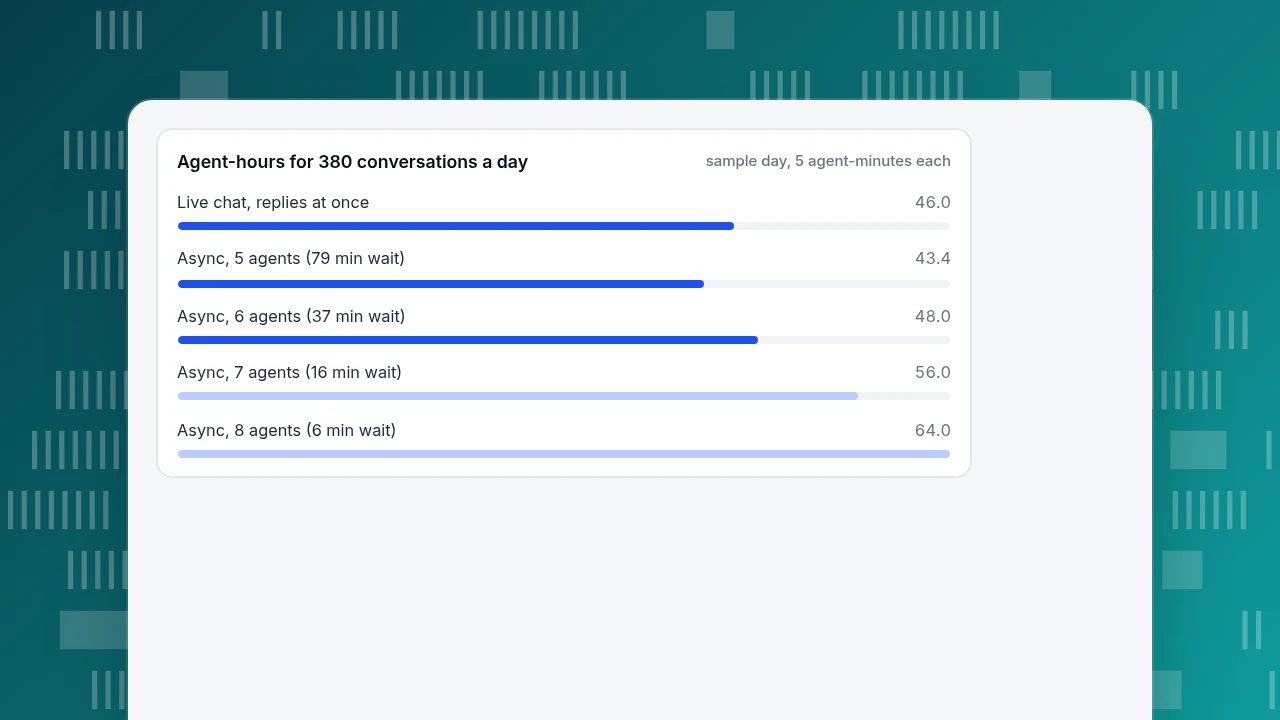
So async at 5 agents uses 2.6 fewer agent-hours (5.7%) and halves the number of people needed at the same time. The price is a worst-case wait of about 79 minutes. Now tighten the promise:
| Team size | Capacity per hour | Longest wait | Agent-hours |
|---|---|---|---|
| 5 agents | 51 | 79 minutes | 43.4 |
| 6 agents | 61.2 | 37 minutes | 48.0 |
| 7 agents | 71.4 | 16 minutes | 56.0 |
| 8 agents | 81.6 | 6 minutes | 64.0 |
If your promise is to reply within about 15 minutes, async needs 7 agents and 56 agent-hours, which is more than the 46 for live chat. The saving in async comes entirely from accepting longer waits; it is not a property of the channel. That is the number to check before you tell finance that async will reduce headcount.
Agent-hours for 380 conversations a day
sample day, 5 agent-minutes eachWhen should I choose live chat instead?
Use the staffing result and the customer's situation to decide. These rules are judgement based on the figures above, not published thresholds.
- If the customer is mid-purchase or the problem is blocking them, use live chat or a phone line. They need a sub-minute answer and will not wait an hour.
- If your promise has to be under about 15 minutes, do not expect async to be cheaper. The 7-agent row above is the reason.
- If the answer needs research, an order lookup or another team, use async. Agents can investigate between replies; Zendesk lists this as one of the benefits.
- If customers span time zones, use async. A reply that lands in their morning is better than an offline form.
- If the thread runs on WhatsApp, keep the first reply and the resolution inside the 24-hour window, or prepare template messages for late replies.
- If a thread has been waiting for more than your first-reply target, treat it as urgent and move it to live chat or a call. That handoff is where async quality is won or lost.
A practical hybrid is live chat during staffed hours, async outside them, and an auto-reply that states the next reply time. The second half of that sentence matters more than the first: a stated time turns waiting into an expectation.
How do I handle asynchronous messaging in TapCub?
TapCub's chat is a website widget. It does not connect WhatsApp or SMS, and it does not send email on your behalf, so it supports a hybrid rather than a full async messaging stack. It does have the parts of an async workflow that matter for the example above.
- Find your own peaks. In Live chat › Reports, the heatmap counts chat starts by weekday and hour in your site's time zone. That is the arrivals row in the staffing example, taken from your own data.
- Set hours and the offline path. In Live chat › Chat settings › Office hours choose the time zone and working days. Outside those hours, or when no agent is online, visitors see the offline greeting and can leave an email and a question, which land in Live chat › Chat settings › Offline messages with the statuses New, Replied and Closed. Treat that queue as your async inbox and give it one owner and one reply deadline.
- Let the thread continue. If a visitor writes again within the reopen window on Live chat › Chat settings › Appearance, the same conversation reopens (the default is 24 hours). After the window, a new conversation starts and the earlier ones show above it.
- Choose how AI covers the gaps. In Live chat › Chat settings › AI assistant, the mode "Only when all agents are offline" lets a person answer while someone is online and the knowledge base answer first otherwise. The AI only drafts replies from your knowledge base; it cannot look up an order.
- Measure the response time that people actually delivered. The first-response figure in Live chat › Reports counts only the first human reply, not an AI one, and offline messages are counted separately from resolved conversations. Compare it with your target from the table above.
TapCub does not run WhatsApp, SMS or email threads, and it only measures the chat on your own site. Within that scope it organises the queue and the response times so you can decide how much of your support can safely wait.
FAQ
What is asynchronous messaging in customer service?
It is support in which customers and agents exchange messages without both being online at once. The thread stays open, the customer replies when convenient and the agent answers when free. Email, WhatsApp and similar channels work this way, while phone calls and standard live chat do not.
Is asynchronous messaging cheaper than live chat?
Only if customers accept longer waits. In the worked example, 5 agents replying within about 79 minutes use 43.4 agent-hours against 46 for live chat, a 5.7% saving, while a reply within about 16 minutes needs 56. The saving comes from the waiting time you allow.
How fast should I reply to an asynchronous message?
Aim between live chat and email. Help Scout lists 1.5 minutes as good enough for chat and 12 hours for email; HubSpot research quoted there says most customers call 10 minutes or less immediate. A first reply within an hour is a sensible starting target, then adjust from your data.
Does WhatsApp support limit how long I can reply?
Yes. Meta's documentation says a 24-hour window opens when the customer messages you and resets with each new message. Inside it you can send free-form replies; after it closes you can only send approved template messages, so plan reply deadlines within the window.
Sources
- Zendesk. What is asynchronous messaging and how does it work? — definition, pros and cons, and the customer preference figures (36% and 21%). Checked 2026-11-20.
- Help Scout. 7 ways to improve your customer service response times — first response benchmarks by channel, dated 2025-08-26, and the HubSpot immediacy figure. Checked 2026-11-20.
- Meta. WhatsApp Business Platform pricing: customer service window — the 24-hour window and template message rule. Checked 2026-11-20.
Was this article helpful?
We use your answers to fix and expand this page.
Couldn’t send. Please try again in a minute.
Thanks for the feedback. We’ll use it to improve this page.You’ve already sent feedback on this page. Thanks.

Product Analyst
Focuses on event analysis, conversion funnels, and retention, using clear metric definitions and structured analysis to explain product performance.