Try it on your own data
Every report in this article is in the free plan. One snippet for web and apps, up to 10 sites.
Start freeChoose live chat support software on four criteria: how fast customers get a reply, whether you can serve other languages, how safely AI can take repeated questions, and whether the reports prove it works. Run a two-week pilot with pass marks set in advance, so the decision rests on numbers.
What you will learn
- Estimate agents with workload = chats per hour × handling hours, aiming for about 80% occupancy
- Test AI on 20 real questions and set a wrong-answer limit before the demo
- Set pilot pass marks first, so the result is a decision and not an opinion
What is live chat support software, and what should it do?
Live chat support software lets visitors on your website or app talk to your team in real time, through a chat widget on their side and an inbox on yours. "Live chat support" is the practice; the software is the widget, the inbox, the routing rules and the reports that make the practice work at more than one person's scale. For the practice itself, see live chat customer service; for the plain definition, live chat.
At minimum, the software does five things: shows a chat widget on your pages, delivers messages to an agent inbox, assigns each conversation to someone, keeps the history and records what happened. Everything else is an extra, and the extras are where products differ. That is why this article compares on four criteria, in the order they hurt when they are missing: response, languages, AI assistance and reporting.
| Criterion | The question it answers | What to test |
|---|---|---|
| Response | Will customers get an answer fast enough? | Routing, staffing, first-response measurement |
| Languages | Can you serve customers who write in other languages? | Translation quality and what each side sees |
| AI assistance | Can software take the repetitive questions safely? | Accuracy, boundaries and handoff |
| Reporting | Can you prove it works and find what is wrong? | Metric definitions and attribution |
| Criterion | The question it answers | What to test |
|---|---|---|
| Response | Will customers get an answer fast enough? | Routing, staffing, first-response measurement |
| Languages | Can you serve other languages? | Translation quality and what each side sees |
| AI assistance | Can software take repeated questions safely? | Accuracy, boundaries and handoff |
| Reporting | Can you prove it works? | Metric definitions and attribution |
Ordered by how much it hurts when missing.
Criterion 1: how fast will customers get an answer, and how many agents does that take?
Response speed is a staffing question first and a software question second. The software decides who sees a conversation and how quickly; the number of people decides whether anyone is free.
A simple staffing estimate: workload in agent-hours per hour = chats per hour × average handling time in hours.
Sample data: 30 chats an hour, 8 minutes each. Workload = 30 × 8 ÷ 60 = 4.0 agent-hours per hour. If an agent can handle 2 chats at once, you need 4.0 ÷ 2 = 2 agents running flat out. Nobody can sustain 100% occupancy, so aim for about 80%: 2 ÷ 0.8 = 2.5, which rounds up to 3 agents. With no concurrency (one chat at a time), the same load needs 4.0 ÷ 0.8 = 5 agents.
From that, three software features follow:
- Routing and assignment. Automatic assignment to available agents, with transfer when someone cannot answer.
- Status and office hours. Agents set themselves online or away, and the widget behaves differently outside working hours.
- Prepared answers. Canned replies cut handling time on repeated questions; canned responses covers how to write them.
Measure speed as the time to the first human reply, and report the median alongside the average, because a few very slow chats distort an average.
Criterion 2: can you serve customers in languages your team does not speak?
There are two ways to cover languages, and they cost differently:
| Approach | Strength | Weakness |
|---|---|---|
| Agents who speak the languages | Best nuance, no translation lag | Hiring and shift cover per language |
| Two-way machine translation | One team covers many languages | Idioms, product names and tone can slip |
What you should test is concrete. Take ten real customer messages, including two with idioms and two with product names, and run them both ways. Check what the agent sees (original and translation) and what the customer sees (their own language only). Count the messages that a reasonable customer would have found confusing. In the sample pilot, 1 of 10 failed, which is the most you should accept without a human check for important conversations.
Also confirm that the customer's own language is detected, not guessed from the browser alone, and that agents can see the original text in cases such as a refund dispute. Treat translation as a way to widen coverage, not as a substitute for a person when the stakes are high.
Criterion 3: how much of the repetitive work can AI take, and what stops it from doing damage?
AI assistance has two parts, and you should evaluate them separately. One is answers drawn from your own knowledge base: a question matches a prepared answer and is sent. The other is generated text, where a model drafts a reply from your documents. The first is predictable; the second is useful and needs limits.
Run a test with 20 real questions your team receives, and sort the outcomes:
| Outcome | Count in the sample | Share |
|---|---|---|
| Correct answer sent without a person | 12 | 60% |
| Handed to a person | 5 | 25% |
| Wrong or misleading answer | 3 | 15% |
Decide the pass rule in advance. A sensible rule is that the wrong-answer share must be at most 5%, which is 1 in 20. In the sample, 3 in 20 fails, even though 60% were answered correctly. The wrong answers matter more than the correct ones, because a company can be held responsible for what its chatbot tells a customer, as a tribunal decided in Moffatt v. Air Canada.
For evidence on the upside, a study of customer support agents found that AI assistance raised issues resolved per hour by 14% on average, with a larger gain for newer agents. Check three product behaviours: that the AI hands over to a person when the answer is not in your documents, that it can only produce replies and not change orders, and that you can see when it was used.
Criterion 4: can the reports prove the chat is working?
A chat tool that cannot tell you what happened is a cost you cannot defend. Ask for these metrics, with their definitions in writing:
| Metric | Definition to insist on | Sample, one week |
|---|---|---|
| Conversations | Conversations started in the range | 600 |
| Resolution rate | Resolved ÷ conversations | 480 ÷ 600 = 80% |
| First response | Time from start to the first human reply | Median 45 s |
| Satisfaction | Score after resolution, 1 to 5 | 4.3 |
| Agent workload | Handled, resolved, replies per agent | Per person |
| Where chats start | The page where the visitor opened the chat | Top 10 pages |
Be careful with two traps. If an AI reply counts as a "first response", your speed looks better than it is; ask whether human and AI are separate. And a conversion comparison between chatters and non-chatters is biased, because people who chat are often closer to buying already; treat the raw gap as an upper bound. For chat metrics in depth, see chat analytics.
How do you run a two-week pilot with pass marks?
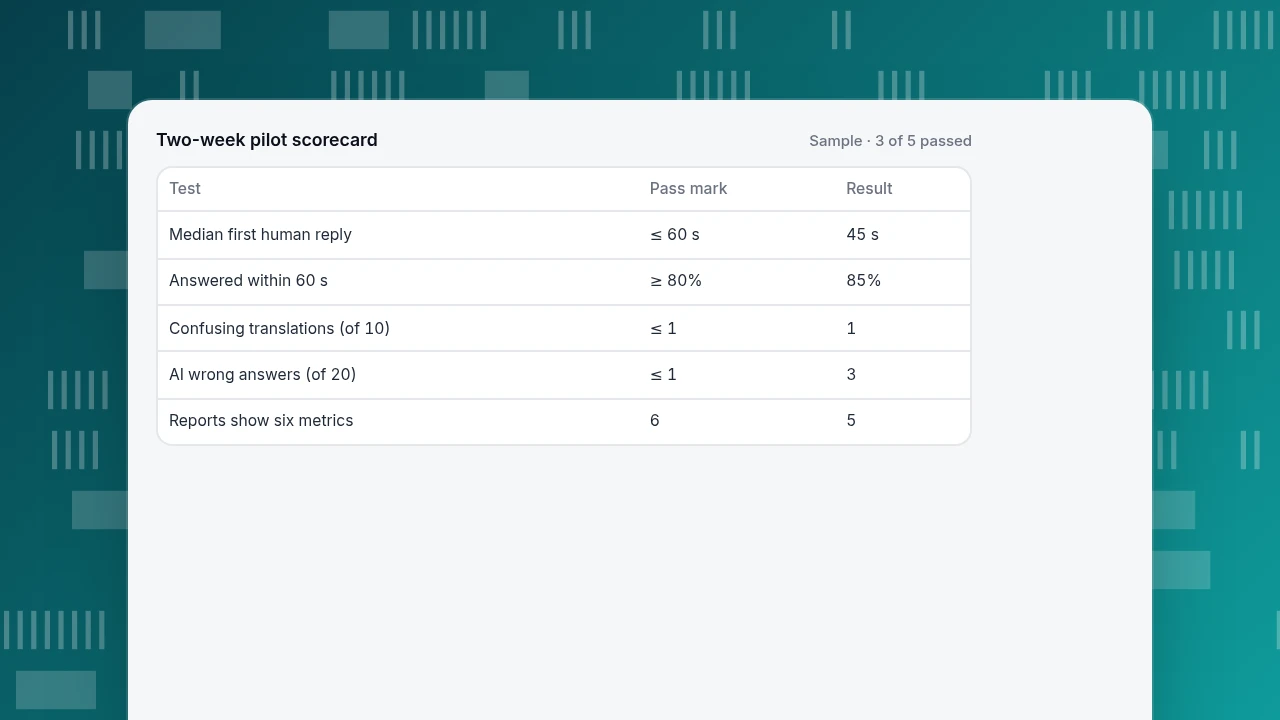
Decide pass marks before the pilot so that the result is a decision, not an opinion.
| Test | Pass mark | Sample result | Pass? |
|---|---|---|---|
| Median first human reply | At most 60 s | 45 s | Yes |
| Chats answered within 60 s | At least 80% | 85% | Yes |
| Translation: confusing messages out of 10 | At most 1 | 1 | Yes |
| AI wrong answers out of 20 | At most 1 (5%) | 3 | No |
| Reports show the six metrics above | All six | 5 of 6 | No |
Result: 3 of 5 passed. The two failures are specific and fixable: tighten the knowledge base and its handoff rule, and ask whether the missing report can be added. If the vendor cannot fix either in the pilot, you have your answer. For a small team, live chat for small business covers what to cut from this list.
Two-week pilot scorecard
Sample · 3 of 5 passed| Test | Pass mark | Result |
|---|---|---|
| Median first human reply | ≤ 60 s | 45 s |
| Answered within 60 s | ≥ 80% | 85% |
| Confusing translations (of 10) | ≤ 1 | 1 |
| AI wrong answers (of 20) | ≤ 1 | 3 |
| Reports show six metrics | 6 | 5 |
How do you choose live chat support software in five steps?
- Estimate the staffing with the workload formula and decide how many people will be in the inbox at peak.
- List your languages and decide which ones need native agents.
- Write 20 real questions for the AI test and fix the wrong-answer limit.
- Write the six metrics you need, with definitions.
- Run the pilot and score against the pass marks.
Add the website installation question last: if you already run site analytics, check whether chat can share its script and visitor identity so that the agent sees where the visitor came from. Add live chat to your website covers the installation options.
Common mistakes when choosing live chat support software
- Buying on the feature list. Features overlap; pass marks separate.
- Under-staffing. 30 chats an hour at 8 minutes each needs 3 agents at 2 concurrent chats, not 2.
- Counting AI replies as response. It flatters the speed number.
- Trusting the AI demo. A demo uses the questions it was built for; yours differ.
- Using translation for high-stakes chats without review. Idioms fail first.
- Judging success by the raw chatted-versus-not conversion gap. It overstates the effect.
How would this pilot run in TapCub live chat?
TapCub live chat uses the same script and visitor ID as TapCub web analytics, so a site that already has the script gets chat by switching it on. Here is how each criterion maps to the product.
- Switch on and route. Turn on live chat in Live chat › Chat settings › Appearance (the bubble appears without changing site code), set working hours in Live chat › Chat settings › Office hours, and manage availability and automatic assignment in Live chat › Agents. Conversations arrive in Live chat › Inbox under pending, mine, all and ended.
- Give agents context. Each conversation shows the visitor's source, the pages from the last 2 days and past conversations, with one click to the visitor's profile in analytics. Canned replies are inserted by typing
/in Live chat › Canned replies. - Languages. Live chat › Chat settings › Greeting & translation turns on two-way translation: visitors and agents each see their own language, and the original is shown to the agent only.
- AI with limits. In Live chat › Knowledge base, a Q&A entry that matches is sent as written and does not use an AI call; documents are split into passages, searched, and drafted into an answer. Live chat › Chat settings › AI assistant has three modes: off, only when all agents are offline, and AI first. When the material is not enough, it hands over to a person. It only produces replies; it does not change orders, send email or call other systems.
- Reports. Live chat › Reports shows conversations, resolution rate (resolved ÷ all), first response (the first human reply only), satisfaction, agent workload, knowledge base hit rate and the pages where chats start. Conversion attribution compares goal rates of visitors who chatted and who did not.
One boundary: the chat widget has no pre-chat form; to get an email address, ask in the conversation or use offline messages.
FAQ
What is live chat support?
Live chat support is real-time customer service over a chat window on a website or app. Visitors type a question, and an agent, or an AI that hands over to an agent, answers in the same conversation. It suits quick questions where waiting for email would lose the customer.
What features should live chat support software have?
At minimum a widget, an agent inbox, assignment and routing, history and basic reports. Beyond that, compare on four criteria: how fast customers get a reply, whether you can serve other languages, how safely AI can take repeated questions, and whether the reports prove it works.
How many agents do I need for live chat?
Workload in agent-hours per hour is chats per hour × handling time in hours. At 30 chats an hour and 8 minutes each, that is 4.0; with 2 concurrent chats per agent and an 80% occupancy target, you need 3 agents. Recalculate for your peak hour.
Is live chat support software worth it for a small business?
It can be, if visitors ask questions that decide a sale and someone can answer within about a minute. A small team can start with office hours, canned replies and offline messages. See live chat for small business for what to keep and what to skip.
Can AI replace human agents in live chat?
Not fully. AI can take repeated questions that your knowledge base answers well, but it needs a handoff to a person when the answer is not in your material, and a company can be held responsible for wrong answers. Measure the wrong-answer rate before you widen its scope.
See also: Live Chat Services: How to Choose One With Criteria, Pricing Math and a Scorecard.
See also: Chat SDK vs Chat Widget: How to Choose Between Building and Embedding.
See also: Live Chat Features: What Each Team Size Really Needs.
See also: Best Live Chat Software: How to Choose and Compare.
Sources
- Civil Resolution Tribunal of British Columbia. Moffatt v. Air Canada, 2024 BCCRT 149 — a company was held responsible for what its website chatbot told a customer. Verified 2026-11-19.
- Erik Brynjolfsson, Danielle Li & Lindsey R. Raymond. Generative AI at Work. NBER Working Paper 31161, 2023 — 14% average and 34% novice-worker gains in issues resolved per hour in customer support. Verified 2026-11-19.
Was this article helpful?
We use your answers to fix and expand this page.
Couldn’t send. Please try again in a minute.
Thanks for the feedback. We’ll use it to improve this page.You’ve already sent feedback on this page. Thanks.

Product Analyst
Focuses on event analysis, conversion funnels, and retention, using clear metric definitions and structured analysis to explain product performance.