Try it on your own data
Every report in this article is in the free plan. One snippet for web and apps, up to 10 sites.
Start freeThe live chat features you need depend on how many people answer: a solo owner needs an offline form, business hours and saved replies; a team of 2 to 10 adds visitor context, transfers, reports and a knowledge base; a larger team adds routing rules and permissions. Compute your own staffing first, then weigh options with weights that match your size.
What you will learn
- Must-haves for every size: offline message form, business hours and saved replies
- Compute staffing: 1,200 chats at 8 minutes, 2 at once and 70% utilisation is 0.71 of one person, so routing can wait
- Set weights before scoring: the same three options rank differently for a solo owner and a 10-agent team
Which live chat features do you actually need?
It depends on how many people answer the chat. A one-person shop needs a chat box that reliably captures messages when she is away, plus a few saved replies. A ten-person team needs routing, permissions and reports, or the chat turns into a shared inbox nobody owns. Everything else is optional until a number tells you otherwise.
A live chat feature here means anything the chat tool does for the visitor (the widget, the greeting, the offline form), for the agent (inbox, saved replies, visitor context) or for the owner (reports, permissions, data controls). Most feature lists put all three in one pile of 40 bullet points. This guide sorts them into must-have, add when you grow and check before you buy, by team size.
If you are still choosing a tool, live chat support software compares what to look for overall; if you have chosen and are installing, add live chat to your website covers setup. A site-side view of the same list (the widget, mobile behaviour, accessibility) is in live chat features for websites.
What does the feature list look like by team size?
Priorities change with the number of agents and with chat volume. This table assumes one of three situations: solo (1 person answering, part time), small team (2 to 10 agents) and larger team (more than 10, or several shifts).
| Feature | Why it matters | Solo | Small team | Larger team |
|---|---|---|---|---|
| Offline message form | Visitors arrive when nobody is online; no form means a lost lead | Must-have | Must-have | Must-have |
| Business hours | Sets what the visitor sees outside coverage | Must-have | Must-have | Must-have |
| Saved replies | The same 20 questions make up most of the volume | Must-have | Must-have | Must-have |
| Visitor context (source, current page, recent pages) | You answer the right question without asking "where are you?" | Nice | Must-have | Must-have |
| Mobile notifications or email alerts | You can only answer what you notice | Must-have | Must-have | Handled by inbox |
| Transfer and assignment | Two people cannot both reply; handoff needs history | Not needed | Must-have | Must-have |
| Routing rules and permissions | Who sees which chats, who may export or delete | Not needed | Add when you grow | Must-have |
| Reports (volume, first response, resolution) | You manage what you measure; also shows staffing gaps | Nice | Must-have | Must-have |
| Knowledge base and automated answers | Takes the repeat questions off agents | Add when you grow | Must-have | Must-have |
| Proactive invites | Starts chats on high-intent pages | Nice | Add when you grow | Add when you grow |
| Two-way translation | Serves visitors in languages your team does not speak | Check need | Check need | Add when you grow |
| Data retention and export controls | Required where you handle personal data | Check need | Must-have | Must-have |
"Check need" means: look at your visitor languages or data rules before paying for it. The right-hand columns are not about being a bigger company; they are about the tool coordinating more than one person.
| Team size | Must-have | Add when you grow | Check before paying |
|---|---|---|---|
| Solo (1 part-time) | Offline form, business hours, saved replies, alerts you will see | Knowledge base, reports | Languages, data rules |
| Small team (2-10) | Plus visitor context, transfer and assignment, reports, knowledge base | Routing rules and permissions, proactive invites | Translation need, retention and export |
| Larger team (10+) | Plus routing rules and permissions, retention and export controls | Proactive invites, translation | Page speed, keyboard access, limits |
Rows summarise the full table in the article; the point is whether the tool coordinates more than one person.
What can you decide from the numbers?
Team size is not a guess, you can compute it. Sample data: a site gets 1,200 chats a month; an average chat takes 8 minutes of agent time; one agent can handle 2 chats at once; and agents can realistically spend 70% of their paid time in the chat window (the rest is breaks, notes and follow-ups).
- Handling time: 1,200 × 8 ÷ 60 = 160 hours of conversation.
- With two chats in parallel: 160 ÷ 2 = 80 hours of staffed chat time.
- At 70% utilisation: 80 ÷ 0.7 = 114.3 hours of paid time.
- Against a 160-hour month, that is 0.71 of one person.
So at this volume a single agent, covering business hours only, can handle it, and routing is unnecessary. At 3,000 chats a month with the same assumptions, the same arithmetic gives 285.7 hours of paid time, or about 1.8 people: the point at which transfer, assignment and reports stop being optional. (Check: 3,000 × 8 ÷ 60 = 400; ÷ 2 = 200; ÷ 0.7 = 285.7; ÷ 160 = 1.79.)
Use your own numbers: chats a month, minutes per chat, how many chats an agent really runs at once. If the result is under about 0.5 of one person (again a rule of thumb), buy for capturing messages, not coordinating a team.
How do you weigh features when comparing options?
Give each feature a weight from 1 to 5 for how much it matters to you, score each option from 1 to 5 on it, and multiply. The weights are the point: change them for team size and the ranking changes.
Sample data: three options (A, B, C) scored on six features, with two weight sets.
| Feature | Option A | Option B | Option C | Solo weight | 10-agent weight |
|---|---|---|---|---|---|
| Offline form | 5 | 3 | 4 | 5 | 3 |
| Saved replies | 3 | 5 | 4 | 4 | 4 |
| Routing | 2 | 5 | 3 | 3 | 5 |
| Visitor context | 4 | 2 | 5 | 4 | 3 |
| Reports | 3 | 5 | 3 | 3 | 5 |
| AI answers | 1 | 4 | 3 | 2 | 3 |
Solo weights (maximum 21 × 5 = 105): A = 70 (66.7%), B = 81 (77.1%), C = 80 (76.2%). B and C are close, and C wins if visitor context matters a little more.
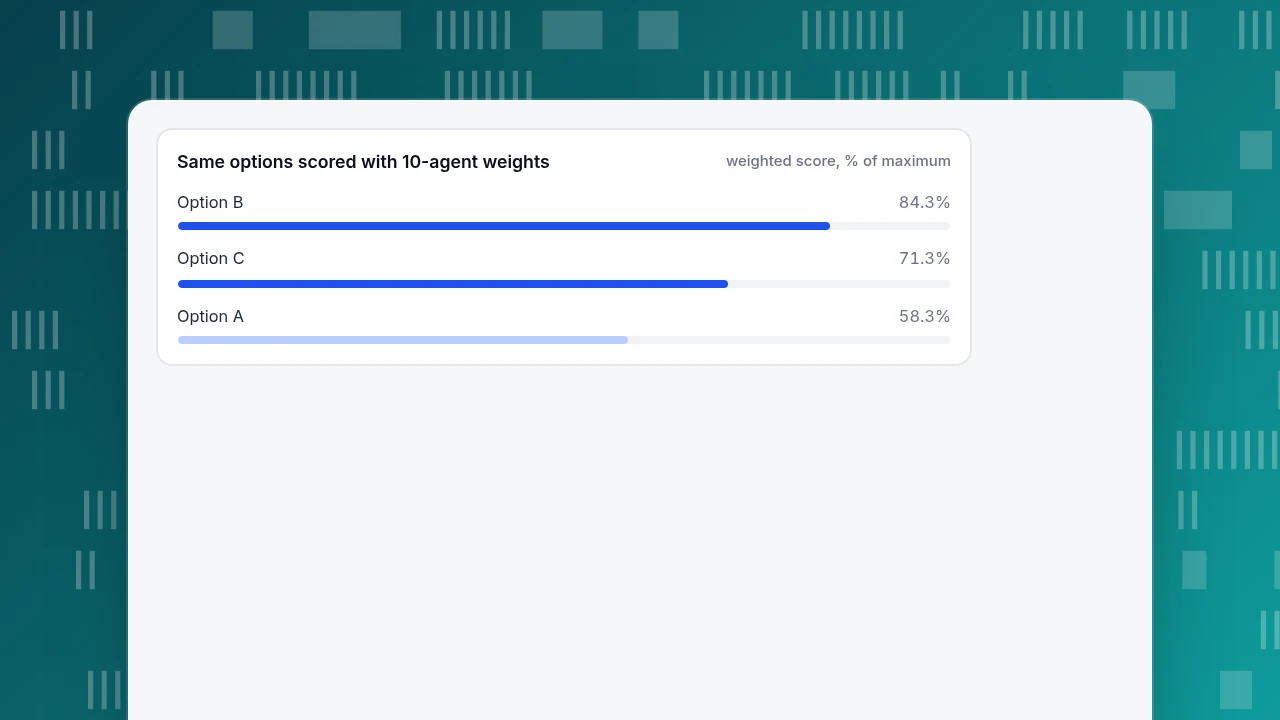
10-agent weights (maximum 23 × 5 = 115): A = 67 (58.3%), B = 97 (84.3%), C = 82 (71.3%). Now B is clearly ahead, because routing and reports carry the weight.
Two rules for doing this honestly: set the weights before you look at the options, and do not count a feature that is only a roadmap promise as a 5.
Same options scored with 10-agent weights
weighted score, % of maximumWhich "advanced" features are worth it?
Add these only when a number says you need them:
- Automated answers from a knowledge base. Add when the same questions fill more than about a third of your chats and an agent is the bottleneck (a rule of thumb, not a standard). Check that the tool hands off when it has no answer, and that bot messages are labelled. See AI support agent. One caution: an automated answer is your published statement; in Moffatt v. Air Canada (2024 BCCRT 149) a tribunal held an airline to what its website chatbot said (case). Evidence for AI that helps agents, rather than replacing them, is stronger: in a study of 5,179 support agents, an AI assistant raised issues resolved per hour by 14% on average and 34% for novices (Brynjolfsson, Li and Raymond, NBER Working Paper 31161).
- Proactive invites. Add when you can name the two or three pages where visitors hesitate (pricing, checkout) and you have agents online to answer. Start with one rule on one page and look at how many invites turn into replies. See proactive chat invites.
- Translation. Add when more than a few percent of chats arrive in languages your team cannot read. Count them first.
- Voice, video and screen sharing. Check whether your problems are visual ("show me") before paying for them; most support questions are solved by text.
What should you check that vendors rarely list?
These do not appear in feature tables but decide whether the tool helps or hurts:
- Does it slow your pages? Chat widgets are third-party scripts. Google's Core Web Vitals treat an Interaction to Next Paint of 200 ms or less as good at the 75th percentile of page loads, 200 to 500 ms as needs improvement and over 500 ms as poor (web.dev). Test your key pages before and after adding the widget.
- Can everyone use it? WCAG success criterion 2.1.1 (Level A) requires that all functionality be operable through a keyboard interface (W3C). Open the widget and send a message using only the keyboard.
- Can you turn it off on a page? Checkout and login pages often need it off. Check this before you commit.
- Who can see and delete conversation data? Look for permissions, retention settings and export.
- What happens when you hit a limit? Ask what visitors see when your monthly conversations or AI usage run out; the answer should be a message form, not an error.
How does this look in TapCub?
Take the capacity example: 1,200 chats a month, one agent, business hours only. Here is how the must-have rows in the table map to TapCub, using only what the product does.
- Switch it on without new code. If your site already runs the TapCub analytics script, turn on Enable live chat in Live chat › Chat settings › Appearance; the bubble appears after a reload. The same script and visitor ID serve analytics and chat.
- Cover the away hours. Set Live chat › Chat settings › Office hours and the offline greeting. Outside hours visitors can leave an email and a question, collected in Offline messages with statuses New, Replied and Closed. With the AI assistant on, the knowledge base answers first and the form appears only when it cannot.
- Save the repeat answers. Add the 20 most common replies to Live chat › Canned replies (type
/to insert, edit before sending). - Give the agent context. In Live chat › Inbox the side panel shows where the visitor came from, the pages viewed in the last 2 days and past conversations, with one click to the analytics visitor profile.
- Grow into the rest. When capacity says you need a second person, Live chat › Agents adds online status, auto-assignment, transfers and fine-grained permissions; Live chat › Reports shows conversations, resolution rate, average first response and satisfaction, and the knowledge base hit rate.
TapCub's chat has no pre-chat form: if you need an email, ask in the conversation or use the offline form. TapCub does not do CRM, lead scoring or email marketing; it measures what chat does to conversion in Live chat › Reports › Conversion attribution, and the sample size warning appears when fewer than 30 visitors chatted. Plan limits (agents, monthly conversations, AI calls) are on the account's Chat plan page.
FAQ
What are the most important live chat features?
An offline message form, business hours and saved replies come first for every team size. Add visitor context, reports and a knowledge base when more than one person answers; add proactive invites and translation when numbers justify them.
What live chat features do small businesses need?
A reliable offline form, saved replies, notifications you will actually see, and basic reports. For a solo owner, routing and permissions are not needed; for 2 to 10 agents, transfers and assignment become must-haves.
How many agents do I need for live chat?
Compute it: chats × minutes per chat ÷ 60 ÷ concurrent chats ÷ utilisation ÷ monthly paid hours. With 1,200 chats, 8 minutes, 2 concurrent chats and 70% utilisation, that is 0.71 of one person.
Do live chat widgets slow down a website?
They can, as any third-party script can. Measure Interaction to Next Paint on your key pages before and after; 200 ms or less at the 75th percentile is Google's threshold for good.
Should I use a chatbot instead of live chat?
Use both: automated answers for repeat questions with a clear handoff to people for the rest. See chatbot vs live chat.
Sources
- Google, Interaction to Next Paint (INP), web.dev (thresholds checked 2026-11-20).
- W3C, Understanding Success Criterion 2.1.1: Keyboard, WCAG 2.2 (checked 2026-11-20).
- Brynjolfsson, Li and Raymond, Generative AI at Work, NBER Working Paper 31161, issued April 2023 and revised November 2023 (checked 2026-11-20).
- Civil Resolution Tribunal of British Columbia, Moffatt v. Air Canada, 2024 BCCRT 149, February 2024 (case citation confirmed through law-firm summaries on 2026-11-20).
Was this article helpful?
We use your answers to fix and expand this page.
Couldn’t send. Please try again in a minute.
Thanks for the feedback. We’ll use it to improve this page.You’ve already sent feedback on this page. Thanks.

Product Analyst
Focuses on event analysis, conversion funnels, and retention, using clear metric definitions and structured analysis to explain product performance.