Try it on your own data
Every report in this article is in the free plan. One snippet for web and apps, up to 10 sites.
Start freeGood live chat examples share four habits: the answer comes in the first message, the agent asks at most one thing back, the next step has a time on it, and the agent checks it worked. Below are ten sample conversations, written as illustrations rather than real transcripts, each annotated with what made it work.
What you will learn
- Put the answer before the question: in the sample set, 7 of 10 chats were resolved in the chat itself
- Do not promise what the agent cannot grant; hand off and say what happens next (a company answers for what its chat says)
- Review ten of your own chats against six yes/no items; anything below 4 of 6 is a rewrite
What do good live chat examples have in common?
Good live chat exchanges look unremarkable. The agent answers the question that was asked, in the first message, in plain words; asks at most one thing back; says what happens next; and checks that it worked. Nothing in them is clever.
The ten sample conversations below are written for this article as illustrations. They are not real customer transcripts, and the numbers in the summary table are sample data. Each one is annotated with the habit it shows, so you can copy the habit, not the wording. For ready-to-paste templates by situation, see live chat scripts; for the first message a visitor sees, see live chat welcome message.
Two reasons to keep messages short: people skim. A study of 45,237 page views by the Nielsen Norman Group found visitors read at most 28% of the words on an average page, and realistically about 20% (Nielsen, 2008). That was web pages, not chat, but a chat window is a smaller page; assume the same habit.
What do good pre-sales chats look like?
Pre-sales chats come from visitors who are close to deciding and missing one fact. The job is to supply that fact fast and then get out of the way.
Example 1: pricing page, one missing fact
Visitor: Does the Pro plan include the API? Agent: Yes, API access is included from Pro up. Do you need it for a one-off export or for a regular sync? Visitor: Regular sync, daily. Agent: Then Pro covers it. The daily limit is on the pricing page under "API calls", and I can send you that link if you like. Visitor: Please. Agent: [link] Anything else before you decide?
What worked: the answer ("Yes") came before the question. The one question asked was the one that changes the recommendation. First reply: 20 seconds.
Example 2: product page, comparing two options
Visitor: What's the difference between the 2 sizes? Agent: The large one holds about twice as much. If you travel with a laptop, take the large; for daily commuting with a tablet, the small is enough. Which is closer to you? Visitor: Laptop. Agent: Large, then. It's in stock and ships tomorrow if you order today.
What worked: the agent turned a feature comparison into a decision rule ("if you carry a laptop, large") and committed to a recommendation. Visitors rarely want a list of differences; they want to be told which one fits. First reply: 35 seconds.
Example 3: visitor wants a discount
Visitor: Any discounts? Agent: There's a 10% code for first orders that I can send you right now. Is this your first order with us? Visitor: Yes. Agent: WELCOME10, valid for 7 days. It applies at checkout, not in the cart page.
What worked: it gave the offer first and the condition second, and it named where the code works, which is the question that causes the next chat. (Sample code, not a real one.) First reply: 15 seconds.
What do good billing chats look like?
Billing chats are where a vague reply costs trust fastest, because the visitor is already worried about money. Be precise about amounts, dates and what you can and cannot do.
Example 4: charged twice
Visitor: I was charged twice this month! Agent: Sorry about that. I'll check now. Can you tell me the last four digits of the card and the dates of the two charges? Visitor: 4417, both on the 3rd. Agent: Thanks. I can see one charge and one pending authorisation on the same day. The pending one drops off by itself, usually within 3 to 5 business days, so you will end up paying once. I'll note this on your account in case it doesn't drop by the 10th. Visitor: OK. What if it doesn't? Agent: Then message us and I'll escalate it to the payments team. You won't need to explain it again.
What worked: it asked only for identifiers it needed, said what it saw, gave a date by which to worry, and promised that nobody would ask the visitor to repeat themselves. First reply: 45 seconds.
Example 5: refund request outside the agent's authority
Visitor: I want my money back for last month. Agent: I can help start that. Refunds after 30 days need a manager's approval, so I'll pass this to them now with your details. They reply within one working day by email. Visitor: Will I get it? Agent: I can't promise the outcome. What I can promise is that you'll get a written answer tomorrow, and I've put in your reason so you don't have to repeat it.
What worked: the agent did not promise something it could not grant. A company is responsible for what its chat says: in Moffatt v. Air Canada (2024 BCCRT 149) a tribunal held an airline to a refund policy its website chatbot had stated, rejecting the idea that the chatbot was a separate entity (case). The same applies to a human agent who "sort of" agrees to a refund. This chat was a handoff, correctly. First reply: 30 seconds.
Example 6: invoice details
Visitor: Where do I put our VAT number? Agent: Account, then Billing details. Add it there and the next invoice includes it. For invoices already sent, tell me the month and I'll reissue them. Visitor: January and February. Agent: Done: both reissued, check your email in a few minutes.
What worked: a path (where to click) plus an offer to fix the past. Visitors with this kind of question usually have two problems, the one they asked and the backlog. First reply: 25 seconds.
What do good bug and problem chats look like?
For a problem, speed matters less than gathering the right facts in one pass.
Example 7: something is broken
Visitor: Your export is not working. Agent: Sorry, let's fix it. Three things will help me: which export (CSV or PDF), what you saw (error message or nothing), and which browser? Visitor: CSV, nothing happens, Safari. Agent: Thanks. Does it work in Chrome, if you have it? Visitor: Not installed. Agent: Understood. I can't reproduce this on my side yet, so I'm passing it to our engineers with those details and will email you once there's a fix or a workaround. Tonight, I can send you the CSV by email if you tell me the date range.
What worked: three specific questions in one message instead of three round trips, an honest "I can't reproduce this yet", and a stopgap (send the file by email). First reply: 60 seconds, but the visitor did not wait on silence.
Example 8: user error, no blame
Visitor: Can't log in. Agent: Let's get you in. Is the message "wrong password" or "account not found"? Visitor: Account not found. Agent: That usually means a different email from the one you signed up with. Did you sign up with a work address? Visitor: Oh, yes I did. Thanks! Agent: Glad that's sorted. If you can't remember which, tell me your name and I'll check the likely address for you.
What worked: it asked the question that splits the cause in two, offered the likely explanation without saying "you made a mistake", and added an exit if the guess was wrong. First reply: 40 seconds.
What do good chats outside office hours look like?
Example 9: nobody is online
Visitor: Do you ship to Canada? Auto reply: We're offline until 9:00 (Eastern). We ship to Canada, usually in 5 to 7 business days. Leave your email below and a person will follow up with the exact cost. Visitor: [email] Agent (next morning): Good morning. Shipping to Canada on your order of two items is $18, delivered in 5 to 7 business days. Want me to add it to your cart?
What worked: the offline message still answered the question, so the visitor was not left with a form and nothing. The follow-up quoted the exact figure instead of "let us know if you need more help". First reply: 50 seconds after the agent started work, and the visitor had an answer in seconds the night before.
Example 10: a short, successful chat
Visitor: Is there a student price? Agent: Yes, 40% off with a student email address. Add it at checkout, and it applies automatically. Visitor: Thanks.
What worked: nothing extra. The agent answered in one message, did not pad it with pleasantries and did not ask for an email "so we can follow up". First reply: 18 seconds.
How do the ten examples compare?
Sample data: the ten examples scored on the same four measures. Averages were recalculated from the rows.
| # | Situation | First reply (s) | Messages | Outcome |
|---|---|---|---|---|
| 1 | Pricing question | 20 | 6 | Resolved in chat |
| 2 | Product comparison | 35 | 5 | Resolved in chat |
| 3 | Discount | 15 | 4 | Resolved in chat |
| 4 | Charged twice | 45 | 8 | Resolved in chat |
| 5 | Refund outside authority | 30 | 6 | Handed off |
| 6 | Invoice details | 25 | 5 | Resolved in chat |
| 7 | Export failing | 60 | 9 | Handed off |
| 8 | Login failure | 40 | 7 | Resolved in chat |
| 9 | Offline shipping question | 50 | 6 | Follow-up promised |
| 10 | Student price | 18 | 4 | Resolved in chat |
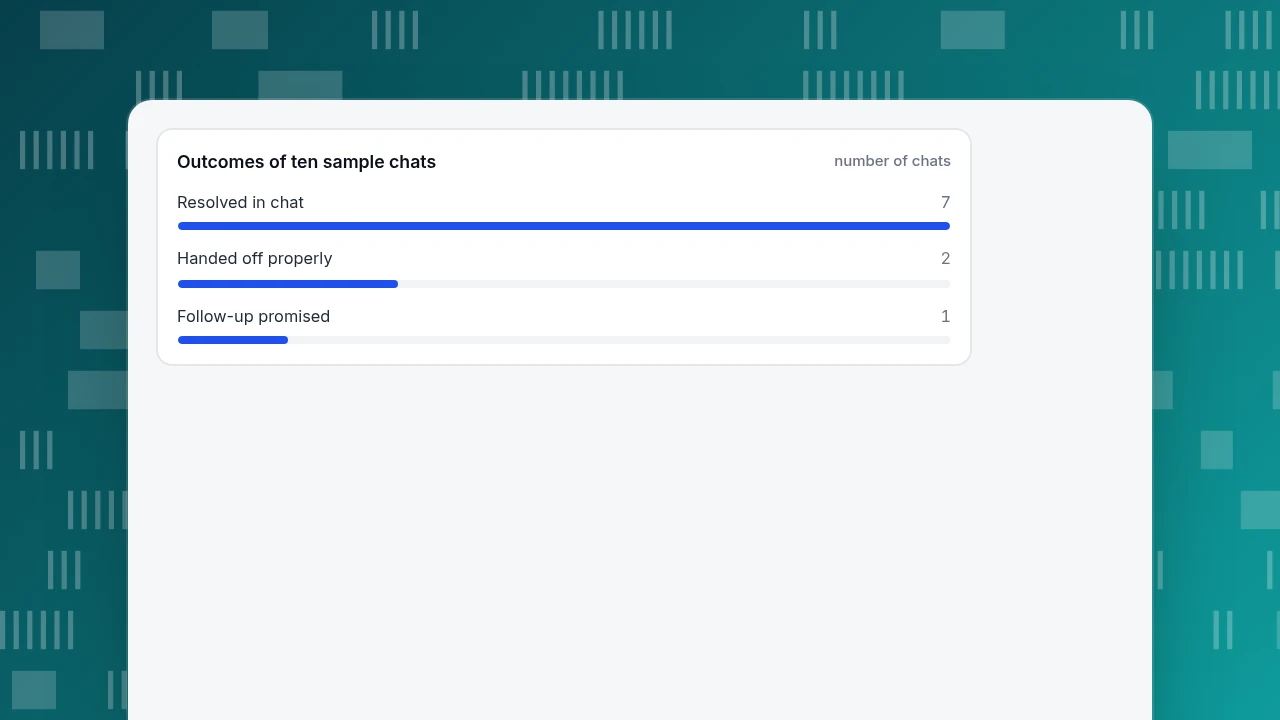
The mean first reply is 33.8 seconds (median 32.5) and the mean length is 6.0 messages. Seven of ten (70%) were resolved in the chat itself, two were handed off properly, and one (the offline chat) ended with a follow-up promise. Five of ten had a first reply within 30 seconds.
Notice what the numbers do not say: the fastest first reply (15 seconds) and the slowest (60 seconds) are both on the "good" list. A fast reply does not rescue a wrong answer, and a slightly slower reply that contains the three questions needed to fix a bug beats a quick "Can you elaborate?".
Outcomes of ten sample chats
number of chatsHow do you turn these into your own standard?
Copy the habits, not the wording. This checklist is what the ten examples have in common; use it to review ten of your own transcripts.
- Is the answer in the first message? If the first message is a question and the visitor asked a question, rewrite.
- At most one question back, or one bundled set of facts. Three specific questions in one message are fine; three separate round trips are not.
- Does it name the next step and a time? "Within one working day by email" beats "soon".
- Does it promise only what the agent can grant? If not, hand off and say what happens next.
- Does it check it worked? One closing line is enough; skip it when the visitor has already said thanks.
- Does it avoid reading policy at the visitor? Summarise in a sentence and link the page.
Score each of ten recent chats 0 or 1 on these six items. Anything below 4 is a rewrite candidate. For people new to the job, written examples help a lot: in a study of 5,179 customer support agents, an AI assistant that suggested replies raised issues resolved per hour by 14% on average and by 34% for novice and low-skilled workers (Brynjolfsson, Li and Raymond, NBER Working Paper 31161). A shared set of annotated transcripts plays the same role for a human team at no cost.
| Habit | What it looks like | Fails when |
|---|---|---|
| Answer first | 'Yes, API access is included from Pro up' | The first message is a question to a visitor who asked one |
| One question back | One bundled set of facts, e.g. CSV or PDF, error or nothing, browser | Three separate round trips |
| Next step with a time | 'A written answer tomorrow by email' | 'We'll get back to you soon' |
| Only promise what you can grant | 'I can't promise the outcome' | 'Sure, we'll refund you' without authority |
| Check it worked | One closing line | Padding after the visitor has said thanks |
| No policy dumps | One sentence plus a link | Pasting the policy text into the chat |
Score ten recent chats 0 or 1 on each item; below 4 of 6 is a rewrite candidate.
How would you collect and review these in TapCub?
Take the six-point checklist above and the ten sample chats. Here is how to run the same review on your own conversations in TapCub.
- Pick the chats to review. Open Live chat › Inbox and use the Resolved list (a chat that is resolved reopens if the visitor writes again within 24 hours by default). Take ten recent ones across the topics you handle most.
- Read them with context. In the inbox side panel you see the page where the visitor started, their source, and the pages they browsed in the last 2 days. A pricing question from someone who had read three pricing pages is a different chat from one on the home page.
- Save the good replies. Turn repeated good answers into Live chat › Canned replies: type
/in a conversation to insert one, edit it before sending. Keep them as starting points; the habit is "edit, then send". - Check the numbers. Live chat › Reports shows average first response (seconds, human replies only, with the median), resolution rate and satisfaction, and a list of the pages where chats start. Compare your average with the 33.8 seconds in the sample table.
- Mark the handoffs. Use transfers for anything outside an agent's authority, so the next person sees the conversation history instead of asking again. TapCub does not score transcripts for you; the six-point review is a manual step.
TapCub does not write replies for the agent unless you turn on the AI assistant; that only drafts from your knowledge base and cannot issue a refund or change an order.
FAQ
What is an example of a good live chat conversation?
One where the first message answers the question, the agent asks at most one thing back, states the next step with a time, and checks it worked. Example 1 above is the pattern: "Yes, API access is included from Pro up", then one clarifying question.
How long should a live chat take?
There is no ideal length; the ten samples above average 6.0 messages, from 4 for a simple answer to 9 for a bug. Measure resolution and satisfaction, not minutes, and set the target per topic.
What should the first message say?
Answer the question if you can; if you cannot, say what you are doing and what you need. Avoid "How can I help you today?" as a reply to a visitor who has already asked.
Should agents use scripts?
Use them as starting points that agents edit before sending. A pasted script that ignores what the visitor said reads like a bot and gets a worse outcome than a short custom line.
Sources
- Jakob Nielsen, How Little Do Users Read?, Nielsen Norman Group, 5 May 2008 (checked 2026-11-20).
- Brynjolfsson, Li and Raymond, Generative AI at Work, NBER Working Paper 31161, issued April 2023 and revised November 2023 (checked 2026-11-20).
- Civil Resolution Tribunal of British Columbia, Moffatt v. Air Canada, 2024 BCCRT 149, February 2024 (case citation confirmed through law-firm summaries on 2026-11-20).
Was this article helpful?
We use your answers to fix and expand this page.
Couldn’t send. Please try again in a minute.
Thanks for the feedback. We’ll use it to improve this page.You’ve already sent feedback on this page. Thanks.

Product Experience Specialist
Writes about product experience, practical workflows, and growth, turning complex processes into clear steps for everyday decisions.