Try it on your own data
Every report in this article is in the free plan. One snippet for web and apps, up to 10 sites.
Start freeA live chat script is a multi-turn conversation template that fixes the structure and must-say information while leaving wording to the agent. Scripts make everyone say the right thing at the key moment without sounding the same. Below: 21 templates across 7 scenarios, when to depart from them, and a 30-day audit that keeps the library useful.
What you will learn
- A live chat script fixes the structure (confirm → info → next step) and the must-say facts; the agent owns the wording.
- Depart from the wording when the visitor is upset, the news is bad, or the case is unusual — keep the structure and the facts.
- Audit the library every 30 days: use counts and CSAT tell you which scripts to keep, rewrite or retire.
What is a live chat script?
A live chat script is a pre-written, multi-turn conversation template for one support situation — a greeting, a pre-sales question, a refund, a transfer. It is not a single line you paste. It maps the whole exchange, so a new agent knows not just what to say but when to say it. The point of a script is to make sure everyone says the right thing at the key moment, not to make everyone sound the same: the script owns the structure and the must-say information; the wording belongs to the agent.
Every script below follows three moves:
- Confirm — acknowledge the specific request and reflect it back, so the visitor knows you understood.
- Info — give the one fact or answer that matters, with the details filled in.
- Next step — say what happens now and when, so the conversation ends with a plan, not a shrug.
A filled mini-example for a refund: "You're within the 30-day window, so order 1042 is eligible (confirm). I've refunded $24 to your card (info). It lands in 3–5 business days and the receipt goes to your email (next step)." Same three moves, every time.
Scripts use {placeholders} for the details an agent fills in before sending. The table shows the common ones.
| Placeholder | What the agent fills in | Filled example |
|---|---|---|
{name} | The visitor's name or handle | "Hi Sam" |
{order_id} | The specific order | "order 1042" |
{date} / {time} | A real deadline or timestamp | "by Friday" |
{amount} | The exact money figure | "$24" |
{page} / {link} | The page they're on, or a help link | "the reset guide" |
This is different from a canned response. A canned response is one saved reply for one recurring question; a script is the full conversation around it. If you want the 40 short, reusable lines that sit inside these scripts, that guide covers them. And if you are still deciding what chat should handle at all, start with live chat customer service. The rule to hold onto: fixed = structure + must-say facts; flexible = wording.
| Part of the script | Keep fixed | Leave flexible |
|---|---|---|
| Confirm / opening | Acknowledge the specific request; use the visitor's name or order | Greeting style and how warmly to open |
| Must-say information | Policy facts: refund window, amount, deadline, next step | Sentence order and plain-language phrasing |
| Next step | What happens now and when | How to phrase the offer or recap |
| Tone and small talk | Match the situation; no cheerfulness on bad news | Empathy wording and personal touches |
The script locks the structure and the facts that must be said; how it sounds belongs to the agent.
Complete live chat scripts by scenario
Below are 21 conversation templates across the seven situations that make up most chat volume. Each one follows confirm → info → next step, and each leaves {placeholders} for the agent to fill. Treat them as a skeleton to adapt, not a transcript to read aloud. For proactive openers on pricing or checkout pages, see proactive chat invites.
Greeting
Open by naming what the visitor is doing, then confirm the request before you answer.
1. First-time visitor
Visitor: Hi, is this the right place to ask about {topic}? Agent: It is, {name} — you're in the right place. What's your question about {topic}? Visitor: {question} Agent: Here's the short answer: {answer}. Next step: I can send the full steps to {email} if that helps.
2. Returning visitor
Visitor: Hi again, I was here yesterday about {topic}. Agent: Welcome back, {name}. I can see your earlier chat. Is this a follow-up on {topic}, or something new? Visitor: A follow-up — {detail}. Agent: Understood. Picking up where we left off: {info}. Next step: {next_step}.
3. Visitor on a specific page
Visitor: Hello, I'm on the {page} page and a bit confused. Agent: Hi {name}, I see you're on {page}. Is it {specific_part} that's unclear? Visitor: Yes, exactly. Agent: Here's what that does: {info}. Next step: want me to stay while you try it?
Pre-sales
Confirm the need before you pitch. A pre-sales script qualifies, it does not recite features.
1. Plan fit
Visitor: Which plan covers {need}? Agent: Good question. How many {unit} do you have, and is {need} the main goal? Visitor: About {number}, and yes. Agent: Then {plan} fits — it includes {feature} for {price}. Next step: I can start a trial, or send a comparison to {email}.
2. Feature or integration fit
Visitor: Does {product} work with {tool}? Agent: Let me confirm what you need: are you trying to {goal} between them? Visitor: Yes, {goal}. Agent: Yes — {product} connects to {tool} via {method}. Next step: here's the setup guide {link}; want me to check your setup?
3. Comparison objection
Visitor: I'm comparing you with {alternative}. Why pick you? Agent: Fair to compare. What matters most to you — {criterion_a} or {criterion_b}? Visitor: Mostly {criterion_a}. Agent: On {criterion_a}, {product} does {specific_difference}. Next step: I can show you in a {duration}-minute demo, or send details to {email}.
Troubleshooting
Confirm the symptom and the conditions before you suggest a fix, so you don't send the visitor down the wrong path.
1. Error message
Visitor: I'm getting "{error}" when I {action}. Agent: Sorry about that, {name}. Does it happen every time, or only with {condition}? Visitor: Every time since {date}. Agent: That error usually means {cause}. Try {step}; next step: tell me what you see and I'll take it from there.
2. Something stopped working
Visitor: {feature} stopped working for me. Agent: Let's pin it down. Which browser or device, and did it work before {date}? Visitor: {browser}, and yes, it worked last week. Agent: Thanks. A common cause is {cause}. Please try {step}; next step: if it persists, send a screenshot to {email} and I'll escalate.
3. Reproduced, then escalate
Visitor: I tried {step} and it's still broken. Agent: Thanks for trying that. I've reproduced it on {version} — it's a bug, not your setup. Visitor: Oh good, so it's not me. Agent: Right. I've logged it for our engineers as {ticket}. Next step: I'll update you at {email} by {date}.
Refunds
State the policy fact plainly, then the next step. This is the scenario we'll use to test rigid versus flexible wording below.
1. Refund within the window
Visitor: I'd like a refund for order {order_id}. Agent: I can help, {name}. You're within the {days}-day window, so order {order_id} is eligible. The refund is {amount}. Visitor: Yes, please. Agent: Done — {amount} is on its way back to {payment_method}. Next step: it usually lands in {days} business days; the confirmation goes to {email}.
2. Refund outside the window
Visitor: Can I get a refund? I bought it {time} ago. Agent: Let me check, {name}. Our window is {days} days and this order is past it, so a refund isn't available — I'm sorry. Visitor: That's frustrating. Agent: I understand. What I can do is {alternative}, like {option}. Next step: want me to set that up, or send the policy to {email}?
3. Duplicate charge
Visitor: I was charged twice for {order_id}. Agent: Thanks for flagging that. I see two charges of {amount} on {date}; one is a duplicate. Visitor: Yes, please fix it. Agent: I've refunded the duplicate {amount}. Next step: you'll see it in {days} business days, and the receipt goes to {email}.
Transfers
A good transfer carries the context so the visitor never repeats themselves. Confirm why you're moving them, then hand off.
1. To billing
Visitor: I need to change the card on my account. Agent: I can get you to the right person. This is a billing change, so our billing team handles it. Visitor: Okay. Agent: I'm transferring you now with our chat attached — you won't repeat anything. Next step: {colleague} will pick up here shortly.
2. To technical
Visitor: The integration keeps failing and I've tried everything. Agent: That sounds like a job for our technical team. You've already tried {steps}, correct? Visitor: Yes, all of it. Agent: Then I'll bring in {colleague}, who can see this whole conversation. Next step: they'll join here; I've noted {detail} so you don't repeat it.
3. Urgent escalation
Visitor: This is urgent — {issue} is blocking our launch. Agent: I hear you, {name}. This is urgent and affects {scope}, so I'm escalating it. Visitor: Thank you. Agent: I've marked it urgent and looped in {colleague}. Next step: you'll hear from us by {time}; I'll stay on until they join.
After-hours
When nobody is online, confirm the question, set a reply expectation you can keep, and offer a self-serve path.
1. Offline, leave a message
Visitor: Hi, are you there? I need help with {topic}. Agent: Thanks for reaching out, {name}. We're offline right now and back at {time} {timezone}. I've noted your question about {topic}. Visitor: Can someone reply tomorrow? Agent: Yes. Next step: leave your email and we'll reply by {next_business_day}; meanwhile this guide may help: {link}.
2. Offline, urgent
Visitor: It's {time} and {issue} is down. Is anyone available? Agent: I'm sorry — we're outside office hours. This sounds urgent, so I want to route it correctly. Visitor: Please, it's blocking us. Agent: Next step: leave your email and mark it urgent; the on-call person sees it first thing at {time}. For now, {workaround} may keep you running.
3. Offline, self-serve
Visitor: Do you have someone I can talk to about {topic}? Agent: We're offline until {time} {timezone}, but I can point you to answers now. Is your question about {specific}? Visitor: Yes. Agent: This article covers it: {link}. Next step: if it doesn't solve it, leave your email and a person will reply when we're back at {time}.
Closing
Close with a recap and a next step, not a generic "let me know if you need anything." If it isn't resolved, say so honestly.
1. Resolved, recap
Visitor: That fixed it, thanks! Agent: Glad it's sorted, {name}. To recap, we {summary}, and {next_step} happens by {date}. Visitor: Perfect. Agent: Next step: I'll close this chat; reply here anytime and it reopens. Have a good {time_of_day}.
2. Resolved, follow-up promised
Visitor: Okay, I'll wait for the email then. Agent: Sounds good. You'll get {item} at {email} by {date}, and I've noted {detail}. Visitor: Great, thanks. Agent: Next step: I'll close this now; if it hasn't arrived by {date}, just reply here. Thanks for your patience, {name}.
3. Unresolved, honest close
Visitor: I still don't think this is working. Agent: I'm sorry we didn't fully fix it today, {name}. Here's where we are: {status}, and {colleague} is looking at it. Visitor: Alright. Agent: Next step: you'll get an update at {email} by {date}. I'll keep this open until it's resolved. Thanks for bearing with us.
When to follow the script — and when to depart
A script is a floor, not a ceiling. The structure and the must-say facts stay; the wording flexes with the moment. Nielsen Norman Group's research on tone of voice found that tone changes how trustworthy and friendly people judge a company to be — which is exactly why the same cheerful line that works for a greeting backfires on a refund denial. Use this rule of thumb:
| If the visitor… | Keep fixed | Change freely |
|---|---|---|
| Is calm, asking a routine question | Structure + must-say facts + suggested wording | Personalise the opening |
| Is upset or angry | Structure + must-say facts | Drop scripted empathy; apologise in your own words |
| Is getting bad news (refund denied, outage) | Structure + the facts you must state | Write the apology and next step fresh |
| Has an unusual or edge case | The confirm → info → next-step flow | Improvise the info; escalate if needed |
When the news is bad, a canned apology reads as exactly that; see better ways to say sorry. And the small courtesies that keep a departure from feeling abrupt are covered in chat etiquette.
Does flexible wording actually change results? Here is the same refund script — script 1 above — used two ways. Sample data: 60 refund conversations each, same structure and same must-say policy information, only the wording adapted to the visitor.
| Metric (60 chats each) | Rigid wording | Flexible wording |
|---|---|---|
| Satisfied (CSAT 4–5) | 30/60 = 50% | 48/60 = 80% |
| Average handling time | 9.0 min | 6.0 min |
| Structure & must-say info | identical | identical |
CSAT is the share of satisfied responses, per the Qualtrics CSAT formula: satisfied ÷ responses × 100. The flexible version gained 30 points (80% − 50%) and cut handling time by 3 minutes (9.0 − 6.0), while saying the same required things. The difference was not the policy — it was that agents stopped reading and started talking. That is the thesis in one table: scripts govern structure and must-say information; wording is left to the agent.
Maintaining the library: a 30-day script audit
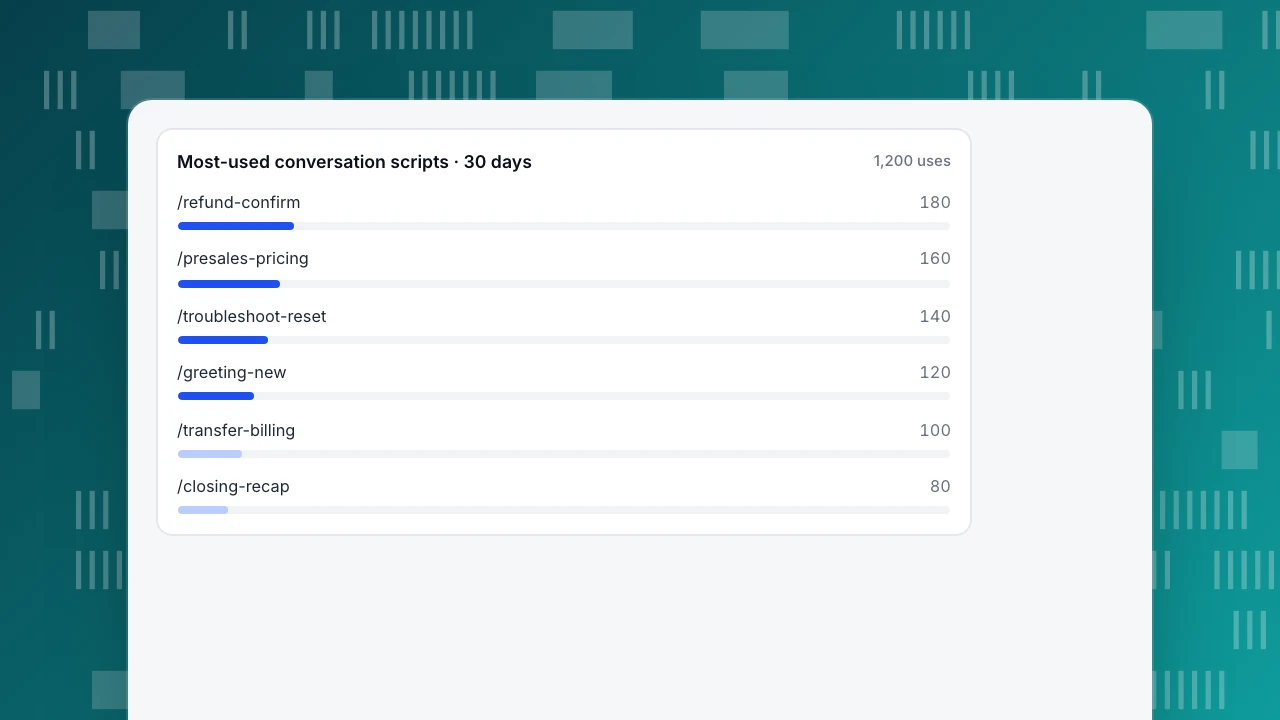
A script library rots quietly: policies change, agents invent workarounds, and half the scripts go unused. Audit it every 30 days with two numbers — usage and satisfaction. Here is a worked audit. Sample data: a team's library of 48 conversation scripts was used 1,200 times in 30 days.
- The six most-used scripts account for 780 uses: 780 ÷ 1,200 = 65.0% of all usage.
- 16 scripts were never used: 16 ÷ 48 = 33.3% of the library.
- The remaining 26 scripts account for the other 420 uses (1,200 − 780 = 420).
The chart shows the top six. Three actions follow from the usage × CSAT rule:
- Zero uses in 30 days → retire. Sixteen unused scripts make the library harder to search; remove them (16 of 48 here).
- High use, low CSAT → rewrite the wording, keep the structure. These are the scripts doing the most work and disappointing people; they get new phrasing first.
- High use, high CSAT → keep and polish. The top six deserve the most careful writing, because they carry two-thirds of the volume.
This is the same discipline as managing a canned-response library, with one addition: because these are full conversations, you can score satisfaction on the whole exchange, not just a single reply. Watch first response and handling time after each audit too — a better library should make both shorter without lowering CSAT.
Most-used conversation scripts · 30 days
1,200 usesHow to run these scripts in TapCub
Take the refund conversation above. In TapCub, the agent inserts it as a canned reply, adapts the wording to the visitor, and you can see whether it actually helped — because chat and analytics share one visitor ID.
- Store each agent turn as a canned reply. In Live chat › Canned replies, save the refund script's agent turns as rows with shortcuts named by scenario and step (for example
refund-1,refund-2). Keep shared policy scripts (refunds, transfers) at site level so every agent gets the same must-say facts, and turn on Personal (only visible to me) for an agent's own phrasing. In the inbox composer, type/and the shortcut; the row fills the box, and nothing is sent until the agent has adapted the wording and pressed send. Step by step: use canned replies. - Let the must-say facts come from the knowledge base. In Live chat › Knowledge base, store the refund window as a Q&A entry. With the AI assistant on, a visitor question that matches it gets the stored answer as written, with no AI call; pin it and it shows in the widget's FAQ, where opening the answer creates no conversation. The refund window then reads the same in the bot, the FAQ and the agent's script.
- Treat the proactive opener as a script too. In Live chat › Chat settings › Proactive invites, trigger on a page plus seconds spent there — for example the pricing page after 30 seconds — and write the opener (up to 300 characters) with the same confirm → info → next-step flow. The rule list records impressions, open rate and reply rate, so an opener nobody answers gets retired like any other script.
- Read the visitor before you word the reply. In Live chat › Inbox, the side panel shows the source, the current page and the last two days of browsing, on the same visitor ID as analytics. A visitor who has been on the refund-policy page for a while gets a different first line from one who just arrived from an order email; the structure stays the same.
- Run the 30-day audit. Each row in Live chat › Canned replies has a use count, which gives you the usage column of the audit: rows nobody sent in 30 days are the retire list. Live chat › Reports gives the average satisfaction score, first response and resolution rate, with satisfaction per agent under agent workload. TapCub does not score individual scripts, so after rewriting a high-use script, compare those numbers for the following month.
Boundaries worth stating: TapCub's widget has no pre-chat form (ask for an email in the conversation, or use Live chat › Chat settings › Offline messages after hours), TapCub does not run A/B tests, and the reports do not show handling time — the rigid-versus-flexible comparison above is an illustrative sample, so treat month-over-month satisfaction and first response as observation, not a controlled split. AI only drafts replies; it does not issue refunds or change orders.
FAQ
What is a live chat script?
A live chat script is a pre-written, multi-turn conversation template for a specific support situation — greeting, pre-sales, troubleshooting, refunds, transfers, after-hours or closing. It fixes the structure (confirm, give information, state the next step) and the facts that must be said, while leaving the exact wording to the agent. Unlike a one-line canned reply, it maps the whole exchange, so a new agent knows not just what to say but when to say it.
How often should you update live chat scripts?
Review the library every 30 days, and immediately whenever a policy, price or product change makes a must-say fact wrong. Use counts and satisfaction show which scripts to rewrite first: high-use scripts with low CSAT get new wording before anything else, and scripts nobody used in 30 days can be retired. Between audits, let agents flag any line that keeps needing edits — that is a script asking to be rewritten.
What is the difference between a live chat script and a canned response?
A canned response is a single saved reply an agent inserts for one recurring question. A live chat script is a full multi-turn conversation for a situation, showing how the exchange should flow from opening to next step. Scripts are the backbone; canned responses are the reusable lines inside them. Many teams store each script turn as a canned reply so agents can insert and adapt it quickly.
Do live chat scripts hurt the customer experience?
Not when they fix structure and facts but leave wording to the agent. In the sample comparison above, the flexible version of the same refund script scored 80% CSAT versus 50% for the rigid one, with shorter handling time. Scripts hurt when agents paste them verbatim into upset or unusual conversations. Keep the must-say information, drop the exact phrasing when the moment calls for it, and the experience improves.
How many live chat scripts does a team need?
Enough to cover the situations that make up most of your volume — often 30–50 conversation scripts across your main scenarios. In the sample audit, 48 scripts produced 1,200 uses in 30 days, but just six accounted for 65% of them and 16 were never used. Start with the high-volume scenarios, then let use counts tell you what to add, rewrite or retire rather than writing for every edge case.
Can AI use these live chat scripts?
Yes, as source material. Store the must-say facts as knowledge-base Q&A so an AI assistant answers common questions exactly, and let it hand off to a person with the transcript when a case is unusual. The AI drafts replies; it does not issue refunds or change orders. Keep the same discipline: the AI should follow the confirm-info-next-step flow, and a person should own anything commercial.
See also: Bot Names: How to Name a Chatbot (30 Ideas and a Test).
See also: Chatbot Templates: 8 Conversation Scripts and How to Adapt Them.
See also: Sales Pitch Examples: Problem, Proof and One Next Step.
See also: Follow-Up Email After No Response: Samples and a Three-Send Rule.
See also: How to Make a Sales Call Script: Fill-In Template With Timing.
See also: Live Chat Examples: 10 Annotated Conversations and What Worked.
See also: Live Chat Welcome Message: Examples by Page Type and How to Test.
Sources
- Moran, K. (2016). The Four Dimensions of Tone of Voice. Nielsen Norman Group — tone changes how trustworthy and friendly a company is judged to be. Verified 2026-11-15.
- Microsoft Learn (2026-05-27). Start a chat proactively (Dynamics 365 Customer Service) — proactive-chat trigger scenarios. Verified 2026-11-15.
- Qualtrics. What is CSAT and How Do You Measure It? — CSAT = satisfied responses ÷ total responses × 100. Verified 2026-11-15.
Was this article helpful?
We use your answers to fix and expand this page.
Couldn’t send. Please try again in a minute.
Thanks for the feedback. We’ll use it to improve this page.You’ve already sent feedback on this page. Thanks.

Product Experience Specialist
Explores usability, user journeys, and feature adoption through practical examples of onboarding and everyday product use.