Try it on your own data
Every report in this article is in the free plan. One snippet for web and apps, up to 10 sites.
Start freeA good chatbot template does three things: the greeting says it is an automated assistant, it asks what kind of question this is before answering, and when it cannot answer it hands off to a person with the context. Below: eight templates to adapt, why handoff decides trust and how to change each one using your own handoff data.
What you will learn
- Open with who the bot is and what it can do, then ask the topic
- Write the handoff so the visitor never repeats the question
- Treat templates as drafts and change one at a time using handoff reasons
What a chatbot template is, and the three rules behind a good one
"Chatbot template" means two different things. One is a design template: the look of the chat widget. The other, and the subject here, is a conversation template: the text the bot sends at each step, and the decision about what happens next. Whatever the tool, a good template follows three rules:
- Say what it is. The first message states that this is an automated assistant, and what it can do.
- Ask the type of question first. Narrowing to "orders, returns, payment, something else" before answering keeps the bot from answering the wrong question confidently.
- When it cannot answer, hand off, and bring the context. A handoff that makes the visitor repeat everything is a failed template.
The first rule is not only etiquette. In the EU, Article 50 of the AI Act, which applies from 2 August 2026, says systems that interact directly with people must be designed so those people know they are dealing with an AI system, unless that is obvious to a reasonably informed person from the context. This is not legal advice; check your own obligations. The second reason is liability: a Canadian tribunal held an airline responsible for wrong information its website chatbot gave a customer (Moffatt v. Air Canada, 2024), so the bot's words are your words.
Eight chatbot templates you can adapt
Text in braces is a placeholder. These are starting points, written for a store or service site; replace the nouns with yours.
| # | Scenario | Template text | Change it when |
|---|---|---|---|
| 1 | Greeting and identity | "Hi, I'm {name}, {company}'s automated assistant. I can answer questions about orders, delivery and returns, or connect you with a person. What can I help with?" | More than a quarter of first messages are about something the greeting does not mention |
| 2 | Question-type menu | "Pick the closest topic: Orders · Returns · Payment · Something else" | "Something else" is chosen more than about 25% of the time; add the topic people are typing |
| 3 | Answer and check | "{One or two sentences of answer.} Did that answer your question? [Yes] [No, talk to a person]" | The "No" share for one topic is high; rewrite that answer, not the template |
| 4 | Clarifying question | "I want to get this right. Is your question about {option A} or {option B}?" | Visitors still miss after one clarification; hand off after the second miss |
| 5 | Handoff | "I'm connecting you with {team}. I've passed on: {summary of what you asked}. Replies usually take about {n} minutes." | Visitors repeat their question to the agent; the summary is missing or unclear |
| 6 | Outside office hours | "Our team is offline until {time, time zone}. Leave your email and question and we'll reply by {time}. Meanwhile, these answers may help: {links}" | Offline messages ask things the links already answer |
| 7 | Pointer for what the bot cannot do | "I can't look up an order myself. Your order number is in your confirmation email, and the tracking link there shows the latest status." | The pointed-to page changes or you add a self-service lookup |
| 8 | Close | "Glad that helped. Anything else I can help with?" | Visitors reopen the chat within a day with the same question |
Template 7 matters more than it looks. Many bots are asked to do things they cannot do, such as check an order or change an address. Saying so plainly and pointing to the next step is better than a vague answer.
Why handoff is the template that decides trust
Every other template can be mediocre and the bot still works; a bad handoff ruins the visit. A good handoff message has four parts: who is taking over, what the bot already knows, what the visitor does not need to repeat, and how long it will take.
| Version | Message | What goes wrong or right |
|---|---|---|
| Weak | "I can't help with that. Please contact support." | Dead end; the visitor must find another channel and start again |
| Better | "I'm connecting you with a person." | Better, but the visitor does not know whether the agent will see the question |
| Working | "I'm connecting you with the support team. They'll see your question about a refund on order #{number}. Replies usually take about 5 minutes." | Names who, shows what carries over and sets a wait |
Two more rules for handoff. First, give a way out early, not only after the bot has failed three times: a visible "Talk to a person" option on the answer-and-check template (template 3) stops visitors from feeling trapped. Second, when nobody is online, say so and take a message (template 6) rather than promising a person who is not there.
How to write the text itself
Chat text is read in a narrow window by someone with a question. Rules that hold for all eight templates (these are working rules, not published standards):
- Two short sentences at most per message. If the answer is longer, give the shortest version and link out.
- Three to five buttons at most. More than that is a menu page, not a chat.
- One question per message. "What's your order number and email and issue?" gets one of the three.
- Say what the bot will do before it does it. "I'll pass this to a person" tells the visitor what comes next.
- Retry once, then hand off. One clarifying question (template 4) is helpful; repeating "I didn't understand" is a loop.
- No fake human. If the bot has a name, the greeting still says it is automated; do not add a stock photo and a typing delay to imply a person.
For human scripts (what agents say, not the bot), see live chat scripts; for stored human replies, see canned responses. Which kind of bot is behind the template, rule-based or AI, is covered in types of chatbots, and which questions to give it first in chatbot use cases. A bot's name is a separate decision, covered in chatbot names.
How to change templates using your own data
A template is a first draft. The conversation log tells you what to change. Sample data: 200 bot conversations from one month.
| Outcome | Conversations | Share of 200 |
|---|---|---|
| Bot answered, no handoff | 120 | 60% |
| Handed off to a person | 80 | 40% |
Break the 80 handoffs down by reason:
| Handoff reason | Count | Share of 80 | What to change |
|---|---|---|---|
| No knowledge match | 36 | 45% | Add answers for the missing questions; this is content, not script |
| Visitor asked for a person | 24 | 30% | Read the transcripts: was the offer too late (template 3), or was a person the right answer? |
| Turn limit reached | 12 | 15% | Add a clarifying question (template 4), or raise the turn limit if conversations were making progress |
| Model could not answer | 8 | 10% | The documents are thin on this topic; add a Q&A entry |
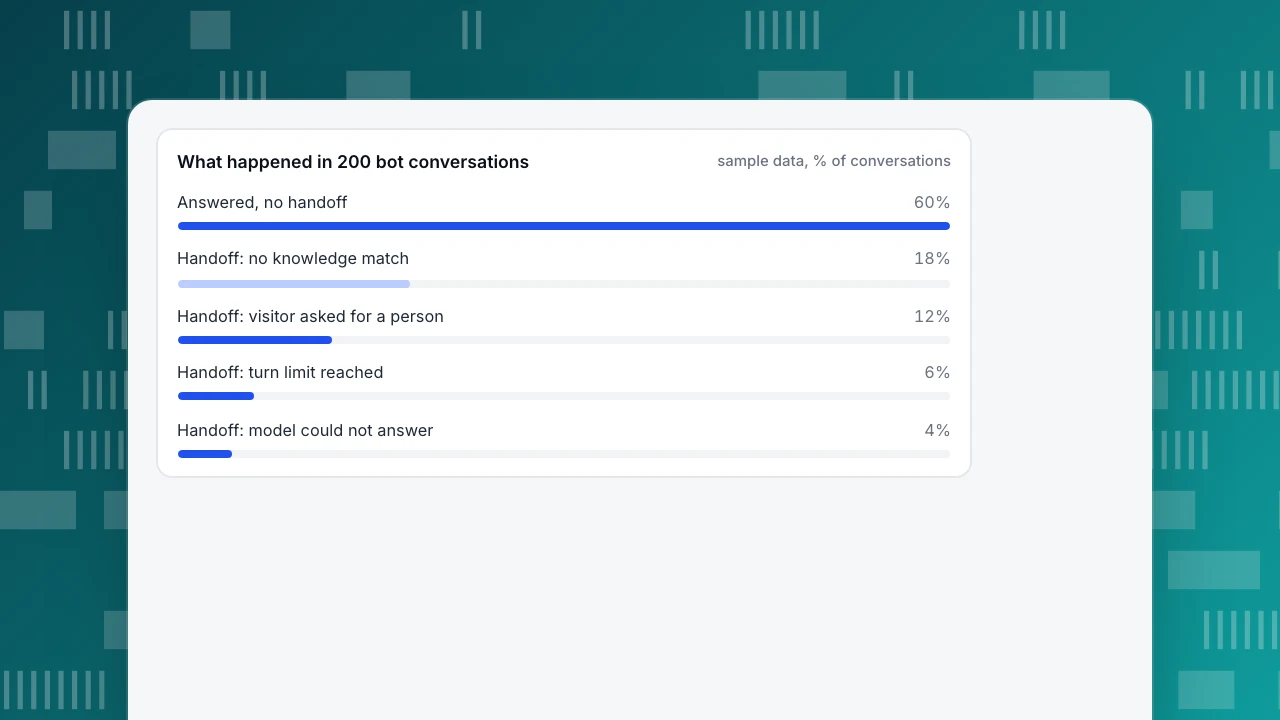
Check: 36 + 24 + 12 + 8 = 80, and 80 ÷ 200 = 40%. The largest slice, "no match", is 36 ÷ 200 = 18% of all conversations, so adding answers for the most frequent unmatched questions is a bigger gain than rewording any greeting. The second slice, 24 requests for a person (12% of all chats), is a design question: if most of them come right after the first answer, the bot is not earning trust and template 1 should offer a person sooner.
Run this monthly: take the unmatched questions, add the repeated ones to the knowledge base, change one template at a time and compare the next month's handoff rate. If you change three things at once you cannot tell which one worked.
What happened in 200 bot conversations
sample data, % of conversations| Handoff reason | Share of handoffs | What to change |
|---|---|---|
| No knowledge match | 45% (36 of 80) | Add answers; it is content, not script |
| Visitor asked for a person | 30% (24 of 80) | Check whether the offer came too late |
| Turn limit reached | 15% (12 of 80) | Add a clarifying question or raise the limit |
| Model could not answer | 10% (8 of 80) | Add a Q&A entry for the topic |
Sample data: 200 bot conversations, 80 handed off.
Common mistakes with chatbot templates
- Passing the bot off as a person. The greeting should state it is automated. Beyond etiquette, regulation is moving toward requiring it.
- Starting with a form. Asking for an email before the first answer loses visitors who only wanted a quick answer. Ask for contact details when a handoff or an offline message needs them.
- Templates with no way out. Every path should reach a person, or a message form, within two or three turns.
- A greeting that promises everything. "Ask me anything" invites questions the bot cannot answer; list what it can do.
- Treating the template as finished. The first month's log is the real brief.
- Using a long welcome. A paragraph in a narrow chat window pushes the question box off screen.
How to set these templates up in TapCub
Start from the 200-conversation example and take it into TapCub's AI assistant. TapCub's chat generates replies from your knowledge base; it does not edit orders or call other systems, which is why template 7 matters.
- Turn on the AI assistant. In Live chat › Chat settings › AI assistant choose a mode: off, only when all agents are offline, or AI answers first. The assistant needs at least one enabled knowledge base entry before it answers.
- Set the greeting and identity. Fill in Assistant name and AI opening line, which is sent once before the AI first speaks in a conversation. Visitors are told they are talking to an AI before the first reply, and that notice cannot be turned off, so rule 1 is built in.
- Write the answers as Q&A entries. In Live chat › Knowledge base, a question that matches a Q&A entry gets your stored answer as written, with no AI call; use this for templates 3 and 7. Documents are for longer material the model drafts from. Test in the Playground, which spends no quota and creates no conversation.
- Set the handoff. Write the Handoff message (template 5) and choose Max AI turns per conversation, from 1 to 20, default 6; past that the chat hands off. If you leave the message empty, the visitor sees a default line in their interface language, or a prompt to leave an email and question when nobody is online.
- Read why chats were handed off. The inbox labels each handoff: no knowledge match, the model cannot answer, the visitor asked, turn limit, or an agent took over. Those are the four reasons in the example table. Click Fix & save on a wrong answer to store the right one as a Q&A entry.
- Check results. In Live chat › Reports, the knowledge base hit rate shows the share of questions answered by a direct match or retrieved answer.
TapCub does not have a pre-chat form, so ask for an email inside the conversation or through offline messages.
FAQ
What should a chatbot say first?
State that it is an automated assistant, say what it can help with and ask which topic the visitor needs. For example: "Hi, I'm {name}, {company}'s automated assistant. I can help with orders, delivery and returns, or connect you with a person." Keep it to two short sentences.
What is a chatbot template?
A chatbot template is either a design template for the chat widget or a conversation template: ready-made text and logic for a situation such as greeting, order status, handoff or offline hours. Adapt it to your products, then change it using your own conversation data.
Does a chatbot have to say it is a bot?
Often yes, and it is good practice everywhere. The EU AI Act's Article 50, applying from 2 August 2026, requires AI systems that interact with people to be designed so they know it is an AI, unless obvious from context. This is not legal advice; check the rules for your market.
How many templates does a chatbot need?
Eight cover most sites: greeting, topic menu, answer and check, clarifying question, handoff, offline hours, pointer for what it cannot do and close. Add more only when your logs show a repeated situation the eight do not handle.
How do I know a chatbot template is working?
Look at handoff rate and the reasons. In the sample, 40% of conversations were handed off, and 45% of those were "no match", an answer-content gap. Change one template at a time and compare the next month.
Sources
- Civil Resolution Tribunal of British Columbia. Moffatt v. Air Canada, 2024 BCCRT 149: responsibility for information given by a website chatbot (paragraphs 27–28). Checked 2026-11-18.
- European Union. Regulation (EU) 2024/1689 (AI Act), Article 50: transparency obligations for AI systems that interact with people, applying from 2 August 2026. Checked 2026-11-18.
Was this article helpful?
We use your answers to fix and expand this page.
Couldn’t send. Please try again in a minute.
Thanks for the feedback. We’ll use it to improve this page.You’ve already sent feedback on this page. Thanks.

Solutions Engineer
Covers SDKs, API integrations, and data implementation, with an emphasis on validation, system interoperability, and troubleshooting.