Try it on your own data
Every report in this article is in the free plan. One snippet for web and apps, up to 10 sites.
Start freeChatbot use cases work when answers are stable and mistakes are cheap — pick by those two axes, not by industry. This guide sorts 12 common use cases into a 2×2 matrix, gives each a trigger, a handoff rule and a metric, and proves the point with a one-month worked example.
What you will learn
- Automate only where answers are stable and errors are cheap: shipping FAQs, read-only order status, pricing info, returns-policy explanations
- Let the bot draft but keep a human deciding on bookings, account changes and refund eligibility; never automate refund execution, order edits or complaints
- Test each use case on 20 real past questions before launch and watch KB hit rate plus resolution rate — the same store saved 60 hours on one case and lost 2.5 on another
Which chatbot use cases should you automate? A two-axis test
Most chatbot use case lists are organised by industry: ecommerce, healthcare, banking. That grouping hides the thing that actually decides success. Inside one ecommerce store, a shipping FAQ and a refund-exception decision are both "ecommerce use cases" — and automating them produces opposite results, as the worked example below shows.
Two questions sort any use case better than an industry label:
- Is the answer stable? The correct reply is the same for nearly every visitor and rarely changes: delivery times, plan contents, return windows. Unstable answers depend on the individual case: which product fits, whether this refund qualifies, what will calm this customer down.
- What does a wrong answer cost? Low cost means an annoyed visitor who asks again. High cost means money moved, an order broken, a booking lost, or a complaint escalated. Price the difference concretely: a wrong delivery-time answer costs one follow-up question; a wrong refund decision costs the refund amount, the rework and the customer's trust.
The four combinations give four verdicts:
- Stable + low cost → automate first. The bot answers from verified content; a mistake is corrected by a better answer.
- Stable + high cost → bot drafts, human confirms. The policy is knowable, but applying it wrongly is expensive, so a person signs off.
- Unstable + low cost → engagement only. Recommendations, quizzes and feedback vary by design; a wrong suggestion costs a click, not a refund.
- Unstable + high cost → keep human. No bot should execute these.
The table below places 12 common use cases on the two axes. One assumption throughout: the bot only generates replies and has a working handoff to a person. Whether it is rule-based or AI-powered changes how you build it, not where it belongs — that taxonomy is in types of chatbots.
| Use case | Answers | Error cost | Verdict |
|---|---|---|---|
| Shipping & delivery FAQ | Stable | Low | Automate first |
| Read-only order status | Stable | Low | Automate first |
| Pricing & plan information | Stable | Low | Automate first |
| Returns-policy explanation | Stable | Low | Automate first |
| Appointment booking | Stable | High | Bot drafts, human confirms |
| Subscription / account changes | Stable | High | Bot drafts, human confirms |
| Refund eligibility check | Stable | High | Bot drafts, human confirms |
| Product recommendations | Unstable | Low | Engagement only |
| Feedback collection | Unstable | Low | Engagement only |
| Buying quiz | Unstable | Low | Engagement only |
| Refund execution & order edits | Unstable | High | Human only |
| Complaints & service recovery | Unstable | High | Human only |
Stable = the correct answer rarely changes; error cost = what a wrong answer costs in money, trust or rework. Verdicts assume a replies-only bot with a working human handoff.
Stable answers, low error cost: 4 use cases to automate first
These four share a profile: the answer lives in verified content — a knowledge base — and a wrong reply is an inconvenience, not a loss. Write the answers once, test them, and let the bot repeat them.
1. Shipping and delivery FAQ
- Trigger: "How long does delivery take?", "Do you ship to Canada?" on product, cart or help pages.
- Bot message: "Standard US delivery takes 3–5 business days; express is 1–2. Orders placed before 2 pm ship the same day."
- Handoff: the question names a specific late order, or nothing in the knowledge base matches.
- Metric: knowledge-base hit rate and self-resolution rate.
2. Read-only order status
- Trigger: "Where is my order?" with an order number.
- Bot message: "Order #8246 shipped on Nov 12 with DHL; tracking shows delivery expected Nov 16." The bot reads a status; it never changes one.
- Handoff: the status is stuck or lost, or the visitor wants an address change or cancellation.
- Metric: share resolved without an agent; repeat contacts about the same order.
3. Pricing and plan information
- Trigger: a visitor lingers on the pricing page or asks "What's included in the Pro plan?"
- Bot message: "Pro includes 5 seats, unlimited projects and priority support, billed monthly or yearly. Full comparison: {link}." Quote verified facts only.
- Handoff: discount requests, custom quotes, or "which plan fits my team?" — a sales judgment.
- Metric: invite-to-conversation rate on the pricing page; conversion attribution for chatted visitors.
4. Returns-policy explanation
- Trigger: "Can I return this?", "Who pays return shipping?"
- Bot message: "Unused items can be returned within 30 days of delivery; we email a prepaid label. Full policy: {link}." Use the policy's exact wording.
- Handoff: the visitor wants to start a return now, or claims an exception ("it arrived damaged").
- Metric: hit rate on policy questions; handoff rate (a rising handoff rate means the policy text is unclear).
Stable answers, high error cost: 3 use cases where a human confirms
Here the rules are stable but a wrong application is expensive. Drafting still pays: the bot gathers the details and cites the policy, so the human spends a minute deciding instead of ten minutes digging. The pattern is the same for all three: the bot drafts, a human decides, and the draft never reaches the visitor as a decision.
5. Appointment booking
- Draft → confirm: the bot offers 2–3 slots from published availability, the visitor picks one, and a staff member confirms the booking before it is final.
- Handoff: double-bookings, special requests, or anything the availability rules do not cover.
- Metric: confirmation rate and the share of drafts a human edits.
6. Subscription and account changes
- Draft → confirm: the bot summarises the requested change — plan, price difference, effective date — and a human approves before anything is applied to the account.
- Handoff: every execution. The bot may collect the request; it never flips the switch.
- Metric: edit rate on drafts; changes applied without approval (target: 0).
7. Refund eligibility
- Draft → confirm: the bot drafts an assessment against the written policy and cites the exact clause ("outside the 30-day window, clause 2.1"); a human decides yes or no.
- Handoff: the decision itself, always. Eligibility is where exceptions live, and exceptions are judgment calls.
- Metric: share of drafts a human overturns — a high overturn rate means the policy needs rewriting, not a smarter bot.
Unstable answers, low error cost: 3 engagement use cases
These answers are supposed to vary by visitor. A wrong suggestion costs a click, so the bot can run them end to end — the goal is participation, not resolution. For the wider picture of what to automate in support, see customer service automation.
8. Product recommendations
- Trigger: a visitor browses a category or asks "Which one should I get?"
- Bot message: 2 quick questions — "Who is it for, and what's your budget?" — then 2–3 suggestions with reasons.
- Metric: participation rate and clicks through to product pages.
9. Feedback collection
- Trigger: right after a resolution or a purchase, while the experience is fresh.
- Bot message: one question, not a survey: "What almost stopped you from buying today?"
- Metric: response rate and the themes that repeat.
10. Buying quiz
- Trigger: gift shoppers and uncertain visitors on a category page.
- Bot message: 3–5 questions, then a shortlist: "Based on your answers, these two fit best." Optionally ask for an email to send the results.
- Metric: completion rate and email-capture rate.
Unstable answers, high error cost: 2 use cases to keep human-only
11. Refund execution and order edits
- Why it fails: money moves and orders change state. A wrong amount, a duplicate refund or an address change after fulfilment has started compounds into real loss — the worked example below prices this out.
- What the bot may do: acknowledge, collect the order number and the reason, and route. Nothing else.
- Route: straight to a human agent with the collected context attached.
12. Complaints and service recovery
- Why it fails: the right response depends on tone, history and how much authority the responder has. A scripted apology to an angry customer reads as dismissal and escalates the complaint.
- What the bot may do: recognise the complaint and hand off immediately — no canned empathy, no attempt to resolve.
- Route: a human, flagged as a complaint, with the transcript.
Routing rules to write down before launch:
- If the request moves money or changes an order or account → human; the bot only collects context.
- If the visitor is angry or mentions legal action → human immediately, no bot reply.
- If there is no verified answer → say so and hand off; never guess.
- If two consecutive attempts fail → human.
Worked example: one month, two use cases, opposite results
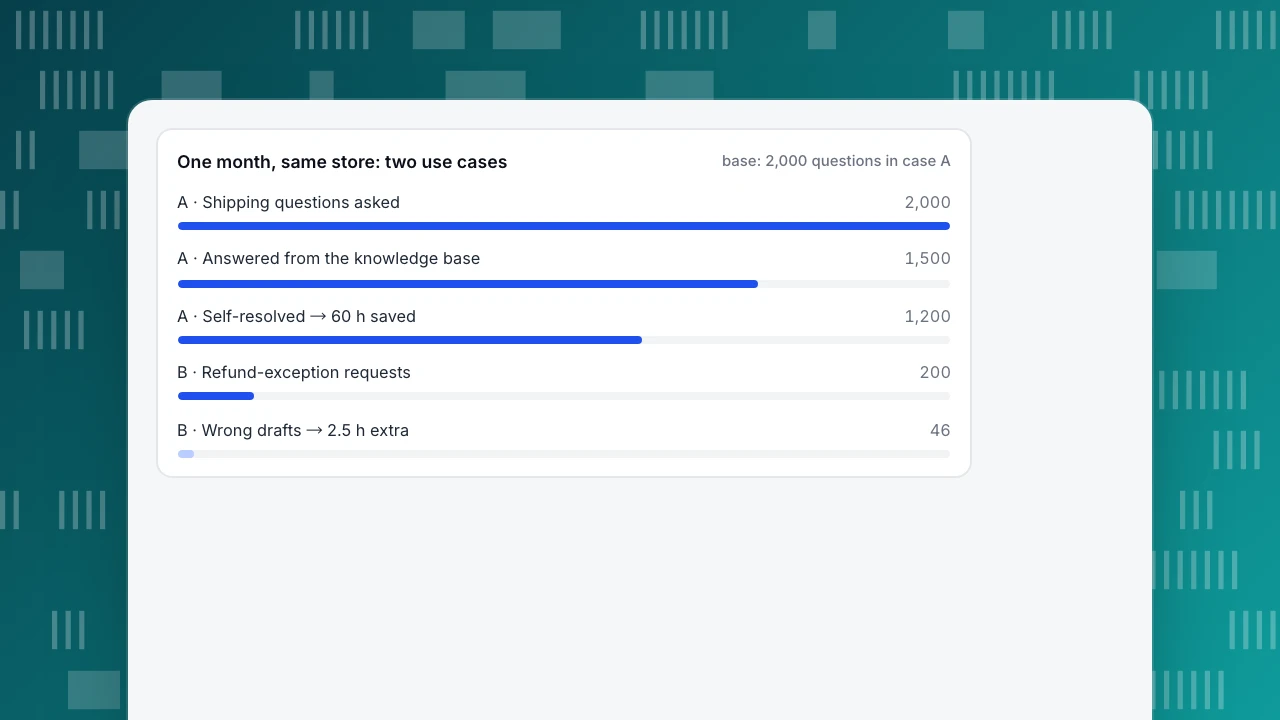
Sample data: one ecommerce store, one month, two use cases from the same "ecommerce" industry group.
Case A — shipping FAQ (stable answers, low error cost).
- 2,000 shipping questions arrived.
- The knowledge base answered 1,500 of them: 1,500 ÷ 2,000 = 75% hit rate.
- 1,200 of those 1,500 visitors were self-resolved: 1,200 ÷ 1,500 = 80%.
- Each question would have taken an agent about 3 minutes: 1,200 × 3 = 3,600 minutes = 60 agent-hours saved.
Case B — refund exceptions (unstable answers, high error cost). The store let the bot draft refund-exception decisions for human review.
- 200 exception requests arrived; a human would have handled each in about 4 minutes: 200 × 4 = 800 minutes human-only.
- The bot's drafts were wrong in 46 cases: 46 ÷ 200 = 23%.
- Reviewing every draft took 2 minutes: 200 × 2 = 400 minutes. Reworking the 46 wrong ones took 12 minutes each: 46 × 12 = 552 minutes.
- Total with the bot: 400 + 552 = 952 minutes — 152 minutes more than human-only, about 2.5 extra hours.
Same store, same month, opposite results: one use case gave back 60 hours, the other added 2.5. The industry label was identical; the two axes were not. That is the whole argument for picking use cases by answer stability and error cost instead of by industry. Case A is classic ticket deflection (for the wider store setup, see AI chatbots for ecommerce); case B is what happens when a high-cost case is automated without a human gate. The fix is not a smarter bot for case B: move it back to human-only, keep case A running, and re-check the quadrant whenever the policy or the product changes.
One month, same store: two use cases
base: 2,000 questions in case APre-launch checklist: test a use case before you switch it on
Run these 8 checks per use case, not per bot. The full rollout and measurement method is in how to roll out an AI support agent; this list only answers "did I pick and prepare this use case correctly?"
- Replay 20 real historical questions. Pull 20 past questions of this type and test the bot's answers. Pass: at most 1 wrong; 2 or more → fix the knowledge base and retest before launch.
- Test the handoff end to end. Ask for a human mid-conversation. Pass: an agent receives the conversation with the transcript, and the visitor repeats nothing.
- Test after hours. Send a message outside office hours. Pass: a knowledge-base answer or an offline form that collects email and question — never a dead end.
- Record the baseline. Write down current volume, handle time and resolution rate for this question type before switching the bot on; otherwise you cannot prove the 60 hours.
- Limit the scope. The bot answers questions about your product and policies only. Pass: off-topic prompts get a polite refusal and a handoff, not an improvised answer.
- Anchor every answer in verified data. Each reply must trace to a knowledge-base entry or document — one of HeroThemes' watch-outs for support bots. Pass: no invented policies or prices in the replay test.
- Keep human oversight on high-cost cases. IBM's chatbot guidance treats bots as no replacement for complex or sensitive issues. Pass: booking, account and refund drafts never auto-send.
- Name a metric owner and a review date. Pass: one person owns the hit rate and resolution rate for this use case, with a first review two weeks after launch.
How to run these use cases in TapCub
The shipping-FAQ case from the worked example is exactly what TapCub's AI assistant is built for: it answers from your knowledge base and never touches an order. The refund-exception case shows where it stops. Here is that month's setup in five steps.
- Write the 4 automate-first cases into the knowledge base. In Live chat › Knowledge base, use Q&A entries for high-frequency stable questions: when a visitor's line matches the question (or contains every keyword), the stored answer is sent as written, without an AI call. Use documents for long policy text: they are split into roughly 600-character passages, retrieved by full-text search, and the model drafts the reply. Pin the top shipping Q&A entries to the visitor-side FAQ — opening a pinned answer creates no conversation and uses no quota; only Not solved or a request for a person starts one. Before launch, run checklist item 1 in Playground: it takes the same path, spends no quota and creates no conversation.
- Set the AI boundary. In Live chat › Chat settings › AI assistant, choose AI answers first or Only when all agents are offline. The AI generates replies only: no refunds, no order edits, no calls to other systems. It hands off when the material is not enough, when the visitor asks for a person, or after Max AI turns per conversation (default 6), and the inbox labels the reason. That is why case B never reaches the bot in TapCub: refund decisions and their execution stay with agents, who can still keep the policy wording consistent with canned replies.
- Cover after hours. Set timezone-based hours in Live chat › Chat settings › Office hours and the email-plus-question fallback in Live chat › Chat settings › Offline messages. With AI on, the knowledge base answers first; the offline form appears only when it cannot — checklist item 3 passes by design.
- Invite pre-sales questions by intent. Live chat › Chat settings › Proactive invites triggers on page plus seconds spent — for example the pricing page after 30 seconds. In Live chat › Inbox, the agent's side panel already shows the visitor's source, current page and last 2 days of browsing: chat and analytics run on the same script and the same visitor ID.
- Watch the numbers as you add each case. Live chat › Reports shows the knowledge-base hit rate (questions answered by a direct Q&A match or a retrieved answer) and the resolution rate for the period. These are site-wide, not per use case, so switch on one case at a time and compare against the baseline from checklist item 4. When the bot gets an answer wrong, Fix & save in the inbox stores the corrected reply as a Q&A entry. Live chat › Reports › Conversion attribution compares goal conversion for visitors who chatted versus those who did not (relative lift = chatted rate ÷ no-chat rate − 1) and flags fewer than 30 chatters as too small a sample.
Boundaries worth stating: the widget has no pre-chat form — ask for the email in the conversation or use the offline message. TapCub is not a CRM and does no lead scoring. And the AI executes no actions; every case in the human-only quadrant stays human.
FAQ
What are chatbots used for?
Chatbots handle repetitive questions (shipping, pricing, policies), read-only lookups like order status, engagement such as recommendations and quizzes, and draft preparation for bookings or refund eligibility. The reliable way to choose is not by industry but by two axes: automate where answers are stable and mistakes are cheap, and keep a human wherever a wrong answer moves money or breaks an order.
What is a common use case of chatbots?
Answering the same question repeatedly without an agent — the shipping FAQ in the worked example is typical: 1,500 of 2,000 questions answered from the knowledge base, 1,200 visitors self-resolved. This is ticket deflection: routine contacts resolved by self-service so agents can spend their time on exceptions that actually need judgment.
Which chatbot use cases should you avoid automating?
Keep refund execution, order edits and account changes human: they move money or change records, and errors compound. Complaints and service recovery also stay human because the right response needs judgment and authority. And avoid letting a bot give medical, legal or financial advice — high error cost with unstable answers is the quadrant where automation does damage.
When should a chatbot hand off to a human?
Hand off when the visitor asks for a person, when the request touches money or an account, when no verified answer matches, or after 2 failed attempts. HeroThemes lists the same watch-outs: hand off when things go wrong and monitor accuracy. The handoff must carry the transcript so the visitor never repeats the story.
How do you measure whether a chatbot use case works?
Track 4 numbers per use case: knowledge-base hit rate, self-resolution rate, handoff rate, and conversion attribution for visitors who chatted versus those who did not. Compare them with the baseline you recorded before launch — the worked example's 60 saved hours only mean something against a baseline. The full measurement method is in rolling out an AI support agent.
See also: AI Agents for Business: Where to Start and How to Control Risk.
See also: NLP Chatbot: How It Works and Where It Should Hand Off to a Person.
See also: Retail Chatbot: Automate Orders, Shipping and Returns First.
Sources
- Tim Mucci, Molly Hayes. Chatbot use cases and examples. IBM Think, 2024-09-04 — rule-based vs AI-powered bots, enterprise use cases, human oversight. Verified 2026-11-15.
- Beata Stefanowicz. 23 Best Chatbot Use Cases for Customer Service & More (2026). Tidio, updated 2026-02-19 — industry-grouped use-case list and FAQ wording. Verified 2026-11-15.
- Shankar Chavan. 12 Practical Chatbot Use Cases and Examples Across Industries. HeroThemes, updated 2026-07-31 — use cases and "Things to Watch Out" for support bots. Verified 2026-11-15.
- Crisp. 15 Chatbot Use Cases by Industry (with Real Examples). 2023-08-02 — industry-grouped use cases with brand examples. Verified 2026-11-15.
Was this article helpful?
We use your answers to fix and expand this page.
Couldn’t send. Please try again in a minute.
Thanks for the feedback. We’ll use it to improve this page.You’ve already sent feedback on this page. Thanks.

Customer Experience Consultant
Writes about live chat, visitor conversations, and self-service, sharing practical ways to make customer communication clearer and more effective.