Try it on your own data
Every report in this article is in the free plan. One snippet for web and apps, up to 10 sites.
Start freeAI agents for business pay off on tasks with a measurable success criterion and a low cost of failure, one job per agent and a source for every output. In a worked month, one agent nets $270 when each error costs $40 and $900 when it costs $5. Start where mistakes are cheap.
What you will learn
- Pick a first task by three tests: a measurable success criterion, a low cost when it fails and output you can check against a source
- Control risk with design choices made before launch: one job, read-only first, a source on every output, human approval for irreversible actions, caps and a stop switch
- In the sample, the failure cost sets the bar: break-even completion is 31.8% with $40 errors and 21.5% with $5 errors, and a 150-task trial at 44.0% clears it
What are AI agents for business, and how do they differ from chatbots?
An AI agent is software in which a language model decides its own steps and chooses which tools to use to reach a goal, instead of following a fixed script. Anthropic's engineering guidance draws the line this way: workflows coordinate models and tools through predefined code paths, while agents let the model direct its own process. A chatbot is the narrower case: it answers inside a conversation and usually takes no action outside it. "AI chatbots for business" and "AI agents for business" overlap, and many products sold as agents are really workflows or a single model call with retrieval.
The distinction matters for risk, not vocabulary. The more steps and tools a system controls, the more ways it can be wrong and the harder it is to see where. The same guidance advises starting with the simplest solution and adding multi-step agents only when simpler ones fall short, because agents trade cost and latency for performance and can compound errors. If you are still choosing a kind of bot, see types of chatbots; for the use cases a chatbot can safely take, see chatbot use cases.
Which business tasks suit an AI agent?
Choose a task by three tests, not by how impressive the demo looks. A good first task has a measurable success criterion (you can say what "done correctly" means), a low cost when it fails (a wrong output is caught or cheap to fix), and output that can be checked against a source (a document, a query result, a record). The table here applies the tests to six common tasks.
Two patterns follow from the table. Agents that answer from written material (support questions, internal FAQ) pass all three tests, which is why customer support is the usual first deployment. Agents that act on money, people or contracts fail the second test however good the model is, so they should propose and a person should approve. Anthropic's guidance reaches the same place for support: it fits conversational work with access to customer data and knowledge base articles, where success is measurable through user-defined resolutions.
If a task passes only one or two tests, change the task before you change the model. Narrow the scope, add a source the output must cite, or add an approval step.
| Task | Success criterion | Cost of a failure | Checkable against a source? | Verdict |
|---|---|---|---|---|
| Answer routine support questions | Question resolved with no repeat contact | Low to moderate; the customer can ask again | Yes, the help centre entry | Good first task |
| Answer questions about your analytics | The number matches the query that produced it | Low when the query is shown, high when it is not | Yes, the query can be re-run | Good first task |
| Summarise or tag content (call notes, tickets) | Reviewer accepts it with no edits | Low | Yes, the original text | Good first task |
| Draft emails to named customers | Accurate and on-brand | Moderate; a sent mistake reaches the customer | Partly | Draft only, a person sends |
| Approve refunds or discounts | Correct amount to the correct person | High; money leaves | Yes, but the decision is a judgement | Propose only, a person approves |
| Screen job applicants | No clear measurable criterion | High; it affects people | Weak | Not a first task |
A task that passes only one or two tests needs a change (narrower scope, a source, an approval step) before it needs a better model.
How do you control the risk of an AI agent?
Risk control is a short list of design decisions made before launch, not a policy document. Work through these eight for every agent:
- One job per agent. "Answer shipping questions from the help centre" is a job; "run customer service" is not. A narrow job has a narrow way to be wrong.
- Read-only first. Start with an agent that can look at data and write text but cannot change anything. Add actions one at a time.
- Every output carries its source. A number should come from a query you can re-run; an answer should come from an entry you can open. No source, no output.
- A person approves anything irreversible. Refunds, emails to customers, price changes and deletions are proposed by the agent and approved by someone.
- Hand off instead of guessing. Define the conditions under which the agent stops and passes the task on, with the context.
- Caps. Limit the number of steps per task, the volume per day and the spend per month, so a loop cannot run away.
- A log and a stop switch. Record what the agent did and be able to turn it off in one step.
- Limit the data it can read. Give the agent the narrowest access that does the job, and no more.
The NIST AI Risk Management Framework, a voluntary framework released in January 2023, organises this work into four functions: Govern, Map, Measure and Manage. The list above maps onto them: the job and data scope are mapping, the caps and approvals are management, and the trial below is measurement.
Responsibility does not move to the software. In Moffatt v. Air Canada (2024 BCCRT 149), a Canadian tribunal held an airline responsible for what its website chatbot told a customer. Plan on owning every output.
What does an AI agent save? A worked month
Sample data: a team has a task that comes up 1,500 times a month and takes 6 minutes by hand. It could be sorting and replying to routine inbound requests. Staff cost $30 an hour, or $0.50 a minute. An agent costs $300 a month.
Define "completed". An output counts as completed when the reviewer accepts it with no edits. Suppose the agent completes 40% of tasks.
- Completed: 1,500 × 40% = 600. Not completed: 1,500 − 600 = 900.
- Time saved: 600 × 6 min = 3,600 min = 60 hours = 60 × $30 = $1,800.
- Failed attempts still cost review time: assume 1 minute each, 900 × 1 min = 900 min = 15 hours = $450.
- Spot checks on completed work: 10% of 600 = 60 checks × 2 min = 120 min = 2 hours = $60.
- Errors that slip through: assume 3% of completed outputs are wrong, 600 × 3% = 18, and each costs $40 to correct (a customer contact, a rework). 18 × $40 = $720.
- Subscription: $300.
Net monthly value: 1,800 − 450 − 60 − 720 − 300 = $270.
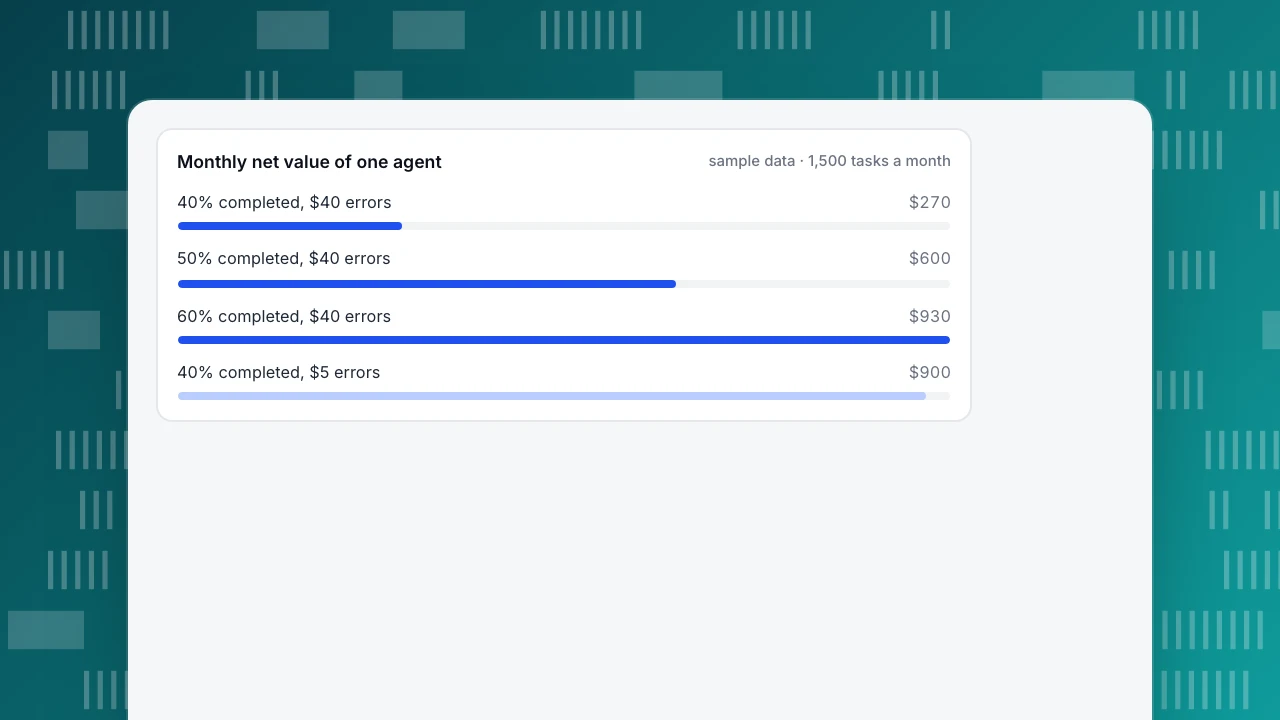
That is barely positive, and the reason is the cost of errors. Change one assumption: if a wrong output costs $5 to fix instead of $40, errors cost 18 × $5 = $90 and the net becomes 1,800 − 450 − 60 − 90 − 300 = $900. The same agent, on a task where failure is cheap, is more than three times as valuable.
Where is break-even? Per completed task the value is $3.00 (6 minutes at $0.50) minus the expected error cost (3% × $40 = $1.20) minus the spot check (10% × 2 min × $0.50 = $0.10), which is $1.70. Each task not completed costs $0.50 of wasted review. With completion rate c, the monthly net is 1,500 × [c × 1.70 − (1 − c) × 0.50] − 300. It is zero at c = (300 ÷ 1,500 + 0.50) ÷ (1.70 + 0.50) = 0.70 ÷ 2.20 = 31.8%.
| Completion rate | Monthly net (error cost $40) |
|---|---|
| 30% | −$60 |
| 40% | $270 |
| 50% | $600 |
| 60% | $930 |
With $5 errors the break-even drops to 21.5%. The conclusion for a business owner is not "agents pay" or "agents don't pay"; it is that the failure cost sets the bar the completion rate must clear. Measure that bar before you buy.
Monthly net value of one agent
sample data · 1,500 tasks a monthHow should you trial an agent before launch?
A trial answers one question: does the completion rate clear break-even with room to spare? Run it in three stages.
- Write the success criterion first. What does "completed" mean, and who decides? Fix the definition before you see any output, so you cannot adjust it to fit the results.
- Shadow run. Let the agent produce outputs on real tasks while people keep doing the work, and compare. Take 150 tasks. Say 66 are accepted with no edits: 66 ÷ 150 = 44.0%. With only 150 tasks the 95% interval (Wilson method, NIST) runs from 36.3% to 52.0%. The lower end, 36.3%, is above the 31.8% break-even, so the case holds even on the pessimistic reading. Had it been 52 of 150 (34.7%), the lower end would sit below break-even and the answer would be "not yet".
- Limited rollout. Send a small share of real volume, such as 10%, through the agent for two weeks, with the stop switch ready. Review a sample, read every failure and compare completed work against what people produce.
Set the go or no-go rule before the shadow run: go only if the lower end of the interval clears break-even. And rerun the trial when the task, the source material or the model changes.
Common mistakes when adopting AI agents in a business
- Starting with the largest, most important process. The first deployment teaches you the most when a failure is cheap. Start where an error costs a few dollars, not a customer.
- Buying the model before defining success. Without a criterion for "completed", every demo looks like a success.
- Counting attempts as savings. In the example, 900 of 1,500 tasks were attempted without completing and still cost review time.
- Giving one agent many jobs. It becomes impossible to say which part failed or what to fix.
- No source on outputs. If you cannot check an answer against something, you will find the errors through customers.
- Skipping the stop switch. An agent you cannot turn off in one step is a risk the day it misbehaves.
- Treating the pilot as the result. A shadow run on 150 tasks is a trial with a wide interval, not a guarantee. Keep sampling after launch.
For the cost-and-benefit side of one common agent, the support chatbot, see chatbot ROI and AI support agent.
How to use AI agents for business in TapCub
TapCub offers AI where the three tests pass: answering from written material and answering questions about your analytics. It does not run autonomous multi-step work for you. Here is how each piece maps to the checklist above.
- Customer questions, answered from your knowledge base. In Live chat › Knowledge base, write Q&A and document entries; in Live chat › Chat settings › AI assistant, choose Off, Only when all agents are offline or AI answers first, and set Max AI turns per conversation (1 to 20, default 6). The AI only drafts a reply: it does not change an order, send email or call another system. When it is not confident, it hands off, and the inbox labels the reason. That is rules 1, 2 and 5 in the checklist.
- Data questions, answered from your own numbers. In All-platform analytics › Operations › AI Assistant, the Ask tab turns one sentence into a repeatable analysis (metric, time, comparison, breakdown and filters). The numbers come from an analysis query run on your project, not from a knowledge base, and the answer includes the query, so you can re-run it with Open in analyzer. That is rule 3. The page shows a daily cap on model calls, and with no model configured it answers by rules only (badge: Rules only (no model calls)), which is rule 6.
- Ask why a number changed. The Why did it change tab splits a change by channel, referrer domain, country, device, entry page and similar, with each value's contribution equal to its change divided by the total change.
- Connect your own agent, read-only. The MCP tab gives the endpoint (
/api/v1/mcp) and a client config. Create a key in Configuration › Settings › API keys with the Read stats scope. The tools only read: they do not write events, edit definitions or create monitors. That is rules 2 and 8. Setup steps are in connect AI agents with MCP. - Know the boundary. TapCub's AI does not create monitors, send notifications, refund or change orders. If you build an agent elsewhere, TapCub's part is measuring what it does: conversations resolved, handoffs and satisfaction in Live chat › Reports, and the effect on your goals in analytics.
FAQ
What are AI agents for business?
AI agents are software in which a language model decides its own steps and tools to complete a task, such as drafting a reply from your help centre or answering a question about your data. They differ from fixed workflows, where the steps are set in advance, and from chatbots, which usually only answer.
Which business tasks should you give an AI agent first?
Tasks with a measurable success criterion, a low cost when they fail and output that can be checked against a source. Answering support questions from a written knowledge base and answering questions about your own analytics fit; approving refunds or contracts does not, and should stay with a person.
What is the difference between an AI agent and an AI chatbot for business?
A chatbot answers inside a conversation. An agent decides its own steps and can use tools to act, such as running a query or sending something. Agents can do more and fail in more ways, so they need caps, logs, approvals and a stop switch that a simple answering bot does not.
Are AI agents safe to use with business data?
Safety comes from scope, not from the model. Give the agent read-only access first, the narrowest data it needs, a source for every output and a log of what it did. In the sample here, the cost of errors alone moved a month's net value from $900 to $270.
How do you know if an AI agent is worth it?
Compute the break-even completion rate from your own numbers, then run a shadow trial and compare the lower end of the interval to it. In the example, break-even was 31.8% and a 150-task trial gave 44.0% with a lower end of 36.3%, so it passed.
Sources
- Anthropic. Building effective agents — workflows versus agents, when to use agents, customer support as an application. Verified 2026-11-17.
- NIST. AI Risk Management Framework — a voluntary framework released 26 January 2023 with the functions Govern, Map, Measure and Manage. Verified 2026-11-17.
- Civil Resolution Tribunal of British Columbia. Moffatt v. Air Canada, 2024 BCCRT 149 — responsibility for chatbot information. Verified 2026-11-15.
- NIST/SEMATECH e-Handbook of Statistical Methods. Confidence intervals using the method of Agresti and Coull — the Wilson interval used in the trial. Verified 2026-11-17.
Was this article helpful?
We use your answers to fix and expand this page.
Couldn’t send. Please try again in a minute.
Thanks for the feedback. We’ll use it to improve this page.You’ve already sent feedback on this page. Thanks.

Technical Engineer
Focuses on tracking code, SDKs, and API integrations, with practical guidance on implementation checks and troubleshooting.