Try it on your own data
Every report in this article is in the free plan. One snippet for web and apps, up to 10 sites.
Start freeAn AI help desk lets software answer the routine questions first and hands everything else to people. It works when the AI answers only stable, written-down questions and passes the conversation on, with its context, the moment it cannot. In the worked month, a dashboard showing 45% handled shrinks to 35% truly resolved, and the desk still returns 298%.
What you will learn
- Give the AI only questions whose answers are stable, written down and cheap to get wrong; everything else goes to a person
- Four handoff rules: no source, no answer; a request for a person is final; a turn limit; and the context travels with the conversation
- Count resolved strictly: in the sample, 45% on the dashboard was 35% after repeat contacts, and wrong answers cut the return from 298% to 132%
What is an AI help desk?
An AI help desk is a customer support desk in which software answers the routine questions first and people take the rest. The software can do three jobs: answer customers directly, route and prioritise incoming requests, and draft replies for agents. The term is used loosely, so be clear which job you are buying or building. This guide covers the first one, the front line that talks to customers, and the handoff to people that makes it safe.
"Help desk chat" is the same idea seen from the customer's side: a chat window in front of the desk. The desk is the system behind it, with the queue, the owners and the history. The AI sits between the two, and its quality depends on two things you control: the material it answers from and the rule for when it steps aside.
Answering customers is not the only place AI helps. In a staggered rollout to 5,179 support agents, Brynjolfsson, Li and Raymond found that an AI assistant raised issues resolved per hour by about 14% on average and about 34% for novice workers. That is drafting help for agents, which lowers the cost of every human-handled conversation. It is a different lever from the one measured below, where the AI answers without a person.
For the broader idea of a software agent that answers support questions, see AI support agent; this guide stays on the desk's workflow and boundaries.
Which questions should an AI help desk answer first?
Hand a question to the AI first only when three things are true: the answer is stable, it is written down, and a wrong answer is cheap to fix. The table here sorts common questions by those tests.
Two rules sit behind the table. If the answer depends on something the AI cannot see, such as the status of one customer's order, send the visitor to a person rather than letting it guess. If the answer needs a decision, such as approving a refund or waiving a fee, the AI can gather the details but a person decides. Anything touching safety, legal commitments or a visibly upset customer starts with a person.
A quick way to test your own list: take your last 100 conversations, mark each as "stable and written down" or not, and count. If most of them are not, writing the knowledge base is the first job, not switching the AI on.
| Question type | Example | Give to the AI first? | Why |
|---|---|---|---|
| Stable policy or hours | What are your opening hours? What is the returns window? | Yes | Written down, rarely changes, and a wrong answer is caught on the next message |
| Documented how-to | How do I reset my password? How do I connect the tool? | Yes | The steps exist in your documentation; the AI only has to find and restate them |
| Order or account status | Where is my order? | No, hand off | The answer depends on data the AI cannot see, and a guess is the worst outcome |
| Refund, fee waiver or exception | Can you waive this fee? | Gather details, a person decides | It needs a decision and may commit money |
| Upset or complaining customer | This is the third time it has broken | No, hand off | Tone and judgement matter more than speed |
| Safety, legal or medical | Is this safe for my child? | No, hand off | A wrong answer can cause harm or a legal commitment |
| Anything with no matching source | A question you have never written an answer for | No, hand off | No source, no answer |
Test your own list: mark your last 100 conversations as stable and written down, or not, and count.
What are the four handoff rules?
An AI help desk is only as good as its exit. Wrong answers hurt more than no answer, because the customer trusts them and acts. Four rules cover the exit:
- No source, no answer. If nothing in the knowledge base matches the question well enough, hand off. A fluent guess is the worst outcome.
- A request for a person is final. When the visitor asks for a human, stop answering immediately. Do not offer one more try.
- A turn limit. If the conversation passes a set number of AI replies without resolving, hand off. TapCub's default is six; lower it if your transcripts show customers giving up earlier.
- The person gets the context. The agent should see the whole transcript, what the AI said and why it handed off, so the customer never repeats themselves. A handoff that drops the context turns the AI's work into extra work.
Add one more for the quiet hours: if nobody is online, the visitor should get a way to leave an email and a question, not a dead end.
Customers should also know they are talking to software. In the EU, Article 50(1) of the AI Act requires systems intended to interact directly with people to be designed so those people are informed they are dealing with an AI, unless that is obvious from the context. Responsibility stays with you either way: in Moffatt v. Air Canada (2024 BCCRT 149), a Canadian tribunal held an airline responsible for what its website chatbot told a customer.
What does an AI help desk save? A worked month
Sample data: a store's help desk receives 2,000 conversations in a month. An AI answers first; people take every handoff.
Count what was really resolved
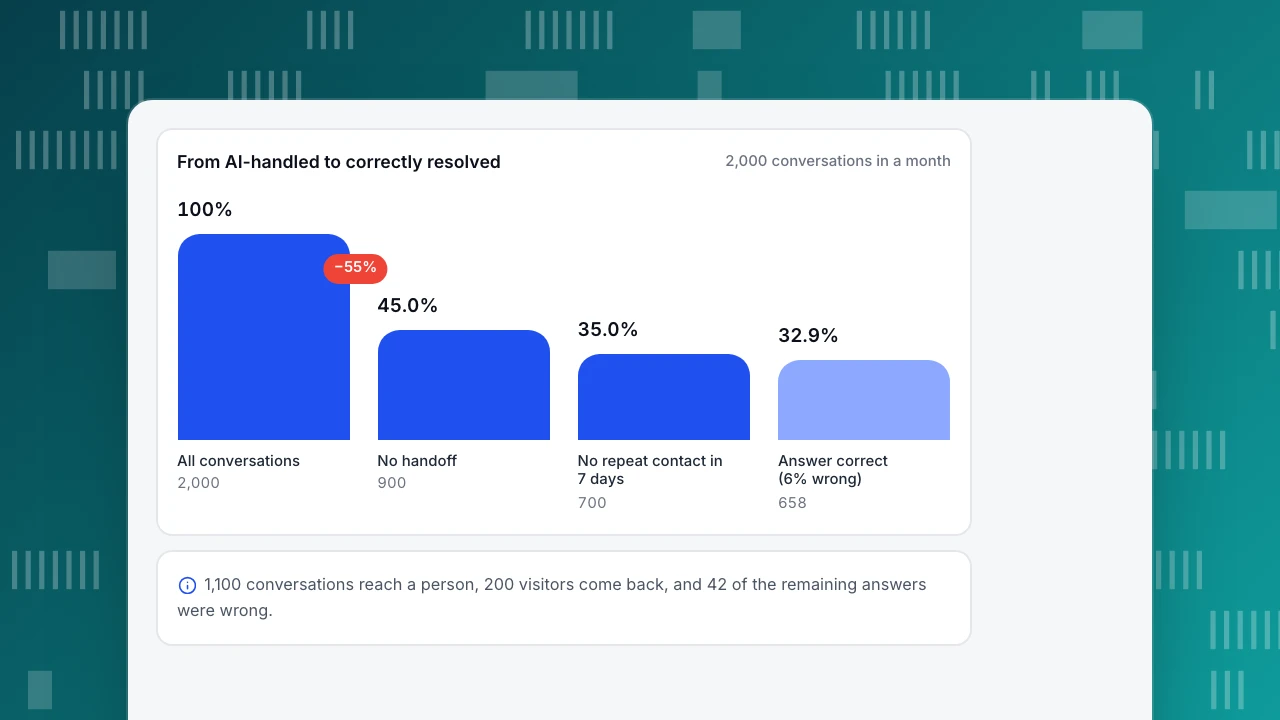
- The AI's dashboard shows 900 conversations that ended without a handoff: 900 ÷ 2,000 = 45%.
- Of those, 200 visitors came back about the same issue within seven days, so they were not resolved: 900 − 200 = 700, and 700 ÷ 2,000 = 35%.
- A human-handled conversation costs a fully loaded $30 an hour ÷ 6 conversations an hour = $5.00.
- Labour saved: 700 × $5.00 = $3,500.
Costs
- Software: $250 a month. AI usage: $150.
- Upkeep: 12 hours writing and fixing answers × $30 = $360.
- Answer review: 4 hours × $30 = $120.
- Total: 250 + 150 + 360 + 120 = $880 a month.
Two things that usually get left out
- Poor handoffs. If the 900 handed-off conversations arrive without context and each costs the agent an extra 30 seconds ($0.50), that adds 900 × $0.50 = $450.
- Wrong answers. Suppose 6% of the 700 answers were wrong: 700 × 6% = 42. If each costs one human conversation ($5) plus $10 in goodwill, it is $15 each, and 42 × $15 = $630.
| Version | Labour saved | Costs | Net | Return on costs |
|---|---|---|---|---|
| Base case | $3,500 | $880 | $2,620 | 298% |
| With poor handoffs | $3,500 | $1,330 | $2,170 | 163% |
| With wrong answers | $3,500 | $1,510 | $1,990 | 132% |
| Both | $3,500 | $1,960 | $1,540 | 79% |
The return is (labour saved − costs) ÷ costs, so with both leaks it falls from 298% to 79%, a (298 − 79) ÷ 298 = 73% cut, and it is still positive. The break-even resolution rate in the base case is $880 ÷ (2,000 × $5.00) = 8.8%; counting the wrong-answer cost per resolved conversation ($5.00 − 6% × $15 = $4.10) it is 880 ÷ (2,000 × 4.10) = 10.7%. The decision is robust, but only because the 35% was counted strictly: the 45% on the dashboard would have overstated labour saved by (900 − 700) × $5 = $1,000. For a fuller treatment of costs and conversions, see chatbot ROI and customer service automation.
From AI-handled to correctly resolved
2,000 conversations in a monthAll conversations
2,000
No handoff
900
No repeat contact in 7 days
700
Answer correct (6% wrong)
658
How do you check that the answers are right?
Quality checking has two parts: a random sample for the error rate, and a targeted review for what to fix.
Sample. Every week, draw 100 random conversations the AI resolved and mark each as correct or wrong against your own documentation. Say 6 are wrong: that is a 6.0% error rate, but with only 100 conversations the 95% interval (Wilson method, NIST) runs from 2.8% to 12.5%. Doubling the sample to 200 with 12 wrong narrows it to 3.5%–10.2%; halving the width takes roughly four times the sample. So track the trend over several weeks rather than reacting to one.
Targeted review. Read three groups in full each week:
- every conversation with a low satisfaction score, the signal that an answer failed;
- every handoff labelled "no match" or "model cannot answer", which are the gaps to fill with new Q&A entries;
- every conversation where the visitor wrote again within a week, the signal of false resolution.
Then fix the source, not just the symptom. A wrong answer should become a corrected knowledge-base entry so the same question is answered correctly next time, and the weekly sample should be re-drawn after big edits.
Is an AI help desk for IT the same thing?
An AI IT help desk answers employees, not customers, and the difference is what the AI is allowed to do. The table sets the two side by side.
| Aspect | Customer help desk | IT help desk |
|---|---|---|
| Who asks | Anonymous visitors, often once | Known employees, repeatedly |
| Typical request | Policy, how-to, order questions | Password reset, access, software install |
| Wrong answer costs | Refunds, goodwill, trust | Lost work, security exposure |
| What the AI needs | A written knowledge base | A knowledge base plus identity and permission to act |
The first row sounds minor but changes the design: with known users you can authenticate before acting, and the question stops being "what may it say" and becomes "what may it do". If the AI only replies, as in the workflow above, the IT version is the same except that the knowledge base is internal runbooks and the handoff target is a technician. If it also resets passwords or grants access, those actions need their own approvals and logs.
Common mistakes when setting up an AI help desk
- Counting "no handoff" as "resolved". In the example it overstated resolution by 10 points (45% against 35%). Always subtract repeat contacts.
- Switching on before the knowledge base is written. With no stable, written answers the AI either stays silent or guesses; both disappoint.
- Letting it try again after "talk to a person". The customer asked once. A second attempt is the fastest way to a low score.
- Measuring only volume. A high AI share with falling satisfaction means the AI is answering questions it should hand off.
- No weekly review. Answers go stale as policies change. Without a sample, errors are found by customers.
- Hiding the AI. Customers should be told; in the EU it is also required for systems built to talk to people.
How to set up an AI help desk workflow in TapCub
Here is how the store in the example would run the front line in TapCub live chat. TapCub's AI only writes a reply from your knowledge base; it does not look up orders, refund, change accounts or send email, so those stay with a person.
- Write the knowledge base first. In Live chat › Knowledge base, add Q&A entries for the stable questions: when a visitor's line matches, the stored answer is sent as written and no AI call is used. Add Document entries for longer material; they are split into passages of about 600 characters and the model drafts from the best matches. Pin Q&A entries to the visitor FAQ: opening one creates no conversation and uses no quota, and Not solved brings the question to an agent. The Playground tests answers without using quota.
- Choose the mode. In Live chat › Chat settings › AI assistant, pick Off, Only when all agents are offline (people answer while someone is online) or AI answers first. Set Max AI turns per conversation (1 to 20, default 6). The visitor is told they are talking to an AI before the first reply, and that notice cannot be turned off. If the knowledge base has no enabled entries, the AI does not answer.
- Set the handoff. Write the Handoff message the visitor sees. In Live chat › Inbox, each handoff is labelled with its reason: no knowledge match, the model cannot answer, the visitor asked, the turn limit, or an agent took over. If nobody is online the window turns into the message form, and if the quota runs out or the model fails the chat hands off instead of showing an error.
- Review weekly. Live chat › Reports shows the knowledge base hit rate, resolution rate (resolved ÷ conversations), satisfaction from 1 to 5 and first response, which counts an agent's first reply and not an AI reply. In Inbox, Fix & save stores a corrected answer as a Q&A entry. In Live chat › Knowledge base, the Draft inbox turns resolved conversations from the last 30 days into Q&A drafts that go live only when you approve them.
- Count repeat contacts yourself. A visitor who writes again after the reopen window gets a new conversation tagged as returning, with the earlier one shown above it. TapCub does not give a ready-made repeat-contact rate, so tally them in the weekly review to get from the 45% of the example to the 35%.
FAQ
What is an AI help desk?
An AI help desk is a customer support desk in which AI answers routine questions first, routes requests or drafts replies, and people take what the AI cannot resolve. The useful measure is not how many conversations the AI touched but how many it resolved correctly without a handoff or a repeat contact.
Can AI replace a help desk team?
Not in the sample here: AI fully resolved 35% of 2,000 monthly conversations, and people handled the rest, including every handoff. It changes what the team spends time on, taking stable questions off the queue, but harder and higher-risk cases still need people.
What is the difference between a help desk chat and an AI help desk?
Help desk chat is the channel: a chat window where a customer talks to the desk. An AI help desk is the desk itself with AI added, whether that is answering in the chat window, routing tickets or drafting replies. You can have chat without AI and AI without chat.
How do you hand off from AI to a human?
Use four rules: hand off when no source matches, hand off at once when the visitor asks for a person, hand off after a turn limit, and send the agent the full transcript and the reason. If nobody is online, give the visitor a way to leave an email and a question.
How do you measure whether the AI help desk is working?
Count only conversations that ended without a handoff and with no repeat contact within seven days, then sample answers for correctness and read low-satisfaction conversations. In the example, the dashboard's 45% fell to a real 35% after removing 200 repeat contacts, and 6% of those answers were wrong.
Sources
- Erik Brynjolfsson, Danielle Li & Lindsey R. Raymond. Generative AI at Work. NBER Working Paper 31161, 2023 — about 14% average and 34% novice-worker gains in issues resolved per hour. Verified 2026-11-17.
- Civil Resolution Tribunal of British Columbia. Moffatt v. Air Canada, 2024 BCCRT 149 — responsibility for chatbot information. Verified 2026-11-15.
- Regulation (EU) 2024/1689. Artificial Intelligence Act, Article 50 — transparency duty for systems that interact directly with people. Verified 2026-11-17.
- NIST/SEMATECH e-Handbook of Statistical Methods. Confidence intervals using the method of Agresti and Coull — the Wilson interval used for the error rate. Verified 2026-11-17.
Was this article helpful?
We use your answers to fix and expand this page.
Couldn’t send. Please try again in a minute.
Thanks for the feedback. We’ll use it to improve this page.You’ve already sent feedback on this page. Thanks.

Data Engineer
Writes about event design, data quality, and collection workflows, with verifiable implementation methods for reliable analytics.