Try it on your own data
Every report in this article is in the free plan. One snippet for web and apps, up to 10 sites.
Start freeTo automate customer service, automate triage and preparation first — routing, canned replies, offline fallback and a knowledge base — then automate answers. Done in that order, AI replies rest on a prepared foundation instead of guessing. This guide gives the map, the sequence, the stop rules and a sample month you can recompute.
What you will learn
- Automate triage and preparation first — routing, canned replies, offline fallback, knowledge base — then automate answers.
- Gate each stage: a low KB hit rate, no handoff path, or rising repeat contacts means stop and fix before adding AI answers.
- Measure honestly: count only human first replies, subtract repeat contacts, and keep offline messages separate.
What can you automate in customer service?
Customer service automation is not one switch. Split the work into two layers: triage and preparation (getting the right conversation to the right place, with the right context, before anyone answers) and answers (the reply itself). The order is the whole point. Automate the first layer well and the second has something solid to stand on; automate answers first and you get a confident bot guessing at questions your team has never written down.
The map below covers nine parts of the service: what each can automate, whether it should, and where it stops. Rows 1–5 are triage and preparation; rows 6–9 are answers, including the two you should not hand to a reply-only bot at all. This article is about the sequence and the boundaries, not a list of bot features.
| Layer | Part of service | Can automate? | Should automate? | Stop rule |
|---|---|---|---|---|
| Triage & prep | Routing / auto-assignment | Yes | Yes — first | Keep a manual reassign path |
| Triage & prep | Greeting + context capture | Yes | Yes — first | Say it's automated; don't fake a human |
| Triage & prep | Canned replies | Yes (agent-inserted) | Yes — first | Agent edits before sending |
| Triage & prep | Offline fallback | Yes | Yes — first | Set a reply window you can keep |
| Triage & prep | Knowledge-base self-service | Yes | Yes — before AI answers | Exact-match Q&A; 'Not solved' goes to a human |
| Answers | AI drafts for agents | Yes | Yes — after the KB is solid | Agent reviews before sending |
| Answers | AI answers first | Yes | Only after the gates pass | Stop on takeover, human request, or thin material |
| Answers | Order changes, refunds, external calls | Not with reply-only AI | No — human executes | AI may draft; a person approves and acts |
| Answers | Emotional / compliance-risk chats | No | No | Route to a human immediately |
Rows 1–5 are triage and preparation; rows 6–9 are answers. Automate the first group before the second.
What order should you automate in?
Automate in four stages and do not skip ahead. Each stage has a gate — a condition you check before moving on. If the gate fails, stay put and fix it; that is cheaper than unwinding a bot that answers badly.
| Stage | What you turn on | Gate before the next stage |
|---|---|---|
| 1 · Triage & prep | Auto-assignment, canned replies, offline fallback | Every chat has an owner and a handoff path; the offline queue has a reply window you keep |
| 2 · Knowledge base | Q&A self-service and pinned FAQ | KB hit rate is healthy and the top questions are covered |
| 3 · AI assists | AI drafts for agents, or AI only when agents are offline | Agents trust the drafts; handoff works; repeat contacts are not rising |
| 4 · AI answers first | AI-first replies with takeover | Repeat contacts stay flat or fall; satisfaction holds |
Three stop rules apply at every gate. If the knowledge-base hit rate is low, the material is not ready: an AI answering from a thin KB will guess, so stay at stage 2 and write more Q&A. If there is no handoff path, do not turn on AI answers at all — a bot that cannot reach a person traps the visitor. If repeat contacts rise after you automate something, the automation is closing conversations that were not really resolved; roll back and fix the answer or the routing.
This is the thesis in practice: most of the saving comes from stages 1–2, before any AI answer. The worked month below shows triage and prep alone cutting human time by 55%.
How do you write automatic responses that don't annoy customers?
An automatic response is any message sent without a person typing it live: the greeting, the offline fallback, the handoff note. Three rules keep them from annoying people — say whether a machine or a person is speaking, give the next step and a time, and always leave a way to reach a human. Here are three templates you can adapt; {braces} are details you fill in.
Greeting + expectation (when a chat opens):
Hi {name}, thanks for reaching out. I'm an automated assistant — I can answer common questions right away, and I'll bring in a person if I can't help. What's going on?
Offline fallback (outside office hours):
Thanks for your message. Our team is offline until {time} {timezone}. Leave your email and question here and a person will reply by {window}. Meanwhile, this article may help: {link}.
Handoff to a human (when the bot stops):
I'm bringing in {agent}, who can see our whole conversation — you won't need to repeat anything. They'll pick this up {when}. If it's urgent, {urgent_channel}.
Notice what each one does: it names the speaker, sets a concrete expectation, and keeps an exit to a person. The greeting does not pretend to be human; the offline message gives a window you can actually keep; the handoff promises no repetition. Write these once, then review them whenever your hours, policies or product change.
When must a human take over?
Some conversations should never be finished by a bot. Write these as hard rules, not suggestions:
- Orders, refunds, or anything that calls another system. A reply-only AI generates text; it does not change an order, issue a refund, or query your billing system. Even an AI that can take actions should have a human approve anything that moves money or data. Route these to a person.
- Two failed knowledge matches in a row. If the bot cannot match the question twice, it is guessing. Stop and hand off rather than trying a third time.
- The visitor asks for a human. Immediately — no negotiation, no "let me try one more thing".
- Emotional or compliance-risk conversations. An angry customer, a cancellation threat, a privacy or legal question, anything about safety: a person takes over. A scripted apology into a serious problem makes it worse.
The boundary behind all four: an AI that only generates replies is a drafting and triage tool, not an agent that executes. That is a feature, not a limitation — it keeps the bot from doing something irreversible while you are still tuning it. The rollout and measurement of an AI support agent that does more is covered in AI support agent; here the point is simply where the line sits.
What does automation actually save? A worked month
Here is a month you can recompute. Sample data — not a customer result, just a worked example.
A small team receives 1,000 intents in a month. Baseline, all human: 1,000 conversations × 6 minutes = 6,000 minutes = 100 hours, median first response 4 hours, resolution 880/1,000 = 88%.
Now automate triage and prep, then answers:
- 400 intents self-serve from the knowledge base. Pinned FAQ answers and help articles resolve them without creating a conversation, so they never enter the queue.
- 600 become chats. AI answers first on 300 and resolves 210 (210/300 = 70%); the other 90 hand off. The remaining 300 chats go straight to a person, so humans handle 300 + 90 = 390.
- Repeat-contact check. Of the 210 the AI "resolved", 21 come back within 7 days with the same problem — those were not really resolved. Honest AI-resolved = 210 − 21 = 189. The 21 returns become new human conversations, and a person resolves 19 of them.
- Human load, honestly. 390 + 21 = 411 conversations. Of the original 390, humans resolve 351 (351/390 = 90%); plus 19 of the 21 repeats.
- Resolution. Count the conversations that actually happened: 600 + 21 = 621. Resolved = 189 (AI) + 351 + 19 (human) = 559, so 559/621 = 90%. A naive report keeps the old figures — 880/1,000 = 88% — and misses both the self-served intents that left the queue and the repeats that came back.
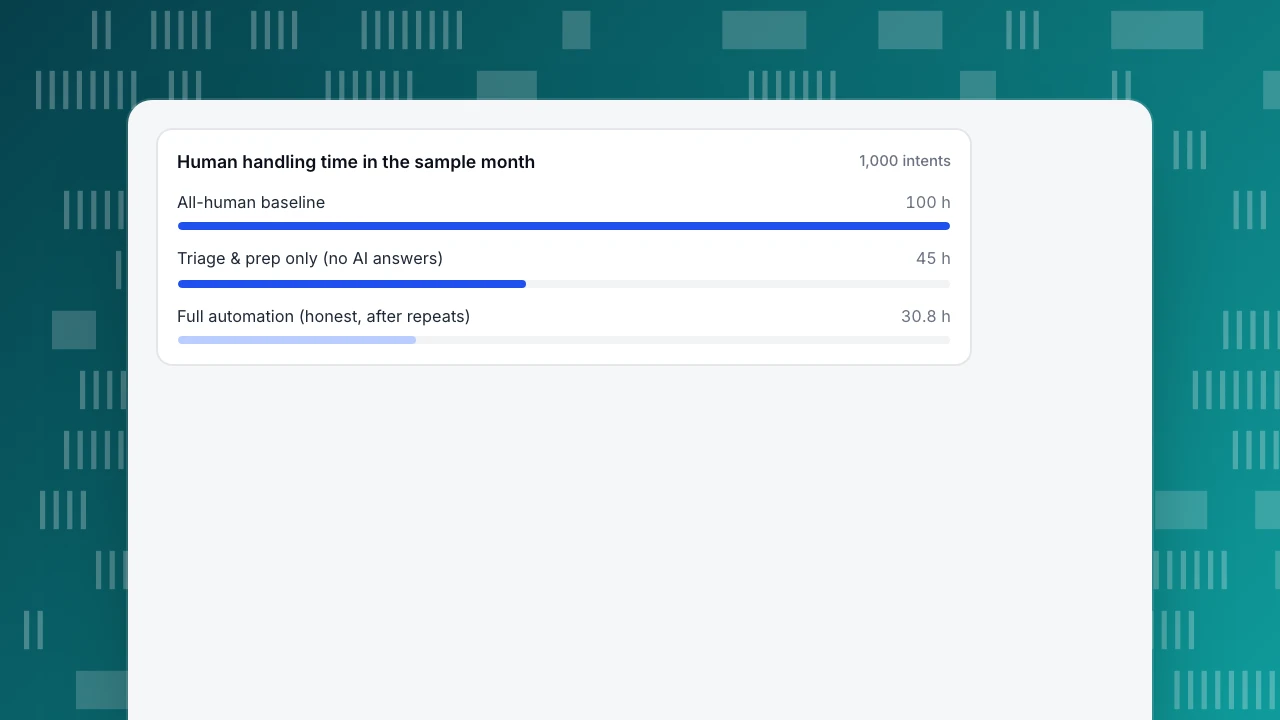
- Human time. 411 × 4.5 minutes = 1,849.5 minutes ≈ 30.8 hours, down from 100 (−69.2%). The 4.5 minutes (vs 6) is what routing, context and canned replies buy.
- Prep-only stage. Before any AI answer, triage and prep already remove the 400 self-served and speed the rest: 600 × 4.5 = 2,700 minutes = 45 hours (−55%). Most of the saving is here, not in the AI.
- Automation rate. Naive: (400 + 210)/1,000 = 61%. Honest: (400 + 189)/1,000 = 58.9%.
Four metric definitions keep these numbers honest. Resolution rate = resolved ÷ all conversations, not ÷ intents — the 400 self-served are not conversations. First response counts only the first human reply; an instant bot greeting is not a first response, and with humans handling 411 chats instead of 1,000 the queue is shorter, so measure the improvement on your own data. Knowledge-base hit rate = questions answered by a direct Q&A match or a retrieved answer ÷ questions asked; it is the gate for stage 2. Offline messages are counted separately and never as "resolved". The share of contacts kept out of the human queue is its own metric, defined in ticket deflection. To turn the saved hours into a money figure, see chatbot ROI. The chart below shows where the human time goes.
Human handling time in the sample month
1,000 intentsHow to automate customer service in TapCub
Run the same sample month in TapCub. Because analytics and live chat share one script and one visitor ID, the context that makes triage work is already there when a chat opens — no integration to build.
- Context arrives with the chat. With the analytics script installed, turn on Enable live chat in Live chat › Chat settings › Appearance, and write Greeting (agents online) and Greeting (agents offline) in Live chat › Chat settings › Greeting & translation. Each conversation opens with the visitor's source, current page and last two days of browsing in the inbox side panel, so the agent — or the bot's handoff — never starts blind.
- Triage first: assignment + canned replies. On the same Appearance page, turn on Auto-assign new conversations to online agents and pick least load or round robin, so every chat has an owner the moment it arrives. Build the offline and handoff templates above as site-level rows in Live chat › Canned replies; agents type
/in the composer to insert one and edit it before sending. This is the stage that takes handling from 6 to 4.5 minutes in the sample month, before any AI answer. Setup: chat routing and assignment. - Knowledge base before AI. In Live chat › Knowledge base, add Q&A entries for the top questions and pin the most common ones. A pinned Q&A shows in the visitor-facing FAQ, and opening the answer creates no conversation and uses no quota — that is where the 400 self-served intents go. Only when a visitor clicks Not solved or asks for a person does a conversation start and route to an agent. Playground tests answers without spending quota.
- Then AI answers. In Live chat › Chat settings › AI assistant, choose one of three modes: off, only when all agents are offline, or AI answers first. A Q&A match is sent as stored with no AI call; otherwise the model drafts from document passages. Before the first reply the visitor is told they are talking to an AI, a notice that cannot be turned off, which is the "say who is speaking" rule built in. AI-first stops when an agent takes the chat or replies, or when the visitor asks for a person; it also hands off when the material is not enough or after Max AI turns per conversation (default 6), and the inbox labels the reason. Put the handoff template in Handoff message. Outside office hours (Live chat › Chat settings › Office hours) the knowledge base answers first and only then shows the offline form (Live chat › Chat settings › Offline messages), which moves new → replied → closed. Setup: set up AI chat replies and offline messages.
- Measure honestly. In Live chat › Reports, watch resolution rate, first response (human first reply only) and knowledge-base hit rate. Offline messages are counted separately, not as resolved. TapCub has no repeat-contact metric: a visitor who writes again within the Reopen window (24 hours by default) reopens the same conversation, and after it a new conversation is created and tagged as returning, with the earlier one shown above it. To find the 21 returns, sample AI-resolved conversations and check which came back.
Two boundaries, stated plainly: the AI only generates replies — it does not change orders, issue refunds or call other systems — and the chat widget has no pre-chat form (ask for an email in the conversation or use the offline form). For what to point a bot at, see chatbot use cases; for running the human side of chat well, see live chat customer service.
FAQ
What is automated customer service?
Automated customer service uses software to handle routine service tasks without a person typing each reply: routing conversations, answering common questions from a knowledge base, sending greetings and offline fallbacks, and drafting or giving AI replies. It works best when triage and preparation are automated first, so the answering layer rests on written, reviewed material rather than guesswork.
What should you automate first in customer service?
Automate triage and preparation first: auto-assignment so every chat has an owner, canned replies for repeated answers, an offline fallback with a reply window, and a knowledge base for self-service. Only then automate answers. In the sample month, that prep layer alone cut human handling time by 55% before any AI reply — the answering layer adds the rest on top of a prepared foundation.
What are the disadvantages of automated customer service?
The main risks are confident wrong answers, trapped visitors who cannot reach a person, and inflated metrics. A bot answering from a thin knowledge base guesses; a bot with no handoff path frustrates people; and a resolution rate that ignores repeat contacts looks better than reality. The stop rules — low KB hit rate, no handoff, rising repeats — exist to catch each of these before they scale.
Can AI fully replace human customer service agents?
No. A reply-only AI generates text; it does not change orders, issue refunds or call other systems, and it should not finish emotional or compliance-risk conversations. Even an AI that can act needs human approval for anything irreversible. The realistic model is AI for triage and routine answers, with a fast, context-preserving handoff to a person for everything else.
How does customer service automation benefit small businesses?
It lets a small team cover more hours without more headcount: self-service and offline fallback handle after-hours demand, routing and canned replies cut handling time, and AI answers routine questions while people focus on the hard ones. The sample month shows 100 hours of human work falling to about 31 — but only because the prep layer was built first and the numbers were measured honestly.
Sources
- Salesforce. What Is Automated Customer Service? — definition and components of automated service. Published 2024-05-24, modified 2026-08-28. Verified 2026-11-15.
- Zendesk. What is automated customer service? A practical guide — examples, measurement and FAQ. Published/modified 2026-11-04. Verified 2026-11-15.
- Račkauskaitė, E. How to Automate Customer Service in 5 Steps (2026 Guide). Capacity, 2026-05-22 (modified 2026-10-02) — five-step rollout and the automated-vs-live split. Verified 2026-11-15.
- Hałabuda, P. Customer service chatbots. LiveChat, 2026-08-26 — chatbot vs AI agent, routing and handoff use cases. Verified 2026-11-15.
Was this article helpful?
We use your answers to fix and expand this page.
Couldn’t send. Please try again in a minute.
Thanks for the feedback. We’ll use it to improve this page.You’ve already sent feedback on this page. Thanks.

Data Engineer
Writes about event design, data quality, and collection workflows, with verifiable implementation methods for reliable analytics.