Try it on your own data
Every report in this article is in the free plan. One snippet for web and apps, up to 10 sites.
Start freeCustomer service questions come in two kinds: the ones you ask after a service interaction, and the diagnostic ones an agent asks during it. Keep fewer of the first kind — each question should map to a decision you would change — and remember the conversation itself usually tells you more than any survey.
What you will learn
- Keep a question only if its answer would change a decision — and name the owner of that decision.
- Post-service: one 1–5 rating, one effort question, one optional open 'why'; send within about 24 hours of resolution.
- The conversation is the richer survey: mine resolved transcripts, write knowledge-base answers for the top questions, and watch the hit rate.
The two kinds of customer service questions
"Customer service questions" covers two different jobs, and mixing them up is why most question lists feel useless. One kind you ask the customer after the interaction is over. The other kind your agent asks during the interaction, in order to solve it. They need different wording, different timing and different success tests.
(If you came here for job-interview questions — "tell me about a time you handled an angry customer" — that is a different intent. This guide is about asking customers, not hiring agents.)
| Family | Who asks | Example questions | Job it does |
|---|---|---|---|
| Post-service questions | You, after resolution | "How satisfied are you with this interaction? (1–5)" · "What is the main reason for your score?" | Tells you what to fix next |
| In-chat diagnostic questions | The agent, during the chat | "What happened right before the error?" · "What are you trying to get done?" | Gets this visitor to an answer |
The rule for the first family is the thesis of this guide: fewer questions are better, and every question you keep should map to a decision you would actually change. The rule for the second family is different — ask enough to diagnose, and no more. And before you write a single survey question, remember that the conversation itself often tells you more than the survey will. A post-service question succeeds when it changes what you fix next; a diagnostic question succeeds when the visitor stops repeating themselves.
A common failure mixes the two. A team sends a ten-question survey after every chat and includes "What were you trying to do?" — a diagnostic question — long after the issue is solved. The customer already told the agent that in the conversation; asking again produces a shrug, not data. Post-service questions look backward at the experience. Diagnostic questions look forward at the problem. Keep them apart, and the rest of this guide treats them separately.
The decision test: keep a question only if it changes a decision
Most post-service surveys grow by accretion: someone adds a question, nobody removes one. The fix is a one-line test. For each question, write down the decision its answer would change, and the person who owns that decision. If you cannot name both, drop the question.
Three examples show how it works. "How satisfied are you with this interaction? (1–5)" stays: the support lead reads the lowest-scoring question type and fixes it first. "What is your name and email?" goes: a logged-in chat already knows who the visitor is, and nobody changes a decision based on the answer. "How likely are you to recommend us? (0–10)" goes for now: a Net Promoter-style score only earns its place if someone owns a follow-up program that acts on it.
Name a real role, not a department. "The support lead reads the lowest-scoring type each Monday and assigns a fix" is an owner; "the company cares about feedback" is not. A borderline question fails the same way: "How satisfied are you with our website?" sounds useful, but if nobody owns a redesign driven by survey answers, it is decoration. Drop it, or find the owner first. Dropped questions are not lost information — identity and source move to analytics, where they already live. The effort question survives for the same reason as the rating: the CX owner reads it to decide whether the refund flow needs fewer steps.
Run a typical eight-question draft through the test and three survive: the 1–5 rating, the effort question, and one optional open "why". Five go. That 8-to-3 cut is not a loss of information — the dropped questions either duplicate data you already have or feed no decision. The table below scores all eight, with the decision and the owner for each. For the metrics behind these questions, see customer experience metrics.
| Question | Decision it changes | Owner | Verdict |
|---|---|---|---|
| How satisfied are you with this interaction? (1–5) | Which question type to fix first | Support lead | Keep |
| How much effort did it take to get this resolved? | Whether to simplify the refund flow | CX owner | Keep |
| What is the main reason for your score? (optional, open) | What to write in the knowledge base next | Support lead | Keep |
| What is your name and email? | None — already known from the chat or login | — | Drop |
| How did you hear about us? | None — already in analytics sources | — | Drop |
| How would you rate our website design? | No one owns a redesign from survey answers | — | Drop |
| How likely are you to recommend us? (0–10) | Only if a follow-up program exists | CX owner | Drop (for now) |
| Would you like our newsletter? | None — marketing opt-in belongs elsewhere | — | Drop |
Sample draft survey: 8 questions cut to 3. A question survives only if a named owner would act on the answer.
Post-service questions that earn their place
Three categories survive the decision test for most teams. Each has a wording, a don't, and the decision it maps to.
- Satisfaction (transactional CSAT). Ask: "How satisfied are you with this interaction? (1 = very dissatisfied, 5 = very satisfied)". Don't ask "How satisfied are you with our company?" — that is a relationship question, and one chat cannot answer it. Qualtrics separates transactional CSAT, about a recent interaction, from relational NPS, about the overall relationship. The decision: which question type to fix first. To turn ratings into a percentage, use the CSAT formula (SurveyMonkey): satisfied respondents ÷ all respondents × 100. Fix your "satisfied" threshold first — commonly 4–5 on a 5-point scale — and keep it constant.
- Effort (CES-style). Ask: "How easy was it to get this resolved? (1 = very difficult, 5 = very easy)", or the agree/disagree form "The company made it easy for me to handle my issue." Don't fold effort and satisfaction into one double-barreled question. The decision: whether to simplify a flow, such as refunds. Boundary: TapCub has no CES or NPS survey builder — ask this in chat, or use an external survey tool.
- Reason follow-up (one open question). Ask: "What is the main reason for your score?" Optional, open, and only one. Nielsen Norman Group's research on question types finds open-ended questions surface deeper, unexpected insights, while closed ones confirm. Don't make it required, don't ask three open questions, and don't ask "why" twice — a second open question turns a rating into an interrogation. The decision: what to write in the knowledge base next.
Two scale rules keep the numbers comparable. Keep the direction fixed (1 = bad, 5 = good) across every question, and keep the scale length fixed — a 1–5 rating and a 1–7 rating are not the same metric. Define "satisfied" before you compute: counting 4–5 as satisfied is common, counting only 5 is stricter, and the choice moves the percentage. Fix it once, then compare months on the same definition.
Timing rule: send the request within about 24 hours of resolution, while the interaction is fresh. Put the rating first and the optional open text second, so the highest-value answer survives drop-off.
What not to ask
Six ways questions waste responses or produce data you cannot use.
| Don't ask | Why | Instead |
|---|---|---|
| "How satisfied were you with the speed and accuracy of the answer?" | Double-barreled: two judgments, one score. Pew's survey-writing guide splits these into separate questions. | One rating, plus an open "why" |
| "How great was our support today?" | Leading wording presumes the answer and inflates scores. | "How satisfied are you with this interaction?" |
| "Would you use a live-chat feature if we built one?" | Hypotheticals: people mispredict their own behavior (a SurveyMonkey design mistake). | Ask about the last real interaction |
| "What's your email? How did you hear about us?" | You already know: the chat has the identity, your analytics has the source. | Pull identity from the conversation, source from analytics |
| Ten questions after every ticket | Fatigue: the rating gets skipped. One rating plus optional open text is usually enough. | One rating, one optional open question |
| A required open-text box | Respondents abandon the survey or type "good". | Make the open text optional |
The last two rows are the same mistake in different clothes: asking for effort the customer does not owe you. A required open-text box after a resolved chat reads as homework; most people type "good" or leave. One rating, one optional "why", sent within a day — that is the whole post-service survey for most teams. If you need more than that, you probably need to read transcripts instead.
Diagnostic questions agents ask in chat
The second family has a different goal: not a score, a diagnosis. Two sequences cover most chats.
Troubleshooting — four moves, one question each:
- What happened: "What were you doing when the error appeared?"
- What you expected: "What did you expect to happen instead?"
- What you tried: "What have you tried so far?"
- When and where: "Which page were you on, and when did it start?"
Pre-sales — three moves:
- Goal: "What are you trying to get done?"
- Blocker: "What is stopping you right now?"
- Success: "What would a good outcome look like for you?"
Here is the troubleshooting sequence in four turns:
Visitor: The export button does nothing. Agent: What were you doing when it failed — which page, and what did you click just before? Visitor: The reports page, right after I changed the date range. Agent: What did you expect to happen, and what have you tried so far? Visitor: A CSV download. I refreshed twice. Agent: Thanks — that narrows it to the date-range export. Let me check that path.
Four questions, one cause located, no guesswork. The pre-sales sequence works the same way: goal, blocker, success, then a recommendation.
The open-versus-closed rule (Nielsen Norman Group, Rosala 2024): open to discover, closed to confirm. "What happened right before the error?" opens; "Did it start after the update?" confirms. The options you supply shape the answer: in a Pew Research Center poll after the 2008 election, 58% picked "the economy" when it was offered as a closed option, but only 35% named it when the question was open. Discover before you offer choices. Switch from open to closed once you have a hypothesis: "Did it start after the update?" confirms or kills it in one turn.
Two good/bad pairs:
- Bad: "Have you tried restarting?" — closed, and it assumes the fix. Good: "What happened right before the error?" — open, and it locates the cause.
- Bad: "Do you want the monthly or annual plan?" — closed, and it pitches before diagnosing. Good: "What are you trying to get done?" — open, and it qualifies first.
Full multi-turn templates live in live chat scripts; tone and timing in chat etiquette. This section is the question logic, not the script library.
Worked example: one month of questions, read two ways
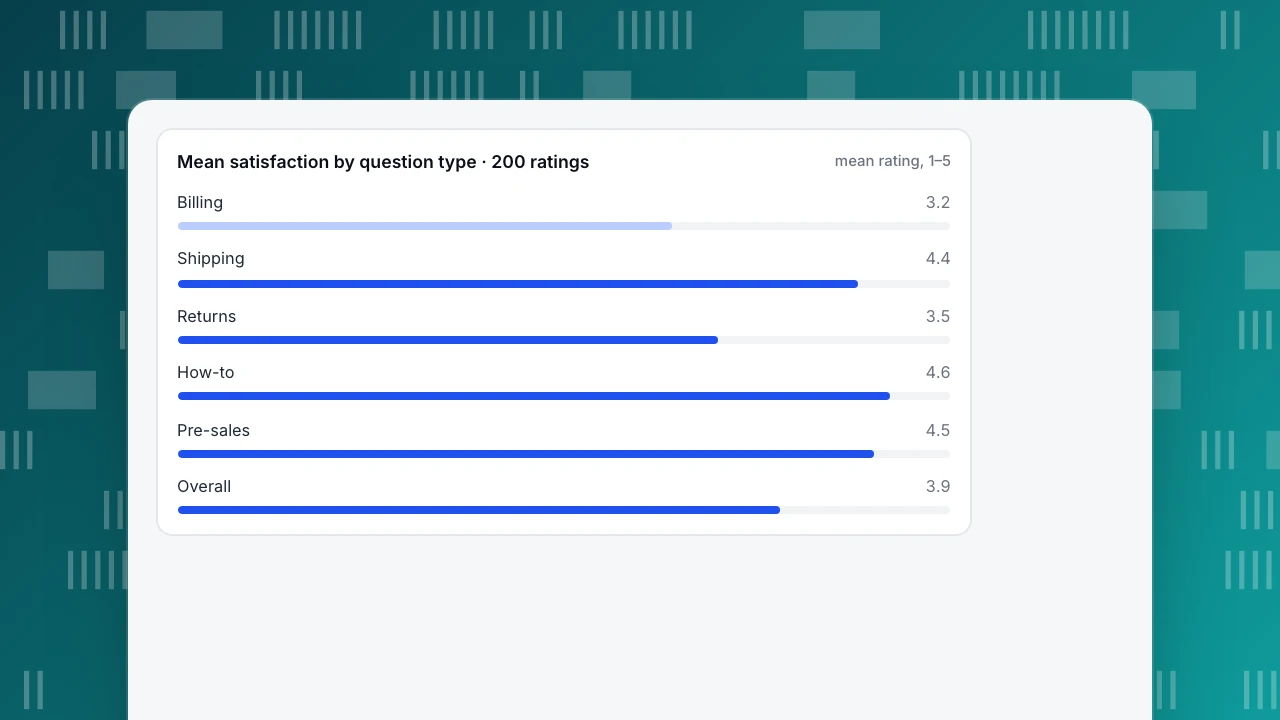
Sample data. One month, 400 conversations in five types: billing 120, shipping 100, returns 80, how-to 60, pre-sales 40. Of these, 200 visitors left a 1–5 rating: billing 60 (mean 3.2), shipping 50 (4.4), returns 40 (3.5), how-to 30 (4.6), pre-sales 20 (4.5).
Read one — the average. Weighted sum: 60×3.2 + 50×4.4 + 40×3.5 + 30×4.6 + 20×4.5 = 192 + 220 + 140 + 138 + 90 = 780. Overall mean: 780 ÷ 200 = 3.9. Looks fine.
Read two — by type. Billing: 192 ÷ 60 = 3.2. Everything else: 588 ÷ 140 = 4.2. The 3.9 average hides a billing problem. As a CSAT percentage (4–5 counts as satisfied): billing 24 ÷ 60 = 40%, shipping 44 ÷ 50 = 88%. Same month, two different stories. How-to (4.6) and pre-sales (4.5) are already strong; the data says leave them alone and spend the effort on billing.
The threshold matters: "satisfied" here means 4–5. Count only 5 and billing's CSAT falls further; count 3–5 and it rises. Fix the threshold once, then compare months on the same definition — otherwise you are measuring your own survey design, not your service.
Now the second source of answers: the conversations themselves. Tag the 400 by the question asked; the top 20 distinct questions cover 260 ÷ 400 = 65% of them. Write 20 knowledge-base Q&A entries and pin the top 8. Next month, the same 400 question events play out differently: 240 are self-served from the pinned FAQ without a conversation, 160 become chats, and the knowledge base answers 96 of those. Hit rate: 40 ÷ 400 = 10% before, 96 ÷ 160 = 60% after. Conversations: 400 → 160, a 60% drop.
The two decisions — fix billing first, write 20 knowledge-base entries — came from reading conversations and splitting ratings by type, not from a longer survey. The chart below shows the mean rating by type, with the overall line for contrast.
Mean satisfaction by question type · 200 ratings
mean rating, 1–5Answers you already have: transcripts and visitor context
Three sources answer most post-service questions without asking the customer anything:
- Resolved transcripts — the actual words customers used, including the question they asked before you solved it, and the tone they used asking it (the raw material of customer sentiment).
- Visitor context — source, current page and recent browsing. "How did you hear about us?" is already in your analytics.
- "Not solved" clicks on FAQ answers — where a "Not solved" button opens a chat, each click arrives with the question the FAQ answer failed to settle, and shows where a human should take over.
Tag with the same five buckets as the worked example — billing, shipping, returns, how-to, pre-sales — so the counts line up month to month. And treat every "not solved" click as a to-do: it names the exact answer that failed, which is the cheapest rewrite list you will ever get.
The top-20 list is your content backlog: each entry is a question customers already asked, in their own words. A four-step mining routine, run monthly:
- Export or tag a month of resolved transcripts by question type.
- Count by type; list the top 20 distinct questions.
- Write a Q&A answer for each; pin the top 8.
- Next month, re-check the knowledge-base hit rate and the conversation count.
Resolution rate tells you whether those answers actually close the issue; training agents to run the diagnostic sequences well is covered in customer service training.
How to do this in TapCub
Take the billing spike from the worked example into TapCub. Five steps.
- Mine the question log. In Live chat › Inbox, open the Resolved list and read a month of transcripts; each resolved conversation also shows its satisfaction score. The context sidebar shows the visitor's source, current page and last two days of browsing, on the same visitor ID as your analytics — so "where did this question come from?" needs no question to the customer. Classify each conversation into the five types yourself, as in the 400-conversation split above; that is how the billing cluster at 3.2 shows up.
- Turn the top 20 into knowledge-base Q&A. In Live chat › Knowledge base, Draft inbox › Generate from conversations merges visitor questions and agent replies from the last 30 days of resolved conversations into Q&A drafts (once every 24 hours, 1 AI call per batch); nothing goes live until you approve a draft. Edit the top 20 and pin the top 8 so they appear in the visitor-side FAQ: opening an answer creates no conversation and uses no quota, while Not solved or a request for a person opens one and brings the question to an agent. With the AI assistant on, a chat question that matches a Q&A entry gets the stored answer as written, with no AI call. That routing is the point: self-service for the easy 65%, a human for the rest, with the transcript already in hand.
- Ask fewer, mapped questions in chat. Use the diagnostic sequences above, and keep consistent wording in Live chat › Canned replies; agents type / in the composer to insert a line and edit it before sending. The post-service rating is built in: after an agent resolves the chat, the visitor can score it from 1 to 5 within 24 hours, one score per conversation — the rating-first, fresh-timing rule from above with no survey to build. TapCub has no survey builder, so the effort question and the open "why" go into the chat itself or an external survey tool.
- Read the reports, split manually. Live chat › Reports shows the average satisfaction score (one decimal) with the number of ratings, satisfaction per agent under agent workload, resolution rate, first response (human first reply only) and knowledge-base hit rate — 96 ÷ 160 = 60% in the example. The by-question-type split above is a manual transcript classification, not a built-in report dimension, and the report shows an average, so compute the 4–5 CSAT percentage from your own tally.
- Know the boundaries. TapCub has no NPS or CES surveys. AI only generates replies — it does not change orders, send email or call other systems. There is no pre-chat form: ask in the conversation, or use Live chat › Chat settings › Offline messages after hours. And no industry-average CSAT is invented here — compare against your own history.
The pattern is the same as the survey rule: fewer questions, each tied to a decision — and the transcript, not the survey, is where most of the answers already live.
FAQ
What is a good CSAT score for customer service?
There is no universal number; it depends on your channel, your customers and your threshold for "satisfied". Track your own history instead. In the sample month above, billing sat at 40% while shipping reached 88% — the spread inside one team is wider than any benchmark would suggest. A rising trend on the same question wording matters more than an industry average, so fix your scale and threshold first, then watch the trend.
What is the difference between CSAT, NPS and CES?
CSAT measures satisfaction with one recent interaction — it is transactional. NPS measures the overall relationship and likelihood to recommend, over time. CES measures how much effort it took to get an issue resolved. Ask CSAT after a chat, NPS periodically, and CES when you are fixing a flow. Qualtrics draws the same transactional-versus-relational line, and the three answer different questions.
How many questions should a post-service survey have?
One rating plus one optional open "why" is usually enough; even longer surveys should stay under ten questions. Every extra question lowers completion and biases answers toward the patient. Run each candidate through the decision test above: if no named owner would change a decision based on the answer, cut it. Three well-mapped questions beat ten that nobody acts on.
When should I send a customer service survey?
Within about 24 hours of resolution, while the interaction is fresh and before the next one blurs it. Put the rating first and the open text second, so the highest-value answer survives drop-off. In live chat, request the rating as soon as the conversation is resolved, so the timing takes care of itself and you never chase a stale memory.
Should I ask for the customer's name or email?
Only if you do not already have it. In a logged-in chat you know who they are, and your analytics already records the source. Asking again wastes a question and signals you were not paying attention. If you need a contact for follow-up, ask once, in the conversation, and say what you will use it for — then move on if the answer is no.
Can AI ask these questions for me?
AI can draft and send replies, including diagnostic questions, but it only generates text — it does not change orders or call other systems. Exact-match knowledge-base Q&A needs no AI call at all. Keep the decision test and the post-service rating in human hands: the point is to change a decision, not to automate a survey.
See also: FAQ Site: How to Build an FAQ Page From Real Customer Questions.
Sources
- Dixon, M., Freeman, K. & Toman, N. (2010). Stop Trying to Delight Your Customers. Harvard Business Review, July–August 2010 (reprint R1007L) — summary-level only: 75,000-person study, effort as a loyalty predictor. Verified 2026-11-15.
- Qualtrics. What is customer satisfaction? A definitive guide — transactional CSAT vs relational NPS vs CES. Verified 2026-11-15.
- SurveyMonkey. 50 customer satisfaction survey questions to strengthen CSAT — CSAT formula and survey-design mistakes. Verified 2026-11-15.
- Rosala, M. (2024). Open-Ended vs. Closed Questions in User Research. Nielsen Norman Group — open for discovery, closed to confirm. Verified 2026-11-15.
- Pew Research Center. Writing Survey Questions — double-barreled questions and open- vs closed-ended wording. Verified 2026-11-15.
Was this article helpful?
We use your answers to fix and expand this page.
Couldn’t send. Please try again in a minute.
Thanks for the feedback. We’ll use it to improve this page.You’ve already sent feedback on this page. Thanks.

Growth Strategist
Explores acquisition channels, activation, and conversion experiments, turning data insights into actionable growth hypotheses and evaluation methods.